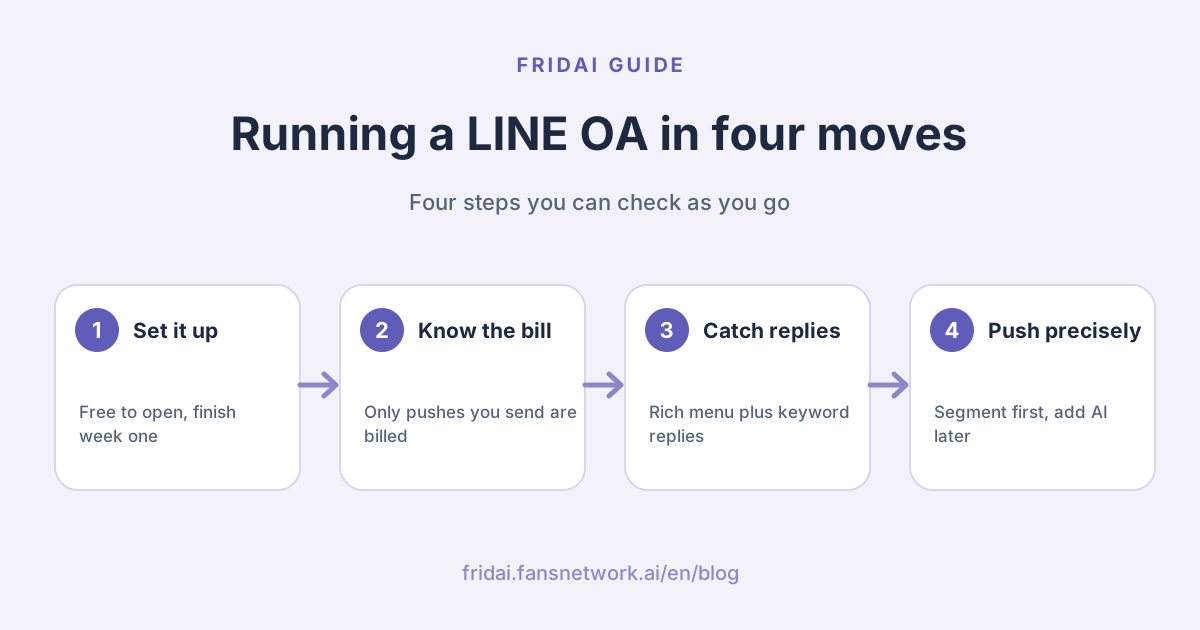
Which stage are you at?
A LINE Official Account (LINE OA, the business side of the LINE messaging app that most people in Taiwan use every day) does not have to be learned from chapter one. Find your position on this chart, then jump to that section.
The nine stages follow the order in which a customer meets them: first they find you, then they learn what they can do, and only then is it your turn to speak first. Skipping around does not break anything. It just costs more.
The nine stages in one table
This table is the contents page. The last column matters most: it tells you whether a step makes your LINE bill bigger.
| Stage | What to decide | Detailed guide | Cost impact |
|---|---|---|---|
| 1. Open the account | Account type, name, who is admin | Setup and first week | Free to open; verification needs a premium ID |
| 2. Work out the cost | Which plan, how many messages a month | 2026 pricing | Monthly fee plus High plan overage |
| 3. Bring in friends | Where entry points go, how to name channels | Adding friends and tracking | Entry points are free; more friends, pricier broadcasts |
| 4. Rich menu | Which buttons, where each one leads | Rich menu planning | Does not use message quota |
| 5. Auto-replies | Keywords, response hours, the exit | Auto-reply setup and examples | Auto-replies are not billed |
| 6. Segmented broadcasts | Who receives it, how to tag | Segments and tags | Smaller lists, fewer messages |
| 7. Campaigns | Coupon, reward card or lucky draw | Coupons and reward cards | Only the broadcast that promotes it is billed |
| 8. Notification messages | Whether to apply for LON | Notification messages (LON) | NT$0.2 each, plus onboarding costs |
| 9. Add AI | Native, a tool, or build it | Three routes to AI replies | Advanced Chat plan or a platform fee |
Stage 1: open the account
Applying for a LINE Official Account is free: sign in with a LINE account or a business account, fill in the required details, and you have a standard account. LINE states that standard, verified and enterprise accounts share the same basic features and billing; the difference is whether the account has passed LINE's review. Verification requires buying a premium ID (a custom @ handle) first and submitting documents. Unverified accounts do not appear in LINE's search results, and after a rename you cannot rename again for seven days, so decide the name and whose login opens the account before you start.
Detailed guide: LINE Official Account setup, account types and a first-week checklist.
Stage 2: work out the cost
The cost is a fixed monthly fee plus overage message fees. The Light plan is NT$0 with 200 messages, Medium includes 3,000 and High includes 6,000. From November 1, 2026, the Medium and High monthly fees go from NT$800 and NT$1,200 to NT$1,000 and NT$1,400, all before tax. Only broadcasts, targeted messages and API pushes count toward quota, and the count is sends multiplied by target friends. Medium cannot buy extra messages; on High, extra messages 1 to 50,000 cost NT$0.2 each and NT$0.15 each from message 50,001.
Detailed guide: LINE Official Account pricing 2026: monthly fees and message costs.
Stage 3: bring in friends
LINE's official ways to add friends are the add-friend link, QR code, add-friend button, in-store poster, and coupons and reward cards; friend-add ads are open only to verified accounts. The key tool is the friend-add channel setting in the account manager: give each entry point a channel, a source and a campaign name, then read how many people each one brought in on the analytics page. Data updates the next day, and a channel only shows under its own name once its count for the period is above 20. The welcome message can hold up to 5 messages, LINE recommends 3 bubbles or fewer, and it is not billed.
Detailed guide: Adding friends to a LINE Official Account: links, QR codes, ads and tracking.
Stage 4: rich menu
The rich menu is the fixed menu at the bottom of the chat. Each area can be assigned a coupon, a URL, text, a reward card or no action, but not every area can be left with no action. Only one menu is shown at a time, and display periods cannot overlap. The image must be JPEG or PNG, 800 to 2500 pixels wide, at least 250 pixels high and no more than 1 MB. LINE's developer documentation states that rich menus do not appear in LINE for desktop, and a menu set through the API takes priority over one set in the account manager, which is usually why a change you made there does not show.
Detailed guide: LINE rich menu sizes, button layouts by industry and planning templates.
Stage 5: auto-replies
LINE auto-replies come in three layers: the welcome message, keyword auto-response messages, and AI. A keyword only fires when the customer's text matches it exactly, ignoring upper and lower case and full-width versus half-width characters. LINE's manual sets the limit at 51 registered keywords and 5 bubbles per response. Responses with no keyword are sent at random, so keep just one as a signpost. If the account manager's auto-response and a webhook both answer the same keyword, the customer receives two replies.
Detailed guide: LINE auto-reply setup: response modes, keyword design and 15 examples.
Stage 6: segmented broadcasts
Segmenting is not a separate feature. It is the choice of recipients when you send a broadcast, and it is billed the same way: sends multiplied by target people. Filtering by attribute requires more than 100 target friends and an estimated 50 or more people after filtering; audiences can be built from chat tags, friend-add channels, message clicks and more. The free tier allows 5 tags in total and 1 per chat; the Advanced Chat plan raises that to 300 and 30. Apart from chat-tag audiences, audiences expire after 180 days, and click or impression audiences must be created within 60 days of the send.
Detailed guide: LINE segmented messages: official rules for broadcasts, audiences and tags.
Stage 7: campaigns
Coupons, reward cards and lucky draws are all built into the account manager, and we found no mention of a separate feature fee on LINE's pages; what costs money is how many friends you broadcast the campaign to. A coupon can be claimed unconditionally, by lucky draw, or through friend referral, and the lucky draw is a setting inside the coupon. Since June 12, 2024, reward cards are limited to friends of the account, and once you stop publishing a card it cannot be restored and the points are deleted. LINE's two documents disagree on whether a saved coupon can still be edited, so save a draft and check first. Lucky draws also raise legal points in Taiwan, which the detailed guide covers.
Detailed guide: LINE coupons, reward cards, lucky draws and five small-shop campaign templates.
Stage 8: notification messages
A LINE notification message (LON) uses the customer's mobile number to deliver notices such as arrivals, bills and bookings into their LINE, even when they are not a friend. The published price is NT$0.2 per notification, charged only when delivery succeeds. The bar is high: the account must be verified or enterprise, each use case must pass LINE's review, promotional content is banned outright, and it takes a contract and system integration. LINE estimates 10 to 20 working days for the process, not counting development. Most small shops do not need it; turning customers into friends at the moment of sale is more practical.
Detailed guide: LINE notification messages (LON): cost, eligibility and small-shop alternatives.
Stage 9: add AI
There are three routes to AI replies on LINE. The native AI chatbot (β) requires the Advanced Chat plan, which LINE's column lists as an NT$100 subscription; it holds up to 100 FAQ entries, is recommended for accounts with fewer than 25,000 friends, and may be unavailable to medical, financial, legal and some other industries. Only when a conversation needs earlier context or rule-based data collection do you need a ready-made AI customer service tool or your own build on the Messaging API. According to LINE's developer documentation, reply messages do not count toward quota and push messages do, so ask any vendor which one it uses.
Detailed guide: LINE AI auto-reply: native features, ready-made tools or building it yourself. If you have already decided on a tool, read LINE AI customer service tools: 5 options compared.
A checklist for the first 30 days
This order is our suggestion, not a LINE requirement. The principle is to finish everything that is free before you start spending.
| When | What to finish | Done when |
|---|---|---|
| Week 1 | Profile, welcome message, response mode, member permissions | At least two admins; new friends know the next step |
| Week 2 | Rich menu plus keyword auto-responses | Every button tapped on a phone leads somewhere |
| Week 3 | Create 3 to 5 friend-add channels and put them out | Every entry point has a name and a lookup sheet |
| Week 4 | Tag chats, read analytics, choose next month's plan | You know your monthly count and block numbers |
A version to copy and tick off:
[LINE Official Account: first 30 days]
[ ] The owner is an admin, with one backup admin
[ ] The account name is the real shop name (follow the verification naming rules if you may apply later)
[ ] Welcome message: who we are, what we will send, one easy question
[ ] A response mode is set for response hours and for off hours
[ ] Every rich menu area has an action; text actions match a keyword exactly
[ ] Only one auto-response has no keyword
[ ] Every auto-response ends with an exit such as "找客服" (ask for a person)
[ ] Counter, parcel card, Instagram and website each use their own friend-add channel
[ ] Before closing each day, tag the customers who replied
[ ] Before month end: sends x target friends = next month's message count
[ ] A secondary payment method is set in the Billing sectionDo not rush into full broadcasts in the first month. When a customer messages first and you reply in chat, nothing is billed, and that is also the easiest time to build up tags.
What changed in 2026
Only items already checked against LINE's official announcements in our detailed guides are listed.
| When | What changed | What to do |
|---|---|---|
| From March 2026 | Response status is always shown on unverified accounts | Make your response settings match reality |
| From April 1, 2026 | Standard accounts no longer show the grey shield | Features are unaffected; apply for verification if you want a badge |
| By October 27, 2026 | Decide whether to accept the new prices | Switch to Light before this date if you do not |
| October 28 to November 2 | First maintenance window | Do plan changes and quota-cap changes early |
| From November 1, 2026 | Medium and High monthly fees change | Auto-renewing accounts are charged the new price that day |
| November 24 to 25 | Second maintenance window | Avoid plan and cap changes here too |
The free message quotas are unchanged. LINE also recommends setting a secondary payment method before October 27, because a failed payment can switch a paid plan to Light automatically. The full explanation and worked examples are in LINE Official Account pricing 2026.
The most common mistakes in running a LINE Official Account
| Mistake | What happens | Read first |
|---|---|---|
| Opening it with an employee's personal login | You lose top-level access when they leave | Setup |
| One QR code for every entry point | You never learn where friends come from | Adding friends |
| A menu button with no next step | The customer only sees their own text sent | Rich menu |
| Too many responses with no keyword | Random replies that miss the question | Auto-replies |
| Broadcasting every campaign to everyone | Message counts jump and so do blocks | Segments and tags |
| Treating LON as cheap promotional SMS | The use case will not pass review | Notification messages |
| Building your own AI with no one to maintain it | It breaks and nobody notices | Three AI routes |
All seven have one thing in common: the action came first, and the question "what will the customer run into after this step?" came later. LINE marketing sounds big, but taken apart it simply means someone is there to catch each step.
FAQ
What is the least a LINE Official Account can cost per month?
It can be NT$0. The Light plan has no monthly fee and includes 200 free messages, and one-on-one chat, auto-replies and the welcome message are not billed. Costs start when you broadcast often, buy a premium ID or add the Advanced Chat plan.
Why does the bill grow when the friend count grows?
Because billing is sends multiplied by target friends. Friend growth itself is free, but every full broadcast counts once per friend. When your friend count nears a plan boundary, it is time to switch to segmented sends.
What is the practical difference between a standard and a verified account?
LINE states that basic features and billing are the same. A verified account shows a badge, can appear in LINE search results and can run friend-add ads, and notification messages are limited to verified or enterprise accounts.
Rich menu, auto-replies or AI: which should come first?
We suggest the welcome message first, then a rich menu paired with keyword auto-responses; neither layer is billed. Look at native AI or a third-party tool only when one question arrives in many phrasings and keywords stop catching it.
Why did some friends not receive my broadcast?
Two common reasons. Friends who blocked you receive nothing; and when you filter by attribute, people whose gender or age the system cannot infer are left out of the list. Check the send history for the real count.
What should I do before the November 2026 price change?
Decide whether to stay on Medium or High; using either after October 27 counts as accepting the new price. If a campaign needs an upgrade or a higher quota cap, avoid the two maintenance windows and add a secondary payment method.
Can I message a customer who has not added me as a friend?
Generally no. LINE's rules state that anything other than a notification message may only be sent to friends, and notification messages are limited to verified or enterprise accounts and reviewed notice content. Small shops should fix their add-friend entry points first.
How FRIDAI can help
The first eight stages of running a LINE Official Account all happen in LINE's own account manager. FRIDAI does not replace them and is not a broadcast tool. FRIDAI Chat handles stage nine: once connected to your LINE Official Account, AI answers incoming messages from your knowledge base and rules, and notifies a person when judgment is needed. FRIDAI has its own monthly fee, so add it to LINE's costs before you decide.
- DM customer service: FRIDAI Chat
- Comment engagement: FRIDAI Social
- Cost first: LINE Official Account pricing 2026
- Tool comparison: LINE AI customer service tools: 5 options compared
- Instagram: FRIDAI on Instagram
- Threads: FRIDAI on Threads
- Facebook: FRIDAI on Facebook
Official sources
- LINE Official Account product and pricing: tw.linebiz.com/
service/ account-solutions/ line-official-account/ - 2026 LINE Official Account plan price change announcement: tw.linebiz.com/
column/ LINEOA-2026-Price-Plan/ - How message fees are priced: tw.linebiz.com/
faq/ oa-price/ message-price-list/ - How billable messages are counted: tw.linebiz.com/
faq/ oa-price/ how-to-calculate-message-expense/ - What to do when a paid plan is switched to Light automatically: tw.linebiz.com/
column/ payment-adjustment/ - How to create a new LINE Official Account: help2.line.me/
official_account_tw/ web/ pc?contentId=20013137&lang=zh-Hant - Differences between standard, verified and enterprise accounts: tw.linebiz.com/
faq/ oa-basic/ 59/ - Official Account verification badge update: tw.linebiz.com/
column/ 2026-OA-rebranding/ - Is a premium ID required to apply for verification: tw.linebiz.com/
faq/ oa-operation/ 13/ - Account basic settings manual: tw.linebiz.com/
manual/ line-official-account/ oa-manager/ - Welcome message tutorial: tw.linebiz.com/
manual/ line-official-account/ 20200514welcomemessage/ - Adding friends and friend-add channel settings: tw.linebiz.com/
manual/ line-official-account/ oa-manager-addfriend/ - LINE Help Center, analytics: help2.line.me/
official_account_tw/ ios/ categoryId/ 20006395/ pc?lang=zh-Hant - Can an unverified account run friend-add ads: tw.linebiz.com/
faq/ lap-campaign/ not-certified-oa-no-CPF/ - Rich menu manual: tw.linebiz.com/
manual/ line-official-account/ oa-manager-richmenu/ - LINE Developers: Rich menus overview: developers.line.biz/
en/ docs/ messaging-api/ rich-menus-overview/ - Auto-response message manual: tw.linebiz.com/
manual/ line-official-account/ oa-manager-autoreply/ - Answering common questions with auto-response messages: tw.linebiz.com/
e-learning/ 20200516-autoreply/ - LINE Help Center, broadcast messages: help2.line.me/
official_account_tw/ ios/ categoryId/ 20006390/ 3/ pc?lang=zh-Hant - LINE Help Center, chat: help2.line.me/
official_account_tw/ ios/ categoryId/ 20006393/ 3/ pc?lang=zh-Hant - LINE retargeting audiences: tw.linebiz.com/
manual/ line-official-account/ oa-mange-daududience/ - Advanced Chat plan introduction: tw.linebiz.com/
column/ 1on1-chat/ - Coupon manual: tw.linebiz.com/
manual/ line-official-account/ oa-manager-coupon/ - Reward card manual: tw.linebiz.com/
manual/ line-official-account/ oa-manager-stampcard/ - Reward card feature update: tw.linebiz.com/
column/ shopcard-renewal-2024/ - LINE notification message product page: tw.linebiz.com/
service/ account-solutions/ line-notification-message/ - LINE notification message downloads (2026 Sales Kit): tw.linebiz.com/
download/ line-notification-message/ - AI chatbot (β) introduction: tw.linebiz.com/
column/ oa-aichatbot/ - AI chatbot (β) main features: tw.linebiz.com/
manual/ line-official-account/ ai-chatbot-main-function/ - LINE Developers: Messaging API pricing: developers.line.biz/
en/ docs/ messaging-api/ pricing/ - FRIDAI Chat: fridai.fansnetwork.ai/
fridai-chat