
Booking system | Built into FRIDAI Chat

Customers book
right in the chat

FRIDAI Booking is the online booking system built into FRIDAI Chat. When a customer asks for a time in LINE, Instagram or Facebook messages, the AI checks your hours and free slots and books it on the spot. You can also put your booking link in your Instagram bio or LINE menu so customers pick a time themselves. After that, customers get reminders at the times you choose and you get notified. If someone doesn't show up, mark it and they get new times the next day.

Get FRIDAI Chat
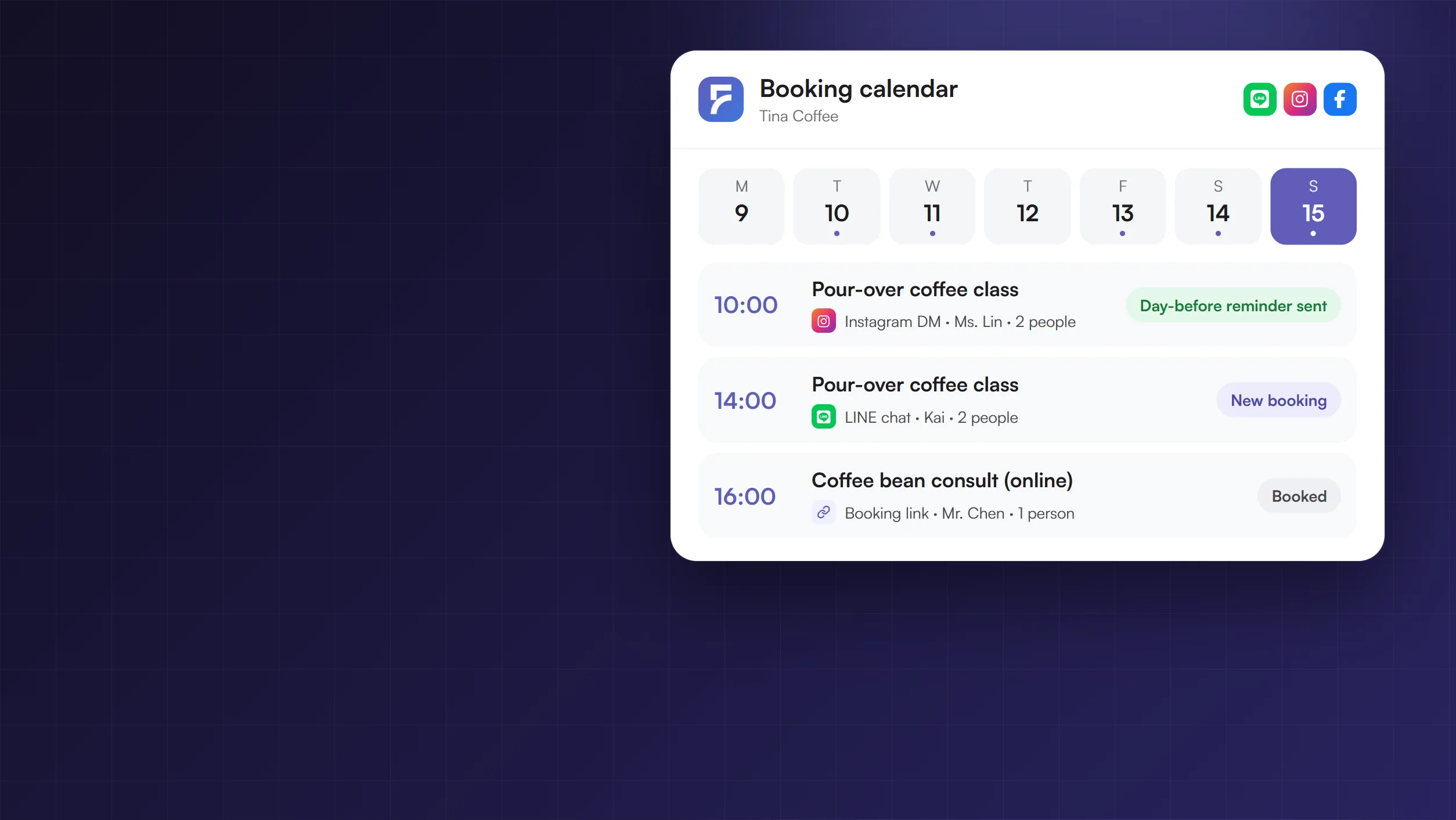
Booking calendar for Tina Coffee on November 15: three bookings from an Instagram DM, a LINE chat and the booking link
Done for you
  • Chat booking
  • Booking link
  • Reminders
  • No-⁠show rebook

Can we book the pour-⁠over class on Sunday afternoon? 2 people

Sure! Sun 11/15 still has 14:00 and 16:00. Which one works?

14:00 please. I'm Kai, 0912-⁠345-⁠678

Booked ✅ Sun 11/15 14:00, 2 people. We'll remind you the day before and an hour before.FRIDAI: You serve, I socialize

What can the booking system do for you?

Booking, reminders and no-⁠shows, all taken care of.

Chat booking

A customer asks in the chat, the AI books it

The AI checks your hours and free slots, asks for the date, party size and contact details, then creates the booking. Customers can also ask in the chat to reschedule or cancel.

Tina CoffeeLINE chat

Can we book the pour-⁠over class on Sunday afternoon? 2 people

Sun 11/15 still has 14:00 and 16:00. Which one works?

14:00 please. I'm Kai, 0912-⁠345-⁠678

Booked! Pour-⁠over coffee class, Sun 11/15 14:00, 2 people.Change booking

Booking created, owner notified

Booking link

Put your booking link on Instagram and LINE

Customers open the link, pick a date and time, fill in their details and they're booked. For in-⁠store services the address and an "Open map" link sit at the top.

Tina CoffeeBooking page
Tina CoffeePick a date and time to book
1 Demo Rd, Da'an, TaipeiOpen map
10:0011:0014:0016:00
Name
Phone
Book now

Sun 11/15 14:00 booked

Reminders

Automatic reminders at the times you pick

Booking confirmed, the day before, 3 hours before, 1 hour before, 15 minutes before and "we're starting": up to 6 reminders by LINE or email. Reminders are sent in Traditional Chinese, as shown.

Tina CoffeeLINE reminder

⏰ 1 小時後見
阿凱,再 1 小時就到預約時間了。📍 手沖咖啡體驗課・2 位📅 11⁠/15(日)14:00🏠 台北市大安區示範路 1 號開地圖修改預約

Day-⁠before and 1-⁠hour reminders sent

No-⁠show rebook

No-⁠show? The next day they get new times

Mark the booking as a no-⁠show and the next day the customer gets the next 3 open times (the message is in Traditional Chinese). You can also turn on "Confirm after 2 no-⁠shows", so their next booking from the booking page waits for your approval.

Tina CoffeeLINE chat

阿凱,昨天沒等到你,是不是臨時有事?手沖咖啡體驗課還有這幾個時間:11⁠/21(六)14:0011⁠/21(六)16:0011⁠/22(日)11:00看其他時間

Let's do the 21st at 2 pm

You're booked! Sat 11/21 14:00, 2 people.

Customer booked again

Get FRIDAI Chat
Chat bookingBooking linkRemindersNo-⁠show rebook1/4

Still going back and forth to book one time slot?

Asking for times in messages, writing it down, hoping customers remember.
FRIDAI books, reminds and follows up for you.

Before

Every appointment by hand

  • "Are you free this weekend?" takes a dozen messages to settle.
  • Requests sent at midnight are seen the next day.
  • You forget to remind them, and they forget to come.
  • No-⁠shows feel awkward to chase.
  • Appointments live in a notebook; every staff member keeps their own.
Get FRIDAI Chat
After

FRIDAI keeps the calendar

  • The AI checks free slots in the chat and books on the spot.
  • Someone answers at midnight too, so no request slips through.
  • Customers get reminders at the times you picked.
  • Mark a no-⁠show and new times go out the next day.
  • One shared calendar; staff log in to see their own appointments.
Get FRIDAI Chat

Reminder times

Up to 6 automatic reminders

In the booking settings, turn on "Remind customers automatically" under Reminders and tick the times you want. The default is 4: booking confirmed, the day before, 1 hour before, plus 15 minutes before for online bookings.

WhenSent byWhat it says
Booking confirmedEmail + LINESent right after booking with a link to change it; online bookings include the meeting link.
Day beforeEmail + LINE"See you tomorrow", sent between 10 am and 10 pm the day before; people who booked that day don't get it twice.
3 hours beforeLINE"See you today", only sent between 8 am and 11 pm; same-⁠day bookings get it once too.
1 hour beforeEmail + LINE"See you in 1 hour", with the address and directions for in-⁠store bookings.
15 minutes beforeLINEOnline bookings only, with the meeting link.
Starting nowLINESent 3 minutes after the start; online bookings get the meeting link again.

Who receives them: Reminders are sent in Traditional Chinese. LINE reminders need your LINE Official Account connected to FRIDAI, and the customer must have booked in your LINE chat or tapped "Get reminders on LINE" after booking; they count toward your LINE Official Account message quota. Email needs the customer's email address. Instagram and Facebook reminders only arrive if the customer messaged you in the last 24 hours.

More features

Everything you need to take bookings

  • Book in LINE

    When a customer sends "預約" (book) to your LINE account, they get a card of times to tap (in Chinese); tapping one opens the booking page with that time already picked.

    For booking pages where customers only pick a time

  • Customers reschedule or cancel

    The confirmation includes a link to change or cancel, and you're notified either way.

    Paid appointments and ones about to start can't be cancelled by the customer

  • New appointment alerts

    Every new appointment, reschedule and cancellation goes to your LINE notification group or email, with name, time, service and phone.

    Including the ones the AI makes in chats

  • Google Calendar sync

    Appointments appear in Google Calendar automatically, and times already busy in Google Calendar can't be taken.

    Online services can get a Google Meet link automatically

  • Online, in store or at home

    Set it per service. In-⁠store bookings include the address and map; online ones include joining instructions and the meeting link.

  • Staff and staff accounts

    Each staff member has their own working hours. Staff log in with their own email to see their bookings, request time off and mark no-⁠shows.

  • Five booking modes

    By room, by staff, room plus staff, staff tied to a room, or store first then product and pickup time (for example cake pickup).

  • Hours and days off

    Set several time blocks per day, such as a lunch break; customers can't book days you mark as off.

  • Confirm after 2 no-⁠shows

    When it's on, anyone with 2 no-⁠shows who books again on the booking page is held until you press "Confirm booking" in LINE.

    Off by default

Who it's for

Any business where customers book a time first

  • Hair salons
  • Nails and lashes
  • Spa and massage
  • Aesthetic clinics
  • Clinics
  • Dental clinics
  • Counselling
  • Physiotherapy
  • Personal trainers
  • Yoga studios
  • Sports court rental
  • Music schools
  • Tutoring
  • Language lessons
  • Law firms
  • Accountants
  • Pet grooming
  • Photo studios
  • Meeting room rental
  • Hobby classes

Message templates by industry: Beauty salon AI customer service, Clinic AI customer service

Start taking bookings in 3 steps

Once you have FRIDAI Chat, follow these three steps.

Step 01

Get FRIDAI Chat

Connect LINE, Instagram or Facebook, then switch to Advanced at the top right of the dashboard.

Step 02

Open Booking Management

Choose Booking Management in the left menu, turn on "AI booking" and set your hours and services.

Step 03

Share your booking link

Put the link in your Instagram bio, LINE menu or website and let the AI handle the chats.

Pricing

No extra charge: it comes with FRIDAI Chat

From US$70 a month

Booking is included in every paid FRIDAI Chat plan (Launch, Essential, Enterprise). Launch is US$70 a month or US$700 a year.

Chat plans are per platform account: connecting both Instagram and LINE means two plans.

Is booking in the US$1 30-⁠day trial?

The trial uses the Simple dashboard, which doesn't show Booking Management. After it becomes a paid subscription, switch to Advanced at the top right and Booking Management appears in the left menu.

Other ways to book

Running a restaurant, or already on SimplyBook.me?

  • Restaurants: use Restaurant Booking

    A reservation system made for restaurants, with tables, a host stand, waitlists and online queueing, in the same FRIDAI Chat dashboard.

  • Connect SimplyBook.me

    Already scheduling in SimplyBook.me? No need to move: once connected, the AI checks SimplyBook for free slots and books customers straight in. The SimplyBook.me API needs a paid plan.

Each brand uses one booking system: FRIDAI Booking, SimplyBook.me or Restaurant Booking.

FAQ

Good questions.

What is FRIDAI Booking?

The online booking system built into FRIDAI Chat. Customers can ask the AI in a chat to check free slots and book, or pick a time on your booking link. Once booked, they get automatic reminders and you get notified; no-⁠shows get new times the next day.

Does it cost extra?

No. Every paid FRIDAI Chat plan includes booking. Launch starts at US$70 a month, or US$700 a year.

Can I use booking in the US$1 trial?

The 30-⁠day trial uses the Simple dashboard, which doesn't show Booking Management. After it becomes a paid subscription, switch to Advanced at the top right and Booking Management appears in the left menu.

Where can customers book?

Two ways: ask the AI in LINE, Instagram, Facebook or other chats, or open your booking link and pick a time. Put the link in your Instagram bio, LINE menu or website.

How are reminders sent?

By LINE and email. LINE needs your LINE Official Account connected to FRIDAI, and the customer must have booked in LINE or tapped "Get reminders on LINE"; email needs their email address. Instagram and Facebook reminders only arrive if the customer messaged you in the last 24 hours.

What happens when someone doesn't show up?

Mark the booking as a no-⁠show. The next day between 10 am and 9 pm, the customer gets a LINE message (or an email if there's no LINE) asking if they'd like a new time, with the next 3 open times.

Can customers reschedule or cancel themselves?

Yes. The confirmation includes a link to change or cancel, and you're notified. Paid appointments and ones about to start can't be cancelled by the customer.

Does it sync with Google Calendar?

Yes. Once connected, appointments appear in Google Calendar and busy times there can't be taken; online services can get a Google Meet link automatically.

Can I have several staff members?

Yes. Choose a mode with staff, give each person their own working hours, and open staff accounts so they can see their appointments and request time off.

Can restaurants use it?

Restaurants should use Restaurant Booking, which has tables, a host stand, waitlists and online queueing. Each brand uses one booking system.

I already use SimplyBook.me. Can I keep it?

Yes. Connect it and the AI checks SimplyBook for free slots and books customers in, no migration needed. The SimplyBook.me API needs a paid plan.

Want to know more? Contact us →