The answer up front: which LINE booking route fits you
| Your situation | Route | Main condition |
|---|---|---|
| You want schedules, time slots, reminders | Solutions Hub or a plug-in module | Basic tier free on Medium or High plan |
| You already use a booking website | Booking link in the rich menu | Set the menu action to "URL" |
| Customers like to ask in chat | Chat booking by staff or AI | Someone or something must reply and confirm |
| A restaurant whose guests phone in | AI voice reservation 2.0 | Per LINE's application page |
Most shops end up mixing them: the rich menu holds the booking button, and chat handles "is Saturday still open?" and "can I move my time?". However good the tool, customers will still ask in chat. Plan for it.
What booking tools does LINE itself offer?
Many owners assume there is a "booking" button in the LINE Official Account (LINE OA, the business side of the LINE messaging app) manager. FRIDAI Editorial looked through LINE Taiwan's official pages and did not find one among the basic features. The booking options LINE describes run through OA Plus's Solutions Hub, plug-in modules, and partner systems connected through the Messaging API. LINE's product page says the Messaging API can support ordering, booking and games, and that connecting it requires your own developer or a partner.
OA Plus Solutions Hub: the easiest door in 2026
On August 5, 2026, LINE published a product update introducing the Solutions Hub (幫手
- Accounts on the Medium or High plan can enable it for NT$0.
- Tools come in a free basic tier and a paid add-on tier; the article does not give the add-on price, so check it in the back office.
- Light-plan accounts can upgrade their plan first, or subscribe to a paid tier without upgrading.
- LINE says no application and no integration work are needed, and there is no limit on how many tools you enable.
- Industries named: beauty, food and drink, retail, professional teaching and lifestyle services.
According to LINE, the path is: log in to the OA Plus back office, click "Solutions Hub" in the left menu, pick a tool and read its notes, then choose "enable free version" or "subscribe to paid version". The Solutions Hub FAQ lists manuals for systems including Mapsbooking and a digital salon manager, and says the newest manual is always the one inside each system's own back office.
One thing to remember: the OA Plus FAQ says that after downgrading to the free Light plan, you can only use audience features and the shop helper; other features become unavailable. If your bookings live in the Solutions Hub, decide where they will go before you downgrade.
Plug-in module marketplace: booking modules built by partners
A 2022 LINE tutorial describes the LINE Official Account plug-in module marketplace, where booking modules built by LINE's official partners handle online booking, queuing and links to customer systems. Its example: a customer types "I want to book" (我要
The article is older and gives no module prices. Before you sign up, read the module vendor's own plan page and check who charges you and how.
AI voice reservation 2.0: phone bookings for restaurants
Under "other solutions", LINE's site lists AI voice reservation (AI 語音
Do not confuse "scheduled messages" with a booking system
The chat screen has a feature called "send scheduled message" (發送
| LINE tool | Best for | Cost |
|---|---|---|
| Solutions Hub | Medium or High plan accounts | Basic tier NT$0, paid add-ons |
| Plug-in modules | A specific vendor's module | Per the vendor |
| AI voice reservation 2.0 | Restaurant phone bookings | Not listed on LINE's page |
| Scheduled chat messages | One-on-one reminders | No feature fee, max 50 |
Route two: put the booking link in the rich menu and auto-replies
If you already use an outside booking website, the quickest LINE booking setup is to open that door inside LINE. Customers do not have to hunt for a URL; one tap takes them to the booking page.
Rich menu: make "Book now" the biggest button
LINE's manual lists the actions each rich menu area can have: coupon, URL, text, reward card, or none. A booking link uses "URL". The manual also sets a few limits: coupon and URL actions need an action label of up to 20 characters, which is used for the phone's read-aloud feature; you cannot set every area to "none"; only one rich menu can be shown at a time, and overlapping display periods cannot be saved; and if "default display" is set to show, customers see the menu as soon as they open the chat. For layouts and sizes, see the LINE rich menu guide.
Auto-reply: when a customer types "booking", send the link
Not everyone taps the menu; many just type. LINE's manual says keyword auto-replies send automatically when a customer types a set word. The limits: up to 51 keywords, not sensitive to letter case or full-width and half-width characters, no emoji as keywords, keyword replies take priority when matched, and up to 5 message bubbles per reply. Add the Chinese words customers actually use, such as 預約 (book), 訂位 (reserve a table), 約時間 (set a time) and 改時間 (change the time). For choosing keywords that do not misfire, see LINE auto-reply setup examples.
Chain the rich menu and keywords together
LINE's beauty-salon tutorial shows a trick: set one rich menu area to a "text" action so tapping it sends a fixed phrase, then use that same phrase as an auto-reply keyword that calls up a multi-page message. For bookings, a "See services" button can open a set of service cards, each with its own booking link.
The weak spot is the last box. "Anything next Wednesday evening?" or "Can I bring my kid?" will not match a keyword, and the customer is back in chat. A booking link usually needs a person or a system that can answer questions next to it.
Route three: take bookings in chat, by staff or AI
For many small Taiwan shops, a LINE booking is simply a back-and-forth chat. LINE's own beauty tutorial describes it that way: let customers book through one-on-one chat, tag friends with their appointment date, and use saved replies to remind them beforehand. LINE's medical industry page likewise mentions online appointments and pre-visit reminders through one-on-one chat.
Chat booking is flexible, because customers can ask and book in the same thread. The downside is that it depends entirely on how fast and careful the replies are. Whether a person or an AI is answering, first define which details must be collected before a request counts as complete.
| Detail | Why ask | If missing |
|---|---|---|
| Date and time | Scheduling and holding the slot | Offer two options |
| Party size or service | Decides length and seating | Let them pick from choices |
| Name and phone | Check-in and last-minute contact | Explain why, then ask |
| Special needs | Allergies, children, a named staff member | Ask once |
| Status | Received versus confirmed | Never say "booked" early |
The last row matters most. A customer leaves their details, the AI or a part-timer replies "you're booked", and that slot was already full. A fast wrong answer is just a more efficient way to make a mess. Until a booking system returns a valid result or a person confirms, the only safe reply is "received, we'll confirm shortly".
What AI is good for here: answering opening hours and service questions, collecting all the details in one go, remembering what the customer said earlier, and handing changes, cancellations and complaints to a person. What it should not do: decide on its own whether a slot is free when it has no schedule to check.
What does LINE booking cost?
LINE's billing matters because some messages in a booking flow are charged and some are not. LINE's product page lists the message types that do not count toward message fees: one-on-one chat messages, auto-reply messages, the welcome message when someone adds you, and the Messaging API's Reply API. Proactive pushes are not on that list. If you broadcast a "see you tomorrow" reminder yourself, it uses your plan's message quota.
| Cost item | Who charges | How to check |
|---|---|---|
| Official Account plan fee | LINE | Billing section and LINE's price list |
| Solutions Hub paid tier | As shown in the back office | OA Plus Solutions Hub page |
| Plug-in module or booking site | Each vendor | Vendor's plan page |
| AI customer service tool | Each vendor | Vendor's pricing page |
| Pushed reminders | LINE message quota | Check the estimate before sending |
LINE Official Account pricing changes on November 1, 2026. Fees and quotas are covered in LINE Official Account pricing 2026, so they are not repeated here.
Five steps to set up a LINE booking system
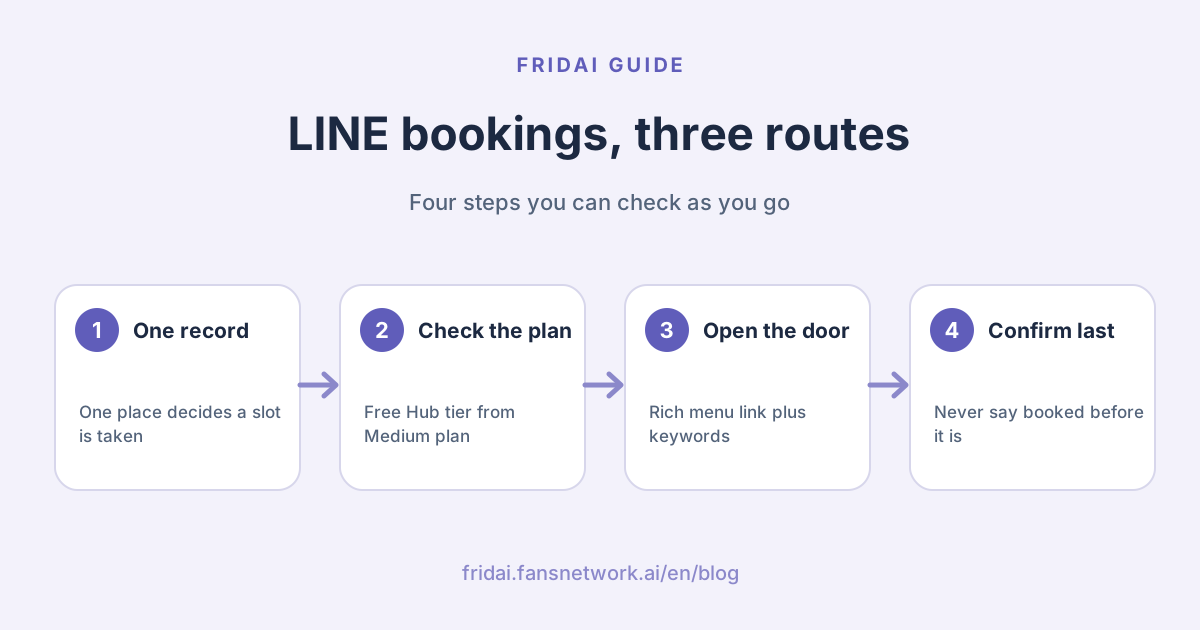
1. Decide where a booking is confirmed
The Solutions Hub system, an outside booking site, or the notebook behind the counter? Only one place should count. Keep two records and you will double-book sooner or later.
2. Check your plan
The free Solutions Hub tier needs the Medium plan or above. Light-plan accounts can upgrade or subscribe to a paid tier. An outside booking website has no such requirement.
3. Put the entry points in the rich menu and auto-replies
Give "Book now" its own rich menu area, with a URL action or a text action that calls up service cards. Set keywords for booking, reserving and changing times. The welcome message is a good place for booking instructions too, and it does not count toward message fees.
4. Write down the chat booking flow
List the details you must collect, the questions that can be answered, and the cases that always go to a person, such as changes, cancellations, complaints, groups and private hire. With AI, write these as rules; with staff, save them as quick replies.
5. Test with five messages
Before going live, play the customer and send, in order: "Free on Saturday afternoon?", "Two people", "I already gave you my number", "Can I move it to Sunday?" and "I want the manager". Check that it asks the right things, remembers earlier messages, and hands the change to a person.
The four most common mistakes
First, treating scheduled messages as a booking system. They only send a message later, at most 50 at a time, and not always on time.
Second, a rich menu that is just a pretty poster. LINE does not allow every area to be set to "none" anyway, so at least make the booking area tappable.
Third, a booking link and chat replies that disagree. If the menu says "book online" and chat says "please call us", customers feel bounced around.
Fourth, downgrading without moving out. Shops using the Solutions Hub lose most OA Plus features after dropping to the Light plan.
LINE booking message templates you can copy
These stay in Chinese because they go to Taiwan customers. Each has a one-line English gloss.
When someone asks how to book, point them to the entry (gloss: tap "Book now" in the menu below to pick a time, or ask your question here):
想預約的話,點下方選單的「立即預約」就能直接選時段喔。
如果想先問問題,直接在這裡打字,我們會盡快回覆你。
Chat booking, collecting everything at once (gloss: tell us the date and time, party size or service, your name and phone, and any special needs):
好的,幫你安排!請告訴我:
1. 想約的日期與時段
2. 人數(或想做的服務)
3. 怎麼稱呼你、聯絡電話
有過敏或其他需求也可以一起說。
Details received but not yet confirmed (gloss: we have your request and will confirm here; the booking is not final until then):
收到你的預約需求了,我們確認時段後會在這裡回覆你。
在收到確認訊息之前,預約還沒有成立喔。
Changes or cancellations, handed to a person (gloss: a colleague will handle your change or cancellation, one moment please):
了解,改期和取消我請店內同事直接幫你處理,請稍等一下。FAQ
Does a LINE Official Account have a built-in booking feature?
FRIDAI Editorial did not find a standalone booking feature among the basic features on LINE Taiwan's official pages. LINE's routes are the OA Plus Solutions Hub, plug-in modules and Messaging API partners, plus AI voice reservation 2.0 for restaurants.
Does a LINE booking system cost money?
The Solutions Hub basic tier is free for Medium and High plan accounts; paid tiers cost extra. Plug-in modules, outside booking sites and AI tools are priced by each vendor, and the LINE Official Account plan fee is separate.
Can a free Light-plan account use the Solutions Hub for bookings?
LINE says Light-plan accounts can upgrade first, or subscribe to a paid tier without upgrading. Accounts that already use OA Plus keep only audience features and the shop helper after dropping to the Light plan.
Do booking replies in LINE chat count toward message fees?
According to LINE's product page, one-on-one chat messages, auto-replies and the Reply API do not count toward message fees. Pushed reminders are not on that list and use your plan's message quota.
Can I use scheduled chat messages as booking reminders?
Yes, LINE lists appointment reminders as a use. But you can schedule at most 50 at once, delivery may be late when traffic is high, and nothing sends if chat is turned off, so busy shops are better served by a booking system's reminders.
If AI takes bookings, could it tell a customer they are booked when the slot is full?
Yes, if the rules are vague. Without a valid result from a booking system, the AI should only say the request is received and pending. Leave confirmation to the booking system or a person, and hand changes and cancellations to a person too.
How FRIDAI can help
If your customers ask for slots in LINE chat, FRIDAI Chat connects to your LINE Official Account, answers from your brand knowledge, takes booking requests in the conversation according to your rules, and alerts a person for exceptions such as changes or complaints. Every FRIDAI Chat plan includes the booking and reservation system, human collaboration and human review. One plan covers one platform account, so add it to your LINE costs before deciding.
- Product: FRIDAI Chat
- Rich menu layouts: LINE rich menu guide
- Restaurants: AI customer service for restaurants
- Instagram: FRIDAI on Instagram
- Threads: FRIDAI on Threads
- Facebook: FRIDAI on Facebook
Official sources
- LINE Official Account product page: tw.linebiz.com/
service/ account-solutions/ line-official-account/ - OA Plus Solutions Hub introduction: tw.linebiz.com/
column/ oaplus-solutionshub-intro/ - Solutions Hub system manuals FAQ: tw.linebiz.com/
faq/ oaplus-solution-hub/ solution-manuals/ - OA Plus after downgrading to Light FAQ: tw.linebiz.com/
faq/ oaplus-others/ downgrade/ - LINE OA Plus product page: tw.linebiz.com/
service/ account-solutions/ oaplus/ - LINE plug-in modules introduction: tw.linebiz.com/
column/ line-start3/ - AI voice reservation: tw.linebiz.com/
service/ other-solutions/ ai-reservation/ - Scheduled chat messages manual: tw.linebiz.com/
manual/ line-official-account/ oa-chat-scheduledmessage/ - Rich menu manual: tw.linebiz.com/
manual/ line-official-account/ oa-manager-richmenu/ - Auto-reply manual: tw.linebiz.com/
manual/ line-official-account/ oa-manager-autoreply/ - Beauty salon booking tutorial: tw.linebiz.com/
manual/ line-official-account/ onboarding-beauty/ - Medical industry use cases: tw.linebiz.com/
smb/ industry-application/ medical/ - FRIDAI Chat: fridai.fansnetwork.ai/
fridai-chat