What is a LINE rich menu? Three things first
According to LINE's official manual, the rich menu sits in the menu area at the bottom of the chat screen, and customers see it whenever they open the chat with your Official Account (LINE OA, the business side of the LINE messaging app). It is not a message and does not get pushed up by new messages, so it is the best place for the entry points a customer might need on every visit.
You only need to remember three things.
- It is one image plus a few tappable areas. You make the image; the layout template cuts the areas.
- Each area needs an action. In the account manager the available actions are coupon, URL, text, reward card, or none; but you cannot set every area to none.
- Only one rich menu is shown to customers at a time. You can schedule different display periods, but they cannot overlap.
Also, LINE's developer documentation states that rich menus are not displayed in LINE for desktop. If most of your customers reply from a computer, important entry points cannot live only in the menu.
Official size, format and limits at a glance
Every number below comes from LINE's official manual and the LINE Developers documentation. The account manager gets redesigned, so the sizes and layouts you can actually pick are whatever you see after signing in.
| Item | Official limit | Planning note |
|---|---|---|
| Image format | JPEG or PNG | Do not hand the account manager a PDF or a design source file |
| Image width | 800 to 2500 pixels | Wider is sharper, and the file is bigger |
| Image height | At least 250 pixels | Width divided by height must be 1.45 or more |
| File size | 1 MB or less | Compress if over; do not just shrink the dimensions |
| Sizes in the account manager | The manual says 6 in total | Small sizes look coarse on high-resolution phones |
| Menu bar text | API limit of 14 characters | Write an action, such as "Tap to book" |
| Action label | Up to 20 characters | Required when you choose coupon or URL |
| Tappable areas | API maximum of 20 | The account manager uses fixed layouts; do not get greedy |
Two additions. First, the sample object in LINE's API documentation uses 2500×1686, a ratio that fits the limits above; if you want a shorter half-height menu, keep to "width divided by height of at least 1.45" and you are fine. Second, the 14 characters and 20 areas in the table are the limits written in the Messaging API documentation; how many characters the account manager actually lets you type is whatever the screen allows.
FRIDAI Editorial's advice is blunt: build the master at maximum width, then check the file size after export. Bigger text and more space around buttons do more than squeezing in two extra buttons. A phone screen is not a poster.
Account manager or Messaging API?
LINE offers two ways to set up a rich menu, and one rich menu can only be managed by one of them; its performance numbers are also only visible in the tool that created it. Choose the right tool first and the two sides will not disagree later.
| Compare | Account manager | Set up by API |
|---|---|---|
| Who it suits | Shops doing it themselves | Teams with an engineer or an integration tool |
| Layout | Pre-cut layout templates | Tappable areas defined freely |
| Display period | Can be set | Controlled by code |
| Different menus per customer | Not supported | Supported, down to the individual |
| Tab switching | Not listed in LINE's documentation | Supported |
| Performance stats | Impressions and click rate | Separate statistics feature |
One more rule that is easy to trip over: LINE's documentation states the display priority is "per-user menu set by API" first, then "default menu set by API", and only last "default menu set in the account manager". So if you installed a third-party tool and the menu you edited in the account manager does not appear, it is usually not broken. It has been overridden.
For most shops starting out, the account manager is enough. Move to the API when you really need "members see the member menu, new customers see the new-customer menu".
Which buttons should each industry use?
The following is FRIDAI Editorial's planning advice, not a LINE rule. There is one principle: order buttons by what customers ask most, not by what the owner most wants to push. Put the most-asked item top left, because that is where the eye lands first.
| Industry | Put first | Can add | Not recommended |
|---|---|---|---|
| Food and drink | Reservations, menu, hours and address | Takeaway and delivery, coupons, reward card | A long brand story |
| Beauty and hair salons | Booking, price list, portfolio | Stylist profiles, aftercare, directions | A campaign page nobody updates |
| E-commerce | Browse products, order lookup, shipping and returns | Monthly offer, member centre, contact support | Too many categories at once |
| Clinics and courses | Booking or sign-up, clinic hours or timetable, location | First-visit notes, fees, FAQ | Q&A that needs professional judgment |
The reasoning behind a few of these trade-offs:
- Restaurant customers are mostly on the road or about to leave home and want something they can finish right now, so reservations and the address matter more than the brand story.
- Beauty customers look at work before deciding. Put the portfolio in the menu and you answer far fewer "do you have photos?" messages.
- In e-commerce, the biggest support time sinks are often order lookups and returns. Putting those two in the menu saves more effort than one more product category.
- Clinics and courses need particular care: keep the menu to process information, and send anything about an individual's situation to a human.
Where should each button lead?
The most common way a rich menu fails is that nothing happens after the tap. The four actions in the account manager each have a natural use; check this table before deciding.
| Action | What happens on tap | Good for | Prepare first |
|---|---|---|---|
| URL | Opens the link you set | Reservation page, product page, map | A URL that opens properly on mobile |
| Text | Sends a piece of text as the customer | Opening hours, prices, FAQ | The matching keyword auto-reply |
| Coupon | Opens a coupon you created | New-customer gift, monthly offer | Create the coupon in the account manager first |
| Reward card | Opens the reward card | Repeat-purchase shops | Create the reward card in the account manager first |
The "text" action is the one most worth your time. LINE's tutorial recommends proactively hinting at available keywords in the welcome message, rich menu or messages, because a keyword auto-reply only fires when what the customer types matches the keyword exactly. Let a button send that word for them and typos stop being a problem.
Three details to keep in mind when designing text actions.
- The text the button sends must match the auto-reply keyword character for character.
- Choose keywords customers would not say alone in normal conversation; for example 「查營業
時間」 ("check opening hours") is safer than 「時間」 ("time"). - End the auto-reply with a next step, such as a reservation link or "type 找客服 (get support) for a human".
If you have both the account manager's auto-reply and a webhook turned on, LINE's manual warns that when both sides are set up for the same keyword, the customer receives two replies. Keep only one. How to set keywords so they do not fire by mistake is covered in LINE auto-reply setup and examples.
Copy-ready rich menu planning templates
A "template" here is a written layout plan, not an image file. Fill in the sheet first, then hand it to a designer or make the image yourself; it is much faster than drawing first and thinking about function afterwards. Replace anything in brackets with your own content.
General planning sheet
This sheet is for your own team, so it is in English.
[Rich menu planning sheet]
Internal title: (e.g. 2026 autumn main menu)
Menu bar text: (e.g. Tap for menu and reservations)
Default display: shown / hidden
Display period: (start date) to (end date)
Layout: (large / small, number of cells)
Cell 1 | Button text:
Cell 1 | Action: URL / text / coupon / reward card
Cell 1 | Content: (the URL, or the text to send)
Cell 1 | Reply it triggers: (for a text action, paste the auto-reply content)
Cell 1 | Who keeps it updated:
(Copy the five lines above for each cell)The four industry templates below stay in Chinese because the button labels, keywords and replies are what your Taiwanese customers will read. Each line reads "cell number | button label | action | content", and the indented 觸發
Six-cell template for food and drink
In English: online reservation (URL), see the menu (text), hours and address (text), takeaway and delivery (URL), this month's offer (coupon), talk to a human (text).
選單列文字:訂位、菜單、優惠都在這

格 1|線上訂位|網址|(訂位頁連結)
格 2|看菜單|文字|送出「看菜單」
  觸發回覆:這是我們目前的菜單(菜單圖或連結)。想訂位可以點選單左上角的「線上訂位」。
格 3|營業時間與地址|文字|送出「查營業時間」
  觸發回覆:營業時間(星期與時段)。地址(完整地址)。地圖(連結)。
格 4|外帶外送|網址|(外送或點餐頁連結)
格 5|本月優惠|優惠券|(後台已建立的優惠券)
格 6|找真人|文字|送出「找客服」
觸發回覆:收到,已通知店員。營業時間內我們會盡快回覆,急事請來電(電話)。Six-cell template for beauty and hair salons
In English: book now (URL), price list (text), portfolio (URL), stylists (text), aftercare (text), directions and parking (text).
選單列文字:預約與價目表

格 1|我要預約|網址|(預約頁連結)
格 2|價目表|文字|送出「看價目表」
  觸發回覆:(價目圖或連結)。實際費用會依髮長與髮況調整,到店會先和你確認再開始。
格 3|作品集|網址|(作品頁或社群連結)
格 4|設計師|文字|送出「看設計師」
  觸發回覆:(設計師名單與擅長項目)。想指定請在預約時備註。
格 5|術後照護|文字|送出「術後照護」
  觸發回覆:(照護重點三項)。有異常狀況請直接輸入「找客服」。
格 6|交通與停車|文字|送出「查交通」
觸發回覆:(地址、最近的捷運站或公車站、停車資訊)。Six-cell template for e-commerce
In English: new arrivals (URL), order lookup (URL), shipping and returns (text), this month's offer (coupon), member centre (URL), contact support (text).
選單列文字:逛商品、查訂單

格 1|逛新品|網址|(新品頁連結)
格 2|查訂單|網址|(訂單查詢頁連結)
格 3|運送與退換貨|文字|送出「運送退換貨」
  觸發回覆:出貨時間(說明)。運費(說明)。退換貨方式(連結)。
格 4|本月優惠|優惠券|(後台已建立的優惠券)
格 5|會員中心|網址|(會員頁連結)
格 6|聯絡客服|文字|送出「找客服」
觸發回覆:請留下訂單編號與問題,客服會在(時段)回覆你。Six-cell template for clinics and courses
In English: book or sign up (URL), clinic hours or timetable (text), location and directions (text), first-visit notes (text), fees (text), staff assistance (text).
選單列文字:預約、時間、地點

格 1|預約或報名|網址|(預約或報名頁連結)
格 2|門診或課表|文字|送出「看時間表」
  觸發回覆:(本月時間表圖或連結)。臨時異動以現場與官方公告為準。
格 3|地點與交通|文字|送出「查交通」
  觸發回覆:(地址、交通方式、停車資訊)。
格 4|初次須知|文字|送出「初次須知」
  觸發回覆:(要帶的東西、建議提早到的時間、取消或改期的規定)。
格 5|費用說明|文字|送出「看費用」
  觸發回覆:(公開的收費項目)。個別狀況的費用需由專人確認。
格 6|專人協助|文字|送出「找專人」
  觸發回覆:已收到,專人會在服務時間內回覆。緊急狀況請直接來電(電話)。
After launch: how do you tell whether it works?
A rich menu you never measure is just decoration. LINE's documentation says rich menus created in the account manager can show statistics such as impressions and click rate. Read them with these three questions.
- Is the menu being seen? If impressions are very low, first check whether the default display is set to hidden and whether the menu bar text makes anyone want to tap.
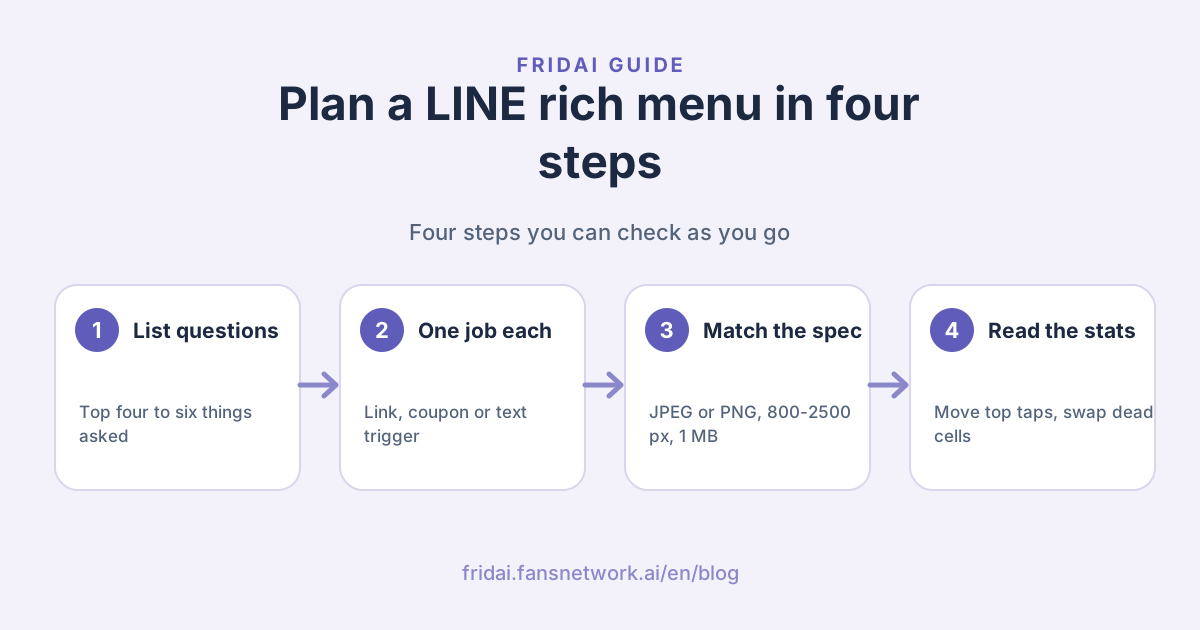
- Which cell gets tapped most? Taps concentrated on one cell mean that is what customers really want; move it to the top left in the next revision.
- Which cell gets almost no taps? A cell nobody has tapped for a sustained period should be swapped for the question support gets asked most.
Add two observations from outside the menu.
- For URL buttons, add a recognisable tracking parameter to the link so your own web analytics can separate "people who came from the rich menu".
- For text buttons, look at how often those keywords are triggered, and whether customers still come and ask the same question after tapping. If they do, the reply is not clear enough.
FRIDAI Editorial suggests changing one thing at a time and noting the date of each revision. Swap the image and the order together and you will not know which change worked.
Common mistakes and how to fix them
- Too many buttons, text too small. A button nobody can read on a phone does not exist. Drop two cells and enlarge the text instead.
- A text action with no matching auto-reply. The customer taps, sees their own line go out, and then nothing. Tap every cell on a phone before launch.
- The text the button sends is one character off the keyword. LINE says the keyword must match exactly to trigger; copy and paste is the safest route.
- The URL only looks good on desktop. Rich menus are not displayed in LINE for desktop, so customers are always on a phone. Check links on a phone.
- The campaign ended and nobody switched back. Schedule the campaign menu and the everyday menu with display periods, and remember the periods cannot overlap.
- You changed it in the account manager and nothing changed. First check whether another tool set a menu by API; API menus take priority over the account manager.
- Treating the menu as the only way in. Some customers will always just type their question, so plan the rich menu together with auto-replies or AI customer service.
FAQ
Do LINE rich menus cost money?
The official pages FRIDAI Editorial checked do not list the rich menu as a separately charged item, and the setup entry is right in the Official Account manager. What mainly generates fees is messages that count toward quota, such as broadcasts; for plans and quotas, see LINE's official pricing page.
What size should a rich menu image be?
The official spec is 800 to 2500 pixels wide, at least 250 pixels high, width divided by height of at least 1.45, a file of 1 MB or less, in JPEG or PNG. The account manager lists the sizes you can choose; pick the closest one on screen.
Why can customers not see my rich menu after I set it up?
There are four common causes: the display period has not started or has ended; the default display is set to hidden, so it only opens when the menu bar is tapped; the customer is on LINE for desktop; or another tool has set a higher-priority menu by API.
Can different customers see different rich menus?
Yes, but LINE's documentation says this requires the Messaging API; a menu created in the account manager is the default menu shown to everyone. When you need segmentation, you would usually bring in an engineer or use a tool that integrates with the API.
What if nothing happens when a rich menu button is tapped?
Check that cell's action first. For a URL, check whether the link is dead. For text, check that the text sent matches the auto-reply keyword exactly, and that the auto-reply is active and not blocked by a time setting.
Can one account use several rich menus at once?
You can create several in the account manager, but LINE's manual states only one is shown to customers at a time and display periods cannot overlap. For a tab-switching effect, LINE's documentation says you need the Messaging API.
How FRIDAI can help
A rich menu lays out the common entry points, but customers do not all follow the buttons, and typed questions still need someone to pick them up. FRIDAI Chat connects to your LINE Official Account and replies according to the AI rules and knowledge notes you write, notifying a human when something needs judgment.
- Product: FRIDAI Chat
- Auto-reply design: How to set up LINE auto-replies
- Tool comparison: LINE AI customer service tools compared
- Rules guide: How to write AI customer service rules
- Instagram: FRIDAI on Instagram
- Threads: FRIDAI on Threads
- Facebook: FRIDAI on Facebook
Official sources
- LINE Official Account manual: rich menus: tw.linebiz.com/
manual/ line-official-account/ oa-manager-richmenu/ - LINE Developers: Rich menus overview: developers.line.biz/
en/ docs/ messaging-api/ rich-menus-overview/ - LINE Developers: Messaging API reference: developers.line.biz/
en/ reference/ messaging-api/ - LINE Official Account manual: auto-reply messages: tw.linebiz.com/
manual/ line-official-account/ oa-manager-autoreply/ - LINE official tutorial: answering common questions with auto-reply messages: tw.linebiz.com/
e-learning/ 20200516-autoreply/ - LINE Official Account manual: basic settings and response settings: tw.linebiz.com/
manual/ line-official-account/ oa-manager/ - LINE official announcement: 2026 Official Account plan price change: tw.linebiz.com/
column/ LINEOA-2026-Price-Plan/