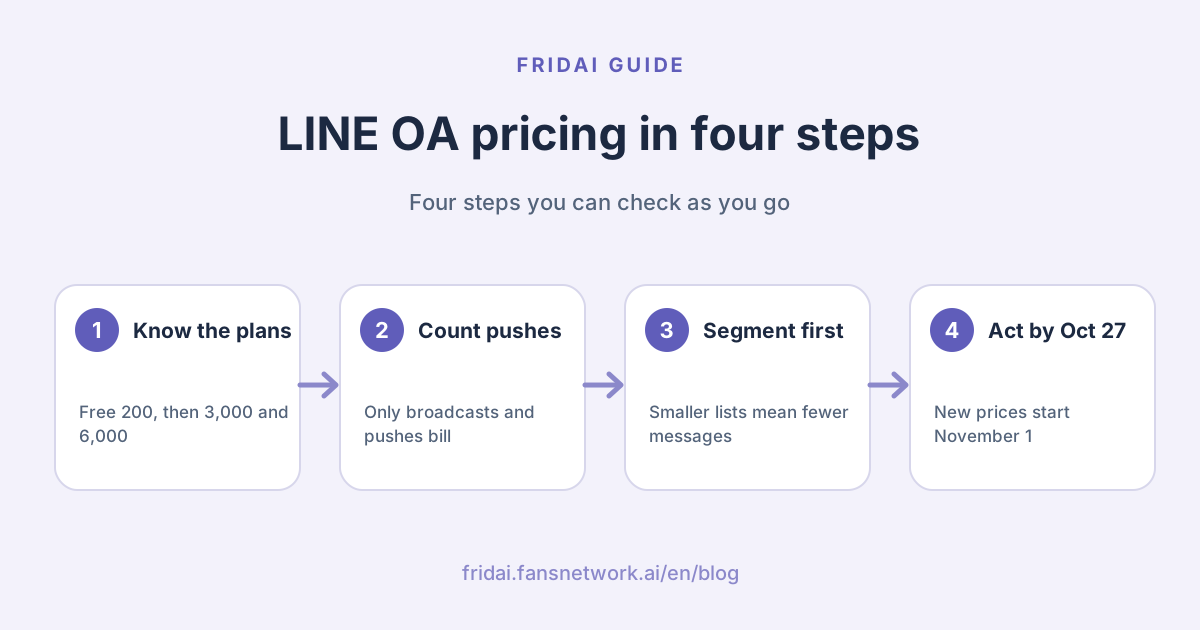
The answer up front: monthly fees and free messages for the three plans
LINE calls the paid tiers of an Official Account (LINE OA, the business side of the LINE messaging app) "promotion plans" (推廣
| Plan | Fee to Oct 31 | Fee from Nov 1 | Free messages | Going over |
|---|---|---|---|---|
| Light (輕用量) | NT$0 | NT$0 | 200 a month | No add-on messages |
| Medium (中用量) | NT$800 | NT$1,000 | 3,000 a month | No add-ons; upgrade to High |
| High (高用量) | NT$1,200 | NT$1,400 | 6,000 a month | Add-ons allowed, tiered pricing |
Three things to remember before anything else.
First, the monthly fee covers use of the Official Account only. It does not include creative production or API development.
Second, the free message quota resets every month. Unused messages do not roll over.
Third, LINE's page states that all fees exclude tax, so add it yourself when you budget.
How are add-on messages priced on the High plan?
Only the High plan lets you keep sending past the 6,000 free messages. LINE's announcement lists just two tiers from November 1, 2026, and they are cumulative.
| Add-on messages that month | Per message | How it is counted |
|---|---|---|
| 1 to 50,000 | NT$0.2 | Starts only after the 6,000 free messages are used |
| 50,001 and up | NT$0.15 | Only the part above 50,000 gets the lower rate |
Cumulative means this: if you buy 60,000 add-on messages, the first 50,000 are still NT$0.2 each and only the last 10,000 are NT$0.15. The whole batch does not drop to the lower price. For the tiers in force until October 31, LINE's FAQ only says "from NT$0.2 per message, tiered and cumulative" and does not list the full schedule in text; check your account manager or the official product deck.
If you reliably send more than 70,000 messages a month, the announcement mentions that, depending on your payment method, you can apply for a message-fee offset through the LINE Merchant Club (LINE 商家
Which messages are billed and which are free?
This section is worth three minutes. Many owners assume that "customer asks, I answer" also burns quota. It does not.
| Message type | Billed? | Note |
|---|---|---|
| Broadcast messages | Counts toward quota | Counted by number of target friends |
| Targeted (segmented) messages | Counts toward quota | Also counted by number of target friends |
| API push | Counts toward quota | For example the Messaging API's Push API |
| One-on-one chat messages | Free | You reply in chat after the customer writes |
| Auto-reply messages | Free | Includes keyword replies and AI auto-replies |
| Welcome message on friend add | Free | The first thing a new friend sees |
| Reply API responses | Free | Commonly used by third-party tools to answer incoming messages |
| LINE VOOM posts | Free | Do not use message quota |
One picture to remember it by:
How are messages counted? LINE's formula is "number of sends × number of target friends = total messages sent". LINE also explains that one broadcast can hold up to 3 message bubbles, and a rich message or a card-based message each counts as a single bubble. So the same content sent as three separate broadcasts versus one tidy broadcast gives a very different count. Before you send, the account manager shows how many messages this send will use, next to the estimated number of target friends. Look at it before you press the button.
There is also a time-zone trap: LINE settles on Japan time, so anything sent after 23:00 Taiwan time counts toward the next day. A broadcast sent late at night on the last day of the month eats into next month's quota.
Other fees that can show up besides the monthly fee
Beyond the promotion plans, a few items in the account manager are charged separately. They are counted apart from message quota.
| Item | How it is charged | What you need to know |
|---|---|---|
| Premium ID (專屬 ID) | Annual fee, valid one year | LINE's text only says "from about NT$2 a day on average"; the amount is on the purchase screen |
| Advanced Chat plan (聊天 | Subscription | LINE's November 2025 article says NT$100; mid-month purchases are not prorated |
| Verified Official Account | Requires a premium ID first | LINE says eligible industries with a premium ID can apply for free |
| APIs for reviewed features | Charged separately | LINE notes that API message fees for some reviewed features are outside the plan |
Premium ID
A standard ID is a random alphanumeric string assigned by the system. A premium ID is one you choose: "@" plus your own string, up to 18 characters, using only half-width letters and numbers plus ".", "_" and "-". LINE states a premium ID is valid for one year. If you buy on the desktop version or Android, the month of purchase counts as the first month; on iOS it starts from the following month. Once bought it cannot be changed. To change it you have to cancel and buy again. After you buy a premium ID, the original random ID and its add-friend QR code keep working.
FRIDAI Editorial could not find the exact annual fee for a premium ID in LINE's official text (the price sits in images and on the purchase screen), so we are not printing a number here. The purchase flow shows you the annual fee to confirm before you press buy.
Advanced Chat plan
This one is for shops that live in one-on-one chat. Chat history retention goes from within 6 months on the free tier to within 5 years, with download; the limits on tags and notes go up; and you can use the AI chatbot (β). LINE states the AI chatbot is a beta with a monthly cap on replies, recommends it for businesses with fewer than 25,000 friends, and says industries such as medical, finance, religion, politics and public administration, and law may not be able to use it. LINE's page does not give the actual cap, so read the purchase screen before you buy.
A small shop, worked through: what does a month cost?
Everything below is a made-up example to show the arithmetic. Rates are the new prices from November 1, 2026, before tax.
Take a handmade dessert shop with 1,500 friends that broadcasts to everyone once a week, four times a month.
Messages per month = 4 sends × 1,500 friends = 6,000
Light: 200 messages, not enough
Medium: 3,000 messages, not enough, and no add-ons
High: 6,000 messages, exactly used up
Cost that month = NT$1,400Six months later the shop has 2,000 friends and the same sending habit:
Messages per month = 4 sends × 2,000 friends = 8,000
Over the free quota = 8,000 − 6,000 = 2,000
Add-on fee = 2,000 × 0.2 = NT$400
Cost that month = 1,400 + 400 = NT$1,800Same 2,000 friends, but now "one announcement a month to everyone, plus three sends to only the 300 regulars who interacted recently":
Messages per month = 1 × 2,000 + 3 × 300 = 2,900
Medium's 3,000 messages are enough
Cost that month = NT$1,000
Side by side:
| Scenario | Messages a month | Plan | Cost that month |
|---|---|---|---|
| 1,500 friends, 4 sends to all | 6,000 | High | NT$1,400 |
| 2,000 friends, 4 sends to all | 8,000 | High plus add-ons | NT$1,800 |
| 2,000 friends, 1 to all plus 3 targeted | 2,900 | Medium | NT$1,000 |
Same shop. The only difference is who receives the message. What makes the bill grow is your friend count multiplied by how often you press broadcast. However many customers message you privately, none of it shows up in this table.
Six ways to bring your LINE Official Account cost down
1. Segment first, broadcast second
Keep full broadcasts for things that really concern everyone: closing days, a move, the big annual campaign. Send the rest as targeted messages to the right people. Billing follows the number of target friends, so a smaller list means a smaller count. LINE's add-friend feature lets you set up custom friend-add channels and later turn the friends who joined through one channel into an audience. It is the easiest way to start segmenting.
2. Say it once, not in three sends
One broadcast can hold up to 3 bubbles. Putting the announcement, the image and the coupon in the same send costs less than pushing once a day for three days. Customers are also less likely to block you for being noisy, and a block is the most expensive cost of all.
3. Move the Q&A into chat
Opening hours, prices, shipping fees and how to book do not need a broadcast "reminder". Put them in the welcome message, the rich menu and auto-replies so customers ask and the system answers. All of those are unbilled message types. For how to design them, continue with the LINE rich menu guide and LINE auto-reply setup examples.
For questions that fixed keywords cannot catch, consider conversational AI replies. Under LINE's rules, one-on-one chat messages and the Reply API carry no message fee. Before you use a third-party tool, ask the vendor exactly which method it uses to reply to customers and whether it also sends any proactive pushes. The three routes are laid out in LINE AI customer service: native features, third-party tools or build your own.
4. On the High plan, set a message cap
High allows add-ons, which also means you can overshoot by accident. The overview page in the Billing section (帳務
5. Stay away from late nights at month end
Messages sent after 23:00 Taiwan time count as the next day. On the last day of the month, either send early or just send the next morning. Do not land in between and spend next month's quota in advance.
6. Time your upgrades and downgrades
An upgrade takes effect immediately in the current month, charges the full monthly fee and gives the full month's free messages; nothing is prorated. A downgrade only takes effect the following month. So upgrading at month end because you ran out means paying a whole month for a few days. If your campaign calendar is predictable, decide the plan at the start of the month.
What changed in 2026
A few things really did change this year. This is not old news reheated.
| When | Change | What to do |
|---|---|---|
| From March 2026 | Response status always shown on unverified accounts | Make sure your response mode matches reality |
| From April 1, 2026 | Standard accounts no longer show the grey shield | No effect on features; apply for verification if you want a badge |
| By October 27, 2026 | Decide whether to accept the new prices | If not, switch to Light before this date |
| From November 1, 2026 | Medium and High monthly fees change | Auto-renewing accounts are charged the new price that day |
LINE's announcement is explicit about the price change: if you are still on the Medium or High plan after October 27, you are treated as having agreed to it. The billing cycle does not change, and the free message quotas stay the same.
There are also two system maintenance windows to watch. The first runs from 8 a.m. on October 28 to November 2; the second from 8 a.m. on November 24 to November 25. During them, buying a plan, upgrading or downgrading, changing the message cap and similar functions are temporarily unavailable. If you have a campaign in early November that needs the High plan or a higher cap, get it done by October 27.
LINE also recommends setting a secondary payment method by October 27, on a different credit card. The reason is practical: if a card authorisation fails or an add-on message fee goes unpaid, a paid plan can be switched to Light automatically, and to recover you first have to repay the failed item in the payment history and then buy the plan back by hand. Finding out on campaign day that you have 200 messages left is a feeling FRIDAI Editorial would rather not describe.
When is the bill charged?
The monthly fee for a paid plan is charged at the start of each month. Add-on message fees are settled at the end of each month and charged around the 10th of the following month. The two land at different times, so do not mistake them for a double charge when you reconcile.
If you have a question about a charge or an invoice, LINE says you must write in through "Contact us" by the 5th (inclusive) of the month after the invoice was issued; later requests are not accepted. The Billing section shows the month's message usage, payment history and e-invoice details. Two minutes at the start of each month is enough.
FAQ
Can I use a LINE Official Account completely free?
Yes. The Light plan costs NT$0 a month with 200 free messages, and one-on-one chat, auto-replies and the welcome message are not billed. As long as you rarely broadcast, the free plan can last indefinitely.
Does replying to a customer's private message use my message quota?
No. The free types LINE lists include one-on-one chat messages, auto-reply messages, AI auto-reply messages, the welcome message on friend add, and the Messaging API's Reply API.
What happens when I use up the Medium plan's 3,000 messages?
The Medium plan cannot buy add-on messages. To keep sending you have to upgrade to the High plan in the account manager first. The month you upgrade is charged the full monthly fee and gets the High plan's full free quota.
What happens if I do nothing after the November 2026 price change?
If you are still on the Medium or High plan after October 27, you are treated as accepting the new price. Accounts that auto-renew by credit card are charged the new monthly fee on November 1, and if the charge goes through there is nothing else to do.
Why did my paid plan suddenly go back to Light?
The usual cause is a failed payment: an unpaid add-on message fee, or a card that is over its limit or expired. Go to the payment history in the Billing section, repay the failed item, buy the plan again, and add a secondary payment method.
Do I have to buy a premium ID? How much is it a year?
Not necessarily. If you just want to run an account, the random system ID works; you only have to buy a premium ID before applying for a verified Official Account. It is valid for one year, and the exact annual fee is whatever the purchase screen shows.
If I buy the Advanced Chat plan, are broadcasts free?
No. The Advanced Chat plan adds one-on-one chat features, such as longer chat history retention and the AI chatbot. It is billed separately from the promotion plans' message quota, and broadcasts are still counted under your original plan.
How FRIDAI can help
The most controllable part of your LINE Official Account cost is how much you rely on broadcasts to say things. FRIDAI Chat connects to your LINE Official Account so that when customers ask about prices, bookings and after-sales in chat, the AI answers from your knowledge base and rules and notifies a human when an exception comes up. FRIDAI has its own monthly fee; add it to LINE's costs before deciding whether it is worth it.
- Product: FRIDAI Chat
- FRIDAI Social: FRIDAI Social
- Your first week: LINE Official Account setup and first-week checklist
- Tool comparison: LINE AI customer service tools: 5 options compared
- Instagram: FRIDAI on Instagram
- Threads: FRIDAI on Threads
- Facebook: FRIDAI on Facebook
Official sources
- LINE Official Account product and pricing: tw.linebiz.com/
service/ account-solutions/ line-official-account/ - 2026 LINE Official Account plan price change announcement: tw.linebiz.com/
column/ LINEOA-2026-Price-Plan/ - How message fees are priced: tw.linebiz.com/
faq/ oa-price/ message-price-list/ - How billable messages are counted: tw.linebiz.com/
faq/ oa-price/ how-to-calculate-message-expense/ - LINE message fee estimate guide: tw.linebiz.com/
column/ budget-auto-count/ - LINE Help Center, payment topics: help2.line.me/
official_account_tw/ ios/ categoryId/ 20006396/ 3/ pc?lang=zh-Hant - How to buy a paid plan, the Advanced Chat plan or a premium ID: help2.line.me/
official_account_tw/ ?contentId=20014008&lang=zh-Hant - Billing section: managing plans and payment methods: tw.linebiz.com/
manual/ line-official-account/ 20240903finace/ - What to do when a paid plan is switched to Light automatically: tw.linebiz.com/
column/ payment-adjustment/ - How to buy a premium ID for an Official Account: tw.linebiz.com/
faq/ oa-price/ 27/ - Premium ID validity period: tw.linebiz.com/
faq/ oa-operation/ 11/ - Premium ID introduction: tw.linebiz.com/
column/ premium-id-exposure-naming/ - Advanced Chat plan introduction: tw.linebiz.com/
column/ 1on1-chat/ - AI chatbot introduction: tw.linebiz.com/
column/ oa-aichatbot/ - LINE Help Center, chat features: help2.line.me/
official_account_tw/ ios/ categoryId/ 20006393/ 3/ pc?lang=zh-Hant - Official Account verification badge update: tw.linebiz.com/
column/ 2026-OA-rebranding/ - Friend-add channel settings: tw.linebiz.com/
manual/ line-official-account/ oa-manager-addfriend/ - FRIDAI Chat: fridai.fansnetwork.ai/
fridai-chat