Full disclosure: FRIDAI is one of the third-party AI customer service tools mentioned in this article. Everything said about LINE's own features comes from LINE's official pages, every approach is judged by the same standard, and where keywords or the built-in features are enough, FRIDAI Editorial says so plainly.
A note on terms: a LINE Official Account (LINE OA) is the business side of the LINE messaging app, the default chat app in Taiwan. The official pages cited here are LINE Taiwan's, and the prices are in New Taiwan dollars (NT$).
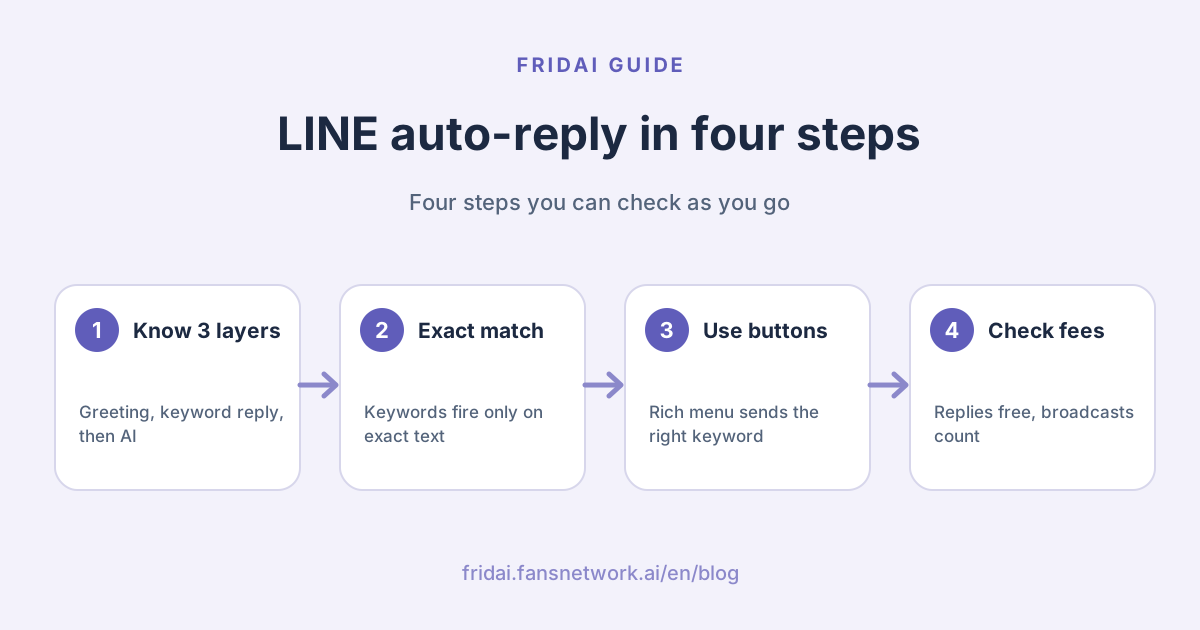
What kinds of LINE auto-reply are there? Separate the three layers first
When shop owners say "LINE auto-reply", they usually mean three different things mixed together. Separate them first, and you will know which one to fix later.
| Type | When it sends | Good for | Main limit |
|---|---|---|---|
| Greeting message | When a customer adds you | Who you are, what you help with, how to start | One chance to open |
| Auto-response message | When a customer messages | Hours, price list, process notes | Keyword must match exactly |
| AI Chatbot (β) | When a customer messages | Common questions asked many ways | Needs the paid chat add-on plan |
| Third-party AI service | When a customer messages | Chats that need context and data collection | Needs integration and a platform fee |
The first three are features of the LINE Official Account manager itself. The fourth is an outside service connected through the Messaging API, and FRIDAI belongs to that group.
One name needs special care. LINE's official manual describes an older feature called "AI auto-response messages" (AI 自動
What do the official response settings decide?
According to LINE's official manual, response settings control the switches for chat, greeting messages, webhooks and auto-response messages. We cannot see your account's screen, and the wording on LINE's own pages shifts a little between versions, so this section only covers the decisions to make first. Check the actual options against the official manual and your own manager screen.
Whether to turn chat on
The manual explains that response hours can only be set once chat is enabled; when chat is off, you can choose whether to enable auto-response messages. LINE's official tutorial also warns that if you choose the bot-only response mode, you cannot chat one-to-one with friends.
There is one more difference the customer can see. With chat on, the customer sees "read" only after you open the message in the manager. With chat off, the customer's message shows as read immediately. If nobody is available to answer in real time, the second setting easily feels like being left on read.
What to use inside and outside response hours
With chat enabled, you can set response hours and non-response hours, and the system switches response method by time slot. A common setup is humans during opening hours and auto-response messages after closing.
The manual also mentions a "reply status" shown under the account name, which tells customers whether a staff member is replying, replies are automatic, or it is outside response hours. This display is on by default. The manual says it can be hidden, but LINE states that since March 2026 the status is always shown for unverified accounts and can no longer be turned off, so keep the setting in line with how you really reply.
Whether to turn the webhook on
You only need it when connecting a third-party tool or writing your own code. The manual warns: if auto-response messages and the webhook are both enabled and both reply to the same keyword, the customer receives two messages. Set keywords on one side only.
The official rules for auto-response messages
Every item below comes from LINE's official manual or official tutorial. These are the ground rules to know before designing keywords.
- The trigger is an exact match. The official tutorial states that if a friend makes a typo, or types one character more or less, the matching reply does not appear.
- Matching ignores upper and lower case, and ignores full-width versus half-width characters.
- Emoji cannot be used as keywords.
- The manual states the limit on registered keywords is 51.
- One response can have several keywords, so synonyms can live together.
- Auto-response messages with no keyword are sent at random during their active period; when a keyword matches, the keyword response takes priority.
- One response can hold up to 5 message bubbles, and they are not limited to text: images, stickers and coupons work too.
- You can insert the friend's display name.
- You can set a date or time. The official example: the same input, "menu" (菜單), returns different content at lunch and at dinner.
- Every response has an active status. If it is set to inactive it will not send, whatever the date and time settings say.
"Messages with no keyword are sent at random" is the one most often missed. If you leave three responses without keywords, any message that matches nothing may get any one of them, and to the customer it looks like you answered a different question.
How do you design keywords that do not misfire?
The exact-match rule cuts both ways. The upside is that the bot will not blurt out a reply just because a customer mentioned a word. The downside is that customers rarely type the exact word you set. So the design goal is to help the customer send the right text, not to guess what they will type.
- Use buttons instead of typing. Turn keywords into text actions on a rich menu (the tappable menu pinned to the bottom of a LINE chat), or list them in the greeting message and ask customers to type them as shown. For layout, see the LINE rich menu planning guide.
- Put several synonyms on one response. For example 營業
時間 (opening hours), 幾點 開 (what time do you open), 幾點 關 (what time do you close) and 營業 時段 (business hours) all point to the same reply. - Avoid very short single words. If you only set 價格 (price), a customer who types 價格
多少 (how much is the price) will not trigger it. Setting the full phrase that customers will tap is more reliable. - Do not let two responses compete for one keyword. Each keyword belongs to one response; keep a mapping sheet to manage them.
- Always leave an exit. End every response by telling the customer how to reach a person, for example by typing 找客服 (talk to support).
- Keep only one response without a keyword, and write it as a menu-style guide, not as the answer to one particular question.
Copy this mapping sheet and fill it in. The keywords stay in Chinese because they must match what your customers type.
Keyword mapping sheet
Response title | Keywords (several allowed) | Active time | Who updates it
Opening hours | 營業時間、幾點開、幾點關、查營業時間 | All day |
Price list | 價目表、看價目表、費用、收費 | All day |
How to book | 預約、我要預約、訂位 | All day |
Shipping info | 運費、出貨、幾天到、運送退換貨 | All day |
Outside opening hours | (no keyword) | Closed hours |
Reach a human | 找客服、真人、客服 | All day |
Are keywords enough, or do you need AI?
LINE's official FAQ is clear about the difference: keyword auto-response needs the text to match exactly, while AI Chatbot (β) understands natural language, so "Opening hours?" and "What time do you open?" both arrive at the same answer.
| Your situation | Suggested approach | Why |
|---|---|---|
| Few, fixed questions; customers will tap a menu | Keywords plus a rich menu | Free, controllable, easy to maintain |
| One question gets asked many ways | Official AI Chatbot or third-party AI | No need to list every keyword |
| Several details must be collected in a row | Third-party AI customer service | Must remember context and ask follow-ups |
| You run LINE plus IG and FB DMs | A cross-platform third-party tool | Write rules and knowledge once |
| Professional judgment or money disputes | A human; auto-reply only takes the message | A wrong answer costs too much |
If your questions are fixed and you do not have many friends, the official features or plain keywords may well be enough. You do not necessarily need an outside tool.
About the official AI Chatbot (β), here is what FRIDAI Editorial confirmed from LINE's official article and FAQ.
- It is a feature of the paid chat add-on plan (聊天
進階方案, literally "advanced chat plan"), and you must buy that plan to use it. The official article labels it a NT$100 subscription; see the official page for billing details. - You upload files such as a price list, menu or opening hours, and the AI generates common Q&As automatically. The manager has a test area where you can try it first.
- LINE notes it is a beta, with a monthly cap on message replies, and recommends it for businesses with fewer than 25,000 friends.
- When the reply cap is exceeded, LINE explains the system switches automatically: to manual human replies during working hours, and to auto-response messages outside working hours.
- It does not message customers on its own initiative.
- LINE says it does not guarantee the accuracy of replies, and lists industries that may not be able to use it, including medical and social welfare, finance, religion, politics and government agencies, and legal services.
So if you run a clinic or a finance-related business, confirm whether you can use it before you plan around it. To compare the three routes of official features, outside tools and building it yourself, see three ways to do LINE AI auto-reply compared.
15 copy-ready LINE auto-reply examples
The templates are in Traditional Chinese because they are written for customers in Taiwan; each group has a one-line English gloss. Replace the text in parentheses with your own details. Our rule is that every reply carries three things: the answer, the next step, and how to reach a person. An auto-reply without a next step is just a more polite way of leaving someone on read.
Greeting messages
Two versions: a welcome that says what the account can do and how to reach a person, and a welcome with a new-friend offer.
(暱稱)你好,歡迎加入(店名)!
這裡可以幫你:查營業時間、看價目表、線上預約。
直接點下方選單,或輸入你想問的事。
需要真人協助,請輸入「找客服」。
謝謝你加入(店名)。
新朋友禮:(優惠內容),使用期限到(日期)。
想知道怎麼用,輸入「新客優惠」就可以。Opening hours
Two versions: regular hours with address and map link, and a notice for a temporary change this week.
(店名)營業時間
週一到週五(時段)
週六、週日(時段)
公休日:(星期)
地址:(地址)
地圖:(連結)
本週營業時間有調整:(日期)休息一天,(日期)恢復正常。
造成不便很抱歉,急事請輸入「找客服」留言。Price questions
Two versions: a price list that asks for two or three details before an exact quote, and a single-item price with a pointer to the order button.
這是目前的價目表:(圖片或連結)
實際費用會依(影響價格的條件)調整。
想要準確報價,請告訴我們(需要的兩到三項資訊),會由專人回覆。
(品項)目前是 NT$(金額),內容包含(項目)。
活動價與組合優惠以(頁面連結)為準。
要直接預約或下單,請點選單的「(按鈕名稱)」。Bookings and reservations
Two versions: how to book online or by message, and a "received, pending confirmation" notice.
預約方式有兩種:
線上預約:(連結)
留言預約:請回覆「日期、時段、人數、姓名、電話」。
留言預約需等我們回覆確認後才算完成。
已收到你的預約需求,目前是待確認狀態。
我們會在(時段)內回覆是否有空位。
要改期或取消,請輸入「改預約」。Shipping, returns and exchanges
Two versions: dispatch time, shipping fee and order lookup, and the return and exchange policy.
出貨時間:付款後(天數)個工作天內出貨。
運費:(金額或免運門檻)。
查訂單:(連結)
查不到訂單,請輸入「找客服」並附上訂單編號。
退換貨說明:
申請期限:(天數)內
申請方式:(連結或步驟)
不適用的商品:(類別)
細節以(退換貨政策連結)為準。Outside opening hours
Two versions: an after-hours reply that asks the customer to leave their question and phone number, and a notice for a multi-day closure.
現在是非營業時間,我們會在(下一個營業時段)回覆你。
先留下「想問的事、聯絡電話」,上班後第一時間處理。
常見問題可以直接點下方選單。
(日期)到(日期)店休,(日期)恢復回覆。
這段期間的訊息我們都會看,恢復營業後依序回覆。
預約請先使用線上預約:(連結)Handing over to a human
Two versions: confirming that a person has been notified, and declining to guess on a question that needs a specialist.
收到,已通知真人客服。
營業時間內大約(時間)內回覆;為了加快處理,請先留下:
問題內容、訂單編號或預約姓名。
這個問題需要專人確認,我先不亂回答。
請留下(需要的資訊),我們會由負責的人直接回覆你。When no keyword matches
One version: a menu-style fallback that lists the keywords to type and how to reach a person.
謝謝你的訊息。你可以輸入下面的詞取得快速回覆:
營業時間/價目表/預約/運費
其他問題請輸入「找客服」,由真人回覆你。
Common pitfalls and how to avoid them
- Turning auto-response on but chat off. Nobody picks up questions outside the scope, and the customer's message shows as read immediately. Leave at least one way to reach a person, and set fixed times to check messages.
- Leaving too many responses without keywords. They are sent at random, so what the customer sees is an answer to a different question.
- Duplicate setup in the manager and the webhook. Both sides reply to the same keyword and the customer gets two messages at once.
- Putting information that expires into a reply. For promotional prices, closed days and changed hours, use the date and time settings, and name one person responsible for taking them down.
- An auto-reply that says "your booking is complete". If a person still has to confirm it, write "received, pending confirmation".
- Writing the greeting message as a long self-introduction. LINE recommends using the greeting to explain the services the account offers, and you can attach a coupon; the point is to let the customer know what to do next.
- Following the names in old tutorials. If you cannot find "AI auto-response messages", it is not you: the official manual has announced the end of that feature.
Changes to watch in 2026: message fees and what gets billed
On how auto-reply relates to message fees, we only cover what LINE has put in writing.
First, LINE's announcement of 1 September 2026 says plan monthly fees change from 1 November 2026. The amounts below are before tax. Plan names are literal translations of the Taiwan plans: Light (輕用量), Medium (中用量) and High (高用量).
| Plan | Monthly fee change | Free messages per month | Extra messages |
|---|---|---|---|
| Light | Stays at NT$0 | 200 | Cannot buy more |
| Medium | NT$800 becomes NT$1,000 | 3,000 | Cannot buy more |
| High | NT$1,200 becomes NT$1,400 | 6,000 | Can buy more |
For extra messages on the High plan, the announcement gives NT$0.2 per message for messages 1 to 50,000, and NT$0.15 per message from message 50,001 onward.
Second, the same announcement lists the messages that are not billed: greeting messages when a friend is added, one-to-one chat messages, auto-response messages, AI auto-response messages, and Reply API messages in the Messaging API. In other words, the greeting messages and keyword auto-responses covered in this article do not use up your free messages, according to LINE.
Third, if you connect a third-party tool, the pricing page on LINE Developers says: reply messages are not counted, while push, multicast, broadcast and narrowcast messages are counted, by the number of people who receive them. So when you choose a tool, ask clearly which kind it uses to answer customers. The full plan calculation is in our LINE Official Account pricing guide for 2026.
FAQ
Does LINE auto-reply cost money?
According to LINE's official 2026 price announcement, greeting messages, auto-response messages and one-to-one chats are all listed as non-billable. What uses your message count is proactive pushing such as broadcasts, and you only need to upgrade or buy more once you go past your plan's free messages.
Why does nothing happen when a customer types the keyword I set?
The most common reason is that the text does not match exactly; LINE states that one character more or less will not trigger it. Next most common: the response is set to inactive, it is blocked by its date and time settings, or auto-response messages are not turned on in response settings.
Can LINE auto-reply work alongside human agents?
Yes. Once chat is enabled, the official response settings let you choose the response method separately for response hours and non-response hours. A common setup is humans during opening hours and auto-response the rest of the time. Go by what your own manager screen shows for the actual options.
Does LINE have built-in AI auto-reply?
Yes. What LINE currently promotes is AI Chatbot (β), a feature of the paid chat add-on plan that you must buy to use, with a monthly reply cap. The older "AI auto-response messages" has been announced as discontinued in the official manual, and the two are not the same feature.
How many auto-response keywords can I set?
LINE's official manual states the limit on registered keywords is 51, and emoji cannot be used. Keywords ignore case and full-width versus half-width. Because the number is limited, it matters even more to gather synonyms into a small number of responses.
Can a customer receive the same auto-reply twice?
Yes, if you enable both the manager's auto-response messages and the webhook, and set a reply to the same keyword on both sides. The official manual recommends setting keyword auto-response in only one place.
When is auto-reply the wrong tool?
Messages involving personal circumstances, professional judgment, money disputes or complaints should not be answered directly by a fixed message. The safer approach is to let auto-reply only take the message and explain the waiting time, and have a person confirm the content before replying.
How FRIDAI can help
Keywords handle fixed questions. They cannot handle "the customer said it differently" or "it takes three questions to finish". FRIDAI Chat connects to your LINE Official Account, replies after understanding the meaning based on the AI rules and knowledge notes you write, and notifies a person to take over when judgment is needed. We suggest tidying up the keywords and examples in this article first, because that material is already a very good first draft of your rules.
- DM customer service: FRIDAI Chat
- Menu planning: How to plan a LINE rich menu
- Rule writing: How to write AI customer service rules
- Tool comparison: LINE AI customer service tools compared
- Instagram: FRIDAI on Instagram
- Threads: FRIDAI on Threads
- Facebook: FRIDAI on Facebook
Official sources
- LINE Official Account manual: auto-response messages: tw.linebiz.com/
manual/ line-official-account/ oa-manager-autoreply/ - LINE Official Account manual: basic settings and response settings: tw.linebiz.com/
manual/ line-official-account/ oa-manager/ - LINE Official Account manual: AI auto-response messages (with the end-of-service notice): tw.linebiz.com/
manual/ line-official-account/ oa-manager-smartchat/ - LINE official tutorial: answering common questions with auto-response messages: tw.linebiz.com/
e-learning/ 20200516-autoreply/ - LINE official tutorial: chatbot and one-to-one chat modes: tw.linebiz.com/
e-learning/ Account-Connect-Chat/ - LINE official column: introducing AI Chatbot (β): tw.linebiz.com/
column/ oa-aichatbot/ - LINE FAQ: how AI Chatbot (β) differs from keyword auto-response: tw.linebiz.com/
faq/ oa-ai-chatbot/ oa-ai-chatbot-compare-auto-response/ - LINE FAQ: is AI Chatbot (β) free: tw.linebiz.com/
faq/ oa-ai-chatbot/ oa-ai-chatbot-fee/ - LINE FAQ: mode switching after the reply limit is exceeded: tw.linebiz.com/
faq/ oa-ai-chatbot/ oa-ai-chatbot-off-limit/ - LINE FAQ: can AI Chatbot (β) send messages proactively: tw.linebiz.com/
faq/ oa-ai-chatbot/ oa-ai-chatbot-auto-send-message/ - LINE Official Account playbook: food and beverage: tw.linebiz.com/
manual/ line-official-account/ onboarding-catering/ - LINE official announcement: 2026 Official Account plan price adjustment: tw.linebiz.com/
column/ LINEOA-2026-Price-Plan/ - LINE FAQ: how message fees are calculated: tw.linebiz.com/
faq/ oa-price/ message-price-list/ - LINE Developers: Messaging API pricing: developers.line.biz/
en/ docs/ messaging-api/ pricing/