Full disclosure: FRIDAI is one of the products in the "ready-made AI customer service tool" group. This article compares all three routes by the same criteria, and where the native features or a DIY build fit better, FRIDAI Editorial says so directly.
A note on terms: a LINE Official Account (LINE OA) is the business side of the LINE messaging app, the default chat app in Taiwan. The official pages cited here are LINE Taiwan's, and prices are in New Taiwan dollars (NT$) unless marked otherwise.
What are the three routes?
Many shop owners hear "AI" and go straight to shopping for a tool, when the LINE manager already has two layers of auto-reply built in. Get a clear picture of the three routes first, so the comparison that follows is about the same things.
| Route | What it is | Who sets it up |
|---|---|---|
| LINE native features | Auto-response messages and AI Chatbot (β) in the Official Account manager | The shop owner |
| Ready-made AI tool | A third-party platform connects your account and provides knowledge, rules and human handoff | The owner or a marketer |
| Build it yourself | Receive messages through the Messaging API and let a language model write the reply | An engineer or automation-savvy person |
Route 1: LINE native features
The LINE Official Account manager has two kinds of auto-reply. The first is auto-response messages: you set keywords and the matching answers, and when the customer's text is the same as a keyword, it replies. LINE's official tutorial is blunt about it: the customer's message must match the keyword "exactly" to trigger, and one character more, one character less or a typo means no reply. One response can hold up to five messages, and you can set a date or time slot.
The second is AI Chatbot (β), launched on 12 November 2025. According to LINE, it picks the best-fitting entry from the common Q&As you have set up and returns it to the customer, and it can understand rephrased questions to a certain degree. You can create Q&As by hand, or upload a PDF or image and let it generate them; the manager has a "common Q&A response test" so you can try before going live.
Route 2: ready-made AI customer service tools
These are third-party platforms that connect to your Official Account through LINE's official Messaging API. You supply brand knowledge and reply rules; the platform receives messages, generates replies, records conversations and notifies a person when needed. FRIDAI Chat, and the tools we compared in LINE AI customer service tools, all belong here. They differ mainly in how rules are written, how a team collaborates and how the fee is calculated.
Route 3: build it yourself
LINE opens the Messaging API to any Official Account. The flow: the customer sends a message, the LINE platform sends the event to the webhook URL you specify, your code or automation flow processes it, and then sends the reply back through the API. For the "process" part in the middle, you can plug in any language model. Make has a LINE app you can use. With n8n, take note: the official docs mark the built-in LINE node as deprecated (it corresponds to LINE Notify, a service that has been shut down), so you have to receive events with the Webhook node yourself and then call the Messaging API.
Which route should you take? Answer three questions first
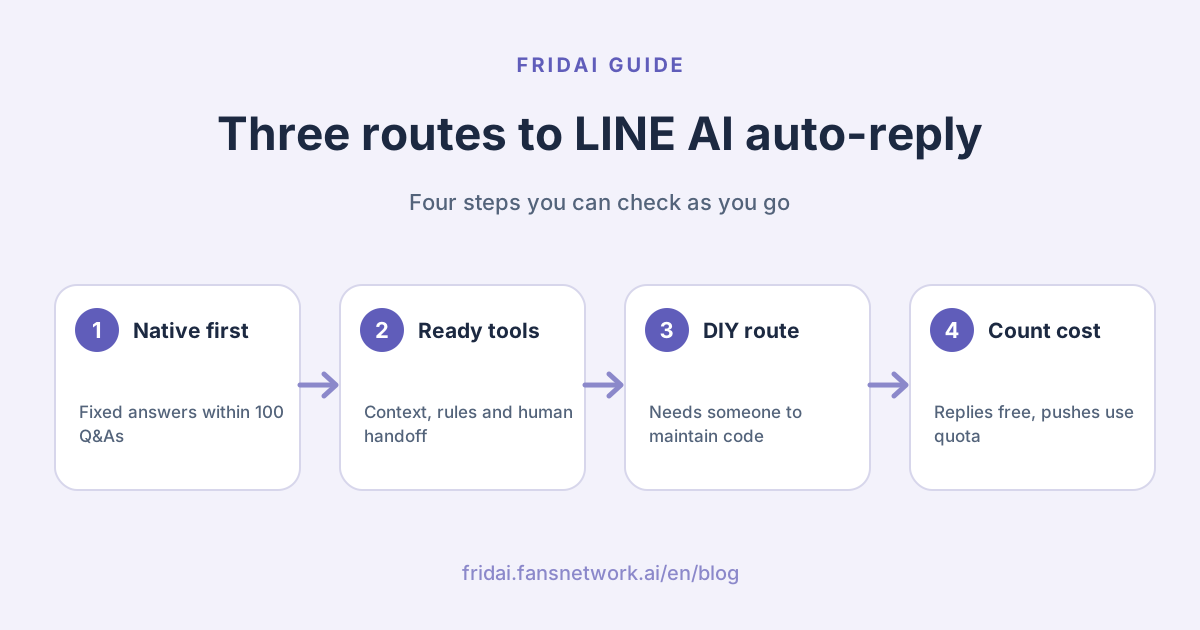
The "100 entries" in the flowchart is not a number we made up: LINE's official manual states that AI Chatbot (β) allows at most 100 common Q&As. If your questions fit in 100 entries and each has a fixed answer, the native features are very likely what you need.
The three routes side by side: seven items
The table uses one set of criteria. Cost is described by structure only; the figures LINE publishes come in a later section.
| Item | LINE native features | Ready-made AI tool | Build it yourself |
|---|---|---|---|
| Time to go live | Shortest; switch it on in the manager | Short; the work is organizing knowledge and rules | Longest; needs development and testing |
| Skills needed | Using the Official Account manager | Explaining your rules clearly | Webhooks, APIs and prompts |
| Upkeep | Update the Q&A content | Update knowledge and rules | Content plus code, hosting and error handling |
| Cost structure | Official Account plan plus the paid chat add-on plan | Platform monthly fee plus Official Account fees | Model usage, automation platform or hosting, labor |
| Knowledge and context | Picks one entry from the common Q&As | Varies by platform; most read knowledge and context | You design all of it |
| Human handoff | Runs alongside manual chat, switched by time slot | Mostly built-in notification and takeover | Build status switching and alerts yourself |
| What breaks first | Wording outside the Q&A scope | Stale knowledge, exceptions the rules missed | Nobody maintains it; duplicate or missed events |
Knowledge and context handling is where the routes differ most
The native AI Chatbot (β) has a clear position: pick an answer from the common Q&A list. The official pages do not mention it asking follow-up questions by condition, collecting details or looking up orders, so for a conversation that needs back-and-forth, such as "I'd like to book two people for Saturday afternoon", try it yourself in the response test before deciding.
Ready-made tools usually manage "brand knowledge" and "reply rules" separately. Taking FRIDAI Chat as the example, you write rules in natural language, keep knowledge in a notebook, and the AI refers to both when it replies. For how to write rules without gaps, see how to write AI customer service rules.
When you build it yourself, the Messaging API only carries messages back and forth. You store the conversation memory and decide how much earlier context to pass to the model. That is freedom, and it is also workload.
Human handoff: do not wait for trouble to think about it
On the native side, LINE explains that AI Chatbot (β) can run alongside manual chat and auto-response messages, and that under "Response settings" in "Settings" you can choose which method to use during response hours and outside them. A common setup is humans during opening hours and AI after closing. As for "hand over automatically when the customer asks for a person", we did not find it described on the official pages, so go by what your own manager screen actually shows.
Ready-made tools mostly make takeover a built-in flow. FRIDAI Chat notifies the team through LINE when a person is needed, and once a person takes over, the AI stays out of the conversation. Other tools behave differently, so during a trial always test "after the human has replied, when does the AI come back".
Build it yourself and you build this too: where to record "this customer is with a human now", how to notify colleagues, and how long before the conversation returns to the AI. Skip this part, and the sight of the AI and a human answering the same customer at the same time is more awkward than being left on read.
Cost structure: what does each route pay for?
We only write down what is officially published. Please verify the rest yourself on the official pages.
LINE native features
Auto-response messages are built into the Official Account manager. AI Chatbot (β) requires the paid chat add-on plan (聊天
Ready-made AI customer service tools
Usually a platform monthly fee, plus the LINE Official Account fees you already pay. Billing units differ by vendor: some count AI replies, some count contacts or agent seats. Taking FRIDAI Chat as the example, public plans start at US$70 per month with 500 AI replies, one plan covers one platform account, and there is a US$1 30-day trial (including 100 AI replies). For other tools, see each vendor's website. For the full calculation, see LINE Official Account pricing in 2026.
Build it yourself
The Messaging API itself is free to start using, but you take on three new bills: language-model usage, the plan or hosting fee for Make or n8n, and the labor to develop and maintain it. The first two depend on volume. The third is the one most often underestimated.
An often-missed detail: reply messages and push messages are counted differently
LINE's developer documentation states that a reply message sent through the Messaging API does not count toward your monthly message quota, while a push message, broadcasts and narrowcast messages do. Meaning: customer asks, AI answers, and that back-and-forth usually does not eat your message allowance. But if your flow is "message the customer again a bit later", the count starts. Whether you take route 2 or route 3, ask clearly which method is used to send replies.
Changes to watch in 2026
LINE Taiwan announced on 1 September 2026 that Official Account plan prices change from 1 November 2026 (all amounts below are before tax). Plan names are literal translations of the Taiwan plans: Light (輕用量), Medium (中用量) and High (高用量).
| Plan | Monthly fee before | Monthly fee after | Free messages per month |
|---|---|---|---|
| Light | NT$0 | NT$0 | 200 |
| Medium | NT$800 | NT$1,000 | 3,000 |
| High | NT$1,200 | NT$1,400 | 6,000 |
The free message counts do not change. Extra messages on the High plan move to two tiers: NT$0.2 per message for messages 1 to 50,000, and NT$0.15 per message from message 50,001 onward. This has no direct link to AI replies, but it affects your total cost for "AI customer service plus broadcasts", so use the new prices when you redo the budget.
Two more things also count as changes from the past year: AI Chatbot (β) only launched in November 2025 and is still a beta; and n8n's built-in LINE node is deprecated, so many old tutorials online will leave you stuck if you follow them.
Limits of the LINE native features, to know before you decide
All of these come from LINE's official pages, not from our own assessment.
- AI Chatbot (β) is a beta with a monthly cap on message replies; the official pages do not publish the exact number.
- LINE recommends it for businesses with fewer than 25,000 friends.
- At most 100 common Q&As.
- Industries such as medical and social welfare, finance, religion, politics and government agencies, and legal services may be unable to use it even after buying the chat add-on plan.
- LINE does not guarantee the accuracy or appropriateness of AI-generated content.
- LINE states that uploaded files and conversation records are not used for AI training.
If you run a clinic, an insurance business or a land-registration agency (代書, a licensed property paperwork agent in Taiwan), confirm the fourth point first, so you do not find out halfway through setup that you cannot switch it on.
Checklist before you build it yourself
DIY is not bad; you just need to know what you signed up for. Every point below is a requirement or warning written in LINE's developer documentation.
- Create a LINE Official Account first, then create a Messaging API channel for it.
- Verify the signature before processing webhook events, to confirm the request really comes from the LINE platform.
- LINE recommends processing events asynchronously, so later requests are not held up.
- The same event may be delivered more than once; deduplicate with
webhookEventId. - The order in which events arrive is not guaranteed to match the order in which they happened; check
timestamp. - One request can send at most five message objects.
- When the model needs time to generate a reply, you can show a loading animation so the customer knows you are working on it.
Beyond these, there are things the documentation will not think through for you: where conversation memory is stored, how to catch a wrong answer from the model, who keeps the API keys, and who takes over when the colleague who built the flow leaves.
A requirements brief you can paste straight to your engineer or freelancer:
LINE AI auto-reply requirements
1. Message source: LINE Official Account one-to-one chat (groups excluded)
2. Knowledge scope: opening hours, price list, services, return and exchange rules (files attached)
3. Fields that must be collected: name, phone number, requested date
4. Must not answer: discounts beyond the listed prices, medical or legal judgments, unconfirmed stock
5. Conditions for handing to a human: customer asks for a person, two failed answers in a row, complaints
6. After handoff: the AI stops replying and notifies ______
7. Conditions for returning to the AI: ______
8. How duplicate events and errors are handled: ______
9. Who updates the knowledge and how often it is checked: ______If you cannot fill in items 5 to 7, the flow has not been thought through yet, and at that point every route gets stuck in the same place.
Who should choose which route?
| Your situation | Suggested route | Why |
|---|---|---|
| One-person shop; 80% of questions are hours and prices | LINE native features | Lowest cost, Q&As are easy to organize |
| You only want someone answering after hours | LINE native features | Can switch method by response hours |
| You are in an industry restricted for native AI | Ready-made tool or DIY | Native AI may not be available |
| Bookings and quotes need back-and-forth | Ready-made AI tool | Needs context and rule-based collection |
| You also answer IG and FB DMs beyond LINE | Ready-made AI tool | Native features only cover LINE |
| You have engineers and your own order or member system | Build it yourself | You decide both flow and systems |
| No engineers, but keen to build it yourself | Native or a tool first | Maintenance labor is the real cost |
Our view: for a team with steady engineering capacity and special systems to connect, building it yourself is the right choice, and there is no need to force a tool onto it to save effort. The other way round, a home-made bot that nobody maintains usually breaks quietly after the first model or API update.
To get the native features working well first, read LINE auto-reply setup examples next.
FAQ
Does a LINE Official Account have AI auto-reply built in?
Yes. Besides auto-response messages, which trigger only on an exact keyword match, LINE launched AI Chatbot (β) in November 2025. It picks answers from the common Q&As you set up, and it is still a beta.
Do I have to pay extra for LINE's AI chatbot?
To have it reply to customers for real, you need to buy the chat add-on plan; LINE's official column describes it as a NT$100 subscription, and the purchase page has the actual billing. You can create common Q&As and run the response test before buying.
Why does my auto-response message not reply when a customer messages?
The most common reason is that the keyword does not match exactly. LINE's official tutorial explains that one character more or less will not trigger it. Also check whether that response is active, and the time slots in your response settings.
Will LINE suspend me for connecting ChatGPT through Make or n8n?
The Messaging API is an interface LINE officially opens, and using it is not a violation in itself. But auto-replies must follow the Official Account guidelines just like ordinary messages, and sending content that bothers or misleads users can still get the account suspended.
Do AI replies use up my LINE message quota?
According to LINE's developer documentation, content sent as a reply message does not count toward the monthly quota, and push messages do. The actual count depends on which method your tool or code uses to reply, so confirm with your vendor or engineer.
Is building it yourself really cheaper?
Not necessarily. The Messaging API is free to start, but model usage, an automation platform or hosting, plus the time to develop and maintain it are all costs. With low conversation volume and no engineer, building it yourself is often more expensive.
Can I mix the three routes?
You can do it in stages. A common order is to handle fixed questions with the native features first, then evaluate a tool or a DIY build once exceptions pile up. Before enabling several response methods on the same account, confirm they will not reply twice to the same message.
How FRIDAI can help
If your LINE conversations have gone beyond "one question, one answer", FRIDAI Chat can reply to customers using natural-language rules plus a knowledge notebook, and notify the team to take over when a person is needed. We suggest starting with the one flow that goes wrong most often, such as bookings or quotes, confirming it answers correctly, asks correctly and hands over correctly, and then widening the scope.
- DM customer service: FRIDAI Chat
- Tool comparison: LINE AI customer service tools compared
- Rules guide: How to write AI customer service rules
- Instagram: FRIDAI on Instagram
- Threads: FRIDAI on Threads
- Facebook: FRIDAI on Facebook
Official sources
- LINE Biz-Solutions: AI Chatbot (β) launch column: tw.linebiz.com/
column/ oa-aichatbot/ - LINE Official Account help: AI Chatbot (β): help2.line.me/
official_account_tw/ web/ categoryId/ 200000670/ 3/ pc?lang=zh-Hant - LINE Biz-Solutions: AI Chatbot (β) main page features: tw.linebiz.com/
manual/ line-official-account/ ai-chatbot-main-function/ - LINE Biz-Solutions: how to enable AI Chatbot (β): tw.linebiz.com/
faq/ oa-ai-chatbot/ oa-ai-chatbot-start/ - LINE Biz-Solutions: auto-response messages tutorial: tw.linebiz.com/
e-learning/ 20200516-autoreply/ - LINE Biz-Solutions: introducing the chat add-on plan: tw.linebiz.com/
column/ 1on1-chat/ - LINE Biz-Solutions: 2026 Official Account plan price adjustment: tw.linebiz.com/
column/ LINEOA-2026-Price-Plan/ - LINE Official Account guidelines: terms2.line.me/
official_account_guideline_tw - LINE Developers: Messaging API overview: developers.line.biz/
en/ docs/ messaging-api/ overview/ - LINE Developers: Send messages: developers.line.biz/
en/ docs/ messaging-api/ sending-messages/ - LINE Developers: Receive messages (webhook): developers.line.biz/
en/ docs/ messaging-api/ receiving-messages/ - LINE Developers: Messaging API pricing: developers.line.biz/
en/ docs/ messaging-api/ pricing/ - n8n Docs: LINE node: docs.n8n.io/
integrations/ builtin/ app-nodes/ n8n-nodes-base.line/ - n8n Docs: Webhook node: docs.n8n.io/
integrations/ builtin/ core-nodes/ n8n-nodes-base.webhook/ - Make: LINE integration: www.make.com/
en/ integrations/ line - FRIDAI Chat: fridai.fansnetwork.ai/
fridai-chat