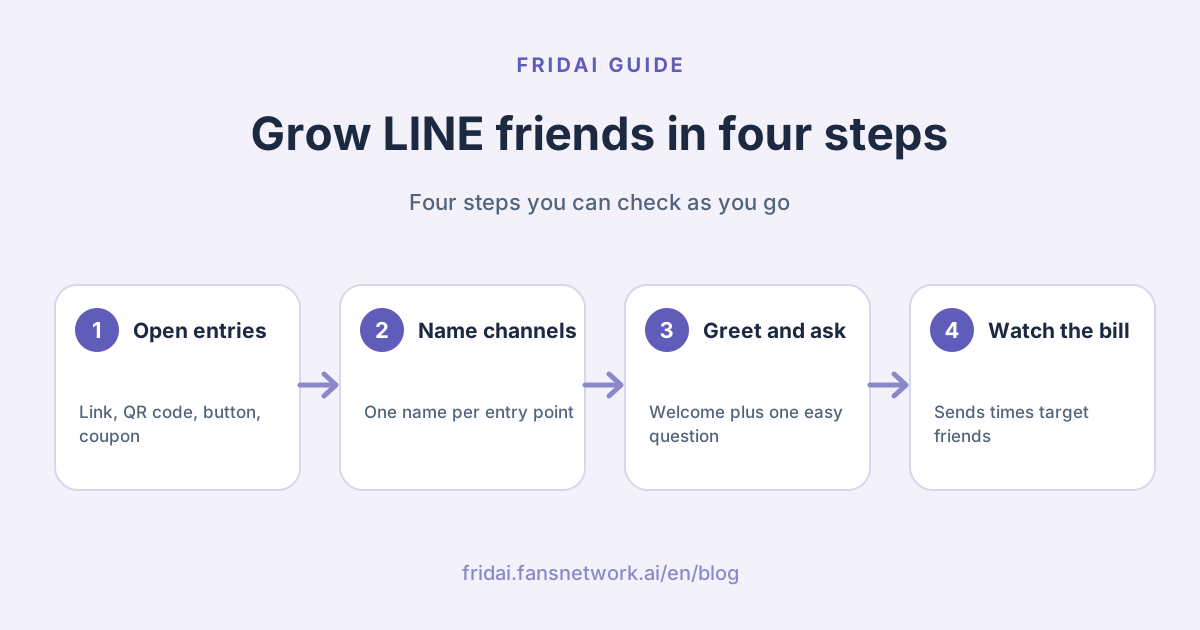
The whole picture: where friends come in and what happens next
Growing a LINE Official Account (LINE OA, the business side of the LINE messaging app) is not a contest of who sticks up the most QR codes. It is closer to running a shop: there has to be a sign at the door, someone has to say hello when a customer walks in, and only then can you talk about them coming back.
Two things matter in this picture. First, whether an entry point is named decides whether you can read your numbers later. Second, whether the customer replies after the welcome message decides whether they are a friend or just a number you pay to broadcast to.
Which add-friend methods does LINE officially offer?
Every method below appears in LINE's own documentation. They are ordered by how much effort they take.
| Method | Where to use it | Effort | What to check |
|---|---|---|---|
| Add-friend link | IG and FB bio, website, newsletter | Low | Adds from that channel |
| Add-friend QR code | Counter, table card, parcel insert, business card | Low | Adds from that channel |
| Add-friend button | Website header, order-complete page | Medium, needs HTML | Adds from that channel |
| In-store poster | Shop front, fitting room, waiting area | Medium, depends on account type | Adds per branch |
| Coupons and reward cards | At checkout, first purchase | Medium | Blocks after joining |
| Premium ID | Said aloud, on air, on signage | Low, annual fee | Adds after verbal promotion |
| Friend-add ads | Ad placements inside LINE | High, needs verification and budget | Cost per friend and blocks |
Add-friend link and QR code
These two are where every shop starts. LINE's manual says the account manager provides a QR code and a URL for adding friends, to be placed on your website or social media, or in the shop.
LINE's Help Center gives the location: in the web account manager, the Home page has "Gain friends" (增加
The link suits online, the QR code suits offline. The rule is simple: when the customer is holding a phone, give a link; when they are looking at something physical, give a QR code. In an Instagram Story, use the link. Posting a picture of a QR code and asking people to screenshot and scan it is a test of love.
Add-friend button
The Help Center explains that "Create a button" (建立
In-store posters
The account manager has a poster feature; choose poster when you set up a channel and the system fills in "LINE official poster". An honest note here: two official documents describe it differently. The Help Center says unverified accounts cannot create posters, while the manual says unverified accounts have one poster design available to download. Go by what your own account shows. Without an official poster, putting the QR code on a table card you designed yourself works just as well.
Coupons and reward cards
LINE's manual lists these as add-friend methods too: create a coupon or reward card and customers add you as a friend when they claim it. It is the most natural moment in a physical shop because the customer gets something on the spot. One caution: the Help Center says a coupon's content can still be edited after it is published, but changing a coupon people already hold invites disputes, so write the conditions clearly from the start.
Search by ID and the premium ID
Many owners assume customers can find them by searching the shop name in LINE. The Help Center is direct: an unverified account does not appear in search results in the LINE app or on the web. If a verified account cannot be found, the "show in search results and recommended accounts" setting in the business profile may be off.
So a standard, unverified account should not rely on customers searching. Hand them a link or a QR code.
The premium ID (專屬 ID) is a different matter. The standard ID is a random alphanumeric string; a premium ID is one you choose, and LINE's column says letting customers type a meaningful ID makes adding you faster. It fits situations where you have to say it aloud: on the phone, in a livestream, on a sign. A premium ID has an annual fee and cannot be changed after purchase; the cost details are in our LINE Official Account pricing guide.
LINE friend-add ads
LINE Taiwan does offer official friend-add ads (加好友
First, they are open only to verified Official Accounts. LINE's FAQ states that if an account running an ad becomes unverified, the system stops delivery.
Second, there are two ways in. A verified account can place ads directly in the desktop account manager with simple settings, or open a separate LINE Ads Platform account (LINE 成效
Third, LINE says you are charged at your bid only when a target user actually becomes a friend, and an existing friend who taps the ad is not charged. The page gives a minimum total budget of NT$500, and you can set region, interests, gender and age.
Fourth, LINE's manual lists some industries that are currently not eligible and limits applications to accounts registered online and paying by card. Figures such as the minimum bid date from different years on different pages, so we are not printing them; go by what the account manager shows.
For a small shop the order is: finish the free entry points, confirm the welcome message keeps people, then think about paying for friends. When the bucket has a hole, turning the tap up only makes the floor wetter.
How do you know which channel brought the friends?
For tracking where LINE friends come from, the official tool is the friend-add channel setting (設定
The three fields to fill in
The steps in LINE's manual are: create a friend-add channel setting, choose the "channel" (管道), fill in the "source" (來源), then fill in the "campaign name" (活動
| Field | What LINE means | What a small shop can enter |
|---|---|---|
| Channel | The platform where the link or QR code appears | Website, shop, Instagram |
| Source | The placement within that channel | Counter card, bio link |
| Campaign name | The name of this promotion | October new-customer gift, always-on |
Decide a naming rule on day one, for example "platform plus placement plus year and month". In three months you will thank yourself.
Where to read the numbers
LINE's tutorial puts it under "Analysis" (分析) at the top left of the desktop account manager, then "Friends" (好友), which has three tabs: overview, attributes and friend-add channels. The overview shows friends added, target friends and blocks, compared with the previous day, 7 days ago and 30 days ago.
LINE's FAQ defines them this way: the friend count is the number of times the account has been added; target friends are those who added you and have not blocked you, so they can receive broadcasts; once you are blocked, you can no longer message that person.
Three reasons the numbers do not show
The Help Center's answer to "friend-add channels show no values" comes down to three things.
First, data updates the next day. A poster put up today shows tomorrow.
Second, a channel's count in the chosen period has to be greater than 20 before it is shown under its own name; below that it is grouped under "Other". New shops often get stuck here. Widen the date range and look again.
Third, the customer must really have joined through that channel's own QR code or link. If the old generic QR code is the one printed, the adds are not recorded against the new channel.
One more safety step. LINE's manual says past settings can be reopened to retrieve the QR code and link, while the Help Center warns that the account manager cannot show previously configured channel information and advises keeping your own files. When two sources disagree, take the cautious one: every time you create a channel, save its name, link and image in your own spreadsheet.
Channels can also be used for targeting
LINE explains that friends who joined through a custom channel can be turned into a "friend-add channel audience" and messaged separately. The Help Center's condition is that the audience must reach 50 people before it can be used for a broadcast. In other words, people who joined in the shop and people who joined from Instagram can receive different content later. The method is in LINE targeted messages and tags.
What should you send in the first 24 hours?
LINE describes the welcome message like this: it is sent when a friend adds the account, you can set up to 5 messages, LINE recommends using at most 3 bubbles, and you can insert the friend's display name. The welcome message does not count toward message quota; LINE's billing explanation lists it as unbilled.
Our advice is stricter: say it in one message, two at most. A new friend did not come to read announcements.
| Moment | What to do | Billed? |
|---|---|---|
| On joining | Welcome message ending in a question | Not billed |
| After a reply | Auto-reply or a person answers in chat | Not billed |
| No reply | Do not chase; wait for a useful notice | Only broadcasts bill |
| Before closing | Check the chat list and tag those who replied | Not billed |
Welcome message template: physical shop
English gloss: thanks for joining; we send new beans, closures and friend-only offers two or three times a month; which do you usually drink, reply with a number.
嗨,謝謝你加入小巷咖啡。
這裡會傳三種訊息:每月新豆、臨時公休、好友限定優惠,一個月最多兩到三次。
想先問一下,你平常喝哪一種?回數字就好:
1 黑咖啡
2 拿鐵或奶類
3 不喝咖啡,想看甜點
Welcome message template: online shop
English gloss: thanks for joining; ask about orders, shipping and returns right here; what are you looking for this time, reply with a number.
嗨,謝謝你加入日日選物。
訂單、出貨和退換貨都可以直接在這裡問,營業時間內會有人回。
你這次是想找什麼呢?回數字就好:
1 自己用
2 送禮
3 只是先逛逛
Welcome message template: appointment-based service
English gloss: this is the salon's LINE; bookings, rescheduling and prices are handled here; which would you like to know first, reply with a number.
嗨,這裡是晴天美甲的 LINE。
預約、改期和價目都可以在這裡處理。
請問你想先了解哪一個?回數字就好:
1 價目與款式
2 可預約的時段
3 卸甲與保養
All three share one structure: who we are, what we will send and how often, and one question that can be answered with a number. LINE's column on blocking also advises telling new friends up front when and what you will send.
Why does the first question matter? Because once the customer replies, everything after happens in chat. You can catch "1", "2" and "3" with keyword auto-replies and put a tag on that chat, and none of it is billed. For designing number replies see LINE auto-reply setup examples; the options can also become rich menu buttons, covered in the LINE rich menu guide.
The five most common add-friend mistakes
Buying friends or using padding services
Bought accounts will not buy from you, but they do show up in your friend count. The more practical problem is money: broadcasts are counted by target friends, so the more fake friends on the list, the more you pay every time you press send. You pay twice, once to buy them and once to message them.
Trading an unrelated prize for friends
Raffle a phone or hand out convenience-store vouchers and the people who join want the phone and the vouchers. LINE's column describes exactly this kind of friend: they arrive when the offer starts and leave when it ends. Choose a gift only your real customers would want, such as a discount on the next purchase, a sample set or an add-on price.
One QR code for every entry point
Nothing breaks, but you will never know whether the table card, the parcel insert or Instagram is working. Separate channels cost nothing but ten minutes.
A welcome message stuffed with three announcements
Brand story, membership scheme, five images. The customer has not asked yet and you have already said everything, so there is no reason to reply. Move that content to the rich menu and keep the welcome to a greeting and one question.
Putting new friends straight into full broadcasts
Someone who joined yesterday gets the same promotion today as a three-year regular, and the block button is right there. LINE's column lists overly frequent messages among the moments friends want to block. Let a new friend get one useful answer in chat before they enter the broadcast list.
More friends: what happens to the message bill?
Most add-friend guides skip this part. LINE bills by "number of sends times target friends". Friend growth itself costs nothing, but the cost of each broadcast grows with it.
The numbers below are made up to show the arithmetic, using prices from November 1, 2026, before tax. The Medium plan (中用量) is NT$1,000 with 3,000 messages; the High plan (高用量) is NT$1,400 with 6,000 and add-ons at NT$0.2 each.
Assume one broadcast to everyone each week, 4 a month
700 friends: 4 × 700 = 2,800 messages, inside Medium's 3,000, fee NT$1,000
800 friends: 4 × 800 = 3,200 messages, over Medium with no add-ons, must move to High, fee NT$1,400
1,800 friends: 4 × 1,800 = 7,200 messages, 1,200 add-ons beyond High's 6,000
Add-on fee = 1,200 × 0.2 = NT$240, total that month NT$1,640Going from 700 to 800 friends moves the bill up a tier. That is not a reason to stop adding friends. It is a reminder of two things.
First, friend quality matters more than quantity. People who came for a prize and never block you stay in the target friend count and keep being billed.
Second, once your friend count reaches a plan boundary, move from broadcasting to everyone to targeted sends. The full plan and add-on rules are in the LINE Official Account pricing guide, and the targeting method is in the LINE targeted message guide.
When a customer writes first and you reply in chat, there is no message fee. The more friends and questions you have, the cheaper it is to keep the Q&A in chat.
An add-friend checklist you can finish in a week
Day 1: Confirm the welcome message is on; rewrite it as greeting + preview + one number question
Day 2: Set one keyword auto-reply for each of the three number answers
Day 3: Create 3 to 5 friend-add channels (counter, parcel insert, IG, website, FB)
Day 4: Put each channel's link and QR code in place and save a lookup sheet
Day 5: Have staff say one fixed invitation line at checkout
Day 7: Read friend-add channels and blocks on the analytics page; note the numbers
Every month after: retire entry points nobody scans and give the spot to ones that workIf your account is not open yet, start with the LINE Official Account setup and first-week checklist, then come back to this list.
FAQ
Does adding friends to a LINE Official Account cost money?
No. The add-friend link, QR code, button and welcome message are free, and friend growth itself is not billed. What costs money is broadcasting on your own initiative, plus the optional premium ID and friend-add ads.
Why can't customers find my Official Account by searching in LINE?
LINE states that unverified accounts do not appear in search results in LINE or on the web. For a verified account, check that the search-result display setting in the business profile is on. A standard account should hand out a link or QR code instead.
Why does the friend-add channel report show no numbers?
Three usual reasons: data updates the next day; a count under 20 in the period is grouped under Other; or the customer scanned a QR code that does not belong to that channel. Widen the date range and check that the new code is the one on display.
Can an unverified account run LINE friend-add ads?
No. LINE states that friend-add ads only support verified Official Accounts, and a running ad stops if the account becomes unverified. An unverified shop should get the free entry points and the welcome message right first.
What is the risk in buying friends or padding the count?
The most direct one is money. Broadcasts are counted by target friends, so accounts with no intention of buying add to every send. They also distort your open and block numbers, which makes it harder to tell what content works.
Why did so many people block us after our giveaway ended?
Because they joined for the prize. LINE's column describes it as arriving with the offer and leaving when it ends. Switch to a gift only your target customers would want, and use the welcome message to say what you will send afterwards.
How many welcome messages can I set, and do they use quota?
LINE says you can set up to 5 at a time and recommends no more than 3 bubbles. The welcome message on friend add does not count toward broadcast quota. The shorter it is, the more likely the customer replies with a first line.
How FRIDAI can help
After friends join a LINE Official Account, the easiest thing to drop is the moment a customer replies and nobody answers in time. FRIDAI Chat connects to your LINE Official Account so that when customers ask about prices, bookings or after-sales in chat, the AI answers from your knowledge base and rules and notifies a human when an exception comes up. FRIDAI does not buy friends for you and is not a broadcast tool; it handles the conversation after friends arrive.
- Product: FRIDAI Chat
- FRIDAI Social: FRIDAI Social
- Once you have more friends: LINE targeted messages and tags
- Work out the cost: LINE Official Account pricing 2026
- Instagram: FRIDAI on Instagram
- Threads: FRIDAI on Threads
- Facebook: FRIDAI on Facebook
Official sources
- Adding friends and friend-add channel settings: tw.linebiz.com/
manual/ line-official-account/ oa-manager-addfriend/ - LINE Help Center, account settings and checks: help2.line.me/
official_account_tw/ android/ categoryId/ 20006388/ 3/ pc?lang=zh-Hant - LINE Help Center, analysis: help2.line.me/
official_account_tw/ ios/ categoryId/ 20006395/ pc?lang=zh-Hant - Tutorial on reading friend data in the account manager: tw.linebiz.com/
manual/ line-official-account/ 20200515elearning02/ - What the friend-growth numbers mean: tw.linebiz.com/
faq/ oa-operation/ 61/ - LINE Official Account friend-add ads: tw.linebiz.com/
service/ account-solutions/ line-official-account/ oa-cpf/ - Friend-add ads manual: tw.linebiz.com/
manual/ line-official-account/ oa-manager-cpf/ - Introduction to built-in friend-add ads: tw.linebiz.com/
column/ add-friend/ - Can an unverified account set up friend-add ads: tw.linebiz.com/
faq/ lap-campaign/ not-certified-oa-no-CPF/ - Welcome message setup tutorial: tw.linebiz.com/
manual/ line-official-account/ 20200514welcomemessage/ - Premium ID introduction: tw.linebiz.com/
column/ premium-id-exposure-naming/ - Message design to avoid being blocked: tw.linebiz.com/
column/ friend-block-message/ - LINE Help Center, broadcast messages: help2.line.me/
official_account_tw/ ios/ categoryId/ 20006390/ 3/ pc?lang=zh-Hant - LINE Help Center, coupons and lotteries: help2.line.me/
official_account_tw/ ios/ categoryId/ 20006392/ 3/ pc?lang=zh-Hant - 2026 LINE Official Account plan price change announcement: tw.linebiz.com/
column/ LINEOA-2026-Price-Plan/ - FRIDAI Chat: fridai.fansnetwork.ai/
fridai-chat