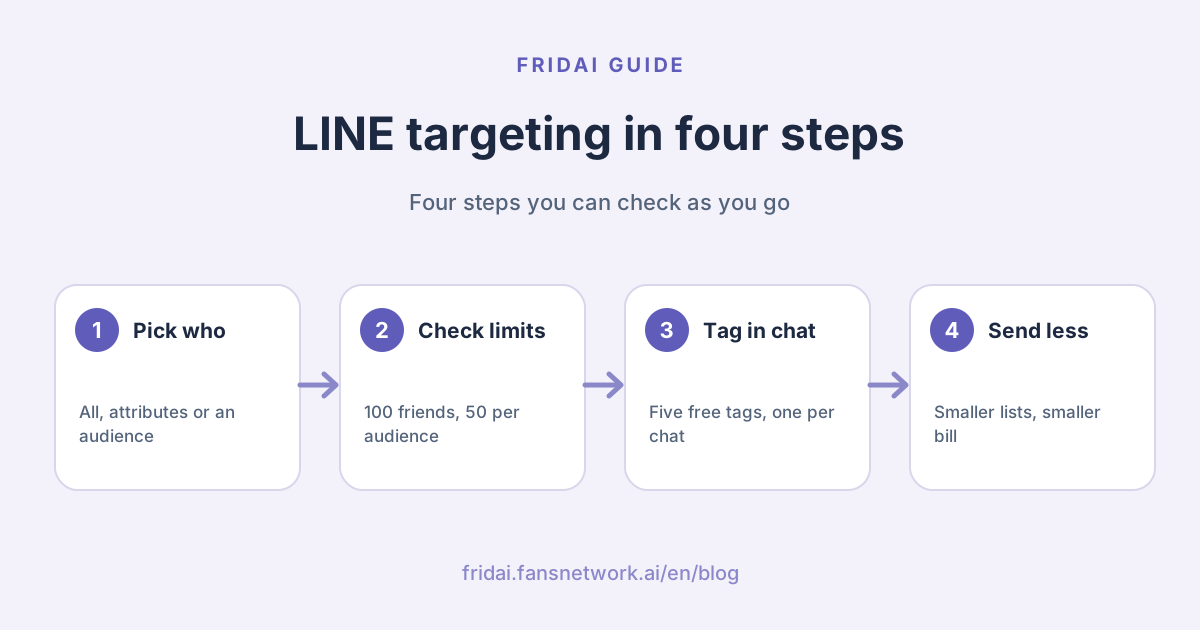
Broadcast vs targeted message: what is the difference?
In the LINE Official Account manager (LINE OA is the business side of the LINE messaging app), targeting is not a separate feature. It is the "recipients" choice inside a broadcast message (群發訊息). LINE's tutorial says so too: targeting settings are part of broadcasting.
| How you send | Who gets it | Official threshold | Good for |
|---|---|---|---|
| Broadcast to all | Every target friend | None | Closures, a move, the big annual campaign |
| Filter by attribute | People matching gender, age, region and so on | More than 100 target friends | Local events, new-friend care |
| Audience | A list you built, such as one tag | Depends on the audience type | Repeat purchase, campaign follow-up |
| Attribute plus audience | The overlap of the two | Both thresholds apply | A very specific small group |
Both count toward broadcast message quota. LINE's Help Center lists what counts: broadcast messages (including targeted messages) and the Messaging API's Push, Multicast and Broadcast. Chat messages, auto-replies, keyword replies, the welcome message on friend add and the Reply API do not.
So the value of segmentation is plain: the same content sent to 300 people who care is cheaper than sending it to 2,000, and less likely to get you blocked.
Filter by attribute: what does LINE give you?
Change the recipients from all friends to a filtered target and you are in attribute filtering. The points LINE documents:
| Item | LINE says | Our note |
|---|---|---|
| Threshold to use it | Target friends must exceed 100 | New accounts need to build friends first |
| Size after filtering | Estimated recipients must be 50 or more | Stacking conditions drops you below it |
| Attributes | Friendship period, gender, age, OS, region | Age comes in 5-year bands |
| Where attributes come from | Inferred from usage such as stickers owned and accounts followed | Chat and call content is not used |
| Freshness | Uses attribute data from about 3 days earlier | New friends may not be classified yet |
Three things to know first.
First, attributes are estimates. LINE says the target count shown is only an approximation; the real count is in the send history, and the figure can differ from one moment to the next.
Second, people with unknown attributes get left out. LINE's manual says that with no attribute set, the message goes to all friends including those whose attribute is unknown. Put the other way, once you choose a gender or age, people the system cannot classify are not on the list.
Third, the most useful one is friendship period. It is not inferred, and it lets you build lists such as "people who joined this month", which suits new-customer care.
There is also an option to set the number of messages for a broadcast: you cap how many go out and the system picks friends at random until the number is reached. It is a brake for your budget, but it picks random people, not the most suitable ones. Do not mistake it for targeting.
What kinds of LINE audience are there?
An audience (受眾) is a reusable list you build yourself. The types and conditions the Help Center currently lists:
| Audience type | How the list is made | Official condition |
|---|---|---|
| Chat tag | People you tagged in one-on-one chat | One-on-one chats only; more than 1 person |
| Friend-add channel | People who joined through a custom channel | Must reach 50 to broadcast |
| Message click | People who clicked a link in a sent message | Create within 60 days of the send |
| Message impression | People who opened a sent message | Create within 60 days of the send |
| Rich menu click and impression | People who saw or tapped the rich menu | Choose a period |
| UID upload | A list of user IDs you upload | User IDs come from the Messaging API |
| Website traffic | Site visitors tracked with LINE Tag | Must reach 50 to broadcast |
Five more rules that shape how you use them, all from LINE's documents.
First, audiences can only be created in the web account manager, not in the admin app.
Second, apart from chat tag audiences, an audience is valid for 180 days.
Third, a new audience first shows as "preparing"; LINE says it takes several hours to become available, and the status does not update if there are too few people.
Fourth, one targeted message can hold up to 10 audiences, counting both included and excluded ones. Exclusion is handy, for example "all regulars, excluding those who already clicked last week's link".
Fifth, audiences and attribute filters can be combined, and the system takes the overlap. LINE's page also notes that the A/
The first two are the easiest for a small shop: chat tags and friend-add channels. A rich menu audience needs a planned menu first; button layouts are in the LINE rich menu guide. Setting up channels is covered in how to get LINE Official Account friends.
The official limits on LINE tags
A LINE tag (標籤) is attached to a chat. The Help Center puts it this way: you can set custom tags on chats to manage users in groups and send messages limited to tagged users. Tags are created in the chat settings.
| Item | Free | Advanced Chat plan |
|---|---|---|
| Tags you can create | 5 | 300 |
| Tags per chat | 1 | 30 |
| Notes per chat | 1 | 1,000 |
| Chat history kept | Up to 6 months | Up to 5 years, downloadable |
This table decides your tag strategy. On the free tier one customer can carry only one tag, so the five tags have to be mutually exclusive; nobody can be both "regular" and "likes desserts". If you want several tags per person you need the Advanced Chat plan (聊天
Two more official limits apply when you build an audience from a tag: a tag already used by another audience cannot be selected again, and deleting a tag deletes its audience with it. So do not rename and rebuild tags casually.
One precondition is easy to miss: a tag sits on a chat, so the customer has to have talked to you before there is a chat to tag. That is why the welcome message should end in an easy question, with an auto-reply ready to catch the answer; see LINE auto-reply setup examples.
Which targeting method should you use?
The order is deliberate. A tag you applied by hand is the most accurate, the friend-add channel comes next, and inferred attributes come last. The higher up the method, the more it depends on what you have built up in chat. If the account is new and you have not passed a hundred friends, work through the LINE Official Account setup and first-week checklist first, then come back to targeting.
How does targeting cut the message bill?
Everything below is a made-up example to show the arithmetic, using prices from November 1, 2026: the Medium plan (中用量) is NT$1,000 a month with 3,000 messages, the High plan (高用量) is NT$1,400 with 6,000, and High add-ons cost NT$0.2 each for the first 50,000, before tax.
Take a lifestyle shop with 2,400 target friends that sends once a week.
Option 1: broadcast to all every week, 4 a month
Messages = 4 × 2,400 = 9,600
High includes 6,000; add-ons = 3,600
Add-on fee = 3,600 × 0.2 = NT$720
Cost that month = 1,400 + 720 = NT$2,120Option 2: 1 announcement to all, plus 3 sends to 500 tagged regulars
Messages = 1 × 2,400 + 3 × 500 = 3,900
Inside High's 6,000
Cost that month = NT$1,400Option 3: 1 announcement to all, plus 2 sends to the 300 who clicked last time
Messages = 1 × 2,400 + 2 × 300 = 3,000
Medium's 3,000 are exactly used up
Cost that month = NT$1,000| Scenario | Messages a month | Plan | Cost that month |
|---|---|---|---|
| 4 sends to all | 9,600 | High plus add-ons | NT$2,120 |
| 1 to all plus 3 to regulars | 3,900 | High | NT$1,400 |
| 1 to all plus 2 to clickers | 3,000 | Medium | NT$1,000 |
Same shop, same number of friends; the only difference is who receives the message. Option 3 sits right on the quota line, so leave some room in practice because Medium cannot buy add-ons. This example says nothing about what your sales will do. It only shows how the bill is calculated. The full plan rules are in LINE Official Account pricing 2026.
A starter tag scheme for a small shop
Free tier: five mutually exclusive tags
Since a chat can hold only one, tag by where the customer is right now, so each person lands in exactly one box.
| Tag | When to apply it | What to send later |
|---|---|---|
| Asked, not bought (問過 | Asked about price or items, no order yet | New arrivals, time-limited offers |
| Bought once (買過 | Completed a first purchase | Usage reminders, repeat-purchase offers |
| Regular (熟客) | Bought twice or more | Pre-orders, early access |
| Business or bulk (企業 | Asked about group orders, gifts or quotes | Seasonal gift boxes, quote updates |
| Low contact (少打擾) | Complaint in progress or asked for fewer messages | Only essentials such as closures |
When a customer moves a step forward, swap the tag. The last one matters: put "low contact" in the exclusion when you send a promotion. It is cheaper than apologising afterwards.
Advanced Chat plan: add a second layer
Once a chat can carry up to 30 tags, it makes sense to add a layer for what the customer likes.
| Tag layer | Examples | Based on |
|---|---|---|
| Stage | Asked not bought, bought once, regular | Purchase history |
| Interest | Coffee beans, desserts, equipment | Items they asked about or bought |
| Pickup method | In-store pickup, delivery | Orders |
| Region or branch | Taipei shop, Taichung shop | Where they visit or ship to |
Two naming tips. First, prefix the layer, for example "
Who tags, and when
Tag schemes usually fail because nobody tags, not because of the design. Writing it as one shop rule works best. English gloss: check the chat list before closing; confirm tags for anyone who wrote today; always apply a stage tag after a first conversation; if unsure, use "asked, not bought".
每天收店前看一次聊天列表
今天回過話的客人,確認標籤是否還正確
新客人第一次對話結束時,一定貼上階段標籤
不確定貼哪個,就貼「問過未買」
A monthly sending rhythm template
This is a skeleton for a small shop that sends two to four times a month. Adjust the numbers and dates to your trade.
Week 1: one broadcast to all
Content: this month's closures, new items, one main campaign
Recipients: all friends, excluding "low contact"
Week 2: one targeted send
Content: repeat-purchase reminder or early access for regulars
Recipients: tag "bought once" or "regular"
Week 3: one targeted send
Content: follow-up or countdown for the week 1 campaign
Recipients: audience of people who clicked the week 1 link
Week 4: no broadcast
Do: read opens, clicks and blocks on the analytics page
Tidy tags and decide which message to change next month
Any time: answer incoming messages in chat; this part carries no message feeLINE's analytics page shows opens and impressions for each message. The Help Center defines opens as the number of people who entered the chat and read the message, and impressions as the number of times the message bubble was displayed. Checking whether blocks jumped after each send is more accurate than any theory.
If quota runs short in a given month, cut the length of the week 1 content and the size of the week 3 list first. Do not cut the week 4 review.
When are native tags no longer enough?
To be clear first: most small shops are fine with the native features. Look outside only when one of these comes up.
| What you run into | Native limit | Where to look |
|---|---|---|
| Tagging by hand, cannot keep up | Chat tags are applied manually | LINE's own OA Plus auto-tagging |
| Want to segment by purchases | The account manager does not know your orders | Marketing tools connected to e-commerce or POS |
| Want automatic multi-step reminders | A broadcast is one-off | LINE marketing automation platforms |
| Too many private messages to answer | Keywords miss varied wording | AI customer service tools |
LINE's own OA Plus
LINE Taiwan has an official advanced platform called OA Plus. Its page lists features including automatic tagging based on friend interactions, different rich menus by tag and tools such as lotteries for adding friends, and says accounts on a qualifying usage plan can enable it for free. Which plans qualify and whether other conditions apply is for LINE's page to say.
Third-party marketing tools
Segmenting by orders or membership tier, or running a sequence of automatic messages, is where marketing automation platforms belong. Keep one thing in mind when you evaluate them: under LINE's billing rules, proactive pushes through the Messaging API also count toward message quota, so LINE's message fees still apply on top of the tool's subscription. LINE's developer documentation also states that audiences such as chat tag and friend-add channel cannot be created through the Messaging API, so tags you applied in the account manager may not carry straight into a third-party tool. Ask before you sign.
What FRIDAI Chat does and does not do
FRIDAI Chat is not a LINE broadcast or targeted-push tool. It works on the chat side: once connected to your LINE Official Account, the AI answers incoming messages from your knowledge base and rules, notifies a human when needed, and keeps customer records and contact tags inside FRIDAI.
What it does not do, stated plainly: it does not schedule broadcasts for you, it does not create audiences in the LINE account manager, and you should not assume tags in FRIDAI sync into LINE's chat tags. If your main need is large-scale targeted pushes, a marketing automation platform is the better fit; the division of labour is described in FRIDAI vs Crescendo Lab.
The six most common targeting pitfalls
The list is too small to send
An attribute filter with fewer than 50 estimated recipients, or a friend-add channel audience under 50, does not pass LINE's threshold. Add one condition at a time and check the count before adding a second.
Treating inferred attributes as fact
Gender and age are inferred, and unknowns are excluded. Use them only for products that really depend on gender or age; otherwise use the tags you applied yourself.
An audience expires unnoticed
Other than chat tag audiences, audiences last 180 days. For lists you rely on, such as a campaign's click audience, plan the replacement before it expires.
Building the click audience too late
Message click and impression audiences have to be created within 60 days of the send. If you want to follow up on a campaign, build the audience the week it goes out.
Renaming or deleting tags
Deleting a tag deletes its audience. To change your categories, create the new tag, move people over, then deal with the old one.
Sending more after you start targeting
Smaller lists make each send cheaper, and it becomes easy to send more often. LINE's column lists overly frequent messages among the moments friends want to block. Targeting is for giving each person fewer, more relevant messages, not for finding more reasons to press send.
FAQ
Do LINE targeted messages cost extra?
There is no separate feature fee, but targeted messages count toward monthly message quota just like a broadcast to all, by number of sends times target recipients. A smaller list means a smaller count, which is why targeting saves money.
Why can't I use filter by attribute in my account manager?
LINE says target friends must exceed 100 before you can use it, and the estimated count after filtering must be 50 or more. While your friend count is still small, target with chat tags or friend-add channel audiences instead.
How many LINE tags can a free account create?
According to LINE's Help Center, the free tier allows 5 tags and only 1 per chat. With the Advanced Chat plan you can create 300 tags and set up to 30 on each chat.
Why is my audience stuck on "preparing"?
LINE says an audience takes several hours to become available after creation. The status also does not update if the audience is too small, your sendable quota is too low or the uploaded file has a problem. Check the size against that audience type's threshold first.
Can I tag friends who have never chatted with me?
Chat tags sit on one-on-one chats, and LINE says a tag audience only applies to one-on-one chats that already have the tag. For friends with no conversation, use a friend-add channel audience or attribute filtering.
If I send targeted messages through a third-party tool, do I avoid LINE's message fees?
No. LINE counts the Messaging API's Push, Multicast and Broadcast toward message quota. The tool's subscription and LINE's message fees are two separate costs; add them together when you evaluate.
What if the block rate is still high after targeting?
Look at frequency first, then at whether the content matches the list. LINE's column advises telling new friends what you will send and how often, and adjusting after watching how blocks change with each send.
How FRIDAI can help
LINE targeted messages handle what you say first; FRIDAI Chat handles what happens when the customer writes back. After a targeted send, customers ask about prices, stock or bookings, and FRIDAI Chat can answer in chat from your knowledge base and rules, notifying a human for exceptions. FRIDAI itself does not send broadcasts and has its own monthly fee; weigh it together with LINE's costs.
- Product: FRIDAI Chat
- FRIDAI Social: FRIDAI Social
- Get the friends in first: How to get LINE Official Account friends
- Work out the cost: LINE Official Account pricing 2026
- Instagram: FRIDAI on Instagram
- Threads: FRIDAI on Threads
- Facebook: FRIDAI on Facebook
Official sources
- LINE Help Center, broadcast messages: help2.line.me/
official_account_tw/ ios/ categoryId/ 20006390/ 3/ pc?lang=zh-Hant - LINE Help Center, chat: help2.line.me/
official_account_tw/ ios/ categoryId/ 20006393/ 3/ pc?lang=zh-Hant - LINE Help Center, analysis: help2.line.me/
official_account_tw/ ios/ categoryId/ 20006395/ pc?lang=zh-Hant - Message sending manual: tw.linebiz.com/
manual/ line-official-account/ oa-manager-sendmsg/ - Targeted message setup tutorial: tw.linebiz.com/
manual/ line-official-account/ 20200515elearning06/ - LINE retargeting audiences explained: tw.linebiz.com/
manual/ line-official-account/ oa-mange-daududience/ - Column introducing the targeting features: tw.linebiz.com/
column/ line-oa-segement-marketing/ - Advanced Chat plan introduction: tw.linebiz.com/
column/ 1on1-chat/ - One-on-one chat feature introduction: tw.linebiz.com/
column/ 1to1/ - Adding friends and friend-add channel settings: tw.linebiz.com/
manual/ line-official-account/ oa-manager-addfriend/ - 2026 LINE Official Account plan price change announcement: tw.linebiz.com/
column/ LINEOA-2026-Price-Plan/ - LINE Official Account OA Plus: tw.linebiz.com/
service/ account-solutions/ oaplus/ - Message design to avoid being blocked: tw.linebiz.com/
column/ friend-block-message/ - LINE Developers, sending messages: developers.line.biz/
en/ docs/ messaging-api/ sending-messages/ - FRIDAI Chat: fridai.fansnetwork.ai/
fridai-chat