What is a LINE notification message?
In one sentence: if a business holds a customer's mobile number, it can use its own LINE Official Account (LINE OA, the business side of the LINE messaging app) to deliver a notice to the LINE account tied to that number, whether or not the person is a friend of the account.
LINE Taiwan calls the product LINE 通知
Three things set it apart from an ordinary broadcast.
First, recipients are specified by phone number, not by friend list. The sales kit explains that the numbers held by the business and the numbers of LINE users are each hashed before they are matched, and the push only happens on a match.
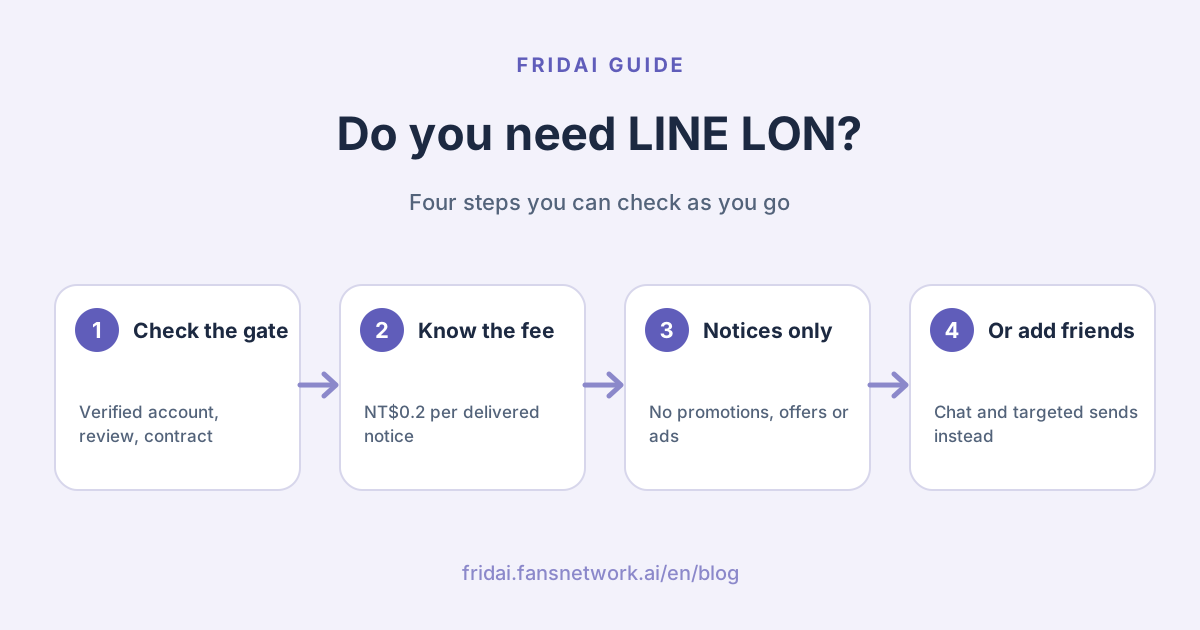
Second, the content can only be a notice. In LINE's own words, a notification message "is not an advertisement". It is limited to notices that are valid and necessary for the user, and any promotional, advertising or discount message is prohibited.
Third, the look is set by LINE. The message format and fields have to pass review by LINE's team. The LINE Developers documentation notes that recent versions of LINE show an "Important notification" label (重要
Who can use it? Three gates to check first
Read this part first. It can save you the next thirty minutes.
| Gate | What LINE says | What it means for a small shop |
|---|---|---|
| Account type | Must be a verified (blue shield) or enterprise (green shield) Official Account | A standard account cannot apply |
| Technical status | A Certified Provider is required | You will most likely need a technology partner |
| How it is bought | An annual-contract API product | It is not a switch in the account manager |
| Development | The business has to build its own message-sending backend | You need a system or a budget |
| Content | Use cases are reviewed by LINE | Notices only, no promotions slipped in |
One more note: LINE's Official Account product page states that a verified account needs a premium ID (專屬 ID) and has to pass LINE's review. Also, from April 1, 2026, standard Official Accounts no longer show what used to be called the grey shield, so "has a shield or not" is now the line between verified and unverified.
If you are a one-person studio, just opened your account, or have no order or booking system, these gates will almost certainly stop you. No need to feel bad. Jump to the alternatives further down; that section is written for you.
How is a LINE notification message priced?
LINE publishes exactly one number: NT$0.2 per notification.
| Item | What LINE publishes | Note |
|---|---|---|
| Unit price | NT$0.2 per notification | LINE's pages do not say whether this is before or after tax |
| What is charged | Only successfully sent messages | Undelivered ones are not counted |
| Settlement | Pay for actual usage, monthly, based on the figures recorded in LINE's system | Reconcile against LINE's numbers |
| Technology partner fees | Commonly an integration fee plus a per-message service fee | LINE gives no amounts; ask each partner |
| Building it yourself | Not included in the NT$0.2 | Development time is for the business to estimate |
LINE's own comparison is with SMS: the product page says a traditional text message costs roughly NT$0.8 to NT$2 each, and notes that this is a reference figure and you should confirm the real rate with your SMS provider.
What FRIDAI Editorial wants to point out is that NT$0.2 is only LINE's message fee. If you go through a technology partner, LINE's own article says the usual pricing is "an integration fee plus a message service fee"; if you build it yourself, there is engineering time. When your monthly volume is low, the SMS savings may not cover the cost of getting set up. Pull out last month's SMS bill and do the sum before going further.
What can you send, and what can you not?
The official sales kit lists 18 eligible use cases. They are grouped below; see the use-case list in the sales kit for the full wording.
| Category | Notices you can send | Notes and limits |
|---|---|---|
| Shopping and orders | Delivery notice, purchase confirmation, custom item ready | Delivery covers shipping, arrival and pickup |
| Bookings | Booking notice, booking reminder | Restaurant reservations, offline services and offline events only |
| Sign-up and applications | Registration complete, bank card approved, bank account opened | Must be something the user applied for |
| Points and payment | Points earned, payment complete | Not for free points given away in a promotion |
| Verification and bills | OTP code for member sign-up, fee confirmation | Bills means regular billing |
| Reminders | Rental due, contract or application deadline, payment deadline | Must relate to something the user applied or signed up for |
| Repairs and outages | Repair complete, infrastructure outage | Outages means electricity, gas and telecoms |
| Enquiries | Directing callers to an enquiry channel | Guides phone callers to the Official Account instead |
What you cannot send is easy to remember: anything with a marketing, promotional, advertising or discount purpose. Birthday credit, limited-time discounts, new arrivals, gift-with-purchase offers all fall in that group.
Three rules that are easy to miss.
First, for content outside the list, LINE reviews case by case whether it is valid and appropriate for users. Even for a listed use case, adding or changing the description triggers an individual review.
Second, a notice can carry a button that opens an external link or a LIFF page (a web page that opens inside LINE), but the page has to relate to the notice, or LINE can require you to change it. Using a "View order" button to smuggle in a promotion page is a dead end.
Third, if you break the rules, LINE has the right to stop your use of notification messages.
Four conditions before a customer actually receives one
Sending is not the same as arriving. The sales kit states that all four conditions below must hold. Miss one and the message does not go out.
| Condition | What it means | Can you control it? |
|---|---|---|
| Phone number matches | The number you hold matches the number registered on the person's LINE account | Yes, by keeping your list accurate |
| They have not blocked you | Users who blocked the Official Account receive nothing | Partly, by being less noisy |
| They consent to receive | The user has not switched off notification messages | No |
| SMS verification done | The user completed SMS verification within the past six months | No |
On consent, three official documents fit together like this. The sales kit says the setting is on by default for users on a recent enough version who have agreed to the privacy policy. The LINE Help Center explains that users can switch it on or off themselves under Settings, then Privacy, then "Provide usage data", then "LINE notification messages", or simply block a particular Official Account to stop its notices. The LINE Developers documentation adds that if a user has never set it, the system first sends a message asking for consent, and if they do not agree within 24 hours the notification is deleted.
On verification, the Help Center says LINE sends a phone number verification reminder about every 180 days to confirm that the number on the account is still in use.
This has a practical consequence. According to the sales kit, a failed number match is known immediately, but the other three failures (blocked, no consent, verification not completed) are only known 24 hours later. That is why LINE itself recommends notification messages for important messages that are "less urgent", such as ordinary shipping and arrival notices, bills and booking reminders. For card-transaction alerts, order-placed notices or system incidents that must arrive within five minutes, stay with SMS, email or app push.
Last, legal responsibility. The official rules are blunt: the business must confirm with its own legal counsel that the mobile numbers were obtained lawfully before using them for notification messages, and LINE takes no legal responsibility if a user questions how a number was obtained. Also, any message other than a notification message may only be sent to friends, never to non-friends.
Notification message vs broadcast vs one-on-one chat
People often lump these three together. They solve three different problems.
| Compared on | Notification message | Broadcast and targeted messages | One-on-one chat and auto-reply |
|---|---|---|---|
| Who receives it | People whose number matches and who meet all four conditions | Friends you select | Customers who messaged you first |
| Friend required? | No, but people who blocked you get nothing | Yes | Yes, and the customer speaks first |
| Cost | NT$0.2 each, only when delivered | Counts toward the monthly quota, by number of target friends | Not counted as a message fee |
| What it can carry | Reviewed notices; no promotions | Campaigns, offers and announcements | Answers to customer questions |
| Barrier to start | Verified account, review, contract, development | Available in the account manager | Available in the account manager |
How broadcast fees and quotas work is covered separately in LINE Official Account pricing 2026.
Do you need LON? One chart to decide
FRIDAI Editorial's view: LON fits businesses that hold a lot of phone numbers, whose customers are mostly not friends yet, and that send a large volume of transactional notices every month. Think e-commerce with an order system, restaurants with a reservation system, chains with a membership system. If your customers already come to you on LINE, LON solves a problem you may not have.
How to apply: go to LINE directly or through a technology partner
LINE's article describes two routes.
| Route | Who it suits | What to prepare | Cost structure |
|---|---|---|---|
| A LINE-certified technology partner | Brands with no development team | Verified account, use cases, phone number list | Commonly an integration fee plus a message service fee |
| Build it yourself | Teams with engineers or a systems vendor | The same, plus your own message-sending backend | NT$0.2 per message plus development cost |
Either way, the sales kit lists the same four-step application process.
1. Use-case review
You submit the notice scenarios you want to send, with descriptions, and LINE headquarters reviews whether they fit the permitted use cases.
2. Contract signing
You sign a purchase contract and an NDA. LINE notes that the documentation for this advanced API is only provided after signing.
3. Testing and acceptance
LINE provides a test environment. When testing is done you submit a screen recording for acceptance.
4. Go live
LINE estimates the process above takes about 10 to 20 working days, and specifically warns that this does not include API integration and system development time.
The technology partners currently listed on LINE Taiwan's product page are Crescendo Lab (漸強實驗室), Omnichat, 直通
If your shop does not qualify, do these instead
At its core, LON exists because "the customer is not a friend, but I still have to notify them". A small shop can turn that around: make the customer a friend at the moment of the transaction, and the later notices no longer need LON.
1. Add friends at the moment of purchase
Put the add-friend QR code on the checkout counter, the booking-confirmed page and the card that goes in the parcel, and say plainly what adding you is good for.
Sample sign copy (Chinese): add us on LINE and we will notify you here about shipping and pickup, a reminder the day before your booking, and you can message us with questions.
加入我們的 LINE,之後這些事都在這裡通知你:
・訂單出貨與到店取貨
・預約前一天提醒
・有問題直接傳訊,營業時間內回覆
More entry points are collected in ways to get LINE Official Account friends.
2. Move confirmations and lookups into chat
When a customer messages you to book or order and you confirm in chat, that is one-on-one chat and is not counted as a message fee. Fixed questions can go to auto-replies; see LINE auto-reply setup examples.
Sample booking confirmation (Chinese): we have your booking, with date, time and party size, and you can reply to this message to change or cancel.
已收到你的預約
日期:_月_日(_)
時間:__:__
人數:_位
要更改或取消,直接回覆這則訊息就可以。
3. When you do need to reach out, use targeted messages
For things you have to announce yourself, such as an arrival or a schedule change, you can send friends a targeted message that goes only to the people concerned. It counts toward the monthly quota, but a small list means a small count. See LINE targeted messages and tags.
4. Put a "check status" entry in the rich menu
Rather than notifying one message at a time, let customers look things up whenever they like. Put order lookup and booking history in the menu; the design approach is in the LINE rich menu guide.
5. Leave the truly urgent to SMS or a phone call
Even LINE recommends keeping highly urgent messages off notification messages. A same-day cancellation or a sudden closure is fastest by phone. No need to force a tool onto it.
Common pitfalls
First, treating LON as cheap promotional SMS. It will not pass use-case review, and a violation after launch can get you cut off.
Second, assuming sent means delivered. Two of the four conditions are out of your hands, and the sales kit says outright that notification messages can replace only part of your SMS cost; failed ones still need another channel.
Third, duplicate notices from SMS fallback. LINE mentions that a user may get the SMS first, then complete verification and receive the notification message too. LINE's suggestion is to include the time the event happened and add a line such as "if you have already completed this, please ignore this message".
Fourth, a stale list. If the number differs from the one registered on the customer's LINE, there is no match. LINE recommends updating numbers regularly and checking again before you send.
Fifth, broadcasting so hard that people block you. Someone who blocked you cannot even receive notification messages, and the sales kit lists "broadcast less, send personalised targeted messages instead" as a way to raise the success rate. Drive customers away with noise and you cut off the notice channel along with it.
FAQ
How much does a LINE notification message cost?
The price published on LINE Taiwan's official page and in its sales kit is NT$0.2 per notification, charged only for successfully sent messages and settled monthly. Going through a technology partner usually adds an integration fee and service fees; confirm the amounts with each partner.
Can a standard LINE Official Account send notification messages?
No. LINE states that only verified (blue shield) or enterprise (green shield) Official Accounts can use them, and you also have to pass use-case review, sign a contract and complete the system integration. It cannot be switched on in the account manager.
Why does a customer receive it without adding me as a friend?
Because notification messages match a mobile number to a LINE account instead of looking at the friend list. If the number matches, the person has not blocked you, has not turned off the setting and has done SMS verification within the required period, they receive it.
Can I include an offer or a campaign link in a notification message?
No. LINE explicitly prohibits any promotional, advertising or discount message, and the page a button opens must relate to the notice. To promote a campaign, send friends a broadcast or a targeted message.
Why does a customer say they never got my notification message?
There are four usual causes: the number differs from the one on their LINE account, they blocked your account, they turned off notification messages, or they did not complete SMS verification. For the last three you only see the result 24 hours later.
How does a customer turn notification messages off?
According to the LINE Help Center, they open Settings in LINE, go to Privacy, then "Provide usage data", and find "LINE notification messages" to switch it on or off. To stop just one business, they can block that Official Account.
Can FRIDAI send LINE notification messages for me?
No. FRIDAI Chat handles the conversation after a customer messages you; it is not a tool for sending notification messages. If you need LON, contact LINE sales or one of the technology partners LINE lists.
How FRIDAI can help
A LINE notification message gets the notice out. When the customer replies "can I change the time?", you are in a chat. Once FRIDAI Chat is connected to your LINE Official Account, the AI can answer those questions from your knowledge base and rules and notify a human when an exception comes up. FRIDAI does not send LON, so evaluate the two separately.
- Product: FRIDAI Chat
- FRIDAI Social: FRIDAI Social
- Cost estimate: LINE Official Account pricing 2026
- Segmentation: LINE targeted messages and tags
- Instagram: FRIDAI on Instagram
- Threads: FRIDAI on Threads
- Facebook: FRIDAI on Facebook
Official sources
- LINE notification message product page: tw.linebiz.com/
service/ account-solutions/ line-notification-message/ - LINE notification message downloads (2026 Sales Kit): tw.linebiz.com/
download/ line-notification-message/ - LINE Taiwan article on using notification messages to earn consumer trust: tw.linebiz.com/
column/ 20221014-LINE-Notification-Message/ - LINE Developers, notification messages overview: developers.line.biz/
en/ docs/ partner-docs/ line-notification-messages/ overview/ - LINE Developers, notification messages technical specifications: developers.line.biz/
en/ docs/ partner-docs/ line-notification-messages/ technical-specs/ - LINE Help Center, changing the notification message setting: help.line.me/
line/ ios/ ?contentId=20011418&lang=zh-Hant - LINE Help Center, receiving a message from a business account you have not added: help.line.me/
line/ ?contentId=20011417&lang=zh-Hant - LINE Official Account product and pricing: tw.linebiz.com/
service/ account-solutions/ line-official-account/