Which three campaign tools are built into a LINE Official Account?
Terms first. The product page for LINE Official Accounts (LINE OA, the business side of the LINE messaging app) lists "coupons / prize draws" (優惠
| Feature | What it does | Limits LINE states |
|---|---|---|
| Coupon (no condition) | Anyone who knows about the coupon can claim it | Display text up to 60 characters, details up to 500 |
| Coupon (prize draw) | Only winners get the coupon | Win rate and a winner cap can be set; the cap is up to 6 digits |
| Coupon (friend referral) | Both the referrer and the referred person can claim | The referred person must never have been a friend of the account |
| Reward card | Issue points, collect them, redeem a reward | Friends of the Official Account only |
Coupons
The official manual says you first choose the claim condition: no condition, prize draw or friend referral. Whichever you choose, you set the display text, validity period, main image, coupon details, number of uses, whether to show a serial number, and the coupon type and conditions of use. The image can be up to 10MB, though LINE recommends keeping it under 1MB.
The manual also mentions an option to list the coupon on LY services such as the Official Account list page, to attract new users to add you. Listed or not, anyone who has the coupon link can view it.
Prize draws
The draw sits in the coupon's "advanced settings". Turn it on, set the win rate, and switch on the winner cap if you need one. LINE describes it as a game-like element, good for adding some novelty now and then. It suits a simple "win and get one coupon" mechanic; multiple prize tiers are beyond the native feature.
LINE separately offers a lucky-draw helper under OA Plus (抽獎
Friend referral
The flow: you publish a referral page, a friend shares it, the new person adds you through the page and claims the coupon, and the system automatically reminds the referrer to claim theirs. LINE notes that this automatic reminder is a free message. You can set the referral period and the maximum number of coupons each user can claim; the coupon's validity runs from the day after it is claimed.
Reward cards
A reward card issues and manages points. When a customer fills the card they get a reward, and the reward is itself a coupon. The settings listed in the manual include a background image, 10 theme colours, the reward, and an expiry period. You can also create an upgraded card so regulars who fill one card move on to another with a different reward.
Points are given by having the customer scan a point-issuing QR code. The Help Center explains that shops without a physical location can download the code image and send it in one-on-one chat. LINE's guide for restaurants adds that the Official Account automatically pushes a free reminder before a reward card expires.
Which feature fits your goal?
Campaigns often fall flat because the goal and the tool do not match. Check this table first.
| Campaign goal | Feature to use | Prepare in advance | Note |
|---|---|---|---|
| Get a new friend to buy once | No-condition coupon in the welcome message | A welcome gift with a low threshold | The welcome message is not a billed message |
| Keep regulars coming back | Reward card | Reward, point rules, counter QR code | The simpler the rules the better |
| Have friends bring new customers | Friend-referral coupon | Referral page image, referral period | Only people who were never friends count |
| Liven up a holiday | Prize-draw coupon | Prize, win rate, winner cap | Check the legal basics before you announce |
| Win back people who went quiet | No-condition coupon plus a targeted message | List criteria, a time-limited offer | A tighter list uses fewer messages |
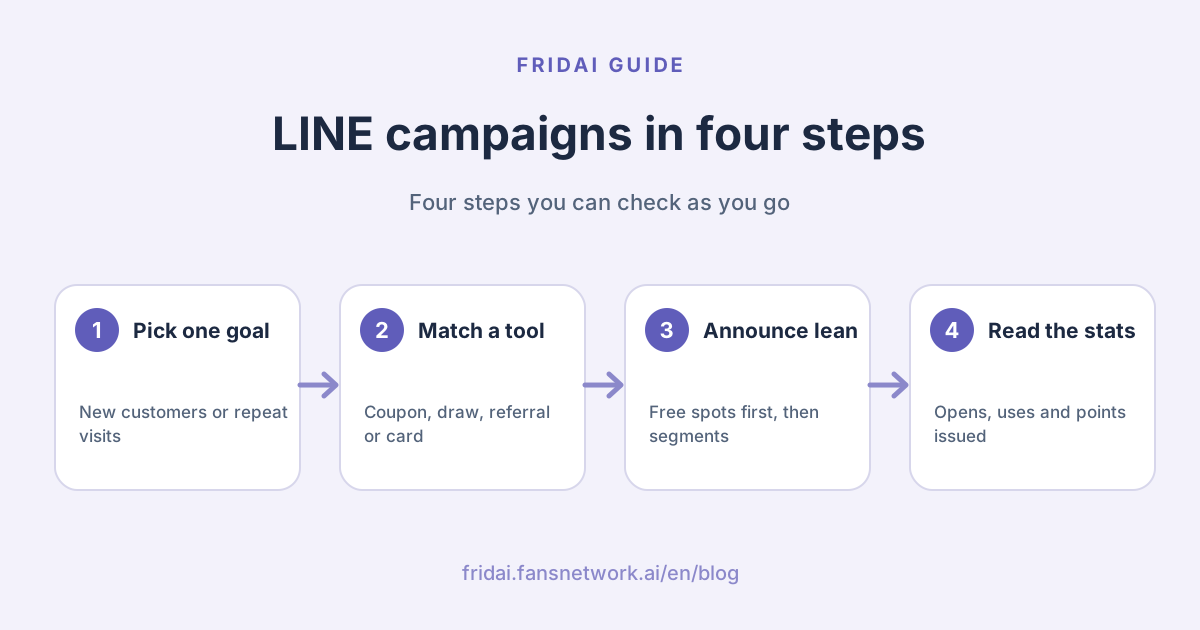
One chart to choose:
Six things to decide before you set anything up
The official manual has full illustrated steps, so FRIDAI Editorial will not rewrite the clicks. Here is what to think through before you open the account manager.
1. The offer and its conditions
A discount, a gift or free shipping? What minimum spend? Put it in the coupon details and say it clearly within 500 characters.
2. The validity period
Too long and there is no urgency; too short and customers cannot use it in time. For a referral coupon, think about two periods separately: the referral period, and the validity after claiming.
3. How many times each person can use it
The manual lists a number-of-uses setting, and you can choose to show a coupon serial number to help you check it or pair it with a barcode.
4. How staff redeem it
Who confirms the coupon has been used? Can they keep up at peak hours? This is not a setting in the account manager, and it is where things most often go wrong.
5. Save a draft first
Pay attention to this one. The official manual says that once you press "Save", a coupon can only be copied, not edited or deleted, and only drafts can be changed. The Help Center FAQ, however, says the content can still be changed after publishing and warns you to think carefully and avoid consumer disputes. The two official documents disagree, so FRIDAI Editorial suggests the cautious route: assume a saved coupon cannot be changed, and check the draft three times.
6. The exit rules for a reward card
LINE explains that a published reward card can be edited except for its expiry period, but changes do not apply to cards users already hold or rewards they already earned. Unpublishing cannot be undone, and the Help Center warns that all settings and the points users hold are deleted. So settle the points needed and the expiry period before launch.
Five campaign recipes for small shops
The announcements below are sample text in Chinese, since that is what your customers will read; replace the blanks and brackets with your own details. Attach the coupon with the account manager's share function instead of pasting text only.
Recipe 1: a welcome gift for new friends
Put a no-condition coupon in the welcome message for new friends. The welcome message is not counted as a message fee, which makes this the cheapest move.
English gloss: thanks for adding us; here is a welcome coupon, valid for a set number of days after claiming; show it at checkout; tap the menu below for the menu and opening hours.
嗨,謝謝你加入____!
送你一張新朋友見面禮:____(例:飲品折 10 元)
期限:領取後_天內
使用方式:結帳時出示下方優惠券給店員
想看菜單或營業時間,點下方選單就可以。
Recipe 2: a reward card for repeat visits
Good for coffee, brunch, nail salons, car washes and any business people return to.
English gloss: our reward card is live; one point per set spend; fill the card for a reward; scan the QR code at the counter, no paper card needed; points expire on a stated date; tap to get your card.
【集點卡上線了】
每消費滿___元集 1 點
集滿_點,送____
結帳時掃櫃檯的行動條碼就能集點,不用帶紙卡。
點數有效期限:____
點這裡領取你的集點卡
Recipe 3: a holiday prize draw
Use a prize-draw coupon; only winners can claim it. The announcement must spell out the prize, the period and how to redeem.
English gloss: holiday draw; campaign dates; prize and number of winners; tap the draw ticket below to enter; redeem in store by a stated date; limited entries per person; see the coupon details for full terms.
【__節抽獎】
活動期間:_月_日到_月_日
獎項:____(共_名)
參加方式:點下方抽獎券參加
兌換期限:_月_日前到店出示
每人限參加_次,詳細辦法見優惠券說明。
Recipe 4: friend referral
English gloss: bring a friend and you both get a gift; share this referral page with friends who have not added us; when they add us you each get a coupon; referral period ends on a stated date; a maximum number of coupons per person.
【揪朋友,兩個人都有禮】
把這張介紹頁分享給還沒加入我們的朋友
朋友加入好友後,你們各拿一張____優惠券
介紹期間:到_月_日為止
每人最多可領_張
Recipe 5: winning back regulars
Do not broadcast to every friend. Use tags or an audience to pick out regulars who have not visited for a while, then send a targeted message.
English gloss: long time no see; this coupon is only for old friends; valid until a stated date, show it in person; we have a new item you might like to try.
____好久不見!
這張券只發給老朋友:____
期限到_月_日,本人到店出示即可使用。
最近有新品____,來的時候可以試試。
For how to build the list, see LINE targeted messages and tags.
How do you announce a campaign without burning money?
The tools are not the cost. Sending is. LINE explains that broadcasts and targeted messages are both counted by the number of target friends, while one-on-one chat, auto-replies, the welcome message for new friends and LINE VOOM posts are not counted as message fees.
So order your announcements like this.
First, use the unbilled spots: the welcome message, the rich menu and LINE VOOM posts. For menu layout, see the LINE rich menu guide.
Second, when a customer asks "any offers?", let an auto-reply bring up the coupon; wording ideas are in LINE auto-reply setup examples. The Help Center also explains that in a one-on-one chat you can pick an existing coupon and send it directly.
Third, if you really need to push, send a targeted message to the people it concerns, and consider a full broadcast last. How fees and quotas work is in LINE Official Account pricing 2026.
Fourth, have an entry point in the shop too. Put the points QR code at the counter and print the coupon link as a QR code on a stand. More add-friend entry points are in ways to get LINE Official Account friends.
How do you measure it? Only the numbers the account manager really has
The official manual says the "Analysis" tab includes statistics for coupons and reward cards. Only the items LINE actually documents are listed here.
| Where to look | Numbers LINE provides | Question it answers |
|---|---|---|
| Analysis: coupons | People who opened and people who used each coupon | Is anyone really using this coupon? |
| Analysis: reward cards | Valid cards, cards issued | How many people are collecting? |
| Analysis: reward cards | Total points issued, in-store points, expired points | Are customers coming back? |
| Analysis: reward cards | Reward coupons issued and used, usage rate | Are rewards being redeemed? |
| Analysis: broadcasts | Opens, clicks and related items | Was the announcement seen? |
Two more useful things. The reward card menu has a "points issued history" you can query by period and download as CSV. After the 2024 update, add-friend analysis gained a "reward card" channel, so you can see how many friends joined because of the card and build an audience from them.
Where LINE provides nothing, we will not make something up. For example, the account manager does not tell you how much revenue each coupon brought in; you have to match that against your till or staff records.
Before you run a prize draw, check these rules
This section only collects provisions FRIDAI Editorial found on Taiwan government websites. It is not legal or tax advice; confirm the practical handling with your accountant.
The Fair Trade Commission's limits on gifts and prizes
Taiwan's Regulations Governing the Amount of Gifts and Prizes Offered by Businesses (事業
The regulations also list what does not count as a gift or prize, including price discounts and volume discounts on the same kind of goods or services, and promotions that do not require a transaction. Our reading is that a plain NT$10-off coupon is closer to a price discount; which category your campaign falls into is still something to confirm with a professional.
On amounts, the text states that when a gift comes with a sale, the gift's value is capped at half the value of the goods if they are worth NT$100 or more, and at NT$50 if they are worth NT$100 or less. For prize draws, the top prize may not exceed NT$5 million, and total prizes for the year have a separate cap based on sales. A small shop will rarely hit the prize caps, but a design like "buy an NT$80 drink, get an NT$100 gift" deserves a second look.
Withholding on prizes
The Ministry of Finance's eTax portal explains that prizes and awards from competitions and games of chance are subject to 10% withholding on the amount paid for individuals resident in Taiwan. When the prize is an item, the payer calculates it from the invoice or receipt amount for buying the prize, or from its own production cost.
As for the amount below which withholding is waived, whether a statement still has to be filed and the deadlines, FRIDAI Editorial did not verify these line by line, so no figures are given here. When a prize has real value, ask your accountant before you announce, and state in the terms what information a winner will need to provide.
LINE's own reminder
In its coupon FAQ, the LINE Help Center reminds you to think carefully before changing a coupon that has already been sent, to avoid consumer disputes. Writing complete terms at the start is much cheaper than correcting them afterwards.
Common pitfalls
First, claim and block. An overly generous welcome gift attracts people who only want the coupon. Lower the stakes a little, tie it to an in-store visit, and use the reward card to keep the people who will actually come back.
Second, a full broadcast for every campaign. The count is friends multiplied by sends: the more friends you have the more it hurts, and the more people block you for the noise.
Third, noticing a mistake after the announcement is out. The manual warns that once a message shown in the chat or on VOOM has been read by a user, later changes no longer apply to it.
Fourth, unpublishing a reward card on a whim. It cannot be restored and the points disappear. Your regulars will have opinions.
Fifth, treating the native draw as a full prize-draw system. It suits drawing one kind of coupon. For multiple prizes or online discount codes, evaluate the OA Plus helper or another tool, and count the messages it will use.
Sixth, nobody answering campaign questions. The moment the announcement goes out, "can I combine it?" and "do takeaway orders earn points?" pour into the chat. Put the answers in auto-replies first, or schedule someone to be on duty. A lively campaign with nobody replying is the saddest kind of silence.
FAQ
Do LINE coupons cost extra?
Coupons and prize draws are built into the LINE Official Account manager, and FRIDAI Editorial found no statement on LINE's official pages of a separate feature fee. Cost arises when you push them by broadcast or targeted message, which counts toward your quota by number of target friends.
Can someone use a LINE reward card without being a friend?
No. LINE announced that from June 12, 2024, viewing the reward card, earning points and using the reward are limited to friends of the Official Account. First-time users are guided to add the account first.
Can I set the odds for a LINE prize draw?
Yes. The draw is part of a coupon's advanced settings. Once it is on you can set the win rate and separately switch on a winner cap of up to 6 digits. Only people who win can claim that coupon.
Can I edit a coupon after saving it?
The official manual says a saved coupon can only be copied, not edited or deleted, while the Help Center says content can still be changed after publishing. The two differ, so save a draft to check first and go by what your own account manager allows.
Why can't a customer claim the friend-referral coupon?
LINE requires the referred person to have never been a friend of that Official Account; anyone who was can only act as a referrer. Also, once the referral period ends, nobody can refer or claim the coupon any more.
What happens if I unpublish a reward card?
According to LINE, it cannot be restored, all settings and the points users hold are deleted, and you have to wait a while before creating a new card. Announce a rule change in advance and leave a buffer period.
What rules apply to a LINE prize draw in Taiwan?
A draw that requires a purchase may count as a "prize" under the Fair Trade Commission's regulations, and prizes are also subject to withholding rules. Small shops rarely reach the caps, but when a prize has real value, check with your accountant before announcing.
How FRIDAI can help
LINE coupons and reward cards bring people in; someone has to catch the questions that flood the chat during a campaign. Once FRIDAI Chat is connected to your LINE Official Account, the AI can answer questions such as campaign terms and expiry dates from your knowledge base and rules, and notify a human when an exception comes up. Coupons, reward cards and prize draws are still set up in LINE's own account manager; FRIDAI does not replace those features.
- Product: FRIDAI Chat
- FRIDAI Social: FRIDAI Social
- Keeping the count down: LINE targeted messages and tags
- Cost estimate: LINE Official Account pricing 2026
- Instagram: FRIDAI on Instagram
- Threads: FRIDAI on Threads
- Facebook: FRIDAI on Facebook
Official sources
- LINE Official Account manual, coupons: tw.linebiz.com/
manual/ line-official-account/ oa-manager-coupon/ - LINE Official Account manual, reward cards: tw.linebiz.com/
manual/ line-official-account/ oa-manager-stampcard/ - LINE Official Account manual, analysis: tw.linebiz.com/
manual/ line-official-account/ oa-manager-analysis/ - Reward card feature update: tw.linebiz.com/
column/ shopcard-renewal-2024/ - LINE Help Center, coupons and prize draws: help2.line.me/
official_account_tw/ ios/ categoryId/ 20006392/ 3/ pc?lang=zh-Hant - LINE Help Center, reward cards: help2.line.me/
official_account_tw/ web/ categoryId/ 20006394/ 3/ pc?lang=zh-Hant - LINE Official Account playbook, retail: tw.linebiz.com/
manual/ line-official-account/ onboarding-retail/ - LINE Official Account playbook, restaurants: tw.linebiz.com/
manual/ line-official-account/ onboarding-catering/ - LINE Official Account product and pricing: tw.linebiz.com/
service/ account-solutions/ line-official-account/ - Lucky-draw helper vs the native prize-draw coupon: tw.linebiz.com/
faq/ oaplus-friendgrowthtool/ luckydraw-coupon-comparison/ - Whether lucky-draw helper messages are billed: tw.linebiz.com/
faq/ oaplus-friendgrowthtool/ luckydraw-paid-message/ - Regulations Governing the Amount of Gifts and Prizes Offered by Businesses: law.moj.gov.tw/
LawClass/ LawAll.aspx?pcode=J0150021 - Ministry of Finance eTax portal, withholding on competition and chance prizes: www.etax.nat.gov.tw/
etwmain/ tax-info/ understanding/ tax-q-and-a/ national/ individual-income-tax/ withheld-rule/ rule/ GgOwpDk