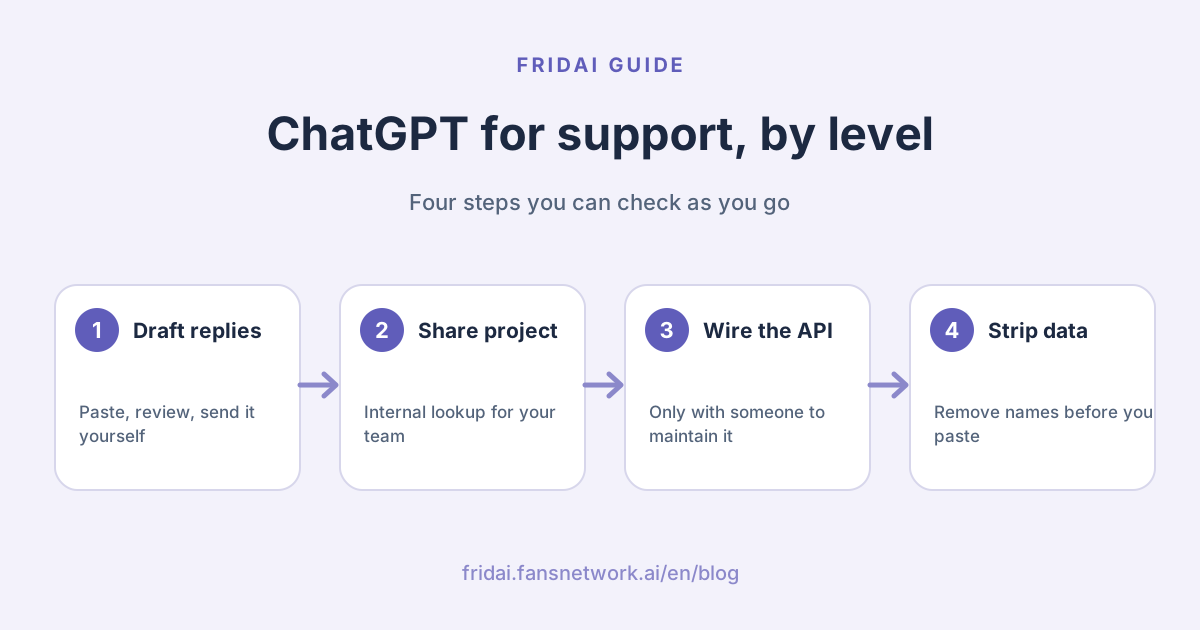
The answer up front: what each of the three levels can do
"Using ChatGPT for customer service" means three quite different things.
| Level | What it can do | What is missing | Who it suits |
|---|---|---|---|
| 1. Drafting assistant | You paste the question, it drafts a reply | You copy and paste everything | Low volume, owner replies |
| 2. Project or custom GPT | Holds shop documents for staff to query | No channel link, does not know the customer | Two or three people sharing replies |
| 3. DIY with the API | Replies to customers inside LINE | Handover, logs and permissions are yours to build | Someone can maintain code long term |
What all three lack is really the same list; there is a section on it below.
Which level do you need right now?
Level 1: ChatGPT as a drafting assistant
You can do this today. A customer sends a message, you paste it into ChatGPT, it writes a reply from the shop details you supply, you read and edit it, and you paste it back into LINE (the messaging app most Taiwan shops use) or Instagram yourself. You are still the one replying; it is a colleague who types faster.
Plans and cost
This is what the official ChatGPT pricing page showed for individual plans when opened from Taiwan today. Amounts are the monthly prices displayed that day; whether tax is included and what you are actually charged is settled at checkout.
| Plan | Monthly price shown | How OpenAI positions it |
|---|---|---|
| Free | NT$0 | Trying out ChatGPT |
| Go | NT$270 | Longer conversations; the page notes it may include ads |
| Plus | NT$690 | Advanced work and productivity |
| Pro | From NT$3,300 | Research and coding |
There are also Business and Enterprise plans; the page's FAQ states Business starts at 2 users. If you only want drafts, try Free for a week before deciding to pay. For each plan's usage limits, read the official page directly; we do not restate them.
A drafting prompt you can paste
You are the customer service drafting assistant for "(shop name)". Write replies using only the "Shop details" below.

Requirements:
1. Reply in Traditional Chinese with Taiwan wording, friendly, three sentences at most.
2. If something is not in the shop details, do not guess. Write 「這部分我確認後回覆您」 instead.
3. Never promise discounts, refunds, delivery dates or any exception.
4. If the customer left out a field needed for a booking, ask only for that one field.
5. After the reply, on a new line starting with [Note], tell me whether anything in it needs me to check personally.

Shop details:
(paste your opening hours, price list, booking and return policies)

Customer's message:
(paste the question, with name, phone and address removed first)
English gloss of the Chinese line: "I will confirm this part and get back to you."
The "Shop details" section is your knowledge base. Paste the same version every time and the drafts stay consistent. How to organise it into a form an AI can use, with fill-in templates for eight blocks, is in How to build an AI customer service knowledge base. Ready-made reply patterns are in the customer service message templates hub.
Three habits that keep drafts steady
First, keep the shop details in one text file and paste that same file every time rather than retyping from memory. When a price changes, change the file first, then paste.
Second, paste one question from one customer at a time. Drop five messages in together and it can easily write customer A's date into customer B's reply.
Third, note what you had to change. The same mistake three times means the shop details are missing a line or the prompt is missing a requirement. Add it and you will not have to fix it again. That list is also a ready first draft of your rules, whichever level you move to later.
Where this level stops
It does not know who the customer is or what you discussed last time, and it will not answer while you sleep. Once volume grows, the copying and pasting becomes a job in itself. And fluent is not the same as correct: read every reply before sending. A wrong answer delivered instantly is just a more efficient way to cause trouble.
Level 2: a project or custom GPT for your team
Level two keeps your shop's documents in one fixed place so colleagues do not paste them every time.
What OpenAI says about Projects
According to OpenAI's help article, a project keeps related chats, files and instructions together, and ChatGPT uses that context when it answers. You can upload PDFs, spreadsheets, documents and images, or paste text, and write instructions that apply only to that project.
Projects can be shared. The article states that sharing is available on Free, Go, Plus, Pro, Business, Enterprise and Edu, and that invitees get either chat or edit access. The limits it lists:
| Owner's plan | File limit | Collaborator limit |
|---|---|---|
| Free | 5 | 5 |
| Go, Plus | 25 | 10 |
| Pro | 40 | 100 |
| Business and similar | 40 | 100 |
So a three-person shop can create one project, add the price list and return policy, and invite two colleagues.
Keep just three things in the project: one plain-text file of shop knowledge, one list of "do not answer, ask the manager" topics, and the project instructions. For the instructions you can reuse the drafting prompt above without the "Customer's message" line. File limits are low, so rather than uploading ten scattered old documents, tidy them into one clean file first. When a price changes, replace the file in the project too, or colleagues will keep getting the old answer.
Custom GPTs: check what changed in 2026 before deciding
Many tutorials online still tell you to "build a customer service GPT". Here is what OpenAI's help article says now:
- Personal accounts (Free, Go, Plus, Pro) can no longer create or publish new GPTs; existing GPTs remain usable.
- Business, Enterprise and Edu workspaces can still create, edit and publish them when workspace settings and permissions allow.
- OpenAI says it plans to retire custom GPTs and recommends moving workflows to Plugins. Retirement for affected Enterprise workspaces is planned for December 11, 2026; other plans are expected to follow the same timeline, subject to the notices your account receives.
The design of a GPT matches how customer service knowledge should be organised anyway: instructions decide how it behaves, knowledge files provide reference material. The article states a GPT can have up to 20 files attached, each up to 512 MB, and recommends text-forward knowledge files. But with a retirement plan already announced, we would not advise a small shop to start building its customer service on custom GPTs now. The pricing page still lists custom GPTs among plan features; where the two pages differ, go by what your own account shows.
Why this level is for internal use only
A project is for collaborators who are signed in to ChatGPT. The help article states that when a share link is set to "Anyone with a link", that means any logged-in ChatGPT user, and that people who join can see the project's chats, files and instructions. It is not a support widget you put on your website for customers, and it will not appear in your LINE account.
So level two is an internal cheat sheet: a new colleague asks it when unsure of a policy, then answers the customer in their own words.
Level 3: connecting to LINE yourself through the API
To have a model actually reply to customers inside a channel, you do not use the ChatGPT product. You use OpenAI's API plus your own code or an automation tool such as Make or n8n. The API and a ChatGPT subscription are separate things; for cost, see OpenAI's official API pricing page.
On the LINE side, we re-checked the developer documentation today. The key points:
- Verify the signature before processing webhook events, to confirm the request came from the LINE Platform.
- LINE recommends processing events asynchronously.
- The same event may be sent more than once; deduplicate with
webhookEventId. - Events may arrive in a different order from the one they happened in; compare
timestamp. - Content sent as a reply message does not count toward the monthly message quota; push messages, broadcasts and similar do.
- Make has a LINE app that Make maintains. n8n's documentation marks its built-in LINE node as deprecated from version 1.64.0, because the LINE Notify service it relied on ended on April 1, 2025; you receive events with a Webhook node instead.
Instagram and Facebook messaging go through Meta's own official interfaces. See Meta's developer documentation for the requirements; we did not verify them for this article, so we say no more.
The API only does "text in, text out". Who the customer is, what was said before, and when to stop so a human can take over are all parts you build. The full checklist and a requirements template you can hand to an engineer are in LINE AI auto-reply: native features, tools or DIY; we do not repeat them here.
Five things all three levels lack
| Missing piece | Why it matters | How to fill it yourself |
|---|---|---|
| Channel connection | Customers are in LINE and Instagram, not ChatGPT | People paste at levels 1 and 2; code at level 3 |
| History per customer | So nobody is asked the same thing twice | Store chats and decide how much to pass along |
| Human handover | Complaints and exceptions need a person | Build the state, the alert and the hand-back |
| Conversation logs | So you can look back when something goes wrong | Store them separately and set a retention period |
| Permissions | Who can read chats, who can edit knowledge | Account sharing settings, or your own code |
This table is the difference between a general chat tool and a customer service system. The first is very good at writing sentences. The second does the things that are not sentences.
Human handover deserves a special mention. Customer service rarely goes wrong because one sentence was poorly written. It goes wrong because nothing stopped when it should have: the customer is already angry and the auto-reply is still saying thank you, or the manager has started replying and the bot cuts in. Levels one and two do not carry this risk because a person handles every message. At level three, once the model replies to customers directly, do not go live until this part works.
Logs are similar. While you are drafting, the record sits in your personal ChatGPT account, separate from the conversation the customer sees in LINE. If you ever need to check what was actually said, the message sent in the channel is the one that counts.
Before you paste a customer's message: privacy notes
What OpenAI says
The points below summarise what OpenAI's help and API documentation showed today. Setting names are given as they appear on screen.
- Services for individuals, such as ChatGPT: OpenAI states it may use your content to train its models, and you can opt out.
- How to opt out: in ChatGPT, go to Settings, then Data controls, and turn off Improve the model for everyone; or make the request in OpenAI's Privacy Portal. After you opt out, new conversations are not used to improve the models.
- Even after opting out, if you give a thumbs up or thumbs down on a response, OpenAI says the entire conversation tied to that feedback may be used for training.
- Temporary chats are not used to improve models while they remain temporary, and they do not appear in chat history.
- ChatGPT Business, Enterprise, Edu and the API: OpenAI states that by default it does not use inputs or outputs to improve its models.
- The API also generates abuse monitoring logs, which the documentation says are retained for up to 30 days by default.
These are OpenAI's statements, and they change. Before you go live, open the settings page yourself rather than relying on anyone's screenshot, this article included.
Remove these before pasting
Before pasting into any chat tool, remove:
- Name, nickname, account ID
- Phone, email, address
- Order number, member number
- National ID number, date of birth, payment details
- Medical records, health conditions, treatment history
Rewrite as: "A customer asks: ..."
Customers give their data to your shop, not to the tools you use, and the responsibility stays with you. The articles of Taiwan's Personal Data Protection Act (個資法) most relevant to customer service, and seven questions you can put to any vendor, are in 9 questions to ask before adopting AI customer service.
What changed in 2026
- Custom GPTs are being retired: personal accounts can no longer create new ones, OpenAI recommends Plugins instead, and affected Enterprise workspaces are scheduled for retirement on December 11, 2026. Before following an old "build a customer service GPT" tutorial, check whether your account can still do it.
- n8n's built-in LINE node is deprecated; old tutorials for connecting LINE will get stuck.
- ChatGPT plan names and contents change quickly. This article records today's page only; the official pricing page is the reference.
When to move to a dedicated tool, and when not to
| Your situation | Our suggestion | Why |
|---|---|---|
| A few messages a day, you reply yourself | Stay at level 1 | A drafting assistant is enough |
| Two or three people reply, answers differ | Level 2 plus one knowledge base | Agree on the answers first |
| After-hours messages often get missed | Look at native platform features first | You may not need to spend anything |
| AI must read context and hand over | Evaluate a dedicated tool | Handover and logs are built in |
| You have an engineer and in-house systems | Level 3, build it yourself | The flow is fully yours |
| Policies still change daily | Do not automate yet | Every level will answer wrongly |
FRIDAI is one such dedicated tool. Its website says it connects direct messages on channels including LINE, Instagram and Facebook, replies from your knowledge base, notifies a human when needed, and keeps the AI out of the way once a human takes over. It has a monthly fee and no free plan. If your volume cannot yet justify that, start with Free AI customer service in 2026; to compare vendors, see AI customer service platforms compared.
FAQ
Can ChatGPT connect directly to a LINE Official Account and auto-reply?
Not the ChatGPT product itself. To auto-reply in LINE you use OpenAI's API together with the LINE Messaging API, wired up with code or an automation tool, or you use an AI customer service tool that already has the channel connected.
How much does it cost to use ChatGPT for customer service?
For drafting only, the Free plan is enough to start. Viewed from Taiwan today, the official pricing page showed Go at NT$270 a month and Plus at NT$690. Automatic replies through the API are billed differently; see OpenAI's official API pricing page.
Will customer messages I paste into ChatGPT be used for training?
According to OpenAI, content from personal accounts may be used for training, and you can turn off Improve the model for everyone under Data controls. Whether or not you turn it off, remove names, phone numbers and addresses before pasting.
Can I still build a custom GPT for customer service?
OpenAI's help article states that personal accounts can no longer create new GPTs and that it plans to retire custom GPTs in favour of Plugins. Business and similar workspaces can still create them for now, but we would not start building a customer service process on them today.
Why do ChatGPT's replies often differ from my shop's policies?
Because it does not know your policies. Without your shop details it can only answer from general knowledge. Paste the same organised knowledge every time, and state in the prompt that it must not guess what is missing, and the drafts will stay close to your shop.
Is it hard to connect ChatGPT to LINE with Make or n8n?
Getting a message in and a reply out is not hard. What comes after is: deduplicating repeated events, storing conversation history yourself, stopping the AI when a human takes over, and noticing when something fails. Without someone to maintain it long term, we would not take this route.
When should I move from ChatGPT to a dedicated AI customer service tool?
When the copying and pasting takes longer than the replying, when after-hours messages keep getting missed, or when you need the AI to remember context and hand over to a human at the right moment. Until then, a drafting assistant is usually enough.
How FRIDAI can help
If you are stuck copying and pasting every message, FRIDAI Chat does the things ChatGPT does not: it connects to the channel, replies from your knowledge and AI rules, and notifies a human to take over when needed. The shop details and prompt you prepared at level one are not wasted; they are the first draft of your knowledge base and rules.
- Product: FRIDAI Chat
- FRIDAI Social: FRIDAI Social
- Organise your shop details: How to build an AI customer service knowledge base
- Turn the prompt into rules: How to write AI customer service rules
- Instagram: FRIDAI on Instagram
- Threads: FRIDAI on Threads
- Facebook: FRIDAI on Facebook
Official sources
- ChatGPT official pricing page: chatgpt.com/
pricing/ - OpenAI Help Center, Creating and editing GPTs: help.openai.com/
en/ articles/ 8554397-creating-and-editing-gpts - OpenAI Help Center, Projects in ChatGPT: help.openai.com/
en/ articles/ 10169521-projects-in-chatgpt - OpenAI Help Center, How your data is used to improve model performance: help.openai.com/
en/ articles/ 5722486-how-your-data-is-used-to-improve-model-performance - OpenAI API docs, Data controls in the OpenAI platform: developers.openai.com/
api/ docs/ guides/ your-data - LINE Developers, Receive messages (webhook): developers.line.biz/
en/ docs/ messaging-api/ receiving-messages/ - LINE Developers, Messaging API pricing: developers.line.biz/
en/ docs/ messaging-api/ pricing/ - n8n Docs, LINE node: docs.n8n.io/
integrations/ builtin/ app-nodes/ n8n-nodes-base.line/ - Make, LINE integration: www.make.com/
en/ integrations/ line - FRIDAI Chat: fridai.fansnetwork.ai/
fridai-chat