Knowledge vs rules: separate them before you start
Many shops setting up AI customer service for the first time paste the price list, opening hours, tone of voice and "never make things up" into the same box. The AI then cannot tell which lines are facts and which are instructions.
The simple split: knowledge is facts, rules are behaviour. Knowledge answers "what is our shop's answer". Rules answer "what should happen in this situation". This is not just FRIDAI's way of putting it. OpenAI's help article on custom GPTs draws the same line: uploaded knowledge files are reference material to draw from when answering, while rules, tone and workflow guidance belong in the instructions.
| Aspect | Knowledge | Rules |
|---|---|---|
| Question it answers | What is the answer | What to do now |
| What it looks like | Prices, hours, address, conditions | If, then, otherwise, only |
| Example | Closed on Mondays | Answer the closing day, then offer to book |
| How often it changes | Whenever a price or promotion changes | Only when the process changes |
| What goes wrong | The answer is wrong | Right answer, wrong handling |
A quick test: if the sentence could be printed on a notice at your shop door, it is knowledge. If it is something you would tell a new member of staff, it is a rule. How to write rules is covered, with real conversations, in How to write AI customer service rules. This article handles the knowledge half only.
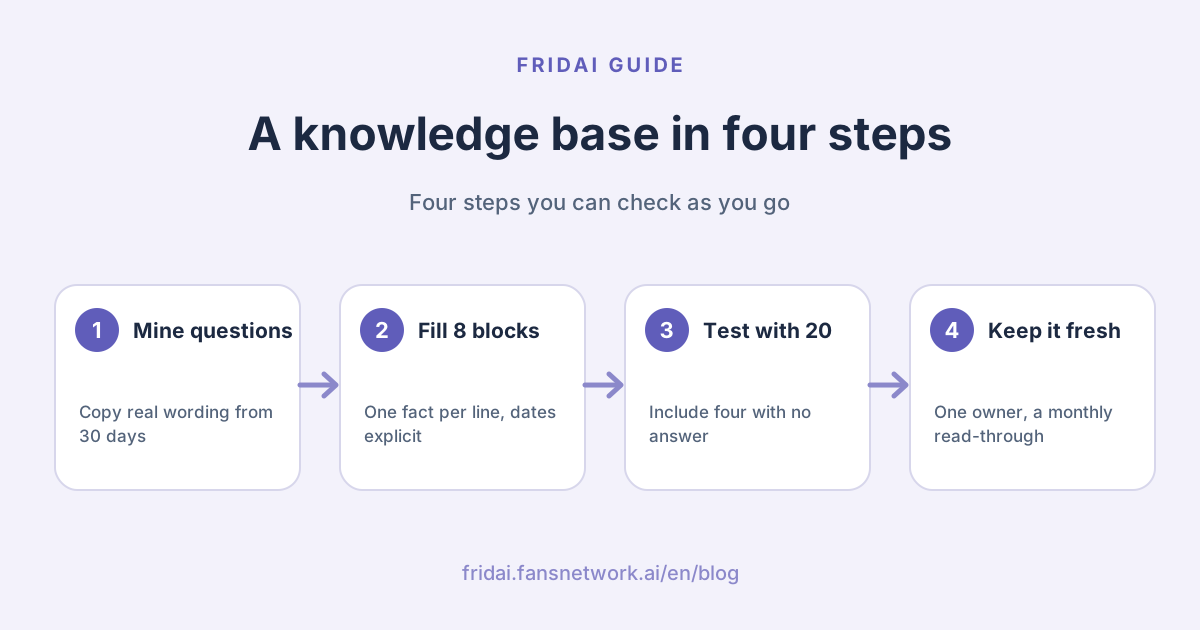
Five steps to build the knowledge base
The order matters. Look at what customers actually ask first, then write the answers. Do not start with a polished brand introduction and then discover that customers only wanted to know whether you take cards.
The eight blocks most small shops need
| Block | What to write | Most often missed |
|---|---|---|
| Business basics | Name, address, hours, directions | Closing days and public holidays |
| Products and prices | Items, specs, prices, tax included or not | The date prices took effect |
| Booking or ordering | How to book, which fields you need | The latest time to book |
| Payment | Accepted methods, deposit, invoice | Whether the deposit is refundable |
| Shipping and pickup | Fees, days, pickup hours | Outlying islands and holidays |
| Returns and after-sales | Deadline, conditions, process | Items that cannot be returned |
| Policies and exceptions | Cancellation, lateness, special needs | Who can approve an exception |
| Contact and handover | Who, when, how fast | What happens after hours |
Each block below has a fill-in template. Replace the brackets with your own content, written in the language your customers use. Delete any line you do not need. Do not leave blanks for the AI to guess.
Block 1: business basics
Shop name: (official name); customers often call us (short name)
Address: (full address, including floor)
Opening hours: (day) to (day), (time) to (time)
Closed: every (day); public holidays (open / closed)
Last entry: (time)
Getting here: about (n) minutes on foot from (station or landmark)
Parking: (yes / no) partner car park; (name and discount)
Service area: (which districts or customers only)
Block 2: products, services and prices
Prices effective from: (yyyy/mm/dd)
Prices below are (tax included / before tax), in NT$
(Item name) | (spec or duration) | NT$(price)
(Item name) | (spec or duration) | from NT$(price), extra by (length / area / quantity)
Add-ons: (item) NT$(amount) per (unit)
Services we do not offer: (things people ask for that you do not do)
Items that need an on-site quote: (list); hand over to a human One item per line. Whenever you write "from", state what the extra charge depends on, or customers will hold you to the lowest price.
Block 3: booking or ordering
How to book: (DM / form / phone)
Fields needed: name, phone, date, time slot, (party size / service)
Latest booking: (days or hours) in advance
Booking window: up to (n) days ahead
Maximum per booking: (people / items)
A booking is confirmed when: (confirmation message received / deposit paid)
Changes: allowed up to (hours) before, by (method)
Block 4: payment
Accepted: (cash / bank transfer / credit card / named mobile payment)
Not accepted: (list)
Deposit: (required / not required); amount (), due within (hours) of booking
Bank account: given by a human only; the AI never posts account numbers
Invoice or receipt: we issue (invoice / receipt); company tax ID (yes / no)
Instalments: (yes / no); conditions ()
Keep the bank account line as written. It is better for payment details to arrive a little late from a person than to sit inside an automatic reply.
Block 5: shipping and pickup
Dispatch: within (n) working days of payment; no dispatch on (day) or public holidays
Delivery methods and fees: (method) NT$(amount); free over NT$(amount)
Outlying islands: (can ship / cannot ship); fee ()
Arrival: usually (n) days after dispatch; the carrier's tracking is final
Pickup location and hours: (address), (hours)
Pickup by someone else: (allowed / not allowed); needs (buyer's phone or name)
Block 6: returns and after-sales
Return window: within (n) days of receiving the goods
Conditions: (unused / packaging intact / invoice included)
Cannot be returned: (custom items, food, opened items...)
Process: DM us with (order name, photos); a human confirms before you send it back
Return shipping: paid by (buyer / seller); (seller pays for defects)
Warranty or after-sales: (period and scope)
Refund method and timing: explained by a human after review; the AI promises no amount or dateBlock 7: policies and exceptions
Cancellation: (hours) before, (no charge / deposit kept on file); later than that, (handling)
Lateness: more than (n) minutes (treated as cancelled / session shortened)
No-show: (handling)
Special needs (allergies, mobility, pets, children): (yes / no / tell us in advance)
Any exception not written above: the AI does not decide; hand over to (role)Block 8: contact and handover
Human service hours: (day) to (day), (time) to (time)
Typical reply time: about (how long) in business hours; after hours, by (time) next day
Urgent contact: (phone), only for (same-day bookings / cannot find the shop)
Always hand over to a human: complaints, refunds, exceptions, quotes, (your own)
When the answer is not in the knowledge base: tell the customer it needs checking and hand overThe last two lines sit between knowledge and rules. Keep the list in knowledge and the "how to hand over" in rules, and make sure the two match.
How to write so an AI can use it
One fact per line
"We close on Mondays but open on long weekends and last entry is 7:30" is fine for a person. An AI quoting it can easily pick up only half. Split it into three lines.
Spell out dates and conditions
"There is a promotion right now" is "right now" forever to an AI. Write "October 1 to October 31, 2026: NT$100 off orders over NT$1,000, once per customer". Write amounts as numbers with units, and times as from-to.
No "roughly"
| Vague wording | What goes wrong | Write instead |
|---|---|---|
| Arrives in roughly 3 to 5 days | Customers read it as a promise | Usually 3 to 5 days after dispatch; carrier tracking is final |
| Price depends | The AI invents an example | Needs an on-site quote; hand over to a human |
| We may open on holidays | Says nothing | Open on public holidays; closed Lunar New Year's Eve to day 3 |
| Lots of people pick this one | No basis | Delete it, or compare specs |
| Returns accepted | No deadline or condition | Within 7 days of receipt, unopened |
All figures above are sample wording. Replace them with your own policy.
Write down what you do not know
The line most often missing from a knowledge base is "we have no answer for this". List the questions that come up often but that you do not want the AI to answer, and mark them "hand over to a human". Any gap you leave, the AI will fill with something that sounds reasonable, and that is usually where the incident starts.
No fixed answer; always hand over to a human:
- (custom quotes)
- (whether a treatment or ingredient suits an individual)
- (whether an item is in stock)
- (whether the price can be lower)
Mine real questions from your own chat history
You do not need a tool. One afternoon and a spreadsheet are enough.
- Open the last thirty days of direct messages across LINE (the messaging app most Taiwan shops use), Instagram and Facebook.
- Each time you find a question, copy the customer's exact sentence into the spreadsheet. Do not reword it.
- In the second column write what you answered; in the third, which of the eight blocks it belongs to.
- Group different wordings of the same question and count them.
- Starting with the most frequent, confirm the matching block contains an answer.
- Find the questions you answer slightly differently each time, decide on one version, then write it in.
Leave out customers' names, phone numbers and addresses as you copy; the spreadsheet only needs the question. Step 6 takes longest and is worth the most: when a knowledge base will not come together, it is often because the shop never had a single answer in the first place. For ready-made reply patterns see the customer service message templates hub, but always use your own customers' wording for the questions.
Keeping it current
Knowledge bases rarely break because something was written wrong. They break because nobody updated them.
| When | What to check | Owner |
|---|---|---|
| The day a price or promotion changes | Replace the old line; do not add one below | Content owner |
| Weekly | Read handed-over chats and add missing answers | Content owner |
| Monthly | Read it top to bottom; check dates and prices | Shop manager |
| Before a season or long weekend | Hours, shipping cut-off, limited items | Shop manager |
You need one owner, and their name goes on the first line of the knowledge base. Every seasonal item carries an end date:
[Limited time] Mid-Autumn gift box pre-order
Period: (mm/dd) to (mm/dd), 2026
Contents: (items and prices)
Last dispatch date: (mm/dd)
Delete this section after (end date). Owner: (name) If your tool lets you set an expiry date on content, use it. If not, a calendar reminder that says "delete Mid-Autumn promotion" works just as well.
Test with 20 real questions before launch
Split the twenty like this: twelve that the knowledge base can answer, four that it deliberately cannot, two asking for an exception, and two that repeat an earlier question in a different tone. Take them straight from the spreadsheet, in the customer's own words. The sample messages below stay in Chinese because that is what your customers will type.
Knowledge base test sheet
No. | Customer's words | Expected answer or behaviour | Actual AI reply | Result | Line to fix
1 | 今天有開嗎 | Answer from opening hours | (paste) | pass / fail |
2 | 可以帶狗嗎 | Not in knowledge; hand over | (paste) | pass / fail |
3 | 可以算便宜一點嗎 | State the price, then hand over | (paste) | pass / fail |
...
20 | () | () | () | () |
Only three results: correct, wrong, should have handed over but did not
Every "fail" must map to a line in the knowledge base; fix it, then re-test the same questionEnglish gloss: "Are you open today?", "Can I bring my dog?", "Can you make it a bit cheaper?"
The four no-answer questions matter most. An AI getting the answerable ones right is not remarkable. Its willingness to say "let me check that for you" when it has no answer is what lets you go live. A fuller scenario test is in the test matrix in 9 questions to ask before adopting AI customer service.
One knowledge base, three ways to use it
This text is not tied to any tool. Write it once and use it in three places.
The first is native or free platform features. Keyword auto-replies and FAQ lists draw on the same eight blocks; you just split them into one question, one answer. The limits of each free feature are in Free AI customer service in 2026.
The second is an off-the-shelf AI customer service tool. Most keep knowledge and rules in separate places. Paste the eight blocks into the knowledge area, write the rules separately, and start testing.
The third is building it yourself, or using a general chat tool to draft replies. Here the knowledge base is the background you paste to the model each time; the cleaner it is, the less editing the drafts need. For how to choose between the three routes, see LINE AI auto-reply: native features, tools or DIY.
When you change tools, this text is the only thing you can take with you. So keep a copy in your own cloud document and treat it as the master; the version inside the tool is the copy. When they differ, the master wins, and you fix the copy.
The three most common failures
Two answers to the same question
An old price list was never deleted, the website and the knowledge base disagree, or two colleagues each pasted a version. The AI cannot know which is newer; it may quote one today and the other tomorrow. There is only one fix: keep one version per question. Changing a price means replacing, not appending.
Expired promotions still live
When a customer in November shows you the AI's reply offering October's discount, it is hard to say it does not count. Give every time-limited item an end date and someone responsible for deleting it that day.
Prices that exist only in an image
Many shops' price lists are a designed image. Text, tables and complex layouts inside an image are not always read correctly as text; OpenAI's help article likewise recommends clear, text-forward knowledge files and notes that complex layouts make content harder to use. Tools handle files differently, so the safest approach is to type the prices out as plain text as well, then use the test sheet to confirm the AI's numbers match yours.
FAQ
How much does an AI customer service knowledge base need to contain?
There is no standard length. Take the twenty questions customers asked most in the past month and test them. If the AI answers what it can and hands over what it cannot, you have enough to go live. After that, add content each week from the handed-over chats.
Can I just upload a PDF or a price-list image?
It depends on the formats your tool supports. Even when upload works, complex layouts and prices inside images can be misread. Write important numbers out in plain text as well, and use test questions to confirm the AI quotes the right amounts.
Why does the AI still quote the old price?
Usually because the old content is still there. Often the new price was added below and the old one never deleted, or another document or old post still carries the old figure. Delete the old version, keep one answer, and re-test the same question.
What is the difference between a knowledge base and an FAQ?
An FAQ is question-and-answer pairs, which suits fixed questions. A knowledge base is broader: it also holds price lists, processes and conditions, so the AI can answer phrasings nobody listed as a question. A small shop can start with an FAQ and fill in the eight blocks over time.
Is it safe to put internal policies in the knowledge base?
Only put in what you are happy for customers to know. Costs, purchase prices, staff members' personal contact details and customers' personal data do not belong there. If it would cause trouble for the AI to say it out loud, do not write it in.
How often should the knowledge base be updated?
Change it the same day a price or promotion changes, and read it top to bottom once a month. Before each season and long weekend, check opening hours and shipping cut-offs again. Updates need a named owner, or very soon nobody is looking after it.
I have no time to organise it. Can the AI learn from my website by itself?
Some tools can scan existing content to produce a first draft, which saves typing. You still need to confirm that draft line by line, especially prices, dates and return conditions, because expired content in old posts gets swept in too.
How FRIDAI can help
FRIDAI Chat manages brand knowledge and AI rules separately. You can maintain the knowledge base yourself in plain text, or let FRIDAI organise your existing posts, comments, direct messages, website and documents as a starting point for you to confirm. Conversations that need a person trigger a notification to your team, and the AI stays out of the way once a human takes over. Our suggestion is to write the eight blocks from this article first; whichever tool you end up with, you will use them.
- Product: FRIDAI Chat
- FRIDAI Social: FRIDAI Social
- Writing rules: How to write AI customer service rules
- Is ChatGPT enough: ChatGPT for customer service: three ways to use it
- Still choosing a tool: AI customer service platforms compared
- Instagram: FRIDAI on Instagram
- Threads: FRIDAI on Threads
- Facebook: FRIDAI on Facebook
Official sources
- OpenAI Help Center, Creating and editing GPTs (knowledge vs instructions; text-forward files): help.openai.com/
en/ articles/ 8554397-creating-and-editing-gpts - FRIDAI Chat: fridai.fansnetwork.ai/
fridai-chat