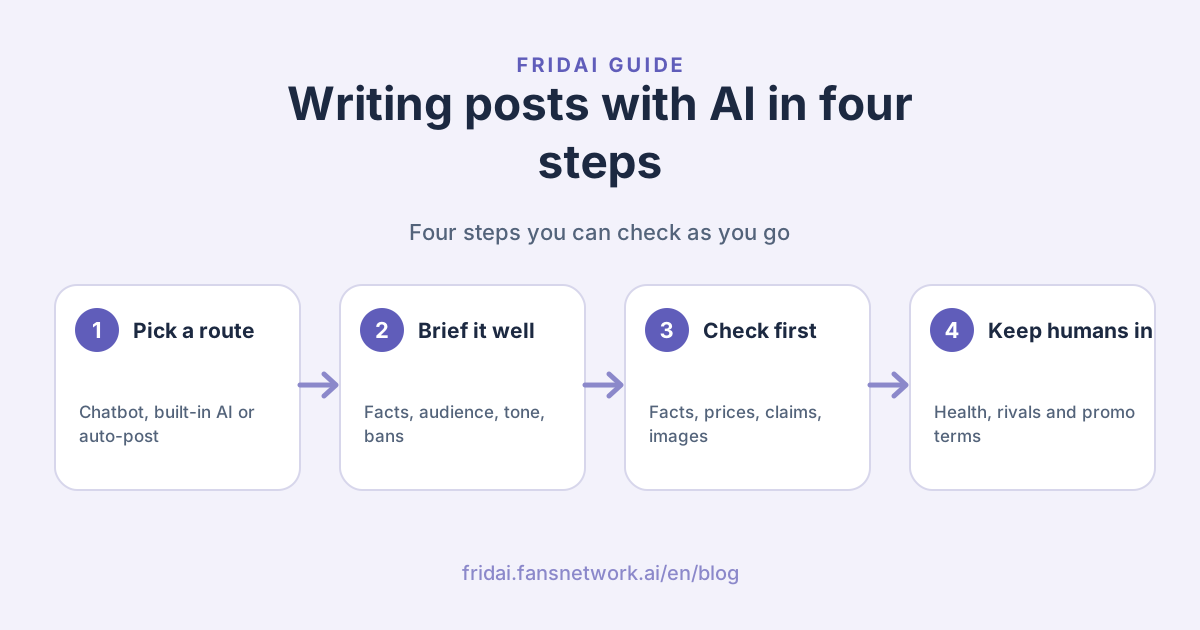
An AI post generator is really three different things
People who search for an AI post generator or an AI caption generator rarely have the same problem. Some cannot get today's post written. Others cannot produce content any week. Work out which one you are before paying for features you do not need.
Type one: a general chatbot plus a good prompt
ChatGPT, Claude and Gemini all belong here. You paste in your brand background and the point of this post, it returns a few versions, you pick one, edit it, and publish it yourself on Instagram, Facebook or Threads. "Writing posts with ChatGPT" means exactly this route.
It is cheap and flexible. On the official plan pages we read today, Claude and Gemini both list a free plan; we could not load ChatGPT's plan page today, so check its site directly. The weakness is that it does not know your shop. Brand voice, banned phrases and your price list are unknown to it unless you paste them in. It also does not publish anything for you.
Type two: AI built into scheduling or design tools
Many tools you already use now have an AI button beside the composer. The benefit is that you write and schedule in one place, with no copying between windows. We read three vendors' official pages today.
| Tool | AI features on the official page | Usage note |
|---|---|---|
| Buffer | Generates post ideas, repurposes existing posts, condenses long content into short posts | Its FAQ says a free Buffer account is enough to use it |
| Later | Caption Writer for Instagram captions; Ideas for content pillars and ideas | 5, 50 and 100 AI credits a month across three plans |
| Hootsuite | Plans page lists generating posts and images with AI | Listed under the Standard plan |
Two additions. Buffer's page says you can make a post more casual or more formal, shorten it or expand it inside the composer to match your brand's voice. Later's page says one credit produces three ideas or one caption. All of these are assistants that help with one post at a time; you still come up with the topic each time.
Two commonly asked-about tools are not in the table. Canva's official pages could not be loaded today, so we do not describe its AI writing feature. As for Meta's own tools, the Meta Business Suite product page we read mentions no AI writing feature, and we found no official documentation confirming whether one is currently offered in Taiwan, so we leave it out. If you see one in your own dashboard, trust your screen.
Type three: an AI auto-posting system
This type does not write single posts; it takes over the whole production line. With FRIDAI Post, for example, you set up repeatable post series such as a daily good-morning post, a weekend new-product post or a holiday campaign, and the AI then writes the copy, makes the images, translates and publishes on schedule. It suits the owner who knows they should post but never has time to write, which is the situation where you really do want an AI social media manager.
The cost is the up-front work of spelling out your brand rules, and someone still has to read what goes out on a regular basis. AI is diligent, but diligently publishing the wrong price is not an improvement.
The three approaches compared
| Criterion | General chatbot | Built-in AI | Auto-posting system |
|---|---|---|---|
| Who writes | AI drafts, you edit | AI drafts, you edit | AI writes from your settings |
| Who publishes | You paste it in | The tool, on schedule | The system, on schedule |
| Brand voice memory | Usually pasted in each time | Varies; mostly per-post tweaks | Set once, then reused |
| Fact-checking burden | Read every post before publishing | Read every post before scheduling | Check at setup, then spot-check regularly |
| Effort per post | Medium: prompt, edit, paste | Medium to low: no pasting | Low, but setup takes time |
| Where it breaks | Invented facts, tone drifts | Generic copy without brand detail | A wrong setting repeats in every post |
No column in this table is "the best". If you post two or three times a week and every post is a photo you took yourself, a chatbot is plenty. The other two only earn their keep once thinking of topics and pressing publish are what is wearing you down.
A prompt template you can copy
When AI-written posts come out badly, eight times out of ten it is because the prompt was one line: "write a post about our new product." The AI cannot read minds; it guesses as much as you leave out. This template lays out the five things to tell it: brand facts, audience, tone, banned claims and format. Keep it in a notes file and change only the last section each time. Write the prompt in the language you post in.
You are our brand's social copy assistant. Write the post using only
what is provided below. Do not add facts that are not given; mark
anything you are unsure of with [TO CONFIRM].

[Brand facts]
- Brand and location:
- What we sell, main items:
- Opening hours and how to order:
- Prices or promotions this post may mention
  (if none, write "do not mention prices"):

[Audience]
- Who the main customers are:
- What they care about most:

[Tone]
- Who is speaking (e.g. the owner, a staff member, the brand editor):
- Word habits (e.g. conversational, no slang, no rows of exclamation marks):
- Use these two posts we wrote as reference: (paste)

[Banned claims]
- No health effects, guaranteed results, "cheapest", "number one"
- No mention of other brands
- Do not invent offers, gifts or deadlines

[Format]
- Platform:
- Length:
- What the first line must do:
- Call to action at the end:
- How many hashtags and where:
- Give me three versions with different angles

[What this post is about]
(Two or three sentences on today's point)
A few tips. First, "use these two posts as reference" does more than any adjective; AI learns tone from examples, not from descriptions like "warm yet professional". Second, ask for three versions, then ask it to merge the two you like. Third, if your chatbot has a way to save standing instructions, store the first four sections there and paste only the last one each time. Claude's plan page lists Projects and Gemini's lists Gems; follow each vendor's own documentation for how they work.
Three filled-in examples
All three shops are hypothetical and only show how to fill in the template. The names, prices and promotions are not real.
Example one: a neighbourhood dessert shop announcing a new item
[Brand facts] Corner Desserts (hypothetical), West District, Taichung.
Handmade cakes and shelf-stable cookies.
Wed to Sun 12:00-19:00; order by Instagram DM or in store.
This post may mention: chestnut Mont Blanc on sale this Friday,
limited daily. Do not mention prices.
[Audience] Nearby office workers and mums; they care about it not
being too sweet and whether we can hold one for them.
[Tone] The owner speaking, conversational, short sentences,
no exclamation marks.
[Banned claims] No "best in Taiwan", no "won't make you gain weight",
no mention of other shops.
[Format] Instagram, under 120 Chinese characters, first line sets the
season, end by asking customers to DM to reserve, 5 hashtags at the end.
Three versions.
[What this post is about] We changed chestnut supplier this year and the
texture is smoother; we want regulars to know.Example two: a nail studio opening next month's bookings
[Brand facts] Fingertip Studio (hypothetical), Zuoying, Kaohsiung.
One-person studio, appointment only.
This post may mention: next month's slots open tonight at 8 pm,
book through LINE. Do not mention prices.
[Audience] Office workers aged 25 to 40; they care about how long
it lasts and whether they can come after work.
[Tone] Like a friend's reminder, short sentences, a little humour is fine.
[Banned claims] No "does not damage nails", no "guaranteed not to chip",
no comments on other studios' work.
[Format] Threads, three to four lines, first line says slots are open,
end with how to book, no hashtags. Three versions.
[What this post is about] Many people missed out last month, so we are
announcing a day earlier this time.Example three: a pet supplies shop sharing know-how
[Brand facts] Furry Picks (hypothetical), online shop selling leashes,
beds and toys.
Do not mention prices or promotions in this post.
[Audience] First-time dog owners; they care about safety and
choosing the right size.
[Tone] Brand editor, friendly but not cutesy.
[Banned claims] No health or medical effects of any kind, no
"vet recommended", no comparison with other brands. For any health
question, write "please ask your vet".
[Format] Facebook, under 200 Chinese characters, three bullet points on
choosing a leash, end by asking people to comment with their dog's size.
Three versions.
[What this post is about] Walks are getting longer as the season changes;
we want to show how to measure chest size.The three examples share one thing: the banned claims are written more precisely than the tone. Get the tone wrong and the post merely sounds unlike you. Get a claim wrong and you have a real problem.
A pre-publish checklist
However smooth the AI's draft is, you are still the one who presses publish. Keep this list beside your scheduling tool and give each post one minute.
1. Facts
- Do the items, address and opening hours match reality today?
- Can every number in the post be traced to a source?
- Did the AI add a story, a customer quote or "studies show"?
2. Prices and promotions
- Do the price, discount, deadline and quantity match the real offer?
- Are the conditions spelled out (limited stock, no stacking, booking needed)?
3. Claims
- Any health effects, results, guarantees or superlatives?
- Any mention of, or hint at, another brand?
4. Images and assets
- Did you take the photo yourself, or do you have the right to use it?
- Did the people in it agree to be shown publicly?
- For AI-generated images: does anything look like a real product but is not?
5. AI content labelling
- Is there realistic video or realistic-sounding audio that was made
or altered with AI?
- Where the platform requires a label, is it there?
6. Last look
- Read aloud, does it sound like how you normally talk?
- Are the links, account tags and hashtags correct?What Meta says about labelling AI content
Meta's help page is clear: when content contains realistic video or realistic-sounding audio that was digitally created, modified or altered, including with AI, Meta may require an AI label, and this applies on Facebook, Instagram and Threads. The requirement does not apply to images, but images generated or edited with AI may still receive a label if Meta's systems detect it; the label appears as "AI info". The same page says that sharing content without a label when one is required may lead to penalties.
That help page does not address text. In other words, the official rules we read do not ask you to label copy that AI drafted; the labelling duty mainly bites on realistic AI video and voice-over. Meta's announcement also notes that content only modified with AI tools and content fully generated with AI show their labels in different places. Details change, so read the official page again before you post an AI video.
Three kinds of post AI should not write alone
| Post type | Why it is risky | The safer way |
|---|---|---|
| Medical, health or financial claims | AI turns "some people say" into "it does" | A responsible person writes; AI only polishes |
| Comparisons with competitors | One wrong basis makes it a false advertisement | Talk about yourself, or cite each item |
| Promotions with legal conditions | Wrong dates or terms must still be honoured | Finalise the terms first; AI copies them unchanged |
This is not timidity. Article 21 of Taiwan's Fair Trade Act says a business may not make false or misleading representations, on goods or in advertisements, about matters that can affect a purchase decision. Article 22 of Taiwan's Consumer Protection Act says a business must ensure its advertising is truthful and that its obligations to consumers may not be less than what the advertisement states. In plain terms: if the post says "buy one get one free until month end", you have to honour it even if the AI wrote it by mistake.
Medical services, food, cosmetics and financial products each have their own advertising rules in Taiwan. They are detailed and we do not summarise them here. One principle is enough: for these categories, someone who knows the rules finalises the post. AI can smooth the sentences at most, and the meaning must be checked again afterwards.
Where FRIDAI Post sits among the three
FRIDAI Post is type three. According to its product page, one subscription publishes to seven platforms: Instagram, Threads, Facebook, LinkedIn, YouTube, X and TikTok. Every plan includes a content calendar and scheduling, AI image creation, multi-language translation and post performance analytics. Launch, Essential and Enterprise cost US$70, US$160 and US$300 a month and include 30, 90 and 300 posts; you can start with a US$1 trial covering 30 days and 30 posts.
The honest part belongs here too. Judged purely as "write me one post", it costs far more than a chatbot, and if you post eight times a month you will not use it. Its value is in handing fixed series to a system that keeps writing and publishing. Even then, the pre-publish checklist above still applies; it just moves from checking every post to checking at setup plus regular spot checks. If you want to write everything yourself and only schedule, there is FRIDAI Post Lite, which has no AI writing.
To compare schedulers, see Social media scheduling tools 2026. To plan a month of topics before letting AI write, continue with the social media content calendar template. If you are writing video rather than posts, the short-video script guide (in Chinese) fits better, and posting to three platforms at once is covered in the IG, FB and Threads sync posting guide (in Chinese).
FAQ
Do AI post generators cost money?
Not necessarily. On the official pages we read today, Claude and Gemini list free plans, and Buffer's AI Assistant works with a free account. Auto-posting systems that write and publish are the ones with a monthly fee; FRIDAI Post starts at US$70 a month.
Will writing posts with ChatGPT reduce my reach?
The Meta documentation we read does not say AI-drafted text is ranked lower, and its AI labelling rules are about realistic video and audio. The more practical risk is copy that is generic and looks like everyone else's, which people simply scroll past.
Do I need to label a post as AI-written?
According to Meta's help page, the content that may require an AI label is realistic video and realistic-sounding audio that was digitally created or altered. Images are outside the requirement but may still be labelled by Meta's systems. The page does not address text posts, and the rules may be updated.
Why do my AI-written posts read like adverts?
Usually the prompt is too short. With no brand facts and no sample posts, AI can only produce the safest generic sentences. Paste in two posts you wrote yourself, then limit the length and list banned words, and the tone gets much closer.
Will AI make up prices or promotions?
Yes, and it will sound confident doing it. That is why the template says not to add facts that were not provided and has you paste in the prices and conditions yourself. Check again before publishing, because under Taiwan's Consumer Protection Act you are obliged to honour what the advertisement says.
How is a chatbot different from an AI auto-posting system?
A chatbot writes only when you ask, and you publish the result yourself. An auto-posting system takes rules and series once and then keeps writing and publishing on schedule. If you post rarely, pick the former. If you often go silent and are willing to spend time on setup, consider the latter.
How FRIDAI can help
If what you lack is a content line that runs by itself, FRIDAI Post writes the copy, makes the images, translates and schedules to seven platforms according to the post series you set up. Our suggestion is to use the prompt template in this article with a chatbot for a month first. If you can write the posts but cannot keep up with publishing them, try FRIDAI Post then.
- Content scheduling: FRIDAI Post
- Write it yourself, schedule only: FRIDAI Post Lite
- Content planning: Social media content calendar template
- Scheduling tools compared: Social media scheduling tools 2026
- Threads scheduling: Threads scheduling guide 2026
- How reach works: Facebook algorithm 2026
- Message templates: Customer service message templates index
- Instagram: FRIDAI on Instagram
- Threads: FRIDAI on Threads
- Facebook: FRIDAI on Facebook
Official sources
- Meta Help: how to identify AI content on Meta products: www.meta.com/
help/ artificial-intelligence/ 1783222608822690/ - Meta Newsroom: approach to labelling AI-generated content and manipulated media: about.fb.com/
news/ 2024/ 04/ metas-approach-to-labeling-ai-generated-content-and-manipulated-media/ - Meta Business Suite product page: www.facebook.com/
business/ tools/ meta-business-suite - Buffer AI Assistant: buffer.com/
ai-assistant - Later pricing: later.com/
pricing/ - Hootsuite plans: www.hootsuite.com/
plans - Claude plans: claude.com/
pricing - Google Gemini subscriptions: gemini.google/
subscriptions/ - Laws and Regulations Database of Taiwan: Fair Trade Act, Article 21: law.moj.gov.tw/
LawClass/ LawSingle.aspx?pcode=J0150002&flno=21 - Laws and Regulations Database of Taiwan: Consumer Protection Act, Article 22: law.moj.gov.tw/
LawClass/ LawSingle.aspx?pcode=J0170001&flno=22 - FRIDAI Post: fridai.fansnetwork.ai/
fridai-post - FRIDAI Post Lite: fridai.fansnetwork.ai/
post-lite