Full disclosure: this comparison is compiled by FRIDAI, and FRIDAI Post is one of the products being compared. Features and prices of the other tools are quoted only from each vendor's official pages. Where we could not find something, we say so; we do not guess and we do not rate them.
Scheduling tools versus AI auto-posting tools
Many people who search for "social media scheduling tools" are trying to solve one of two different problems. Separate them first so you do not buy the wrong thing.
Scheduling tools: you write, it publishes on time
A traditional scheduling tool does one job: it puts posts you have already written and images you have already chosen on a calendar, then publishes them to the chosen accounts at the set time. Meta Business Suite, Buffer, Later, Metricool and Hootsuite are all mainly this kind. Most of them also include an AI assistant that can draft or rewrite a single post, but "what do we post this week" is still your decision every time you open the tool.
AI auto-posting tools: it writes and it publishes
FRIDAI Post belongs to the other kind. You first set up recurring post series, such as a daily morning post, a weekend new-product post or seasonal campaigns. The AI then writes the copy, makes the images, translates and publishes on schedule. What it saves is the daily time spent thinking of topics and writing. The cost is the effort you put in up front to spell out your brand voice and rules, and someone still has to review what goes out regularly.
FRIDAI also has FRIDAI Post Lite, which has no AI writing and sits in the same category as the traditional schedulers: you write the copy, it publishes to each platform on time.
A traditional scheduler takes over the last three boxes. An AI auto-posting tool also does the first two. Neither is the more advanced choice; it depends on which part you are missing.
The six tools at a glance
The three tables below use the same criteria: supported platforms, free plan or trial, billing unit and entry price, AI writing, first comment, and analytics and team features. All prices are figures FRIDAI Editorial read on each vendor's official page today; currency and tax are as shown at checkout.
Supported platforms
| Tool | IG and FB | Threads | X and LinkedIn | Video platforms |
|---|---|---|---|---|
| Meta Business Suite | Yes, Meta's own tool | Cross-post on desktop | Not listed in help pages | Not listed in help pages |
| Buffer | Yes | Yes | Both | TikTok and YouTube |
| Later | Yes | Yes | LinkedIn yes; X not listed | TikTok and YouTube |
| Metricool | Yes | Yes | X is an add-on; LinkedIn paid only | TikTok and YouTube |
| Hootsuite | Yes | Yes, on every plan | Both | TikTok yes; YouTube not confirmed |
| FRIDAI Post | Yes | Yes | Both | TikTok and YouTube |
Threads is the point of this table. All six tools state Threads support on their official pages, but in different ways. Meta Business Suite cross-posts your content to Threads while you create a post, and Meta notes that this works on desktop only. The other five treat Threads as a separate publishing account. The details of scheduling on Threads are in our Threads scheduling guide.
Free plans and pricing
| Tool | Free plan or trial | Billing unit | Entry price |
|---|---|---|---|
| Meta Business Suite | No paid plan listed | No charge | 0 |
| Buffer | Free for 3 channels; 14-day paid trial | Per channel | $5 per channel monthly; $60 yearly |
| Later | 14-day trial; no free plan seen | Social sets and users | US$18.75/ |
| Metricool | Free: 1 brand, 20 posts a month | Brands | From $20/ |
| Hootsuite | 14-day trial; no free plan | Per user | Official FAQ says from $99 |
| FRIDAI Post | US$1 trial: 30 days, 30 posts | Posts per month | US$70/ |
Details to read alongside the table:
- Meta Business Suite is Meta's own tool. Neither the product page nor the help pages we read list a paid plan; you sign in with your access to the Facebook Page or Instagram account.
- Buffer's free plan allows only 10 scheduled posts per channel at any one time. Paid plans have unlimited scheduled posts, subject to an official fair-use limit of 5,000 posts per channel.
- A "social set" in Later is one account on each supported platform. Starter includes 1 set, 1 user and 30 posts per account each month; Growth works out at US$37.50 a month billed yearly and includes 2 sets; Scale is US$82.50 a month and includes 6 sets. The page shows yearly prices by default, so switch the toggle to confirm monthly prices.
- Metricool's free plan cannot connect LinkedIn or X. On paid plans X is a separate add-on, listed at $10 a month per connected account. The page carries both yearly and monthly prices, and we could not tell from the page text which one the $20 refers to, so rely on the checkout page.
- Hootsuite's pricing page says it charges per user and offers monthly and yearly billing. The amounts appear in the page FAQ, which says paid plans start from $99 and Professional is $199. Standard connects 10 social accounts; Professional and above are unlimited.
- FRIDAI Post's Launch, Essential and Enterprise plans are US$70, US$160 and US$300 a month, with 30, 90 and 300 posts; yearly billing gives 2 months free, and one plan publishes to 7 platforms. Post Lite is yearly only, 30 posts a month, with no trial.
AI, first comment and analytics
| Tool | AI writing | First comment | Analytics and team |
|---|---|---|---|
| Meta Business Suite | Not mentioned in help pages | Not mentioned in help pages | Post insights; roles by access |
| Buffer | AI Assistant on every plan | From Essentials; IG, FB, LinkedIn only | Reports on paid; approvals on Team |
| Later | 5, 50 or 100 AI credits a month | Instagram first comment | Data kept 3 months to 2 years |
| Metricool | 5, 20 or 35 credits per brand monthly | Not listed on pricing page | 30 days on free; approvals on Advanced |
| Hootsuite | AI post drafting on every plan | Not mentioned on pages we read | Reports, competitor benchmarks; approvals on Advanced |
| FRIDAI Post | AI copy, images, translation; not in Lite | Configurable; varies by platform | Results for all platforms in one place |
Is there a Traditional Chinese interface?
This matters to teams in Taiwan, where Traditional Chinese is the working language, and we can only report what we could find. Meta Business Suite's official help is available in Traditional Chinese. The language menus on the Buffer and Metricool websites list English, Spanish, French, German and other languages; we did not see Chinese. The Later and Hootsuite pricing pages do not state the interface language. FRIDAI's website and product pages are in Traditional Chinese and English, and you can pay in New Taiwan dollars (NT$) through two Taiwanese payment services, PAYUNi and JKOPAY. The most reliable way to confirm the language inside the dashboard is to sign up for the free plan or trial and look for yourself.
Which one to try first: four situations
A one-person shop on a tight budget
If you only have a Facebook Page and Instagram, use Meta Business Suite and spend nothing. If you also want Threads or TikTok, Buffer's free plan connects 3 channels and Metricool's free plan lets one brand schedule 20 posts a month. Get through one month on a free plan and confirm you really will keep scheduling before you consider paying. Many people buy a tool and only then find that what they lacked was content, not a tool.
A brand on three or more platforms
Count your accounts first, then look at the billing unit. Buffer charges per channel, so it is cheapest when you have few accounts. Later charges per social set, and one set covers exactly one account on each platform. Metricool charges per brand, with several platforms connected under one brand. If X is your main channel, note that the platform list on Later's pricing page does not include X, and X is an add-on in Metricool. FRIDAI Post Lite is one yearly fee for 7 platforms and 30 posts a month, which suits brands with a fixed posting volume.
An agency with many clients
FRIDAI is not the first choice here. Metricool's Starter plan already includes 5 brands, and Advanced adds team and client management, role permissions and post approvals. Buffer's Team plan has unlimited users and an approval workflow. Hootsuite's Advanced plan has content approvals and assignments. What an agency needs is to manage clients separately, let clients approve drafts and deliver reports, so compare those three things first.
A team with no time to write
If every week looks like "the scheduler is open but there is nothing to schedule", the problem is content production. There are two directions. One is to draft post by post with the AI assistant built into a scheduler; Buffer, Later, Metricool and Hootsuite all have one. The other is to set up fixed series in FRIDAI Post and let the AI keep writing and publishing. The second saves more time but needs you to check the content regularly; you cannot set it up and never look again. For how to set this up, see our social media automation guide.
Start free: how far Meta Business Suite goes
Meta's official help is direct: in Meta Business Suite you can create and schedule posts for Facebook and Instagram, manage those posts and view their results. Here are the points in the official help that matter most to a small business.
Features listed in the official help
- When creating a post you can choose where to publish, such as a Facebook Page, an Instagram account or a Facebook Group, and adjust the text for Facebook and Instagram separately.
- The scheduling options include "Active times", which suggests publishing times based on when your followers were most active on Facebook and Instagram over the past 7 days.
- Content is split into tabs by status, such as Published, Scheduled and Drafts. After scheduling, you can edit, reschedule, move to drafts or delete.
- Planner offers weekly and monthly calendar views, with filters by content type and platform.
- Cross-posting to Threads: the official help lists Threads as a destination that Facebook posts and Instagram posts can be cross-posted to, provided the Threads profile has been added to the same business portfolio, and on desktop only.
Its limits
- The platforms are Meta's own: Facebook, Instagram and Threads. X, LinkedIn, TikTok and YouTube have to be handled elsewhere.
- The official help notes a limit of 10 photos for a post to Instagram.
- Planner's platform filter lists only Facebook Pages, Facebook Groups and Instagram accounts; the official help does not say that Threads content appears on the calendar.
- You need full control or content access for the Page or Instagram account to publish.
- The official help does not mention AI writing or first-comment scheduling, so if you need either, look at other tools.
The Instagram app itself can also schedule. The official help says a public account can schedule up to 25 posts a day, up to 30 days ahead, and that features such as product tags and collaborative posts are not currently supported for scheduled content.
Our suggestion: if you have never used a scheduling tool, fill two weeks in Meta Business Suite first. The habit you build on a free tool is worth more than a paid tool's feature list.
What a month actually costs
Take a common case: one brand, one account each on Instagram, Facebook and Threads, three or four posts a week on each, operated by one social media manager. The figures below come only from the official pages and exclude tax.
| Tool | How this case is handled | Monthly cost |
|---|---|---|
| Meta Business Suite | Schedule IG and FB; cross-post to Threads on desktop | 0 |
| Buffer | 3 channels on the free plan or Essentials | 0 or about $15 |
| Later | Starter, 1 social set | US$18.75, billed yearly |
| Metricool | Free plan, 20 posts a month; then Starter | 0 or from $20 |
| Hootsuite | Standard, 1 user | Official FAQ says from $99 |
| FRIDAI Post Lite | 30 posts a month, you write | US$300 a year, about US$25 |
| FRIDAI Post | 30 posts a month, AI copy and images | US$70 |
Three things to remember when reading this table:
- Every free plan has a volume cap. Buffer allows 10 scheduled posts per channel at a time and Metricool 20 posts a month; with a dozen or so posts on each of three platforms, you reach the cap quickly.
- The billing unit turns against you as you grow. The more accounts, the more per-channel pricing costs; the more people, the more per-user pricing costs; the more posts, the more per-post pricing costs.
- For scheduling alone, FRIDAI Post is not cheap. Its monthly fee pays for AI writing, image creation and translation. If all you need is scheduling, a free tool or Post Lite makes more sense.
Checklist before you choose
Copy the checklist below and fill it in once for each tool you are considering. The box you cannot fill in is usually the one you will regret later. It is in Chinese because it is meant for a Taiwan-based team; in English it covers: my platforms and accounts (which platforms, how many accounts on each, posts per account per week), whether the tool supports them (every platform, with Threads and X checked specifically; post types such as carousels, Reels, threads and Stories; first-comment scheduling), how the money works (billing unit by channel, brand, user or post count; monthly cost for my accounts and headcount; monthly or yearly billing, currency and tax; limits of the free plan or trial), and team and risk (how many users and whether approvals are needed; whether accounts connect through the platform's official authorisation; whether failed posts trigger a notification and can be resent; whether schedules and assets can be taken with you if you stop).
一、我的平台與帳號
- 要發的平台:
- 每個平台幾個帳號:
- 每週每個帳號發幾篇:

二、工具有沒有支援
- 以上平台全部支援嗎(Threads、X 特別確認):
- 我要的貼文類型支援嗎(輪播、Reels、串文、限時動態):
- 首則留言能不能一起排:

三、錢怎麼算
- 計價單位(渠道/品牌/使用者/篇數):
- 以我的帳號數與人數算,一個月多少:
- 月繳還是年繳,幣別與稅:
- 免費或試用的上限:

四、團隊與風險
- 幾個人要用,需不需要審稿:
- 連接帳號走平台官方授權嗎:
- 發文失敗會不會通知,能不能重發:
- 停用後,排程與素材帶得走嗎:
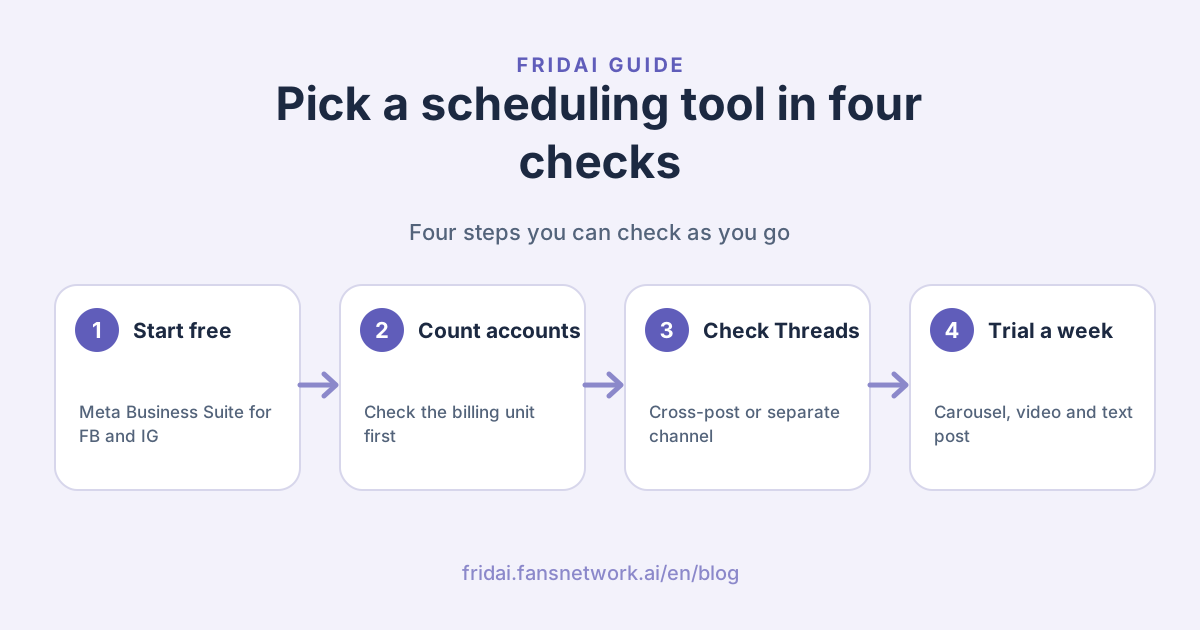
One more check that no table can answer: use the trial to schedule a real week. Schedule one carousel, one video and one text-only post, and see whether each looks the way you want on every platform.
FAQ
Are there free social media scheduling tools?
Yes. Meta Business Suite schedules Facebook and Instagram and lists no paid plan; Buffer's free plan connects 3 channels; Metricool's free plan allows 20 posts a month. Later and Hootsuite offer trials only.
Can you schedule posts on Threads?
Yes. The official Threads account announced built-in scheduling in the app, Meta Business Suite on desktop can cross-post to Threads, and the official pages of all five third-party tools compared here state Threads support.
Does scheduling posts reduce reach?
The official Meta help FRIDAI Editorial read does not say scheduling reduces reach. Meta offers scheduling itself in Instagram, Threads and Business Suite, and suggests times when followers are active. What its policies explicitly restrict is spam behaviour such as very high frequency and repeated content.
Can I post to Instagram, Facebook and Threads at the same time?
Yes. Meta Business Suite on desktop lets you choose all three as destinations when creating a post, provided the accounts are in the same business portfolio. In third-party tools you tick several accounts for one post; we suggest adjusting the text slightly for each platform.
Do I have to hand over my account password to a scheduling tool?
The proper method is to sign in on the platform's own authorisation screen and approve the permissions, so the tool receives an authorisation, not your password. FRIDAI also publishes through each platform's officially authorised API. If a tool asks you to type your social account password directly into its own page, stop and check first.
Scheduling tool or AI auto-posting tool: which should I choose?
It depends on which part you are missing. If the copy is already written and you just do not want to sit and post it on time, choose a scheduling tool or FRIDAI Post Lite. Consider a tool that writes as well as publishes, such as FRIDAI Post, only if you cannot produce content every week, and someone must still review it regularly.
How FRIDAI can help
If you already have content and only need it published on time, FRIDAI Post Lite schedules the posts you have written to 7 platforms. If what you lack is a content production line, FRIDAI Post writes the copy, makes the images and publishes according to the series you set up. If you only run Facebook and Instagram, we suggest getting comfortable with the free Meta Business Suite first.
- Content scheduling: FRIDAI Post
- Write it yourself, schedule only: FRIDAI Post Lite
- Threads scheduling: Threads scheduling guide 2026
- Sync posting: IG, FB and Threads sync posting guide (in Chinese)
- X multi-account: X multi-account auto-posting setup guide
- Instagram: FRIDAI on Instagram
- Threads: FRIDAI on Threads
- Facebook: FRIDAI on Facebook
Official sources
- Meta: Create and manage posts in Meta Business Suite: www.facebook.com/
business/ help/ 942827662903020 - Meta: Cross-post to Facebook, Instagram and Threads in Meta Business Suite: www.facebook.com/
business/ help/ 914097058035853 - Meta Business Suite product page: www.facebook.com/
business/ tools/ meta-business-suite - Meta: Use Planner in Meta Business Suite: www.facebook.com/
business/ help/ 1678733516458988 - Instagram Help Center: create and manage scheduled posts and reels: help.instagram.com/
439971288310029 - Official Threads account: built-in scheduling announcement: www.threads.com/
@threads/ post/ DFLXKN5yOQj - Meta Community Standards: Spam: transparency.meta.com/
policies/ community-standards/ spam/ - Buffer pricing: buffer.com/
pricing - Buffer for Threads: buffer.com/
threads - Later pricing: later.com/
pricing/ - Later Threads scheduler: later.com/
threads-scheduler/ - Metricool pricing: metricool.com/
pricing/ - Hootsuite plans: www.hootsuite.com/
plans - Hootsuite publishing features: www.hootsuite.com/
platform/ publish - Hootsuite Help: create social media content: help.hootsuite.com/
hc/ en-us/ articles/ 4403597090459-Create-engaging-and-effective-social-media-content - FRIDAI Post: fridai.fansnetwork.ai/
fridai-post - FRIDAI Post Lite: fridai.fansnetwork.ai/
post-lite