What Threads is, and how it relates to your Instagram account
In Taiwan many people call it 脆 ("cuì", a nickname that sounds like the English name). According to Meta's help pages, Threads is an app from Instagram for viewing and sharing public conversations; posts and replies can include short text, links, photos, videos or any combination.
On accounts, the help page states three things:
- Anyone who has an Instagram or Facebook account can create a Threads profile.
- Once created, the Threads profile is connected to the Instagram or Facebook account you logged in with.
- Meta uses that account's name, username, profile picture and bio, and also its status relating to intellectual property violations and Community Standards.
The last point matters for a brand: Threads is not a spare identity you can restart. The main account's record comes with it, and misbehaving on Threads can come back to the main account.
Is there a Threads business account?
Many people search for a "Threads business account". In Meta's official help today we found no article describing a separate business account type on Threads, so we do not write a "switch to a business account first" step. What we could find is this:
- Meta Business Suite's help states that a Threads profile can be added to a business portfolio, which is required before you can cross-post to Threads from the desktop version.
- The same page states that starting in September 2026 Threads access settings can be managed independently from Instagram, rolling out gradually. A brand that hands social to an outside partner can grant Threads only.
What Threads officially offers brands
Every cell below comes from Meta's help pages or official announcements. Where the announcement said testing or gradual rollout, we say so.
| Feature | Official statement | How a brand uses it |
|---|---|---|
| Insights | Views, replies, reposts and quotes, plus follower count over time and follower age, gender and location | Check weekly and find the topics that draw replies |
| Links | Up to five links in the bio, with a count of visits to links you share | One each for website, booking and LINE |
| Topic tag | Up to 1 topic per post, up to 50 characters, with or without # | Pick the single best fit |
| Communities | Introduced October 2025, built on topic tags and custom feeds | Find where your trade is discussed |
| Reply controls | Limit replies and quotes to followers; approve replies before they appear | For sensitive notices or promotions |
| Drafts and scheduling | August 2024: up to 100 drafts, scheduling entering tests | See the scheduling guide |
| Ads | Threads feed placement for image, video and carousel ads | Consider once there is budget |
A few of these need more explanation.
Insights
Meta announced insights in August 2024, covering views, replies, reposts and quotes on posts, plus follower count over time and follower demographics. Updates in 2025 added three things: tapping a metric breaks interactions into likes, replies, quotes and reposts; a chart covers a seven to 90-day period; and you can see where people found your content, including on other apps.
The help page adds two cautions. First, the reply count on a thread you start includes all replies in the thread, not just direct replies to your original post. Second, likes, replies, reposts, quotes and views are described as still in development. Read the numbers for trends, and do not lose sleep over single-digit differences.
Topic tags
The help page is clear: up to one topic per post, and tapping it shows search results for that topic. The Instagram habit of a long string of hashtags has no use here; pick the single best fit for each post.
Your posts may appear on Instagram and Facebook
The help page states that if your profile is public, Meta may suggest your Threads posts on Facebook or Instagram so that people can discover you, and that this can be turned off in privacy settings. A brand usually has no reason to turn it off, but you should know that the person reading your post may not be using Threads.
Ads
Meta's ads product page states that Threads ads appear in the feed between organic posts and can use your existing image, video and carousel creative; that the Threads feed placement is selected by default when you create a campaign in Ads Manager; and that you do not need a Threads profile, because an Instagram account or Facebook Page can be used. The page also says the ads deliver on mobile only and that feed ads have no call-to-action button.
To be plain about it: the page lists no countries, so we do not write that Taiwan is "fully open" or "not open". The most reliable check is to open your own Ads Manager and see whether Threads feed appears among the placements.
The limits on scheduling and drafts are fiddly, so they live in the Threads scheduling guide.
Content types that fit Threads
Threads is a text-first, conversational platform. Meta's guidance for creators says that top-performing creators post original content specifically for Threads, that posts which drive conversations are more likely to be recommended, and that photo, video and carousel posts with text average more views than those without. Meta gives no specific figures and we add none.
The table shows the kinds of post a brand uses most.
| Type | Example opening | Avoid |
|---|---|---|
| Opinion | Seven years in this trade, and the line I disagree with most is… | Picking fights or running others down |
| Question | When you buy coffee beans, do you look at origin or roast first? | Asking and never replying, or asking off-topic |
| Behind the scenes | One box short in today's delivery, so the menu changed | Complaining about customers |
| Small know-how | Cream that will not whip is usually a temperature problem | Ten points in one post |
| Work in progress | Third version of the new packaging: which of these two? | A thinly disguised ad |
| Answering customers | Someone asked by DM about home delivery, so here is the answer for all | Exposing a customer's details or chat screenshots |
| Product news | On sale Friday, quantities listed here | Making every post product news |
Keep two limits in mind when writing: the Threads API documentation states that text posts are limited to 500 characters, so longer writing becomes a thread of posts, and each post takes one topic.
The Chinese skeleton below is the copy-and-fill version for a Taiwan brand (first line, middle, closing question, topic, link):
【Threads 貼文骨架】

第一句:(一個立場、一個問題,或一件剛發生的事)
中段:(兩到四句,講你為什麼這樣想)
最後一句:(把球丟回去:你們呢?/選哪一個?)
主題:(一個)
連結:(非必要就不放)
For ranking and recommendations, see Threads algorithm 2026.
Replying is the core job: handling comments responsibly as they grow
In its October 2024 guidance Meta wrote that replies account for almost half of the views on Threads. That is Meta's statement, not our observation. What it means is that the line you write under someone else's post is content in its own right.
While replies are few, answer them all yourself. Once they grow, sort first, then reply.
Four principles for replying
- Answer questions before compliments. An unanswered question is visible to everyone.
- Do not paste the same answer ten times. Same meaning, different sentence.
- For anything with a fixed answer, such as price, stock or opening hours, keep one list so every reply is consistent whoever writes it.
- Complaints and disputes do not go to automation. Reply once in public, then ask the person to message you.
Three common replies, kept in Chinese because they are customer-facing (asking the price, asking opening hours, receiving a complaint):
【三種常用回覆】

問價格:謝謝詢問,這款是(價格),(一句補充)。需要其他尺寸再跟我們說。
問時間:我們(營業時間),(例外日)公休,來之前可以先看置頂。
收到抱怨:很抱歉讓你有這樣的經驗,我們想了解細節,方便私訊我們訂單資訊嗎?
Meta's spam rules
A high volume of comments makes tools tempting, which is fine, but read the rules first. The Spam policy in Meta's Community Standards prohibits the following, and notes that it applies whether done manually or automatically:
- Posting, sharing, engaging with content or creating accounts at very high frequencies.
- Requiring or claiming that users are required to engage with content before they can get something.
- Sharing deceptive or misleading links.
- Selling, buying or exchanging engagement, such as likes, shares, views, follows and clicks.
Separately, the Threads API documentation states that each profile is limited to 250 posts and 1,000 replies in a 24-hour period. That is a technical ceiling, not a recommendation; a frequency far below it can still cause trouble if the content repeats.
So when you reply with a tool, we suggest holding three lines: reply only under your own posts and do not flood strangers' posts; vary even the fixed answers; make sure a person can step in at any time. How to divide the work between automation and people is covered in the social media automation guide.
Protecting a discussion with reply controls
During 2025 Meta added two controls: you can allow replies and quotes only from your followers, and you can turn on reply approvals for individual posts, reviewing replies before deciding which appear publicly. They suit campaign notices and posts that attract advertising accounts. We do not suggest turning them on for ordinary posts, because the value of Threads is that strangers are willing to join in.
A 30-day start plan
This checklist assumes a one- or two-person brand with no dedicated social manager. Finish it and you will have a live account and numbers of your own.
Week 1: set up the account
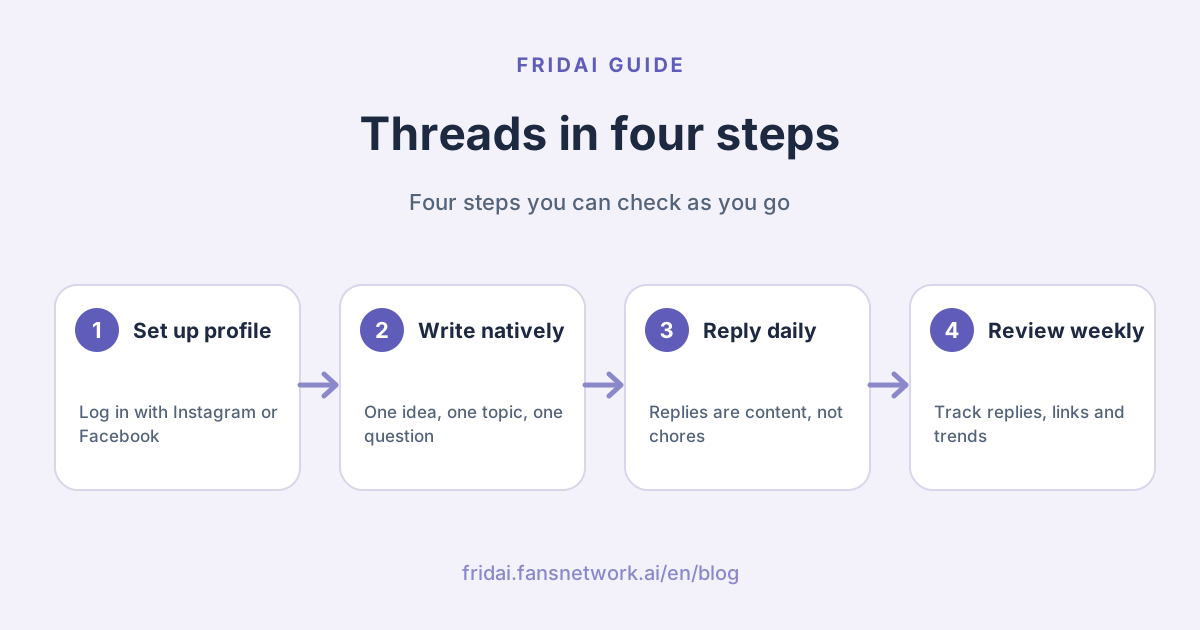
- Create a Threads profile with the brand's Instagram or Facebook account.
- Write a one-sentence bio that says who you are, where you are and what you sell.
- Add links to the bio. The official limit is five; start with website, booking or LINE.
- Confirm the profile is public.
- Follow peers, local shops and the accounts your customers follow, and spend a week watching how others talk.
Week 2: start posting
- Publish three to five posts. Meta's recommendation to creators is to post at least 2 to 5 times per week.
- One idea and one topic per post.
- End at least two posts with a question.
- Spend fifteen minutes a day replying, and leave three substantive replies on other people's posts.
Week 3: find your subjects
- Open insights and see which post drew the most replies.
- Write that subject again from two other angles.
- Try one post with a photo or video, and remember to add text.
- Collect the questions customers asked in replies and turn them into a list of set answers.
Week 4: fix the rhythm
- Decide how many posts a week and which types.
- Put routine posts on a schedule and keep reply time for yourself.
- Check link visits from the bio and replace links nobody opens.
- Write down three things: what drew replies, what did not, and what to do more of next month.
If you already publish Threads through FRIDAI Post, how the system adjusts the next post from performance is explained in the Threads auto-posting performance guide (in Chinese).
What to measure
With Threads marketing it is easy to stare at the follower count alone. We suggest pairing each metric with a question, as below.
| You want to know | Metric | How to read it |
|---|---|---|
| Is the content being seen | Views | Compare with your own last month, not with others |
| Does it start conversations | Replies and quotes | The reply count covers the whole thread; open it to see direct replies |
| Will people share it | Reposts | Usually practical or opinionated content |
| Does it bring people in | Link visits | Match against the link posts you published that week |
| Are these the right people | Follower location and age | A local business with the wrong locations should change its subjects |
| Where people find you | Where your content was seen | Includes recommendations on Instagram and Facebook |
Meta notes these metrics are still in development, so read trends rather than single days. We give no "good" number, because Meta has not published one and trades differ widely.
Common mistakes
Trading bait for comments
Lines such as "comment +1 to get the link" or "like to see the answer" correspond to the Spam policy item on requiring users to engage. A question asked because you want to hear opinions is fine; the difference is whether you are asking or setting a toll.
Pasting Instagram captions unchanged
Instagram captions often carry a string of hashtags and "link in bio". On Threads a post takes one topic, and the tone does not read as conversation. Meta's guidance to creators is to post original content specifically for Threads. Change at least three things: the first line, the topic and the last line. For setting up sync posting, see the Instagram, Facebook and Threads sync posting guide (in Chinese); even after syncing, the Threads version is worth adjusting by hand.
Over-automation
Scheduling is a feature Meta provides and is not the problem. The problem is scheduling and never looking, replying with one identical sentence, or publishing identical content from several accounts. High frequency and repetition fall under the Spam policy whether manual or automated.
Posting without replying
Publishing only announcements on a conversation-first platform is opening the shop door and ignoring whoever walks in.
Buying followers or engagement
The Spam policy explicitly prohibits buying, selling and exchanging engagement. And because the Threads profile is connected to your Instagram or Facebook account, whose violation status carries over, the risk is not confined to Threads.
To reuse a short video on Threads, see the Instagram Reels guide for specs and method; scheduling tools are compared in Social media scheduling tools 2026.
FAQ
Do you need an Instagram account to use Threads?
Not necessarily. Meta's help states that anyone who has an Instagram or Facebook account can create a Threads profile, and the profile is then connected to the account you logged in with.
Is there a Threads business account, and does it cost anything?
In Meta's official help today we found no article describing a separate business account type or a fee on Threads. What we found is that a Threads profile can be added to a business portfolio in Meta Business Suite, and insights can be viewed within Threads.
How many hashtags can a Threads post have?
The help page states up to one topic per post, up to 50 characters, with or without the # symbol. A long string of hashtags carried over from Instagram has no use here; pick the single best fit.
Why is nobody seeing my Threads posts?
Check three things: whether you pasted an Instagram caption, whether you invited replies with a question, and whether you reply to other people. Meta's guidance says posts that drive conversations are more likely to be recommended, and that replies account for almost half of views.
Can you advertise on Threads, and in Taiwan?
Meta's ads product page states that Threads feed is an ad placement supporting image, video and carousel ads, with no Threads profile required. The page lists no countries, so go by whether the placement appears in your own Ads Manager.
Will auto-replying to Threads comments get my account suspended?
Replying through the official API is not a violation in itself, and the limit is 1,000 replies per profile in 24 hours. The risk comes from high frequency, repeated content and misleading links, manual or automated; no tool can guarantee exemption from review.
How many times a week should a brand post on Threads?
Meta's recommendation to creators is at least 2 to 5 times per week. That is general official advice, not a guarantee. A small brand should aim for a steady week first, then adjust by the reply counts in insights.
How FRIDAI can help
If you get a handful of comments a day, reply yourself; you do not need FRIDAI. When you want routine posts on a fixed schedule, or comments outgrow your time, FRIDAI Post puts Threads on the same calendar as your other platforms, and FRIDAI Social can draft replies to Threads comments for you to approve, notifying a person when a complaint or price enquiry comes in.
- Content scheduling: FRIDAI Post
- Comment engagement: FRIDAI Social
- Scheduling tutorial: Threads scheduling guide 2026
- Short video: Instagram Reels guide 2026
- Instagram: FRIDAI on Instagram
- Threads: FRIDAI on Threads
- Facebook: FRIDAI on Facebook
Official sources
- Instagram Help Center: About Threads: help.instagram.com/
788669719351544 - Instagram Help Center: Tag a topic in your post on Threads: help.instagram.com/
1356090605000312 - Instagram Help Center: See information about your posts on Threads: help.instagram.com/
1328624721203027 - Instagram Help Center: Manage suggestions of your Threads posts on other apps: help.instagram.com/
757869952768933 - Meta Newsroom: New Threads features for creators and businesses (August 2024): about.fb.com/
news/ 2024/ 08/ new-threads-features-for-creators-and-businesses/ - Meta Newsroom: Threads educational insights (October 2024): about.fb.com/
news/ 2024/ 10/ find-your-community-with-new-threads-educational-insights/ - Meta Newsroom: Threads feature updates (2025): about.fb.com/
news/ 2025/ 03/ new-threads-features-more-personalized-experience-you-control/ - Meta Newsroom: Introducing Threads communities (October 2025): about.fb.com/
news/ 2025/ 10/ introducing-threads-communities-find-your-people/ - Meta: Ads in Threads: www.facebook.com/
business/ ads/ threads - Meta: Cross-post to Facebook, Instagram and Threads in Meta Business Suite: www.facebook.com/
business/ help/ 914097058035853 - Meta for Developers: Threads API overview and limits: developers.facebook.com/
docs/ threads/ overview - Meta Community Standards: Spam: transparency.meta.com/
policies/ community-standards/ spam/ - FRIDAI Post: fridai.fansnetwork.ai/
fridai-post - FRIDAI Social: fridai.fansnetwork.ai/
fridai-social