Reels specs and length: what the official help says today
Here are the numbers in one place. Every cell comes from the Instagram Help Center. Other "best sizes" that circulate online have no official source we could find, so they are not here.
| Item | Official statement | What it means for a small shop |
|---|---|---|
| Aspect ratio | Anything between 1.91:1 and 9:16 can be uploaded | Vertical 9:16 is simplest; Instagram also says vertical reels are more likely to be recommended |
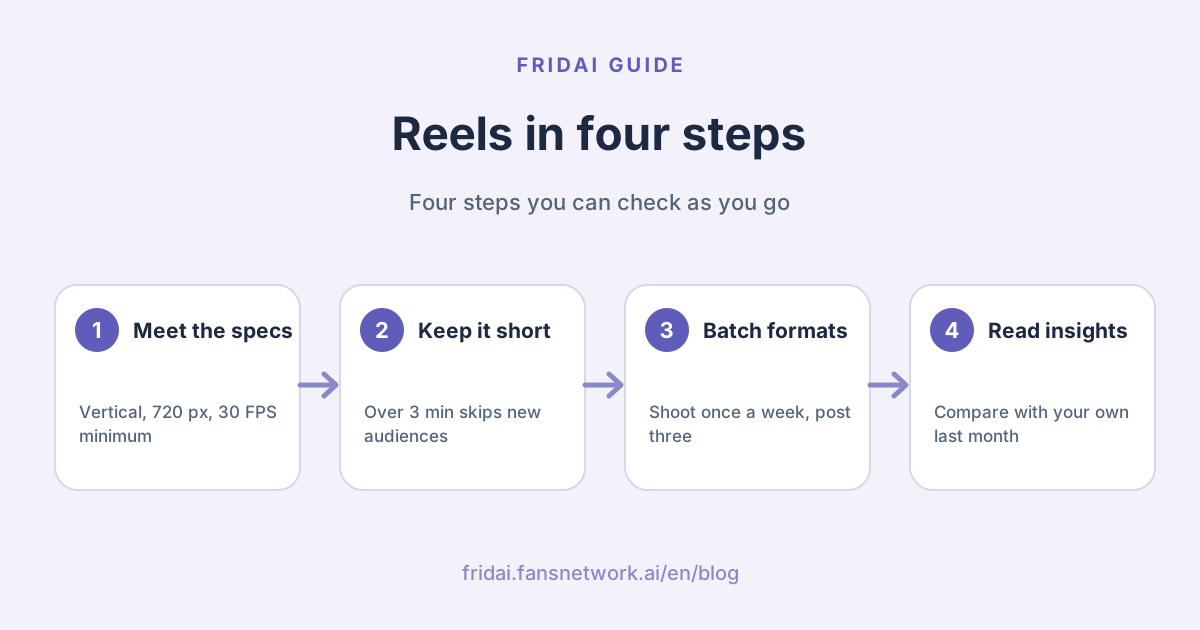
| Resolution and frame rate | At least 720 pixels and at least 30 FPS | Any recent phone manages this; no camera needed |
| Length | Record and edit up to 20 minutes | Being able to upload it does not make it a good idea |
| Recommendation cut-off | Reels over 3 minutes are not recommended to new audiences | To reach strangers, stay under 3 minutes |
| Cover | Recommended 420 x 654 pixels, a 1:1.55 ratio | Put the key words in the middle, leave margin top and bottom |
| Boosting | 90 seconds or less and full-screen 9:16 to be eligible | If you may run it as an ad later, film it this way from the start |
Get the cover right the first time
The help page is blunt: right now you cannot edit a cover photo after you have uploaded it. Finalise the cover before publishing. You can pick a frame from the clip or upload a separate image.
Upload quality
Instagram has an "Upload at highest quality" toggle, which the help page places under Media quality in the menu; uploads take longer with it on. If a sharp video looks soft after uploading, check this toggle first.
Choosing a length
Instagram gives only two numbers: a 20-minute maximum, and no recommendation to new audiences above 3 minutes. Meta has not published a "best" number of seconds, and we will not invent one. The practical test is simple: say what the video needs to say, then stop.
Recommendation eligibility: which reels are more likely to be seen
The Instagram Help Center splits this into two lists. Here they are, kept close to the original meaning.
| Type | Trait Instagram lists | What to check |
|---|---|---|
| More likely to be recommended | May be entertaining for a wide audience | Would someone who does not follow you understand it? |
| More likely to be recommended | Music from the Instagram library, or original audio made with the Reels audio tool | Was the music added inside the app? |
| More likely to be recommended | Filmed vertically | Was it shot landscape and cropped? |
| Seen less often | Muted, blurry or low resolution | Watch it on a phone before uploading |
| Seen less often | Borders, logos or watermarks | Was it downloaded from another app? |
| Seen less often | Most of the image covered by text | Do text cards hide the subject? |
| Seen less often | Not an original video | Is it someone else's footage? |
Two points deserve a careful read. First, Instagram notes that reels from people you follow still appear on their profile and in your feed and are not made less visible. In other words, this list affects whether strangers see you, not whether your followers do.
Second, Instagram's Recommendations Guidelines separately state that unoriginal content largely repurposed from another source with only minor edits and no material added value may not be eligible for recommendations, and that accounts which repeatedly used misleading practices to build a following, such as purchasing likes, may not be recommended. To see whether your account has any limits on its reach, the help page points to Account Status in settings.
For a fuller look at ranking, see Instagram algorithm 2026.
Music and audio: what a business account should know
This is where most of the confusion lives, so we stick to what the help pages say.
- You can use three kinds of audio: your own original audio, original audio by another Reels creator, or audio from the Instagram audio library.
- Licensed audio is copyrighted material Instagram makes available, such as music, film and TV clips and sound effects. It must be attributed to the artist and include the track name.
- Instagram warns that if its agreements with rights holders change, audio tracks in your posts can be muted, although the post can still be viewed. A muted track can be replaced.
- The audio troubleshooting page says that if you cannot find a song, the Licensed Music Library may not be available for your account type or in your country or region. In that case you can use music and sound effects from the Sound Collection.
- A reel you want to boost cannot use licensed music; Instagram recommends royalty-free music such as the Sound Collection, or original audio.
One caveat from us: the official pages do not list which account type can use which songs, so we do not claim that business accounts are barred from anything specific. Go by what you can actually find in your app. The safest option is your own voice and live sound, because original audio is not muted when a licence changes.
Also, cutting a commercial track into your video and uploading it as original audio does not get around the rules. Instagram states that when it detects licensed audio, it changes the attribution from Original Audio to the artist and song title.
Reels, carousels and Stories: which format for which goal
The three formats divide the work between them rather than replace each other. The table lists only differences the official help supports; it does not rank them by performance.
| Format | What the help states | Good for | Not for |
|---|---|---|---|
| Reels | Shown in the Reels tab, Explore and feed; can be recommended to people who do not follow you | Getting new customers to notice you | Details people need to read slowly |
| Carousel post | Up to 20 photos and videos in one post | Steps, menus, comparisons, price lists | Getting into the Reels tab |
| Stories | Expire after 24 hours; insights include replies, sticker taps and link taps | Today's notices, Q&A, limited offers | Staying on your grid long term |
One detail many people miss: Instagram states that videos inside a carousel are not considered reels, will not show up in the Reels tab and do not have reels features. If you want a video in front of strangers, post it as a reel, not as slide two of a carousel.
A weekly short-video routine for a small shop: one shoot, three formats
How does a one- or two-person shop keep short video going? Our advice is to separate thinking, shooting, editing and posting, so you are not starting from zero every day. The checklist below can be followed as written.
Pick three formats you can repeat
- Demonstration: one action from start to finish, such as pulling a coffee, wrapping a bouquet or repairing a phone.
- Answer: the one question customers ask most, answered to camera in three sentences.
- Behind the scenes: deliveries, prep, the hour before opening. No script; live sound is enough.
All three are vertical and original, as Instagram describes, and none needs outside material. They happen in your shop every day.
Weekly checklist
- On Monday, spend ten minutes listing this week's three videos, one per format.
- Choose a quiet hour and shoot all three in one go: vertical, same corner, same light.
- For each video, also capture a frame that can serve as the cover, since a cover cannot be changed after upload.
- Edit on your phone. Keep text off the subject and leave no other app's logo on the video.
- Prefer your own voice for audio; if you want music, add it inside Instagram.
- Use Instagram's built-in scheduling to place the three videos in the week. Instagram states that a public account can schedule up to 25 posts a day, up to 30 days in advance.
- For the first day or two after each video goes out, reply to comments yourself.
- On Sunday, open insights and note which format had the longest average watch time. Shoot one more of that kind next week.
Instagram also notes that product tagging, collaborative posts and sponsored posts are not compatible with scheduled content at this time. Publish the video that needs product tags by hand.
Testing the water: trial reels
If you worry a new topic will put off existing followers, Instagram offers trial reels. The video is shown first only to accounts that do not follow you; followers will not see it in feed or the Reels tab, and it does not appear on your profile unless you later share it with everyone. Eligibility as listed: a public account, with at least 200 followers for a professional account or at least 1,000 for a personal account. Instagram also states that trial reels are evaluated independently in ranking and do not affect your standard reels, and that the reel must be new, because reach may be limited if Instagram detects you have shared the same content before.
Hooks and structure: decide the order before you film
Short video most often stalls at "how do I start". The table lists common openings and the content each suits. It is a writing aid, not a performance promise; Meta has not published which kind of opening works better.
| Opening | Example line | Suits |
|---|---|---|
| Give the result first | This latte art, done for you in thirty seconds | Demonstration |
| Start with the question | People keep asking how long fresh flowers last | Answer |
| Point out a common mistake | Washing a down jacket: most people get step one wrong | Tutorial |
| Show the finished piece | Finished piece first, method after | Food, crafts |
| Open on live sound | No talking, just the sound of the shop opening | Behind the scenes |
Every video can be checked against the same skeleton. The Chinese template below is the copy-and-fill version for a Taiwan shop (opening line, three middle points, closing line, cover text, audio):
【短影音腳本骨架】

開頭一句:(觀眾為什麼要看下去)
中段三點:(每一點一句話、一個畫面)
結尾一句:(希望觀眾做什麼:留言、存起來、來店)
封面文字:(八個字以內,講這支影片在回答什麼)
音訊:(自己講話/現場聲音/App 內音樂)
For fuller talking-head structures and AI-generated scripts, see How to write a short-video script (in Chinese); we do not repeat it here.
Common mistakes: watermarks, music and reposted footage
Downloading from another app and re-uploading
Uploading a video edited on another platform with that platform's logo still on it is the most common mistake. Instagram states that reels containing borders, logos or watermarks are seen less often. Keep a clean original file and upload to each platform separately.
Using music you should not
Cutting a commercial song into the video carries two risks: the rights holder can block the content, and the track can be muted. It matters even more for a video you may boost later, because licensed music makes it ineligible.
Reposting someone else's video
Unoriginal videos are seen less often, and content largely repurposed without material added value may not be eligible for recommendations. Passing off someone else's video as your own saves time today and does the account no good later.
Text covering the frame
Instagram lists "the majority of the image covered by text" among reels seen less often. Captions are fine; a frame that is nothing but text is not.
Sharing to Facebook first, then wanting to advertise
The boosting requirements state that reels already shared to Facebook cannot be boosted, and neither can reels with third-party filters, GIFs, product tags or interactive stickers. Plan separately for videos you intend to advertise.
How to read Reels insights
The Instagram Help Center defines the Reels metrics clearly. Get the terms right before reading the numbers.
| Metric | Official definition | What it tells you |
|---|---|---|
| Views | The number of times your reel starts to play or replay | How often it played; one person can count more than once |
| Viewers | Unique accounts that saw the reel on screen at least once | Roughly how many people saw it; Instagram notes it is an estimate |
| Watch time | Total time the reel was played, including replays | How long it was watched overall |
| Average watch time | Watch time divided by the number of initial views | Where people tend to leave |
| Follows | Accounts that started following you as a result of viewing the reel | Whether it brought new followers |
A few notes on using them:
- Instagram states you need a public account, personal or professional, to view insights.
- Insights can be viewed for up to two years after the reel was published.
- Views and viewers are different things. High views with low viewers means the same people rewatched; close numbers mean most people watched once.
- The most useful one for a small shop is average watch time. Compare it with the video's length and you know roughly which line people left on; move that line earlier or cut it next time.
- Do not use someone else's numbers as a target. Followers and topics differ by account; comparing with your own last month is what means something.
Cross-posting: Facebook, Threads, TikTok and YouTube Shorts
Sending one video to several platforms is sensible, but each platform's rules have to be read separately. We write only what we could find an official statement for today.
- Facebook: the Instagram Help Center states that you link both accounts in Accounts Center and turn on the toggle for your Instagram reels under Sharing across profiles. Meta Business Suite's official table also lists that an Instagram reel can be cross-posted to Facebook Reels, Instagram Stories and Facebook Groups.
- Threads: in the same Meta Business Suite table, what can be cross-posted to Threads is a Facebook post or an Instagram post; the reel rows do not list Threads, and cross-posting to Threads is desktop only. To put a video on Threads, publish it as a Threads post in its own right and rewrite the text. For how to run Threads, see the Threads marketing guide and the Threads scheduling guide.
- YouTube Shorts: YouTube Help states that Shorts can be up to 3 minutes long and that you can upload vertical videos. Music availability differs from Instagram, so a track added inside Instagram is not automatically usable on YouTube.
- TikTok: we did not obtain a citable official TikTok specs page today, so we give no numbers; go by TikTok's own help. What is certain is the Instagram side: reels carrying another app's watermark are seen less often.
The steadiest approach is to keep one original file with no watermark and no embedded licensed music, then upload and add music on each platform separately. To schedule several platforms at once, see the Instagram, Facebook and Threads sync posting guide (in Chinese) and Social media scheduling tools 2026.
FAQ
How long can an Instagram reel be?
The Instagram Help Center states that you can record and edit reels up to 20 minutes, but reels over 3 minutes are not recommended to new audiences. To be seen by people who do not follow you, keep it under 3 minutes.
What are the Reels specs and sizes?
The help page gives an aspect ratio between 1.91:1 and 9:16, at least 720 pixels, at least 30 FPS, and a recommended cover of 420 x 654 pixels. Vertical 9:16 is simplest and also meets the boosting requirement.
Can a business account use popular music?
The help pages say only that the Licensed Music Library may not be available for your account type or region, in which case you can use the Sound Collection. Go by the tracks you can actually find in the app; original audio is the least likely to cause trouble.
Can I post a video downloaded from TikTok as a reel?
You can upload it, but Instagram states that reels containing logos or watermarks are seen less often. Keep a clean original file and upload it to each platform separately.
Why isn't my reel being recommended?
Check the official list first: muted, blurry, watermarked, covered in text, unoriginal, or longer than 3 minutes. Then open Account Status in settings to see whether the account has limits on recommendations.
How many reels a week should a small shop post?
Meta has not published a recommended number, and we give no benchmark. Start with three a week in three formats, keep it up for four weeks, then adjust by average watch time. Being able to continue matters more than volume.
Does scheduling Reels cost money?
Instagram's built-in scheduling has no extra charge: a public account can schedule up to 25 posts a day, up to 30 days ahead. You only need a tool to schedule other platforms too; FRIDAI Post Lite is US$300 a year.
How FRIDAI can help
If you only post to Instagram, built-in scheduling is enough and you do not need FRIDAI. When the same video has to go to Instagram, Facebook, YouTube, TikTok and more, or you want AI to draft the script first, look at FRIDAI Post. If you make the video and write the copy yourself and only need scheduling, FRIDAI Post Lite lets you set the Reels and Shorts cover on the same page.
- Content scheduling: FRIDAI Post
- Write it yourself, schedule only: FRIDAI Post Lite
- Script tutorial: How to write a short-video script (in Chinese)
- Further reading: Threads marketing guide 2026
- Instagram: FRIDAI on Instagram
- Threads: FRIDAI on Threads
- Facebook: FRIDAI on Facebook
Official sources
- Instagram Help Center: Reel size and aspect ratios: help.instagram.com/
1038071743007909 - Instagram Help Center: Record a reel, and how long a reel can be: help.instagram.com/
2720958398006062 - Instagram Help Center: What kind of reels you may see: help.instagram.com/
1525585517644948 - Instagram Help Center: Recommendations on Instagram: help.instagram.com/
313829416281232 - Instagram Help Center: What audio you can use in your reel: help.instagram.com/
329208821595430 - Instagram Help Center: Problems with audio: help.instagram.com/
1612770602842742 - Instagram Help Center: Boost an Instagram reel: help.instagram.com/
570215404599013 - Instagram Help Center: About trial reels: help.instagram.com/
1013292530224018 - Instagram Help Center: Create and manage scheduled posts and Reels: help.instagram.com/
439971288310029 - Instagram Help Center: View insights on your reels: help.instagram.com/
202865988324236 - Instagram Help Center: View insights on your Stories: help.instagram.com/
383939598845756 - Instagram Help Center: Share a post with multiple photos or videos: help.instagram.com/
269314186824048 - Instagram Help Center: Fix problems sharing reels to Facebook: help.instagram.com/
1206864193634431 - Meta: Cross-post to Facebook, Instagram and Threads in Meta Business Suite: www.facebook.com/
business/ help/ 914097058035853 - YouTube Help: Get started creating YouTube Shorts: support.google.com/
youtube/ answer/ 10059070 - FRIDAI Post: fridai.fansnetwork.ai/
fridai-post - FRIDAI Post Lite: fridai.fansnetwork.ai/
post-lite