How does the Threads algorithm rank posts? Meta's three steps
Meta's Transparency Center has a system card titled "Instagram Threads Feed AI system", marked as updated March 7, 2025. It is the most complete official description of how Threads recommends posts.
Step 1: Gather inventory
The system collects a portion of public Threads content plus all the content from accounts you follow, including text, photos and videos. Meta states that what is gathered has to meet its quality and integrity rules.
Step 2: Signals
The system considers input signals. Meta's example is how you have engaged with similar accounts, content or interests.
Step 3: Rank
The system predicts which content will be more valuable to you and shows higher-value content higher up. The card also states that several machine learning models work together and that the models and their input signals change frequently as the system learns.
Unlike the Facebook card, this one does not say how many posts are selected at a time, and it does not mention ads. How Facebook ranks is covered in Facebook Algorithm 2026 and is not repeated here.
For you versus Following
The Threads Help Center is direct about it: For you is a mixed feed of profiles you follow and recommended accounts, while Following shows only the profiles you follow. The system card adds that when you tap Following, content appears in reverse chronological order with no recommended content.
| Feed | Whose posts | How it is ordered |
|---|---|---|
| For you | People you follow plus recommended accounts | By the system's predicted value |
| Following | Only people you follow | Newest first |
| Custom feed | A feed you create yourself | Meta says it can be set to open first |
What this means for a small brand: "Threads traffic" has two sources. Followers see you in Following because you posted. People who do not follow you yet see you in For you because of the system's predictions. Both count toward views, and Insights shows them separately.
Which predictions and signals does Meta name?
The system card lists ten predictions and, under each, the input signals it uses. The table groups the ten into six kinds. The first two columns come from the card; the last column is FRIDAI Editorial's suggestion, not Meta's wording.
| Prediction | What the card says | What a small brand can do |
|---|---|---|
| Like | Predicts whether you will like a post | Write specific things followers agree with |
| Reply | Predicts whether you will create a reply | End on a real question; answer every reply |
| Scroll past | Predicts whether you will scroll past a post | Put the point in the first line |
| Tap into a post | Predicts whether you will tap a post, then another | Make the thread worth opening |
| Tap the author | Predicts whether you will tap the author's profile | Say clearly who you are in your bio |
| Time spent | Predicts time on a post and its permalink page | Match text and media; no padding |
The card's signal names are technical, so here are three groups in plain words:
- Your own habits: how much time you spent in the feed and on post pages over the past day, week and month, how many posts you liked, and how often you like a given author's posts.
- The discussion under a post: views, likes and taps on the reply chain under a post over the past hour and the past six hours. This signal appears again and again in the card.
- How the post itself is doing: the impressions a post receives, its ratio of likes to impressions, and engagement from viewers in the same country over the past week.
So the first fact to accept is that Threads ranks for each person individually. The same post gets a different score for a follower who often talks to you and for a stranger.
What is not recommended?
Honestly, Meta says less here for Threads than for Facebook. FRIDAI Editorial splits what we read into four points and marks which pages are about Threads and which are about Instagram.
"What can't be recommended" in Account Status
The Threads Help Center says Account Status in the app shows two kinds of content: removed content and content that can't be recommended. You can open the affected item, edit or remove it, or request a review. Meta also warns that a review decision can take up to 90 days.
Recommendations Guidelines are stricter than Community Standards
The Instagram Help Center has a page on recommendations that states the principle up front: recommended content comes from accounts you have not chosen to follow, so the bar is higher than the Community Standards. Content that falls short may stay on the platform but is not recommended. The types this page lists as low-quality include:
- Unoriginal content that is largely repurposed from another source with only minor edits and no material added value.
- Long captions unrelated to the content, and coordinated comment networks meant to artificially drive engagement and distribution.
- In countries with third-party fact-checking, content that fact-checkers have reviewed and rated.
There is an account-level list too, such as accounts that recently violated the Community Guidelines or repeatedly used misleading practices like buying likes to build a following. Note that this page's wording covers Facebook and Instagram. The pages we read do not say whether Threads applies the same list item by item, so treat what your own Account Status shows as the answer.
What users do themselves
The system card lists the controls people have: unfollow, hide, mute and report. It states that hiding a post makes the system show less similar content, and so does reporting. In other words, a post that makes people want to hide it costs you more than that one post.
Political and civic content
Meta's Transparency Center page on political content (marked as updated September 18, 2025) says political content is now treated like other types of content and may be recommended to people who do not follow you. Users can adjust how much of it they see.
What advice has Meta itself given?
In October 2024 Meta published guidance for creators on how to grow on Threads. These are that post's points. The numbers are Meta's statements, not FRIDAI Editorial's tests:
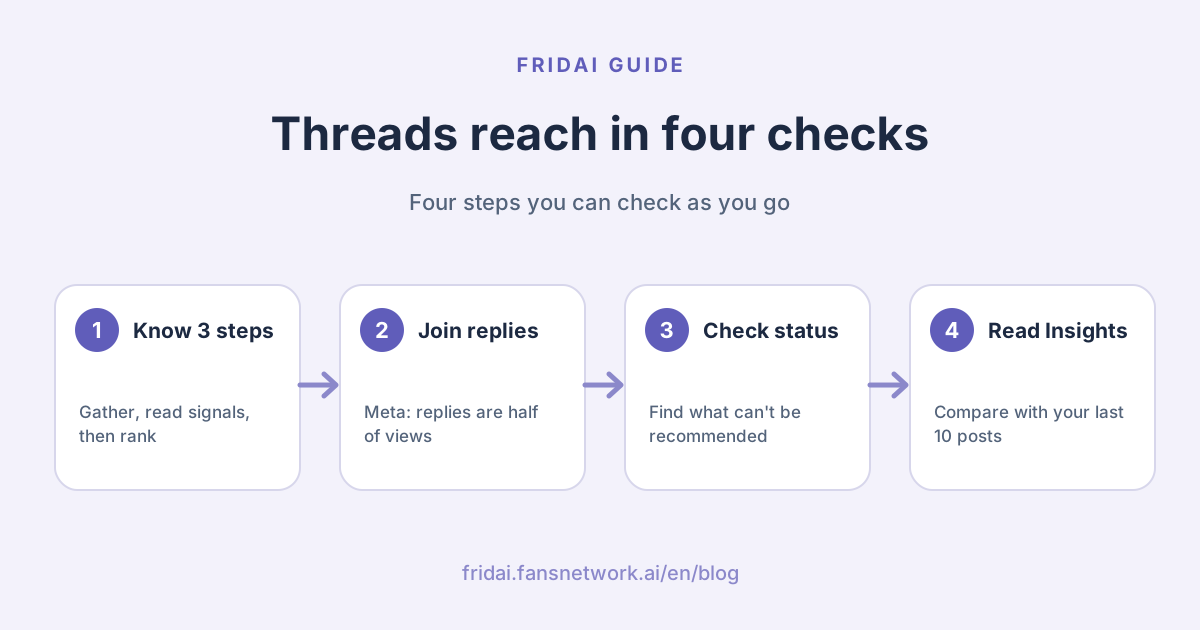
- Replies account for almost half of the views on Threads. Joining other people's conversations is itself a source of reach.
- Meta recommends posting at least 2 to 5 times per week, on the grounds that higher frequency is associated with more impressions per post.
- Posts that drive conversations are more likely to get recommended.
- Top-performing creators post original content made specifically for Threads.
- Video, photo and carousel posts that include text average more views than those without.
Separately, in its 2025 feature update Meta said that, according to its internal data, posts with a tagged topic generally get more views. The same post says eligible creator posts can be recommended to people on Instagram and Facebook. In the other direction, the Instagram Help Center lists "your activity on your Threads profile" as one basis for Instagram's suggested posts. The two apps are linked; for the Instagram side, see Instagram Algorithm 2026.
Myths versus official statements
| Common claim | Does Meta say it? | Our advice |
|---|---|---|
| Scheduled posts get less reach | None of the pages we read says so | Schedule freely; content matters more |
| You must post many times a day | Meta only suggests at least 2 to 5 a week | Keep a pace you can sustain |
| Links always get less reach | None of the pages we read says so | Check your own numbers in Insights |
| Following is also re-ranked | The card says newest first | Post steadily so followers see you |
| Posting without replying is fine | Meta says replies are about half of views | Set aside time to reply every day |
| Topic tags do nothing | Meta says tagged posts get more views | Add one relevant topic per post |
| There is a normal view count | Meta publishes no average | Compare only with your recent posts |
One more word on scheduling. Threads has its own built-in scheduling, and Meta's August 2024 announcement introduced drafts, scheduling and insights together for creators and businesses. FRIDAI Editorial could not find any official statement that the platform penalises a feature it provides itself. For how to choose between built-in scheduling and tools, see the Threads scheduling guide and social media scheduling tools 2026.
What changed in 2026
Only changes with a date that we read on an official page today.
- On February 11, 2026, Meta launched Dear Algo: write "Dear Algo" in a public post followed by what you want to see more or less of, and your feed adjusts for three days. Reposting someone else's request applies it to your feed too. The announcement lists the US, New Zealand, Australia and the UK.
- On June 16, 2026, Meta launched Your Algo: privately tell the system which topics you want more or less of, for one, three or seven days, visible only to you. The announcement lists the US, Canada, the UK, Australia and New Zealand. The help page adds that you can have up to 5 active requests of each kind at a time and notes the features may not be available in your region.
- The same announcement says Communities have graduated from beta and that native-language community tags are starting in Japan, Korea and Taiwan. It is one of the few official updates this year that names Taiwan directly.
What this means for a shop: people can now tell the system "this is the topic I want for the next few days". The clearer your post's topic, the easier it is to match with people who asked for it. That is FRIDAI Editorial's inference; the announcement makes no such promise.
Weekly posting checklist
Keep this checklist next to your scheduling tool and run through it before you plan each week. It is in Chinese because it is meant for a Taiwan-based team; in English it covers: before posting (written for Threads and not pasted from elsewhere, first line states the point, media comes with text, one relevant topic tag, ends on a question followers can answer), after posting (answer replies the same day, leave two or three real replies under other posts on the same topic), and a weekly review (did you reach 2 to 5 posts, which post beat your typical post views, the follower versus non-follower split, and whether Account Status shows anything that can't be recommended).
【每週 Threads 發文檢查清單】

發文前
□ 這則是專為 Threads 寫的嗎?還是把別處的文案原封不動貼過來?
□ 第一行有直接講重點嗎?
□ 有相片或影片的話,有沒有配上說明文字?
□ 加了一個和內容相關的主題標籤了嗎?
□ 結尾是不是一個粉絲真的答得出來的問題?

發文後
□ 當天回完底下的回覆,有人追問就繼續聊。
□ 到同主題的別人貼文底下,認真回覆兩三則。

每週回顧
□ 這週發了幾則?有沒有達到每週 2 到 5 則?
□ 洞察報告裡,哪一則高於「一般貼文瀏覽」?寫的是什麼?
□ 粉絲與非粉絲的瀏覽各占多少?
□ 帳號狀態有沒有出現「不能被推薦」的內容?
How to read Threads Insights
According to the Threads Help Center, on a computer you open Insights from the left menu on threads.com. Meta's definitions:
| Metric | Meta's definition | What to keep in mind |
|---|---|---|
| Views | Total views your content received, followers and non-followers | One person can count more than once |
| Viewers | Unique Threads profiles that saw it at least once | Closer to "people" than views |
| Interactions | Total likes, replies, reposts and shares | Read together with views |
| Net followers | New follows minus unfollows and profiles that left | Watch the trend, not one day |
| Top sources of views | Share from Home, Profile, Activity and Search | Shows where a post was seen |
Three details worth remembering.
- "Views over time" for a single post compares that post with your "typical post views", and Meta states that the typical figure is the median of your last 10 posts. That is the baseline Meta gives you, and it is more reliable than any average quoted online.
- For a single post you can see views from followers and non-followers separately, plus how many profile visits and follows came from that post.
- The Audience tab has "Most active times", calculated from the last 30 days in your current time zone. If you want to know when to post, look there.
Meta also notes that some insights metrics are estimated and in development.
When Threads reach drops, what should you check first?
The last two boxes differ like this: fewer non-follower views means you are being placed in other people's For you feed less often, so join conversations and make your topic clear. Fewer follower views means even your existing followers are not stopping, so go back and see which posts got replies. If you auto-post with a tool, the Threads auto-post performance guide (in Chinese) explains how to let results shape the next round of content.
FAQ
Do scheduled Threads posts get less reach?
None of the official Meta pages FRIDAI Editorial read says so. Threads offers scheduling itself. The predictions on the system card are likes, replies, tapping into posts and time spent; none of them relates to whether a post was scheduled.
How many times a day should I post on Threads?
Meta gives no daily number. Its October 2024 announcement recommends posting at least 2 to 5 times per week and says higher frequency is associated with more impressions per post. Fix a pace you can sustain, then adjust with Insights.
Why did my Threads posts suddenly stop getting views?
Open Insights and compare the post with the median of your last 10 posts, then see how much follower and non-follower views each fell. Next, check Account Status for content that can't be recommended. Meta publishes no "normal" view count.
Do links reduce reach on Threads?
None of the official pages we read says so, and the ten predictions on the system card do not mention links. To see how your link posts actually perform, compare your own numbers in Insights and ignore percentages without a source.
Can a Threads account be limited in recommendations, and how do I check?
Yes. The Threads Help Center says Account Status in the app shows removed content and content that can't be recommended, and lets you edit, remove or request a review. Meta warns that a review can take up to 90 days.
Are Dear Algo and Your Algo available in Taiwan?
Neither announcement lists Taiwan among the launch regions, and the help page notes the features may not be available in your region. Check the menu in your own app; FRIDAI Editorial will not guess Meta's timing.
Can an auto-posting tool increase Threads reach?
A tool helps you post steadily and saves time. It cannot guarantee reach. Threads ranks on each person's predicted reaction to the content, so whether people reply to you, and whether you reply to others, is still yours to look after.
How FRIDAI can help
If your problem is "I know Threads needs steady posting, but every week I have nothing ready", FRIDAI Post lets you set up recurring post series; the AI then writes the copy and publishes on time to Threads, Instagram, Facebook and four other platforms. If you cannot keep up with comments under your posts, FRIDAI Social replies to Threads comments automatically using rules you write. Both solve consistent output and timely replies, not reach: no tool can guarantee reach, and what goes out still needs a person to check it regularly.
- Content scheduling: FRIDAI Post
- Comment engagement: FRIDAI Social
- Instagram ranking: Instagram Algorithm 2026
- Facebook ranking: Facebook Algorithm 2026
- Threads scheduling: How to schedule Threads posts in 2026
- Tool comparison: Social media scheduling tools 2026
- Performance loop: Threads auto-post performance guide (in Chinese)
- Account risk: Can Instagram auto-reply get you banned?
- Instagram: FRIDAI on Instagram
- Threads: FRIDAI on Threads
- Facebook: FRIDAI on Facebook
Official sources
- Meta Transparency Center: Instagram Threads Feed AI system card: transparency.meta.com/
features/ explaining-ranking/ ig-threads-feed/ - Meta Transparency Center: Our approach to explaining ranking: transparency.meta.com/
features/ explaining-ranking/ - Meta Transparency Center: Our approach to political content: transparency.meta.com/
features/ approach-to-political-content/ - Threads Help Center: About your feeds on Threads: help.instagram.com/
2249022798820145/ - Threads Help Center: Personalize your For you feed on Threads: help.instagram.com/
1430001345391112/ - Threads Help Center: View insights on Threads: help.instagram.com/
3675908612671136/ - Threads Help Center: See information about your posts on Threads: help.instagram.com/
1328624721203027/ - Threads Help Center: How to check your Threads Account Status: help.instagram.com/
697276972992357 - Threads Help Center: What to do if you don't think Threads should have taken down your post: help.instagram.com/
2884876031692206 - Threads Help Center: Manage suggestions of your Threads posts on other apps: help.instagram.com/
757869952768933 - Instagram Help Center: Recommendations on Instagram: help.instagram.com/
313829416281232/ - Instagram Help Center: How Instagram determines which posts appear as suggested posts: help.instagram.com/
381638392275939 - Meta Newsroom: Find Your Community With New Threads Educational Insights (October 2024): about.fb.com/
news/ 2024/ 10/ find-your-community-with-new-threads-educational-insights/ - Meta Newsroom: New Threads Features for Creators and Businesses (August 2024): about.fb.com/
news/ 2024/ 08/ new-threads-features-for-creators-and-businesses/ - Meta Newsroom: New Threads Features for a More Personalized Experience That You Control (2025): about.fb.com/
news/ 2025/ 03/ new-threads-features-more-personalized-experience-you-control/ - Meta Newsroom: Control Your Threads Feed With New Dear Algo Feature (February 2026): about.fb.com/
news/ 2026/ 02/ threads-dear-algo/ - Meta Newsroom: New Features to Celebrate 500 Million Monthly Users on Threads (June 2026): about.fb.com/
news/ 2026/ 06/ meta-launching-new-features-500-million-monthly-threads-users/ - FRIDAI Post: fridai.fansnetwork.ai/
fridai-post