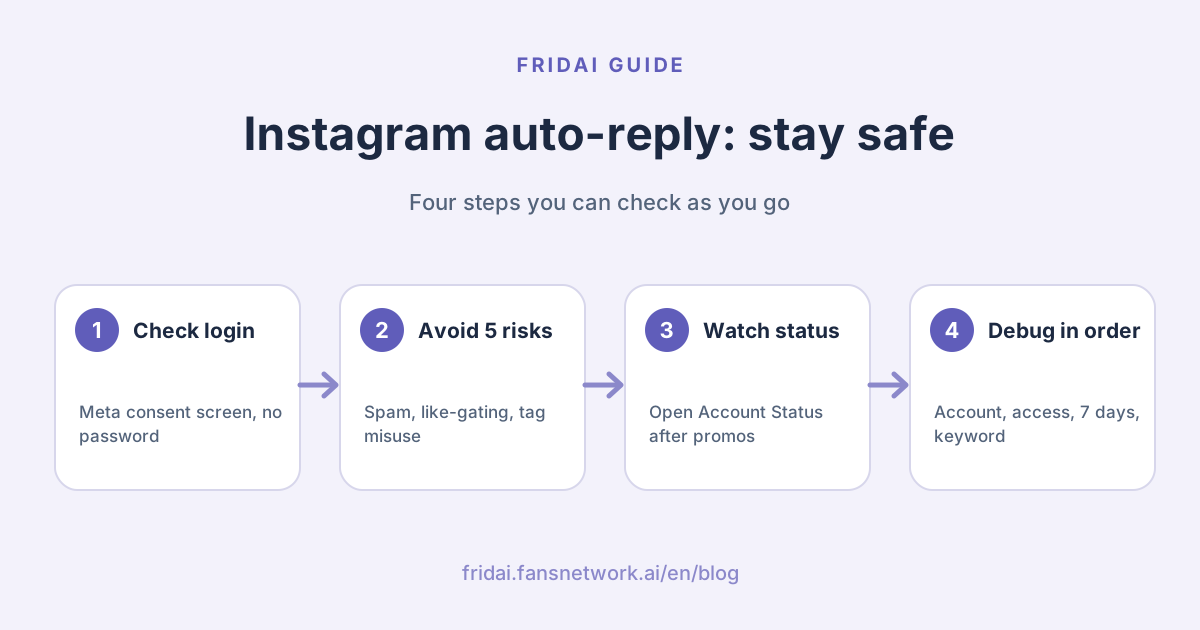
To be upfront: FRIDAI is itself an auto-reply tool built on the official API, so we have a stake in this question. Every risk below links to an official Meta page you can open and check for yourself. Where Meta has not published a number, FRIDAI Editorial will not invent one.
First, tell official API tools apart from unofficial bots
Two very different things are both sold as "Instagram auto-reply". There is one way to tell them apart: how the tool connects to your account.
| Type | How it connects | Meta's position |
|---|---|---|
| Meta's native features | Set up directly in the Meta Business Suite inbox | Provided by Meta |
| Official API tools | Redirect you to Meta's authorization screen, where you approve permissions | Open to developers, bound by policy |
| Unofficial bots | Ask you to type in your Instagram password, or install a plugin that imitates a person | Not allowed by the Terms of Use |
Instagram's Terms of Use are plain about it: you may not access or collect information by automated means without express permission, and you may not solicit or collect other people's login credentials. The official API is that "express permission" channel, and a tool has to obtain advanced access from Meta before it can send and receive messages for someone else's account.
So when you pick a tool, look at the login step first. Being sent to Meta's authorization page with a list of requested permissions is normal. Typing your Instagram password into someone else's website is your cue to close the tab.
Five high-risk behaviours Meta spells out
Handing your password to a third party
The first line of Instagram's Help Center page on third-party apps is: do not give your login information to people or apps you do not trust. The same page says that accounts using such services to get likes and followers may have some features limited, and may be disabled or terminated.
High-frequency, repetitive engagement
Meta's spam policy does not allow posting, sharing or engaging at "very high frequencies", whether done manually or automatically. It also says that lower-frequency activity can still be restricted when it shows other signs of spam, such as repeated content. Meta has not published a "messages per hour" figure. The caps you see passed around online did not come from Meta, so do not treat them as a safety line.
Trading likes, follows or shares for content
The same policy specifically names "requiring users to like, share or follow before they can get specific content". Sending a resource when someone comments a keyword is a feature Meta offers itself, but do not write "follow and share to receive it" in the caption.
Using message tags where they do not belong
After someone messages you, a business has 24 hours to reply. After that only specific tags apply, for example the one that lets a human agent reply manually within 7 days. Meta's policy page states that using tags outside the approved use cases may limit your ability to send messages. Using the human agent tag to push a promotion is exactly that.
Not disclosing that the reply is automated
Meta requires automated conversations to let the person know they are talking to an automated service where the law demands it, and recommends disclosing it even where the law does not. This is not a direct cause of restrictions, but it is written into the policy, and following it is the calmer way to live.
What you will see before a restriction
Instagram has a page called Account Status, found in Settings. According to the official help page, it shows content that was removed and features you currently cannot use, and lets you request a review of a decision. Instagram also says that in most cases you will get a warning before you lose access to your account.
So build a habit: after every large comment campaign, go in and take a look. Stopping automation when a warning appears is a far better deal than betting that nothing will happen. If the account has already been disabled, our guide on what to do when an Instagram account is disabled lists the full official routes.
Already got a warning? Do these four things first
- Pause every automation rule, including scheduled campaigns. Stop first, investigate second, never the other way round.
- Open Account Status, write down the removed content and unavailable features, and keep screenshots.
- Think back over the last two weeks: a newly connected tool, new campaign copy, a sudden spike in comments. The problem usually sits in the most recent change.
- If you believe the decision is wrong, request a review once in Account Status and state the facts clearly. Do not switch accounts or tools and carry on doing the same thing.
If you were using an unofficial tool, the most important moves right now are to change your password, remove the tool's access and turn on two-factor authentication.
Does using an official API tool make you safe?
No. The official API only guarantees that the connection method is compliant. It does not guarantee that what you do with it is.
A tool on the official API can still be set up to answer every comment with the identical sentence, or to run a campaign whose caption says "follow to get the file". Those break content and behaviour policies, regardless of which route the tool takes. On the other hand, the official API does block a different class of risk for you: it does not allow automated pushes after 24 hours, and it does not allow several DMs in response to one comment, so a tool that wanted to misbehave could not get the messages out anyway.
FRIDAI Editorial's view: the official API is a necessary condition, not a free pass. The tool is responsible for staying inside the lines; the copy and the frequency are still yours to manage.
Instagram comment auto-reply not working: the troubleshooting table
Every row below maps either to Meta's documentation or to basic logic that any automation tool shares. Work through it in order; most problems turn up in the first four rows.
| Possible cause | Meta's rule or logic | What to check |
|---|---|---|
| Not a professional account | The API supports business or creator accounts only | Whether the account type has been switched |
| Message access not allowed | Allow access to messages must be on | Connected tools in Instagram message settings |
| Account not linked properly | Native features need a Meta Business Suite link | Link status and your admin permissions |
| Authorization expired | Once the app is removed, the tool gets no events | Connection status in the tool; re-authorize if needed |
| Comment too old | No DM is possible 7 days after the comment was made | Whether an old comment triggered it |
| Live has ended | Live comments can only get a DM during the broadcast | Whether the rule was on before you went offline |
| One was already sent | One comment gets one DM only | The same comment will not trigger twice |
| Keyword mismatch | Native keywords need an exact, case-sensitive match | Typos, full-width vs half-width characters, stray spaces |
| Expecting an instant reply | Native keyword replies send after 15 minutes | Wait and look again, or use another method |
| Overridden by another rule | When a template automation and a keyword both fire, only one sends | Whether an away message or similar is also on |
| Business Agent is on | Turning it on pauses existing automations | Whether Meta Business Agent is enabled |
| It actually did send | Non-followers receive it in message requests | Ask them to check their message requests |
| Requests turned off | Users can choose not to receive message requests | Nothing a tool can do about this one |
| Past 24 hours | No automated reply 24 hours after their last message | The time of the last message in the thread |
| Comment on an ad | Ad comments may be notified more than once | Whether the tool covers ad posts and deduplicates |
| Blocked by the tool | Deduplication, rate limits, skip lists | The tool's log or skip reason |
Meta's setup page adds one more note: some business messaging features are not available in Europe and Japan. If your customer is in one of those regions, silence does not necessarily mean you set something up wrong.
Diagnosis flowchart
If you reach the last box and there is still nothing, open the tool's send log, then contact the tool's support with the comment time, the post link and the keyword. With those three ready, they usually do not need to come back with another round of questions.
Safe setup checklist
- Only use tools that redirect to Meta's authorization page. Never type your Instagram password into a third-party site.
- Read the permissions when you authorize, and grant only the ones comments and messages need.
- Put the key point in the first comment-to-DM message, and invite the person to reply.
- Do not write "like, follow or share to receive" in your copy.
- Trigger once per comment, and do not message the same person repeatedly in a short time.
- Prepare several versions of the public reply so they are not all identical.
- Say in the first DM that it is an automated reply, and how to reach a person.
- Turn the rule off when the campaign ends, so old posts do not keep triggering it.
- Check Account Status regularly. If you see a warning, stop first and investigate second.
- Review your connected apps regularly and remove the ones you no longer use.
A first DM you can paste in
Comment-to-DM gives you one message, and the conversation only continues if the person replies. Here is how FRIDAI Editorial would write it for Taiwanese customers. In English: "Hi, this is an automated reply. The course details you asked for are here: (link). For prices or time slots, reply '
嗨,這是自動回覆。你留言要的課程資訊在這裡:
(放連結)
想問價格或時段,直接回我「想了解」,會有人接著回你。
All three jobs are in there: disclosing that it is automated, delivering what was asked for, and asking for a one-line reply. For finer-grained rules, see how to write AI customer service rules.
FAQ
Can Instagram auto-reply get my account banned?
Auto-replies through Meta Business Suite or an official API tool are not a violation in themselves. The risk comes from unofficial tools that take your password, high-frequency repetitive messages, trading likes or follows for content, and misusing message tags.
How many auto-replies a day before I get restricted?
Meta has not published a per-business message cap. The policy only says very high frequencies are not allowed, and that lower-frequency but repetitive content may also be restricted. Rather than hunting for a number, avoid repeated content and repeated triggers.
The tool says "sent" but the customer says nothing arrived. Why?
When the person does not follow you, a DM triggered by a comment lands in their message requests folder, so ask them to look there. If they have chosen not to receive message requests, it really cannot be delivered.
How long until a restricted feature comes back?
The official help pages do not give a fixed time. What you can do is open Account Status to see the restricted feature and the reason, request a review there if you think the decision is wrong, and pause automation in the meantime.
Is it okay to use an auto-reply tool that asks for my Instagram password?
We do not recommend it. Instagram says outright not to give login information to apps you do not trust, the practice falls outside what the Terms of Use allow, and the account may be restricted or disabled.
My Instagram comment auto-reply is not working. What do I check first?
Three things: whether the account is a professional account, whether tools are allowed to access messages, and whether the tool's connection is still valid. If those are fine, check whether the comment is older than 7 days and whether the keyword matches.
How FRIDAI can help
FRIDAI Social's comment replies and comment-to-DM run on Meta's official API. It can produce a draft for you to approve before anything is sent, and you can define which comments to leave alone and when to notify a person. FRIDAI Editorial's position: whether something can be automated is not the point. Being able to see what happened when something goes wrong is.
- Comment engagement: FRIDAI Social
- DM support: FRIDAI Chat
- Choosing a tool: Instagram auto-reply tools compared for 2026
- When an account is in trouble: Instagram disabled or Facebook hacked: what to do
- Writing rules: How to write AI customer service rules
- Instagram: FRIDAI on Instagram
- Threads: FRIDAI on Threads
- Facebook: FRIDAI on Facebook
Official sources
- Instagram Terms of Use: help.instagram.com/
581066165581870 - Instagram on third-party apps: help.instagram.com/
588549329146493 - Meta Community Standards, spam policy: transparency.meta.com/
policies/ community-standards/ spam/ - Meta Messenger Platform policy overview: developers.facebook.com/
docs/ messenger-platform/ policy/ policy-overview - Meta developer docs, Private Replies: developers.facebook.com/
docs/ messenger-platform/ instagram/ features/ private-replies - Meta developer docs, Instagram Messaging API: developers.facebook.com/
docs/ instagram-platform/ instagram-api-with-instagram-login/ messaging-api - Meta developer docs, Instagram Platform overview: developers.facebook.com/
docs/ instagram-platform/ overview - Instagram, managing message access: help.instagram.com/
791161338412168 - Instagram, managing message requests: help.instagram.com/
585369912141614 - Instagram, checking Account Status: help.instagram.com/
338481628002750 - Meta Business Suite inbox automations: www.facebook.com/
business/ help/ 395965998733706 - Meta Business Suite, setting up automations on desktop: www.facebook.com/
business/ help/ 318238182723007 - FRIDAI Social: fridai.fansnetwork.ai/
fridai-social