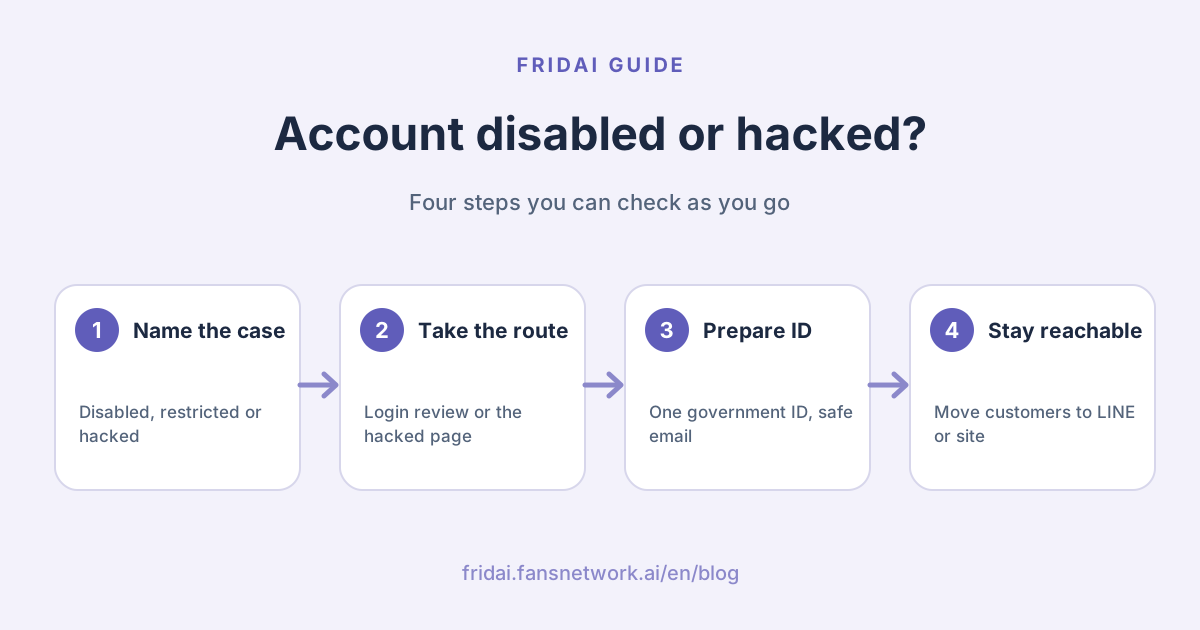
To be upfront: this article summarizes what Meta's official help pages say today. FRIDAI has no "inside channel" that can unlock an account, and anyone who claims to have one deserves your suspicion. Screens and options can differ by region and app version, so go by what you actually see.
First, tell them apart: disabled, restricted or hacked
Take a breath first. All three look like "something is wrong with my account", but they are handled very differently.
| Situation | What you see | Official route |
|---|---|---|
| Account disabled | A message at login saying the account is disabled | Log in and request a review as shown |
| Features restricted | You can log in, but some features do not work | Account Status in Settings |
| Account hacked | Password or email changed, posts you did not make | instagram.com/ |
| Business assets restricted | A Page or ad account shows as restricted or disabled | Meta Business Support Home |
| Account deleted | No disabled message, and the account cannot be found | Meta says it cannot be restored |
Instagram's help page makes a point of this: if you do not see a disabled message when you log in, it may just be a login problem, the account may have been taken over by someone else, or it may have been deleted by you or by someone who knows the password. Do not assume "disabled" from the start.
Decision flowchart
Instagram account disabled: what the official page says
Instagram's Help Center puts it this way: accounts that do not follow the Community Guidelines may be disabled, and you will see a message when you try to log in. If you believe it was a mistake, you can log in to Instagram and follow the on-screen instructions to request a review of the decision.
A few things to notice. This page does not say how long a review takes, so anyone telling you "you will hear back within three days" is not quoting Meta. The page does not list a separate appeal form either; the entry point is the screen you get after logging in. Once an account is disabled, other people can no longer see it.
If the account was deleted rather than disabled, Instagram states that it cannot be restored. You can sign up again with the same email, but you may not get your original username back.
Instagram hacked, or you cannot get in
Instagram's official entry point is instagram.com/. Open it in a desktop or mobile browser and follow the steps. The help page also lists several things to try, and Instagram recommends trying all of them:
- Look in your inbox for a message from security@mail.instagram.com. If your email address was changed, the message may include an option to revert that change.
- Tap "forgot password" on the login screen and ask Instagram to send a login link to your email or phone.
- If the link does not work, request support from Instagram on your phone and enter a secure email address that only you can access.
- Verify your identity when asked. If the account has photos of you, you may be asked to record a selfie video turning your head; Instagram says this video will not appear on Instagram and will be deleted within 30 days.
You can still log in, but someone is meddling
Instagram recommends doing five things immediately: change your password, turn on two-factor authentication, confirm that the phone number and email on the account are correct, go to Accounts Center and remove linked accounts you do not recognize, and revoke access for any suspicious third-party apps.
Professional accounts have one more move. Instagram's help page says that if you can log in but suspect the hacker is still active, you can open business settings in Meta Business Suite on a computer and check the list of people under Users for admins you do not recognize.
Facebook account hacked or suspended
Facebook account hacked
Facebook's official entry point is facebook.com/. The help page recommends opening it on a device you have used to log in to Facebook before, and the system will walk you through a round of security steps. A Page is usually tied to a personal account, so until the personal account is recovered, the Page often cannot be touched either.
Facebook account suspended or disabled
Facebook's help page is more specific than Instagram's: when an account is suspended, you see a notice at login and can appeal within 180 days, and Facebook notes that this window varies by region. If you do not appeal in time, or the appeal fails, the account is permanently disabled and you cannot request another review. Facebook also says that for severe violations an account may be disabled without being suspended first.
In other words, the appeal is precious. Thinking your statement through before you submit matters more than being fast.
A Page or ad account is restricted
Business assets go a different way. Meta's business help says: open Meta Business Support Home on a computer, select the restricted account in the account overview, and read the "What you can do" section. Meta may ask you to confirm your identity, complete verification, secure your account or request a review. The person requesting a review must be an admin of that account.
What to prepare before you appeal
| Item | What it is for | What Meta says |
|---|---|---|
| One government-issued ID | Confirming your name or recovering the account | For example a national ID card, passport or driver's licence |
| Two non-government IDs | A substitute if you have no government ID | Both must show your name, at least one a birthday or photo |
| Sign-up email or phone | Proving you own the account | You may be asked what type of device you signed up on |
| An email only you can use | Receiving follow-up messages | Meta asks for a secure email address |
| Business verification documents | Completing verification for business assets | As requested on screen in Business Support Home |
Facebook's ID help page has two rules that are easy to trip over. First, do not use editing software to cover information on your ID; digitally altered photos are not accepted. Information you do not need to share can be covered with a physical object before you take the photo. Second, submit only the documents you are asked for. Sending more than needed can slow the review down.
As for exactly which business documents to submit, FRIDAI Editorial did not find a fixed list on the official pages today, so we will not write one on Meta's behalf. Go by what your screen asks for.
What not to do
- Do not pay someone to "recover your account". Instagram says outright not to give login information to people or apps you do not trust, and the first thing a recovery service usually asks for is your password and verification code.
- Do not believe that a Meta insider can let you in through the back door. The routes in the official documentation are the ones above.
- Do not fire off repeated appeals at random. Facebook states that after a failed appeal you cannot request another review. The chances are not unlimited.
- Do not submit fake or edited ID.
- Do not buy an account or sell yours as a replacement. Instagram's Terms of Use do not allow buying or selling accounts.
- If you were disabled for a violation, do not rush to open a new account and do the same thing again. The terms state that people previously disabled for violating policy are not eligible to use the service.
- Do not go public attacking the platform or your customers before you have the facts. Write the facts down first.
While you wait: keeping customer service running
Whether the account comes back is out of your hands. Whether customers can find you is not.
| Channel | What you can do now | Reminder |
|---|---|---|
| LINE Official Account | Post an announcement, catch existing customers | Put the add-friend link on your other platforms |
| Your website | Announcement and contact details on the home page | Keep the order lookup working |
| The other Meta channel | Instagram down, use Facebook, and vice versa | Both often hang off one person, so confirm it still works |
| Phone and email | Handle orders in progress | Contact customers who have already paid |
An announcement can be as short as this; you do not need to explain much. This version is written for Taiwanese customers. In English: "Contact details temporarily changed. Our Instagram account is currently unavailable and we are handling it through the official process. Please reach us via our LINE Official Account or the website form for now. Existing orders are not affected and we will update you on shipping. Do not reply to any new account claiming to be us unless you reached it from our website."
【聯絡方式暫時調整】
我們的 Instagram 帳號目前無法使用,正在依官方流程處理。
這段期間請改用 LINE 官方帳號或官網表單聯絡我們,
已下單的訂單不受影響,我們會主動通知出貨進度。
請不要回覆任何自稱是我們的新帳號,除非是從官網連過去的。
The last line matters. When an account is hacked, the hacker often asks your customers for money in your name, and saying so early saves a lot of trouble. If you already run customer service on LINE, see our LINE AI customer service tools guide and let it hold the line on common questions.
Prevention to set up on a normal day
- Turn on two-factor authentication. Instagram recommends an authentication app; SMS or WhatsApp also work.
- Save your backup codes. The help page says you can log in with a backup code when the verification code does not arrive, and suggests taking a screenshot or storing them elsewhere.
- Give at least two people full control of your business assets. With only one, the whole brand is stuck the moment that person's account has a problem.
- Grant just enough access. Meta's business help recommends assigning only the access level the job requires.
- Never hand your password to a tool. Legitimate tools send you to Meta's authorization screen to approve permissions. They do not ask for a password.
- Review connected apps and logged-in devices regularly, and remove any you do not recognize.
- Do not keep your customer list on one platform only. Keep at least one backup line: LINE, email or website membership.
- Check campaign mechanics against policy before launch. Which automation practices carry risk is covered in can Instagram auto-reply get you banned.
FAQ
What do I do if my Instagram account is disabled?
Log in to Instagram first and see whether a disabled message appears. If you believe it is a mistake, follow the on-screen steps to request a review. Meta does not promise a review time or a restoration, so move customers to other channels in the meantime.
How long does it take to get a disabled Instagram account back?
Instagram's official help page gives no time. Facebook does state that you can appeal within 180 days of a suspension, with the window varying by region. Any promise of recovery in a set number of days does not come from Meta.
My Instagram was hacked and both email and password were changed. What now?
Open instagram.com/
My Facebook account was hacked and my Page disappeared with it. What now?
Go to facebook.com/
Can I pay someone to recover my account?
We do not recommend it. The official routes are those Help Center pages, and recovery services usually want your password, verification code or ID, which means handing the account over a second time. Instagram says outright not to give login information to parties you do not trust.
Can I keep resubmitting a rejected appeal?
Facebook's help page states that when an appeal is unsuccessful the account is permanently disabled and no further review can be requested. So get your ID and explanation ready the first time, and do not count on resubmitting.
Will an auto-reply tool get my account disabled?
Tools on Meta's official API are not a violation in themselves. The risk lies with unofficial tools that take your password, and with high-frequency repetitive messages. When choosing a tool, check that it redirects you to Meta's authorization page.
How FRIDAI can help
FRIDAI cannot rescue a disabled account. Only Meta decides that. What we can do is the other half: FRIDAI Chat handles DMs from LINE, Instagram, Facebook and more at the same time, so when one channel has a problem, customer service on the others carries on as usual. Connections use official authorization and never need your password.
- DM support: FRIDAI Chat
- Comment engagement: FRIDAI Social
- Lowering the risk: Can Instagram auto-reply get you banned? Plus troubleshooting
- Choosing a tool: Instagram auto-reply tools compared for 2026
- Cross-platform comparison: 5 AI customer service platforms compared
- Instagram: FRIDAI on Instagram
- Threads: FRIDAI on Threads
- Facebook: FRIDAI on Facebook
Official sources
- Instagram, about disabled accounts: help.instagram.com/
366993040048856 - Instagram, what to do if your account is hacked: help.instagram.com/
149494825257596 - Instagram, hacked accounts overview: help.instagram.com/
368191326593075 - Instagram, professional account still controlled by a hacker: help.instagram.com/
588993474002733 - Instagram, checking Account Status: help.instagram.com/
338481628002750 - Instagram, two-factor authentication: help.instagram.com/
566810106808145 - Instagram, backup codes: help.instagram.com/
1006568999411025 - Instagram on third-party apps: help.instagram.com/
588549329146493 - Instagram Terms of Use: help.instagram.com/
581066165581870 - Facebook, recovering a hacked account: www.facebook.com/
help/ 1216349518398524 - Facebook hacked-account entry point: www.facebook.com/
hacked - Facebook, personal account suspended or disabled: www.facebook.com/
help/ 103873106370583 - Facebook, accepted types of ID: www.facebook.com/
help/ 159096464162185 - Meta business help, troubleshooting a disabled or restricted account: www.facebook.com/
business/ help/ 422289316306981 - Meta business help, adding people to a business portfolio: www.facebook.com/
business/ help/ 2169003770027706 - FRIDAI Chat: fridai.fansnetwork.ai/
fridai-chat