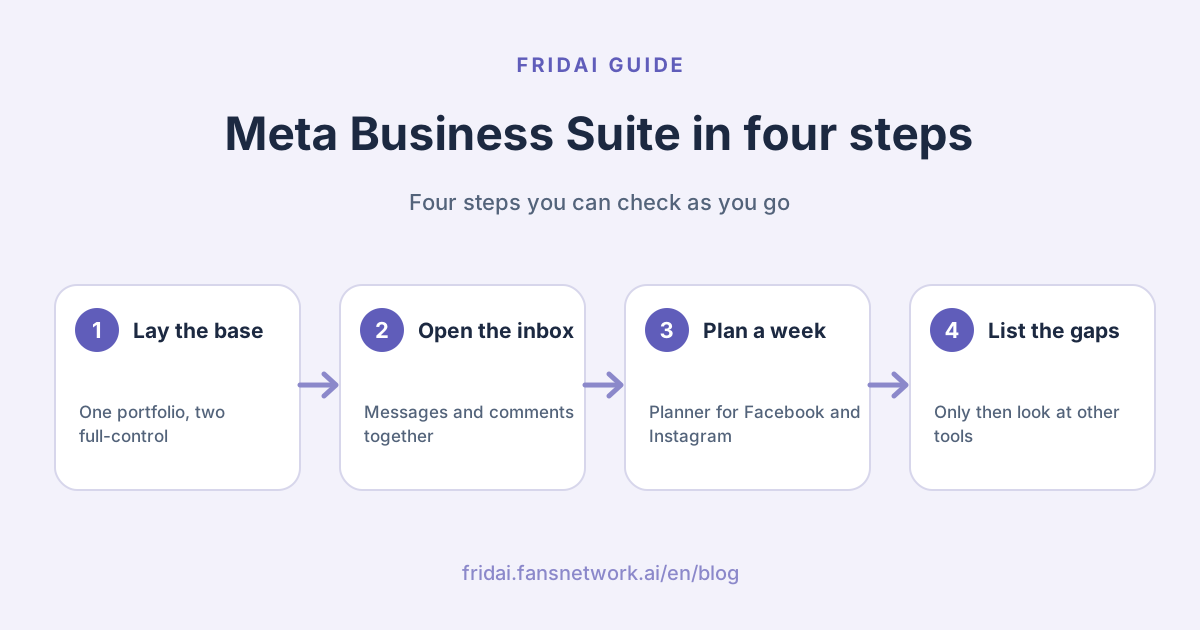
What Meta Business Suite is
Meta's own definition: Meta Business Suite helps small businesses and creators centrally manage their business and online presence across Meta technologies, such as Facebook, Instagram, Threads and WhatsApp. The same page calls it a free platform, available on desktop and as a mobile app.
In Taiwan many people search for a Chinese name, "Meta 商務
The problem it solves is simple: you reply to messages, schedule posts and read numbers without hopping between two apps. It will not answer a question you never wrote an answer for. Better to know that now.
What Meta lists
| Area | What you can do | Meta's note |
|---|---|---|
| Home | Overview, to-do list, recent and scheduled content | Shows notifications that need attention |
| Planner | Weekly or monthly calendar; create and schedule | Needs content permissions |
| Content | Posts, stories, reels, plus A/ | AI can help generate ideas |
| Inbox | Reply to messages and comments; automations | Only comments from connected assets |
| Insights | Organic and paid results, audience, messaging | Needs permission to view insights |
| Ads | Simple ads and boosted content | Use Ads Manager for advanced needs |
| Monetization | Overview of products and policy issues | Can request another review |
| All tools | Ads Manager, Events Manager, billing and more | Stated for desktop |
Sorting out the names: Business Suite, business portfolio, Business Manager
Meta has many names and has changed some of them. This is where most people get stuck.
| Name | What Meta says | How to think of it |
|---|---|---|
| Meta Business Suite | Free platform to manage your presence centrally | Where you work every day |
| Business portfolio | Brings Pages, Instagram, Threads, ad accounts and people together | The container for assets and access |
| Business Manager | Current permission pages treat its roles as former names | The name in older tutorials |
| Ads Manager | Multiple ad sets, custom audiences, retargeting | Where you go for serious advertising |
| Instagram and Facebook apps | The account and Page themselves | The native place to post and interact |
The business portfolio is the foundation
Meta is explicit: you need a business portfolio to use Meta Business Suite. A portfolio lets an organization bring its Facebook Pages, Instagram accounts, Threads accounts, ad accounts, catalogs and other business assets together and manage who can access them.
A few official rules worth knowing before you create one. The name should match the public name of your business and cannot contain special characters. You can personally create up to 2 business portfolios, with no limit on how many you can belong to. A business asset can only belong to 1 business portfolio. That last rule matters: a Page placed in the wrong portfolio is painful to move later.
How it differs from Business Manager
People who ask this have usually read an older tutorial. What we can confirm from current official pages: Meta's permissions article says "full control" was formerly the business admin role and "basic" access was formerly the employee role. In other words, the people and assets once set up in Business Manager now map onto a business portfolio, managed from Settings in Meta Business Suite.
We did not find a current official page that defines Business Manager on its own, so we will not announce on Meta's behalf that it is "retired" or "fully merged". Instagram's help pages still mention Business Manager next to Meta Business Suite today. Just remember: newer guides say business portfolio, older ones say Business Manager, and they deal with the same kind of work.
Division of labour with Ads Manager
Meta says the two tools can be used at the same time. Use Meta Business Suite to schedule organic content, manage comments and messages in Inbox, analyse organic and paid performance, create ads through a streamlined flow, and schedule a boosted post. Use Ads Manager for campaigns with multiple ad sets, custom audience targeting, ad A/
How it differs from the Instagram and Facebook apps
Meta's distinction is "central" and "connected". Meta Business Suite manages assets connected to your business portfolio. The Inbox article notes that you only see comments from connected business assets, not comments on your personal profile. The Instagram app has its own professional dashboard and inbox for that one account.
So keep both: the native app for posting on the spot, Meta Business Suite for sitting down to plan a week and for several people sharing the replies. Instagram says switching back to a personal account loses access to Meta Business Suite, so the account has to be professional first. If you have not switched yet, read Instagram business vs creator account.
Inbox: messages and comments in one place
Meta says Inbox lets you manage messages across Messenger, Instagram and WhatsApp, plus comments on your Facebook and Instagram posts, in one place.
- View all messages together or filter by platform.
- Mark as unread or follow up, or move to the Spam or Done folders.
- Filter by unread, follow-up and assignee, and see messages that came from ads.
- Open a conversation to see customer details and add labels and notes; notes are private to you and the people who manage your Page.
- Set an availability status, and use the leads tab to manage leads.
How far automations go
Inbox automations come as templates: instant reply, away message, frequently asked questions, location, contact information, hours, custom keywords and comment to message. Meta says they are available for Facebook Pages, Instagram business accounts and WhatsApp Business accounts connected to Meta Business Suite.
Keyword automations have hard limits: up to 5 keywords or phrases, exact and case-sensitive matching, and sending 15 minutes after the message arrives. Those details and the decisions to make beforehand are already in Instagram auto-reply in 2026 and Facebook comment and Messenger auto-reply, so we will not repeat them. How long you may keep messaging is governed by the Messenger 24-hour rule.
Three common "where did it go" moments
Meta's troubleshooting page lists several, and they are practical.
First, some Instagram messages are missing. Inbox only displays messages from the Instagram account's main folder; messages in Hidden requests do not sync until you move them to the main folder in Instagram.
Second, automated messages are going out and you do not know the source. Inbox automations end with "Sent by automated response". Messages with an ad ID label come from an ads message template. If it is neither, Meta suggests checking Connected apps under Advanced messaging in the Page's settings.
Third, messages thin out after you connect a third-party messaging provider. Meta says new messages may land in Done or other folders; use filters to find them, and set up conversation routing if needed.
Scheduling and Planner: Facebook and Instagram together, Threads by cross-posting
The core of scheduling in Meta Business Suite is Facebook and Instagram. When you create a post you choose the destination (your Page, Instagram profile or a Facebook Group), you can customise the text for each platform, and "Active times" under scheduling suggests times based on when followers were most active over the past 7 days. The limit for posting to Instagram is 10 photos.
Planner is the calendar: weekly or monthly view, filter by content type (post, story, reel, ad) and by platform (Facebook Page, Facebook Groups, Instagram account). You need content permissions for organic content and ads permissions for ads. If you cannot see Planner, Meta says you may not have the relevant permissions.
What cross-posts where
| Content you create | Can also go to | Meta's limit |
|---|---|---|
| Facebook post | Facebook Stories, Instagram Feed, Groups, Threads | Threads and Facebook Stories desktop only |
| Instagram post | Facebook Feed, Instagram Stories, Groups, Threads | Threads desktop only |
| Instagram reel | Instagram Stories, Facebook Reels, Groups | Threads not listed |
| Facebook reel | Facebook Stories, Instagram Reels, Groups | Facebook Stories desktop only |
| Story | Stories on the other platform | Works both ways |
The condition: your Facebook Page and Instagram profile are connected and in the same business portfolio, and for Threads, the Threads profile has been added to that portfolio too. Meta also notes that cross-posting a Facebook-only post is not currently available.
If you also need X, LinkedIn or TikTok, Meta Business Suite is not enough. Platforms and prices for other tools are compared in social media scheduling tools 2026.
Insights and the ads entry point
Insights on desktop brings together organic and paid results for your Page and Instagram profile. The tabs Meta lists include Overview, Plan, Results, Audience, Messaging, Benchmarking, Content, Ads and Earnings, with the caveat that the tabs you see may differ. Overview focuses on the past 28 days with metrics such as Views and Follows. Messaging shows how many profiles messaged you, new and returning contacts, and your response rate and response time.
For ads, Meta Business Suite is positioned as "quick and simple": create an individual ad or boost existing content and track it from the Ads tab. Meta itself says to use Ads Manager for more detailed audience targeting and offline performance tracking.
When it is enough, and when you need another tool
| Your need | Is it enough? | When to switch | Options |
|---|---|---|---|
| Schedule Facebook and Instagram posts | Yes, free | You also post to X, LinkedIn, TikTok | Cross-platform schedulers or FRIDAI Post |
| Reply to DMs and comments centrally | Yes | Customers are also on LINE, or you need finer assignment | Cross-channel support tools |
| Auto-reply to fixed questions | Templates and keywords cover it | Phrasing varies; replies must use context | AI support tools; FRIDAI Chat is one |
| Comment-to-message campaigns | Template exists, desktop setup | Varied public replies, no duplicate sends | Comment automation tools such as FRIDAI Social |
| Read performance | Organic and paid both shown | You need platforms outside Meta in one report | Reports in scheduling tools |
| Advertise | Simple ads and boosts | Multiple ad sets, custom audiences, retargeting | Meta Ads Manager |
| Produce content | AI helps generate ideas | You want ongoing automatic writing, images and posting | AI auto-posting tools such as FRIDAI Post |
If you only run Facebook and Instagram, your questions are fixed and one or two people manage it, Meta Business Suite is the right answer. Do not rush to buy anything. Compare tools once you are clearly stuck in the third column. Use the free option to its limit and you will know what you are paying for.
Roles and access: who can do what
Meta Business Suite has two levels of access, and they apply both to the business portfolio and to each asset in it.
| Access | What it allows | Former name or note |
|---|---|---|
| Full control | Manage settings, people, tools and all assets; can delete the portfolio | Business admin role |
| Basic access | Work only on assigned assets | Employee role; the default for new people |
| Apps and integrations | Set up Conversions API, create access tokens | Developer role |
| Finance access | View or manage transactions, invoices, payment methods | An added advanced option |
| Temporary access | Basic access only; removed automatically on expiry | Minimum 3 days, maximum 75 days |
Assets have full control and partial access as well. Meta notes someone can have full control of a Page without full control of the whole portfolio. Partial access is task-based: creating content, managing ads, responding to messages.
Before you add people
The entry point Meta describes is Settings in Meta Business Suite, then People in the left menu, then Invite people. The usual stumbling blocks:
- Only someone with full control of the business portfolio can add people. If you cannot see People, that is probably why.
- When inviting someone by Facebook account, the email address must match the one used for their Facebook account.
- They must accept the invitation, and Meta says it can take a few days before all features become available to them.
- To assign an Instagram account, Meta says to make sure you are logged into it under Instagram accounts in Settings.
- A new member's name, work email and assigned assets are visible to people with full control.
One principle, in Meta's own words: assign only the level of access people need to complete their work. Temporary access suits short-term helpers and contractors.
Why a second admin matters
Meta's security guidance recommends (but does not require) that 2 active people have full control of a business portfolio. Two reasons: sensitive actions get a second layer of approval, and someone else still has top-level access if one account or asset shows suspicious activity.
Put plainly: if the owner is the only person with full control, then on the day the owner's personal Facebook account is disabled or hacked, the Page, ad account and inbox are all locked together. The official routes for that day are in Instagram account disabled or hacked. Adding an admin beforehand is a small job; recovering afterwards is a big one.
The same page adds more: limit full control to those who need it, ideally 10 or fewer people; remove people who have not logged in within 90 days; remove people without passkeys or two-factor authentication until they set them up; and remove users on public email domains unrelated to your business.
First-week checklist
Paste this into your notes and do a little each day.
Day 1: foundation
- Page and Instagram professional account are in the same business portfolio
- The correct business portfolio is selected in the top-left menu
- Two-factor authentication is on for your own account
Day 2: people
- Add a second person with full control
- Give everyone else only the access they need
- Remove anyone who has left or you do not recognise
Day 3: inbox
- Instagram message access is allowed
- Check Instagram hidden requests for missed customers
- Set the away message schedule
Day 4: automations
- Write the instant reply and a few frequently asked questions
- For keywords or comment to message, set up on desktop
- Test once by messaging from another account
Day 5: scheduling
- Schedule next week's posts in Planner
- For Threads, confirm the Threads profile is added and use desktop
Day 6: numbers
- Open Insights and note Views and Follows in Overview as a baseline
- Check response time in the Messaging tab
Day 7: review
- List what you could not do in Business Suite this week
- Only look for other tools for the items on that listDay 7 is the point of the whole list. Buying a tool without that "could not do" list is how people pay for features they already had.
Desktop versus mobile app, and other limits
Meta's pages name only a few desktop-only items, but each one is commonly used.
| Feature | Desktop | Mobile app |
|---|---|---|
| Custom keyword automations | Yes | Meta says desktop only for now |
| Comment to message automation | Yes | Meta says desktop only |
| Cross-posting to Threads | Yes | Meta says desktop only |
| Facebook post or reel to Facebook Stories | Yes | Meta says desktop only |
| All tools section | Stated for desktop | Not mentioned |
| Create and schedule content, Planner | Yes | Yes |
| Instant reply, away message, FAQs | Yes | Yes |
| Create ads and boost | Yes | Yes |
The mobile app is available on iOS and Android. Our suggestion: set things up on a computer, reply on your phone.
Other limits Meta states:
- Europe and Japan: certain messaging-related metrics, ads and organic messaging features are unavailable for businesses and ads delivered to and from Europe and Japan, and some automation templates may not appear as a result.
- WhatsApp tab: if it is missing, your region may not support connecting it.
- The away message has no switch: it follows the schedule you set, so to turn it off completely you set yourself as always available.
- Meta Business Agent: turning it on pauses existing automations such as away messages and instant replies.
- Switching Instagram back to personal: Instagram says you lose access to Meta Business Suite.
What to watch in 2026
We found one dated update on the official pages today. The cross-posting article says that starting in September 2026 you can manage your Threads access settings independently from Instagram; it is rolling out gradually and may not be available to you yet. Good news if someone on the team handles only Threads. Separately, several pages note that Meta is gradually updating people to Meta Accounts, so the place where you manage account settings may be named differently from what a colleague sees.
FAQ
Does Meta Business Suite cost money?
No. Meta's help page calls it a free platform. Costs come from the ads and boosts you create inside it and from any third-party tools you subscribe to separately; the platform itself has no monthly fee.
What is the difference between Meta Business Suite and Business Manager?
Business Manager is the older name. Meta's current permissions page says full control was formerly the business admin role. People and assets now sit in a business portfolio, managed from Settings in Meta Business Suite.
Can I use Meta Business Suite without a Facebook Page?
Meta says you need a business portfolio and must log in with a Facebook profile or a managed Meta account. The pages we read do not say whether an Instagram professional account alone is enough, so go by what your own screen shows.
Why can't I find keyword auto-replies in the mobile app?
Because Meta says custom keyword automations are only on desktop for now, as is comment to message. The mobile app covers templates such as instant reply, away message and frequently asked questions.
Why are some Instagram messages missing from Inbox?
Meta says Inbox only displays messages from the Instagram account's main folder; Hidden requests do not sync. Also confirm Instagram's "Allow access to messages" is on and that a third-party tool has not moved messages to another folder.
Can Meta Business Suite schedule Threads?
You can cross-post a Facebook or Instagram post to Threads, but only on desktop, and the Threads profile must first be added to the same business portfolio. Planner's platform filter does not list Threads.
An employee left. What do I do about their access?
Remove them under People in Meta Business Suite Settings. Meta's security guidance also says to remove people who have not logged in for 90 days and to keep two active people with full control, so the business never depends on one person.
How FRIDAI can help
Once Meta Business Suite has Facebook and Instagram in order, FRIDAI covers what it does not: FRIDAI Chat replies to Instagram, Facebook and LINE DMs from your knowledge base and rules and hands off to a human when needed; FRIDAI Social handles comment replies and comment-to-DM; FRIDAI Post can also publish to platforms outside Meta such as X and LinkedIn. If Inbox automations and Planner already cover your work, keep using the free tools.
- DM support: FRIDAI Chat
- Comment engagement: FRIDAI Social
- Content scheduling: FRIDAI Post
- Account types: Instagram business vs creator account
- Scheduling tools compared: Social media scheduling tools 2026
- When an account is in trouble: Instagram disabled or hacked: official recovery paths
- Instagram: FRIDAI on Instagram
- Threads: FRIDAI on Threads
- Facebook: FRIDAI on Facebook
Official sources
- How Meta Business Suite works: www.facebook.com/
business/ help/ 205614130852988 - When to use Meta Business Suite and when to use Meta Ads Manager: www.facebook.com/
business/ help/ 1295113229118502 - About business portfolios: www.facebook.com/
business/ help/ 486932075688253 - Create a business portfolio in Meta Business Suite: www.facebook.com/
business/ help/ 1710077379203657 - About business portfolio and business asset permissions: www.facebook.com/
business/ help/ 442345745885606 - Add people to a business portfolio and assign a business asset: www.facebook.com/
business/ help/ 2169003770027706 - Best practices for making a business portfolio more secure: www.facebook.com/
business/ help/ 608572510632070 - About Inbox in Meta Business Suite: www.facebook.com/
business/ help/ 294426838452244 - About Inbox automations in Meta Business Suite: www.facebook.com/
business/ help/ 395965998733706 - Troubleshoot Meta Business Suite Inbox issues: www.facebook.com/
business/ help/ 1553463246785273 - Create and manage posts in Meta Business Suite on desktop: www.facebook.com/
business/ help/ 942827662903020 - Use Planner in Meta Business Suite: www.facebook.com/
business/ help/ 1678733516458988 - About cross-posting to Facebook, Instagram and Threads: www.facebook.com/
business/ help/ 914097058035853 - About Insights in Meta Business Suite on desktop: www.facebook.com/
business/ help/ 700570830721044 - About Home in Meta Business Suite mobile app: www.facebook.com/
business/ help/ 562251614389815 - Best practices for using Meta Business Suite mobile app: www.facebook.com/
business/ help/ 243034084656852 - Instagram Help Center, Manage access to Instagram messages across apps: help.instagram.com/
791161338412168 - Instagram Help Center, Switch back to a personal account: help.instagram.com/
1717693135113805