First, separate the two entry points: Page comments and Messenger
When people say "Facebook auto-reply setup" they usually mean two different things. One is the public comment under a post, the other is a private message in Messenger. The automation available differs, and so do Meta's rules.
| Entry point | What the customer does | What can be automated |
|---|---|---|
| Page post comments | Asks the price, types +1, tags a friend | Public reply, one private message per comment |
| Messenger messages | Asks a question, wants a quote, books a time | Greeting, away message, FAQs, keyword replies |
| After a comment moves to Messenger | The person replies to your message | You can continue for 24 hours |
Instagram works along similar lines with different details. That side is covered in Instagram auto-reply in 2026; this article is about Facebook Pages only.
The auto-replies Meta already gives a Page
Meta puts these in the Inbox of Meta Business Suite and calls them Inbox automations. The help page says they are available for Facebook Pages, Instagram business accounts and WhatsApp Business accounts connected to Meta Business Suite; when they are on, a person who messages your business or comments on a post automatically gets a response.
| Meta's name | What it does | Note |
|---|---|---|
| Instant reply | Greets someone who messages you for the first time | The desktop setup page calls it Auto reply |
| Away message | Replies when you are not available | Fixed text |
| Frequently asked questions | Suggests questions and replies with a fixed answer | You write the answers |
| Location, Contact information, Hours | Replies with your location, contact details or hours | Three separate templates |
| Custom keywords | Replies when a message contains specific keywords | Desktop only |
| Comment to message | Sends a message reply to comments containing specific words | Desktop only |
There are two more templates for organizing work: identifying unanswered messages and assigning new conversations to admins automatically. Meta also notes that some automations may not be available depending on which channels you have connected, and the labels in a non-English interface may differ from the table.
On desktop, Meta's help page gives this path: go to Inbox in Meta Business Suite, click Automations, click Create automation in the top right, pick a template and follow the on-screen instructions. Before you start, make sure the correct business portfolio is selected in the top-left dropdown. Pick the wrong one and you will keep failing to find your own Page.
Meta's limits on custom keywords
The help page lists four. Read them before you build anything.
- One keyword automation can hold up to 5 keywords or phrases.
- Matching must be exact, and keywords are case-sensitive.
- The same keyword or phrase can only be used in one keyword automation.
- A keyword reply is sent automatically 15 minutes after the message arrives, unless you respond personally first.
There is also a priority rule: when a custom keyword automation and a template automation are both triggered, Meta sends only the template response. Meta's own example is a message that matches a keyword while your away message is on; the away message is what goes out.
How comment to message works in the built-in tools
Comment to message sends one message reply to a comment on your post. One detail to watch: Meta's two help pages describe it differently. The overview page says comments containing "specific hashtags"; the desktop setup page says "specific keywords or phrases." So trust what your own setup screen accepts, and test it from a second account once it is on.
Building conditions and actions from scratch
If the templates are not enough, Create automation also offers Start from scratch. Meta lists three conditions: message is assigned, label is added, new message received; and three actions: send message, add labels, mark as. The help page says custom automations are prioritized over other automations and sent first.
Turning on Meta Business Agent pauses the old setup
Both help pages carry the same note: if you turn on Meta Business Agent, any existing automations (such as away messages or instant replies) will be paused. Do not count on both at once, or you will think the system is broken.
Built-in features versus third-party tools
| Criterion | Meta built-in | Third-party tools |
|---|---|---|
| Cost | No fee listed in Meta's help pages | Monthly fee or usage-based |
| Reply content | Fixed text, exact keyword match | AI can handle different phrasings |
| Public comment reply | Mainly comment to message | Most can also reply publicly |
| Send timing | Keyword replies wait 15 minutes | Depends on the product |
| Human handoff | You answer in the Inbox | Assignment, alerts, review |
| Cross-platform | Meta's channels | Can add LINE and others |
| Best for | Pages with fixed questions and low volume | Varied questions, frequent campaigns, teams |
The advice is the same as for Instagram: use the built-in features until you get stuck, then pay. The usual signs of being stuck are customers who rephrase and get no answer, campaign comment volume you cannot keep up with, or a human who takes over without knowing what happened earlier.
Comment to DM: Meta's Private Replies rules
Third-party "comment to DM" on Facebook runs on Meta's Private Replies. The rules are in Meta's developer documentation, and no tool can get around them.
| Rule | What Meta's docs say | What it means for you |
|---|---|---|
| Number of messages | Only one message can be sent to the person who commented | Put the key point and the link in that one |
| Time limit | Within 7 days of the post or comment being created | Late sends to old comments fail |
| Follow-up | After the person replies, you can continue within the 24-hour window | The first message should invite a reply |
| Recipient | You cannot send a private reply to another Facebook Page | Comments made as a Page do not qualify |
| Scope | Post comments and visitor posts | Visitor posts count too |
| Group posts | Private replies must be enabled in the group's settings; on by default | If the group admin turns it off, nothing fires |
Once the person replies, the ordinary messaging rule applies, meaning the 24-hour window. What you can still do after 24 hours is covered in the Messenger 24-hour rule.
One more rule concerns campaign copy. Meta's spam policy lists requiring users to like, share or follow in order to get content as a prohibited practice. "Comment to receive" is fine; making a like or a share the condition is not.
Page access you need before you start
Half of the setups that fail, fail on access. The Facebook Help Center splits Page management into two kinds.
The first is Facebook access, with full or partial control. These people can switch into the Page and manage it directly, and the access includes responding to messages and to comments. The second is task access, which only works through tools such as Meta Business Suite; one of its tasks is called Messages and Community Activity and covers responding to direct messages, commenting and managing unwanted content. Meta adds that access levels are different if the Page is part of a business portfolio.
If you connect a third-party tool, the person who authorizes it needs the matching access too. Meta's developer docs say the person requesting the Page access token must be able to perform the MESSAGING and MODERATE Page tasks, and the tool needs permissions such as pages_messaging. In plain terms: have someone with message and comment access click Authorize, not a colleague who only has ads access.
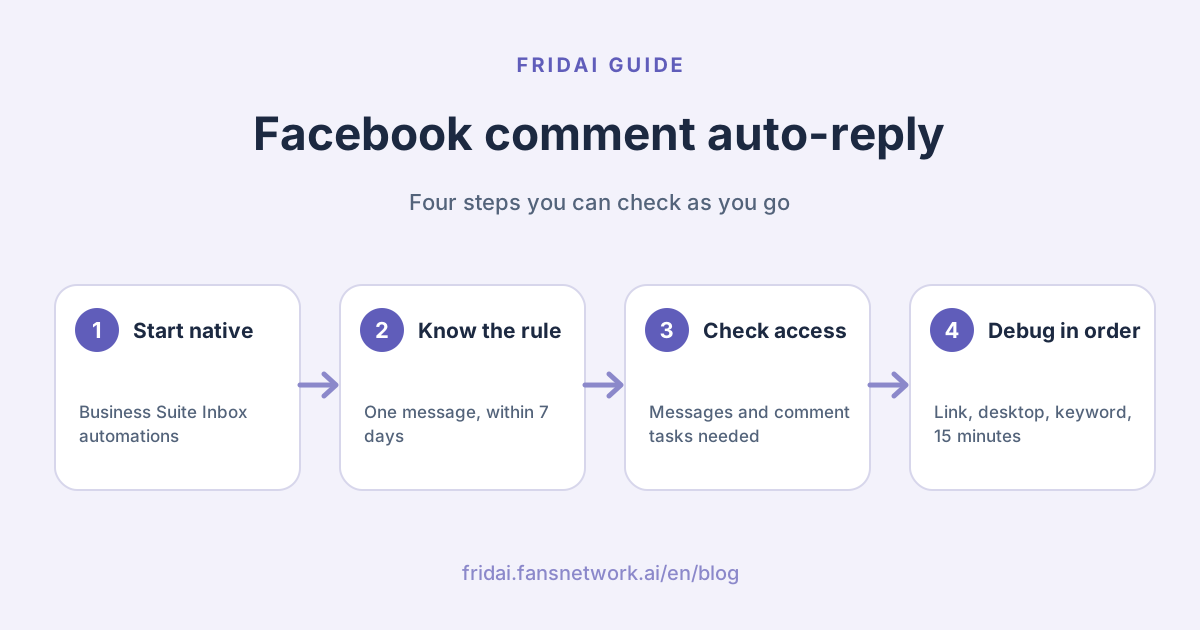
Facebook comment auto-reply flowchart
Five decisions to make before you set anything up
Meta's screens change, so FRIDAI Editorial is not writing click-by-click steps. Settle these five points first and setup goes much faster, whether you use the built-in features or a tool.
1. Which posts are covered
Campaign posts only, or every post. Covering everything is the least work and the easiest way to send a baffling private message to someone who commented about something else.
2. What the trigger words are
Pick words customers actually type. Built-in keywords are exact-match and case-sensitive, so a half-width "+1" and a full-width "+1" (common on Chinese keyboards) are different strings. Spell out the exact word in the post copy.
3. What the one private message says
You get one. Deliver the thing, say it is an automated reply, and ask the person to send one line back so the conversation can continue. Templates are below.
4. Whether to reply publicly
A public "sent you a message" tells everyone else the campaign is real. Prepare several wordings and rotate them; do not post the identical line every time.
5. What goes to a human
Complaints, refunds and price exceptions go to a person first. When automation gets these wrong, the cleanup costs more time than it saved.
Comment auto-reply not firing: troubleshooting table
Every row maps to one of Meta's official pages. Work down in order. The first eight rows are the usual causes with the built-in features; the rest apply to tools that use the API.
| Possible cause | What Meta says | What to check |
|---|---|---|
| Page not connected | Automations are for connected accounts only | Connection status in Meta Business Suite |
| Wrong portfolio selected | Select the correct business portfolio first | The top-left dropdown |
| Looking on mobile | Keywords and comment to message are desktop only | Set it up on desktop |
| Keyword mismatch | Exact match, case-sensitive | Typos, full-width characters, capitals |
| Expecting an instant reply | Keyword replies send after 15 minutes | Wait, then check again |
| Overridden by a template | When both trigger, only the template is sent | Whether the away message is on |
| Business Agent is on | Existing automations are paused | Whether Meta Business Agent is enabled |
| Just created | It may take a few minutes to appear | Refresh and confirm the status toggle is on |
| Comment too old | Private replies only within 7 days | Whether an old comment triggered it |
| Already sent | Only one message can be sent | The same person will not get a second one |
| Commenter is a Page | Cannot private-reply to another Page | Whether they commented as a profile or a Page |
| Group turned it off | Group settings can disable private replies | Ask the group admin |
| Authorizer lacks access | Must be able to do the messaging and moderation tasks | Re-authorize with the right person |
| Customer in certain regions | Some messaging features are unavailable for Europe and Japan | In that case it is not your setup |
If it still does not work, look at the tool's send log and take the post link, the comment time and the keyword to their support. With those three ready, they rarely need to ask you another round of questions. Instagram has its own table in Can Instagram auto-reply get you banned?.
Safe-setup checklist
- Only use tools that send you to Meta's authorization screen. Never type your Facebook password into a third-party site.
- Have someone with message and comment access authorize the tool, and replace authorizations made by colleagues who have left.
- Put the key point and the link in the one private message, and invite a reply.
- Say in the first message that it is an automated reply and how to reach a person. Meta's policy requires disclosure where the law does and recommends it elsewhere.
- Do not write "like, share or follow to receive" in your copy.
- Prepare several public replies so the thread is not a wall of identical lines.
- Turn the rule off when the campaign ends so old posts stop triggering.
- Choose either the built-in automations or Meta Business Agent. Do not assume both run together.
- Route complaints, refunds and price exceptions to a human first.
First replies you can paste
These customer-facing templates are kept in Chinese, since that is what Taiwan customers will read. The private message for a "comment to receive" campaign must do three things: disclose automation, deliver, and ask for a reply. Gloss: "Hi, this is the Page's automated reply. The course brochure you asked for is here: (link). To ask about times or prices, reply 'interested' and a person will follow up."
嗨,這是粉專的自動回覆。你留言要的課程簡章在這裡:
(放連結)
想問時段或價格,直接回我「想了解」,會有人接著回你。
Public replies should not be a single line. Rotate these three. Gloss: "Sent you a message, please check Messenger." / "Got it, the details are in your inbox." / "Message sent, reply there if you have questions."
已經私訊給你囉,請到 Messenger 收信。
收到,資料放在你的訊息匣了。
私訊送出了,有問題直接在訊息裡回我。
For the Messenger instant reply, tell people what happens next. Gloss: "Hello, this is (shop name)'s automated reply. Leave the item or date you want to ask about and someone will reply during business hours. Hours: Monday to Friday 10:00–18:00."
你好,這裡是(店名)的自動回覆。
請直接留下想問的品項或日期,營業時間內會有人回覆你。
營業時間:週一到週五 10:00–18:00The away message should be honest about when you will answer. Gloss: "We are closed right now and this is an automated reply. We will get back to you on the morning of the next business day; for anything urgent call (phone)."
現在是非營業時間,這則是自動回覆。
我們會在下一個營業日上午回覆你;急件請撥(電話)。
FAQ
Is Facebook comment auto-reply free?
The Inbox automations in Meta Business Suite are built in, and Meta's help pages list no fee for them. Third-party tools mostly charge a monthly fee or bill by usage; check each vendor's official pricing page.
Will Facebook comment auto-reply reduce my reach or get the Page banned?
Meta's spam policy does not mention reduced reach. What it says is that accounts engaging at very high frequency, or requiring likes and shares in exchange for content, may be restricted. Using official features, not flooding, and not gating content are the safe practices Meta actually writes down.
Can a personal profile set up comment auto-reply?
No. Meta Business Suite automations apply to connected Facebook Pages, and Meta's messaging platform is for Pages and Instagram professional accounts. Create a Page first.
Can I auto-message people who comment on a live video?
Meta's Private Replies documentation for Facebook does not specifically address live comments, so FRIDAI Editorial cannot confirm it for you. The Instagram documentation does state that live comments can only be messaged during the live broadcast. If you plan a live campaign, confirm with your tool first.
Why does my keyword auto-reply take so long to appear?
That is by design. Meta's help page says keyword automations send 15 minutes after the message arrives, unless you respond personally first. For campaigns that need an immediate response, built-in keywords are not a great fit.
If the same person comments twice, do they get two messages?
Meta's docs say only one message can be sent to the person who commented, and you can continue only after they reply. Whether duplicates happen in practice depends on the tool's deduplication, so test by commenting twice from the same account during your trial.
Can I send the private message after 7 days?
No. Meta requires a private reply to be sent within 7 days of the post or comment being created. For an old campaign, all you can do is reply publicly and ask the person to message you.
How FRIDAI can help
FRIDAI Social can auto-reply to Facebook comments, move comments into private messages, and alert you when something needs a person, such as a price inquiry or a negative comment. FRIDAI Chat takes over the conversation in Messenger, and the same account needs both plans for comment-to-DM. Each starts at US$70 a month, with a US$1, 30-day trial. If your Page gets fixed questions and few comments, start with Meta's built-in features.
- Comment engagement: FRIDAI Social
- DM support: FRIDAI Chat
- After 24 hours: The Messenger 24-hour rule
- The Instagram side: Instagram auto-reply in 2026
- Risks and fixes: Can Instagram auto-reply get you banned?
- The bigger picture: What is social media automation?
- Instagram: FRIDAI on Instagram
- Threads: FRIDAI on Threads
- Facebook: FRIDAI on Facebook
Official sources
- Meta Business Suite, about Inbox automations: www.facebook.com/
business/ help/ 395965998733706 - Meta Business Suite, set up Inbox automations on desktop: www.facebook.com/
business/ help/ 318238182723007 - Meta developer docs, Private Replies: developers.facebook.com/
docs/ messenger-platform/ discovery/ private-replies - Meta developer docs, Instagram Private Replies: developers.facebook.com/
docs/ messenger-platform/ instagram/ features/ private-replies - Meta developer docs, Messenger Platform overview: developers.facebook.com/
documentation/ business-messaging/ messenger-platform/ overview - Meta Messenger Platform policy overview: developers.facebook.com/
docs/ messenger-platform/ policy/ policy-overview - Facebook Help Center, about Page access: www.facebook.com/
help/ 289207354498410 - Meta Community Standards, spam policy: transparency.meta.com/
policies/ community-standards/ spam/ - FRIDAI Social: fridai.fansnetwork.ai/
fridai-social