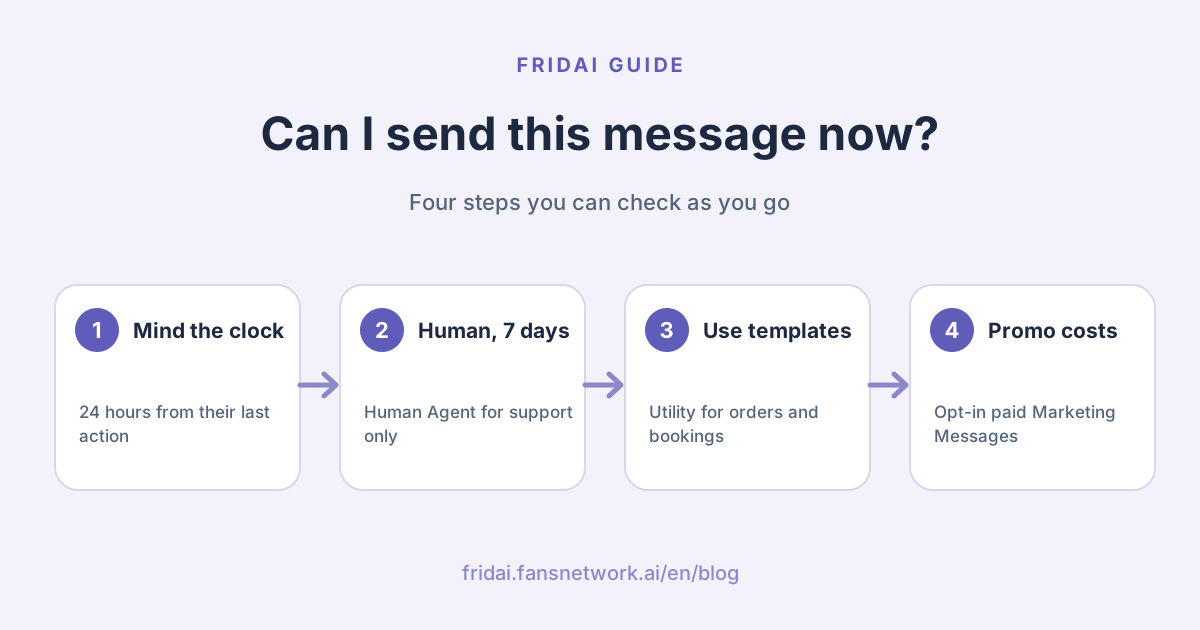
What the 24-hour rule actually measures
Meta calls it the standard messaging window. The policy page is brief: businesses have up to 24 hours to respond to a user, messages in that window may contain promotional content, and users can block or mute the conversation at any time.
Three points to remember.
First, the clock starts from the customer's action, not from your last message. Sending ten messages in a row does not extend the window.
Second, you may sell inside the window. Many people think Messenger bans promotions entirely; the ban applies outside the window.
Third, once the window closes, an ordinary message simply fails to send. Meta's error table has a code specifically for "messaging window closed."
Which actions restart the 24 hours
Meta's policy page lists the actions that open the window on Messenger. Each one restarts the 24 hours.
| Customer action | Opens the window? | Note |
|---|---|---|
| Sends a message to the Page | Yes | The most common case |
| Clicks a call-to-action button in the conversation | Yes | For example Get Started |
| Clicks a Click-to-Messenger ad and starts a conversation | Yes | Inquiries brought in by ads |
| Starts a conversation through a plugin | Yes | For example Send to Messenger |
| Clicks an m.me link with a parameter on an existing thread | Yes | The link needs a ref parameter |
| Reacts to a message | Yes | A single thumbs-up counts |
A customer merely reading your message does not count. Meta's FAQ adds that when you send something like an opt-in request, the window opens only if the user interacts with it.
Instagram's documentation is simpler: you can message a user only after that Instagram user has messaged your professional account, and you then have 24 hours to respond.
After 24 hours: what is still open
This is the core of the article. Below is every channel found in Meta's documentation today, including the ones that have been shut down.
The Human Agent tag
Meta's description: it lets a human agent respond to a user's messages within 7 days of the user's message. There is one allowed use, which is support for issues that cannot be resolved inside the standard window. Meta's examples are a business closed for the weekend or an issue that takes more than 24 hours to resolve.
An app that uses this feature must pass Meta's App Review, and business verification is required. Not every tool has it, so ask your vendor directly.
It is not a promotion channel. Meta's documentation states that message tags may not be used to send promotional content.
Three older message tags are gone
Older tutorials tell you to use three tags for notifications outside the window: event reminders, account updates and post-purchase updates. Their names are CONFIRMED_EVENT_UPDATE, ACCOUNT_UPDATE and POST_PURCHASE_UPDATE.
Meta's changelog entry of March 27, 2026 announced their deprecation and states that from April 27, 2026, requests containing them return error code 100. Meta recommends moving to Utility Templates or the Marketing Messages API.
If your tool's tutorial still tells you to pick one of these three tags, the tutorial is out of date.
Utility template messages
This is one of the two replacements Meta names for the old tags. A utility message is created from a template and contains order or account status updates, or appointment or event reminders, and can be personalized with fields such as the customer's name, a date or an order ID.
The documentation says three things: the template category must be UTILITY and the template goes through approval; the app needs the corresponding permission; and the content must not contain marketing material, or the template is rejected.
The page read today is about Messenger for Pages. It does not mention Instagram and does not state a cost. Whether you can use it, and whether it works for Instagram, is a question for your tool.
One-time notification
When a customer explicitly asks to be told, for example, when an item is back in stock, the Page receives a token that allows one notification outside the window. Meta's policy page says the token can only be used once and expires within 1 year of creation, and that the feature is for time-sensitive, personally relevant notices.
Two limits. It is Messenger only; the policy page says it is not available for the IG Messaging API. And Meta's FAQ says the permission is applied for and granted at the Page level, if the Page meets Meta's criteria.
When FRIDAI Editorial looked for its dedicated developer page today, the page returned "not found," while the policy page and FAQ still list the feature. Treat its current status as whatever your tool tells you, and do not bet a whole campaign on it.
Marketing Messages: the old version ended, the new one is paid
This is the biggest change and the one most likely to be described by outdated tutorials.
The old version was called Recurring Notifications, later also referred to as Marketing Messages. Meta's documentation says that from September 1, 2025, no new integrations were accepted and the sending frequency for existing users dropped from one per 24 hours to one per 48 hours; the feature itself was disabled on February 10, 2026. One entry in Meta's FAQ gives January 12, 2026 instead. Both dates appear, and both have passed. The same FAQ says the discontinuation is global, except for Australia, the EU, Japan, South Korea and the UK.
The new version is the Marketing Message API for Messenger. According to Meta's documentation:
- It launched to all tech providers on July 1, 2025 and is available exclusively through tech providers. A business cannot integrate it directly.
- It is paid. Meta charges the sending business directly, only for messages delivered to the user's device, and the cost appears on the same bill as ads.
- It can only go to people who have opted in. Subscriptions come from people who click a Click-to-Messenger ad and respond, from an uploaded customer list matched to profiles, or from an opt-in template sent in chat.
- One Page can send one marketing message per unique user per day.
- Tech providers can serve businesses in 20 markets, and Taiwan is on the list.
- Recipients cannot be in the European Union, Japan, South Korea, Australia or the United Kingdom.
The documentation lists no per-message price; check your ad account or your tool. None of these pages mention Instagram.
Sponsored messages and private replies to comments
Two more routes exist. Sponsored Messages are an ad product: they can be sent outside the window, are labeled "Sponsored" and must comply with advertising policies. The policy page says they are not available for the IG Messaging API.
Private replies let you send one message within 7 days of a customer commenting on a post. Details are in Facebook comment auto-reply setup.
One table: can I send this right now?
| Situation | Allowed? | Mechanism | Basis |
|---|---|---|---|
| Customer wrote 3 hours ago; you answer and add an offer | Yes | Standard window | Policy overview |
| Customer wrote yesterday noon; you reply this afternoon | Not automatically | A human using Human Agent | Feature reference |
| A question from 5 days ago, answered by a person | Yes | Human Agent, within 7 days | Feature reference |
| An inquiry from 10 days ago you want to chase | No | No matching mechanism | Policy overview |
| "Your order has shipped" | Depends on the tool | Utility template message | Utility docs |
| Reminder the day before a booking | Depends on the tool | Utility template message | Utility docs |
| Customer said "tell me when it is back" | Messenger only | One-time notification | Policy overview |
| Anniversary sale to past customers | Opt-in and paid | Marketing Messages | Marketing docs |
| Notification using the event-reminder tag | No | Tag retired | Changelog |
| Customer comments +1 on a post | Yes, one message | Private reply, within 7 days | Private Replies docs |
The two "depends on the tool" rows are there because Utility templates need a tool with the right permission, and not every tool has it.
How Messenger and Instagram differ
Both are Meta messaging, but the toolbox is not the same.
| Item | Messenger | |
|---|---|---|
| 24-hour standard window | Yes | Yes |
| Human Agent, 7 days | Yes | Docs mention tagging for human replies |
| Other message tags | Some are Messenger only | Some not available |
| One-time notification | Yes, by application | Not available |
| Sponsored messages | Yes | Not available |
| New Marketing Messages | Yes, paid | Not mentioned in the docs |
| Utility template messages | Yes | Not mentioned in the docs |
| Private reply to comments | One, within 7 days | One, within 7 days; live only during the broadcast |
Instagram has one more inbox detail. Meta's documentation says new conversations from users who do not follow you appear in the Requests folder, and a private reply to a commenter who does not follow you also lands in their Request folder. On Instagram, "sent" does not mean "seen."
Put simply: Instagram has almost no outbound channel after the window. Re-engagement on Instagram in practice means getting the customer to message you, or running ads.
Can I send this now? A decision flow
When you land on "you cannot message first," there are three options: wait for the customer to write again, use ads to bring them back into a conversation, or use another channel they gave you. Forcing it through a loophole carries the risk stated on the policy page: using tags outside approved use cases may result in restrictions on your ability to send messages.
What this means for follow-ups, abandoned inquiries and promotions
Chasing quotes and checking back
A customer who asks the price and vanishes is the most common case. Within 24 hours you can follow up automatically once; after that an ordinary message will not send, and automated follow-up stops there. A person replying within 7 days is allowed, provided they are genuinely handling the customer's issue and not sending a promotion under another name.
FRIDAI Editorial keeps follow-ups inside the window: before the conversation ends, ask "shall I remind you tomorrow?" If the customer answers, the window restarts.
Inquiries abandoned halfway
A half-finished booking or a half-asked spec question does not fall under any approved use outside the window. What you can do is close the loop within 24 hours by giving a clear next step before the customer leaves: a link, a button, or a request for a phone number.
A closing line you can use inside the window, kept in Chinese for Taiwan customers. Gloss: "I will hold this for you until 9 pm tonight. Reply 'confirm' to confirm, or tell me if you want another time."
這邊先幫你保留到今天晚上 9 點。
要確認的話回我「確認」,想改時間也直接說。
Promotions and campaign announcements
For promotions outside the window, Messenger now has two compliant routes: paid Marketing Messages, or ads such as Sponsored Messages. Both cost money, and the first also needs the customer to opt in beforehand.
So build the list as you go. Asking honestly in conversation "may we tell you about future offers?" beats scrambling the day before a sale.
Order and booking notices
For transactional notices such as shipping and booking reminders, the old approach was message tags and Meta now points to Utility template messages. Ask whether your tool supports them. If not, send important notices by SMS, email or LINE as well, and do not rely on Messenger alone.
Why LINE has no 24-hour rule
LINE, the dominant messaging app in Taiwan, works on a completely different logic. LINE's developer documentation says an Official Account can send messages to users at any time using push, multicast, narrowcast or broadcast messages. There is no 24-hour window in the design.
The price is money. LINE's documentation splits messages into two groups: reply messages, sent with a reply token in response to a user action, are not counted toward the message count; push, multicast, broadcast and narrowcast messages are counted, there is a monthly limit, and once you pass it messages are not sent.
| Criterion | Messenger / Instagram | LINE Official Account |
|---|---|---|
| Limit on messaging first | Time: the 24-hour window | Message count and cost |
| Replying to a customer | Allowed inside the window | Reply messages are not counted |
| Promotional broadcast | Opt-in and paid, Messenger only | Allowed, counted toward the quota |
| Precondition | The customer acted first | The customer has not blocked you |
So for the same campaign the two strategies point in opposite directions: on Meta you need customers to message you first, and on LINE you need to work out who is worth the message. How LINE counts messages and fees is in LINE Official Account pricing 2026.
What changed in 2026
Three changes could be confirmed in Meta's documentation today.
First, on February 10, 2026 the old Recurring Notifications feature was disabled, except in Australia, the EU, Japan, South Korea and the UK. Its successor, the Marketing Message API for Messenger, is a paid product used through tech providers.
Second, on April 27, 2026 the three message tags CONFIRMED_EVENT_UPDATE, ACCOUNT_UPDATE and POST_PURCHASE_UPDATE stopped working, and requests return error code 100. Human Agent was not on that list.
Third, Utility template messages keep expanding. The changelog shows image support added in September 2025 and named parameters in March 2026. Meta is moving transactional notices toward templates, and the direction is clear.
If the tutorial in front of you was written before 2025 and mentions "free recurring notifications" or "three message tags," read all of it again with suspicion.
FAQ
When does the Messenger 24-hour window start?
It starts from the customer's last action, such as sending a message, clicking a button or reacting to a message. Every action restarts the 24 hours; your own messages do not extend it.
Can I still reply to a customer after 24 hours?
A person can. Meta's Human Agent feature lets a human agent reply to a support issue within 7 days of the customer's message, but the tool must first pass Meta's review. Automated replies and promotional content are not covered.
Do Instagram DMs have a 24-hour limit too?
Yes. Instagram's documentation says you have 24 hours to respond after a user messages you. Instagram also has no one-time notification and no Sponsored Messages, so there are fewer channels outside the window than on Messenger.
Can message tags still be used?
The three tags for event reminders, account updates and post-purchase updates were retired on April 27, 2026 and now return an error. The Human Agent tag remains, limited to a person handling a support issue.
Do Marketing Messages cost money, and are they available in Taiwan?
The new version is paid. Meta charges the business only for delivered messages, and the documentation lists no unit price. Taiwan is on the list of business markets that can be served, but only through an eligible tech provider.
What happens if I break the 24-hour rule?
Once the window closes, an ordinary message fails to send. If message tags are used outside approved use cases, Meta's policy page says your ability to send messages may be restricted, and the notice arrives in the Page Support Inbox.
If a customer reacts to my message, does the 24 hours restart?
Yes. Meta's policy page lists a user reacting to a message as one of the actions that open the standard messaging window, so after the reaction you have another 24 hours to reply.
How FRIDAI can help
FRIDAI Chat handles private messages on Messenger, Instagram and LINE. It answers and collects details according to the rules you write, and alerts you to take over when a person is needed. FRIDAI Editorial's advice is to put the effort inside the 24 hours: reply fast and state the next step in the conversation. That is far more practical than trying to win people back afterwards.
- DM support: FRIDAI Chat
- Comment engagement: FRIDAI Social
- Comment to DM: Facebook comment auto-reply setup
- Instagram tools: Instagram auto-reply in 2026
- Risk guide: Can Instagram auto-reply get you banned?
- The bigger picture: What is social media automation?
- How LINE counts: LINE Official Account pricing 2026
- Instagram: FRIDAI on Instagram
- Threads: FRIDAI on Threads
- Facebook: FRIDAI on Facebook
Official sources
- Meta Messenger Platform policy overview: developers.facebook.com/
docs/ messenger-platform/ policy/ policy-overview - Meta developer docs, Send Messages: developers.facebook.com/
documentation/ business-messaging/ messenger-platform/ send-messages - Meta Messenger Platform changelog: developers.facebook.com/
documentation/ business-messaging/ messenger-platform/ changelog - Meta features reference, Human Agent: developers.facebook.com/
docs/ features-reference/ human-agent - Meta developer docs, Utility Messages: developers.facebook.com/
documentation/ business-messaging/ messenger-platform/ send-messages/ utility-messages - Meta developer docs, Marketing Messages (legacy Recurring Notifications): developers.facebook.com/
docs/ messenger-platform/ marketing-messages - Meta developer docs, Marketing Messages on Messenger: developers.facebook.com/
documentation/ business-messaging/ messenger-platform/ marketing-messages-on-messenger - Meta developer docs, Marketing Message API get started: developers.facebook.com/
documentation/ business-messaging/ messenger-platform/ marketing-messages-on-messenger/ get-started - Meta developer docs, Marketing Message API FAQ: developers.facebook.com/
documentation/ business-messaging/ messenger-platform/ marketing-messages-on-messenger/ faq - Meta developer docs, Messenger Platform FAQ: developers.facebook.com/
documentation/ business-messaging/ messenger-platform/ faq - Meta developer docs, Private Replies: developers.facebook.com/
docs/ messenger-platform/ discovery/ private-replies - Meta developer docs, Instagram Private Replies: developers.facebook.com/
docs/ messenger-platform/ instagram/ features/ private-replies - Meta developer docs, Instagram Messaging API: developers.facebook.com/
docs/ instagram-platform/ instagram-api-with-instagram-login/ messaging-api - LINE Developers, send messages: developers.line.biz/
en/ docs/ messaging-api/ sending-messages/ - LINE Developers, Messaging API pricing: developers.line.biz/
en/ docs/ messaging-api/ pricing/