Three account types: personal, business, creator
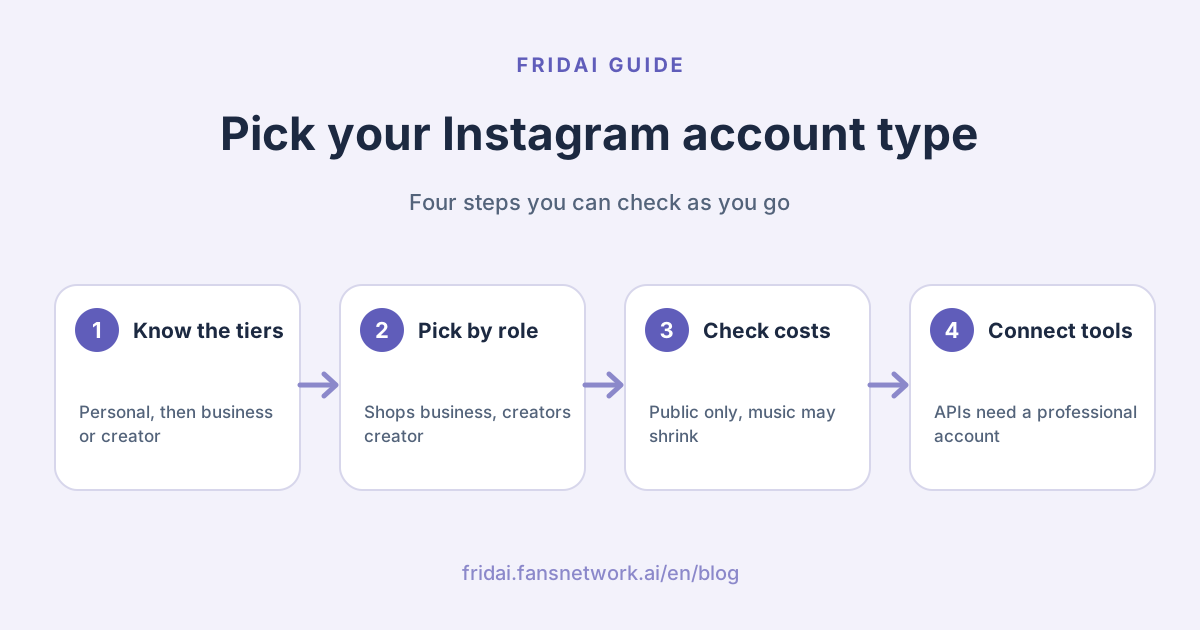
Instagram accounts really have two layers. The first is personal versus professional. The second splits professional into business and creator. So the question has two parts: whether to leave personal at all, and which professional type to pick once you do.
The Instagram Help Center describes the two professional types in one sentence each. Business accounts are best for retailers, local businesses, brands, organizations and service providers. Creator accounts are best for public figures, content producers, artists and influencers. It then lists the features for both in a single shared list.
That matters. Plenty of articles publish long tables of features that "business accounts have and creator accounts do not". The official help pages we read today contain no such table. Below, we only state the differences those pages actually spell out.
Personal versus professional
| Item | Personal account | Professional account |
|---|---|---|
| Can it be private? | Yes | No, it must be public |
| Performance data | Public accounts get "Your dashboard" | Professional dashboard, plus monetization insights |
| Contact button and category label | Not listed | Yes, can be shown or hidden |
| Running ads | Not listed | Run ads and boost from the account |
| Message inbox | Standard inbox | Primary, General and Requests folders |
| Meta Business Suite | Lost when you switch back to personal | Available |
| Third-party tool APIs | Not supported | Supported |
One thing differs from what many people assume: data is no longer exclusive to professional accounts. Instagram's dashboard page says dashboards are available to all public accounts. Personal accounts get "Your dashboard"; professional accounts get the "Professional dashboard", which adds insights on monetization. If all you want is post reach, a public personal account already shows some of it.
What every professional account gets
The Instagram Help Center lists these features for professional accounts, business and creator alike:
- Professional dashboard: track performance and find professional tools and Instagram's educational material.
- Monetization and ads: run ads from the account, and use Meta tools to create ads that appear on both Instagram and Facebook.
- Contact information: a Contact button near the top of the profile with directions, a phone number and an email address.
- Category label: shown below the profile picture; you can hide it after setup.
- Insights: who your followers are, when they are online, and how each post performed.
- Secondary inbox: Primary, General and Requests folders.
- Ranked requests: sort requests by received date or by top accounts.
- Manage followers: review and remove suspected spam and bot accounts.
- Improved discovery: posts and reels may appear in search engine results; this setting can be turned off.
The differences Instagram actually states
| Item | Business account | Creator account |
|---|---|---|
| Who it is for | Retail, local business, brands, organizations, services | Public figures, content producers, artists, influencers |
| Tools the dashboard page names | Frequently asked questions, ads | Subscriptions, branded content tool, partnership ads, payouts |
| Licensed music library | Certain business accounts have no access | Not specifically mentioned |
| Business Suite inbox automations | Listed as an eligible account | Not listed |
| Third-party tool APIs | Supported | Supported |
The "tools the dashboard page names" row comes from Instagram's dashboard article, which says "Creator tools such as" and "Business tools, such as", and notes that the features available vary by account type, region and eligibility. These are examples, not a complete list.
The "category" you choose during setup is a separate thing from the account type. Instagram says so explicitly: the category you choose does not determine whether you set up a business or a creator account. A café can pick the café category and still be a creator account, and the other way round.
Which one should you pick?
| Who you are | Suggested type | Why |
|---|---|---|
| Physical shop, online seller, brand team | Business | Instagram positions it for businesses and brands, and Business Suite inbox automations list business accounts |
| Studio, freelancer, appointment-based service | Business | You need the contact button, message management and ads; you are a "service provider" in Instagram's words |
| Individual creator, influencer, teacher | Creator | Positioned for content producers and public figures; the dashboard names branded content and partnership ads tools |
| Creator who also sells own products | Either | The feature list is shared; decide whether music or Business Suite automations matters more |
| Just sharing life, want a locked account | Personal | Professional accounts cannot be private |
| Not sure yet | Pick one | Instagram says you can change your professional account type at any time |
Our view is blunt: a shop or brand does not need to think long about choosing business. The only group with a real decision is creators who also sell, and even they can switch later in the same settings menu. Choosing an account type is closer to picking a seat than signing a lease.
How to set up an Instagram business account: the official entry point
Instagram's screens change often, so we do not write click-by-click steps. Here are only the menu names the official help page uses, so you know where to look. What you see may differ slightly.
The path Instagram describes: go to your profile, open Settings and activity, find "Account type and tools" under "For professionals", and select "Switch to professional account". Choose a category, then choose Creator or Business. The same can be done on instagram.com, also under "For professionals" in Settings.
Four things to prepare first
- Confirm the account can be public. If it was private, switching makes it public, and Instagram says all pending follow requests are automatically accepted.
- Decide which contact details to show. Once the Contact button is on, anyone who taps it can see them. You can choose not to use your contact info.
- Decide whether to connect a Facebook Page. Instagram marks this step as optional and lets you skip it.
- Choose a category. It appears under your profile picture and can be hidden later.
Do you have to connect a Facebook Page?
No, the account works without one. Instagram's wording is that connecting your business Facebook Page is "recommended" to get the most out of Instagram's business tools. The setup page adds that connecting makes it easier to share Instagram posts on Facebook and use connected experiences such as ads and shopping tools.
The benefits Instagram lists for connecting include running ads from your Page that also appear on Instagram, managing comments and Instagram Direct messages from Inbox in Messenger or Meta Business Suite, cross-app tools such as appointment booking buttons, and using the same payment method for promotions.
There is one side effect. Once a Page is linked, you can only share your Instagram posts to Facebook through that Page, not to another Page or to a Facebook profile. What Meta Business Suite does, and how the Page and account are managed together, is covered in our Meta Business Suite guide.
What changes when you switch, and what does not
| Scenario | What Instagram says | What to watch |
|---|---|---|
| Personal to professional | Account becomes public; pending follow requests accepted | Clear unwanted follow requests first |
| Personal to professional | Professional dashboard, ads and Contact button become available | Contact details are public |
| Business to creator or back | You can change professional account type at any time | Re-check music and tools afterwards |
| Professional to personal | No more access to ads; may lose select tools | Deal with running ads first |
| Professional to personal | Any connected Facebook Page is disconnected | You will need to reconnect later |
| Professional to personal | Lose Meta Business Suite and Meta Ads Manager | Scheduling and inbox are affected |
| Professional to personal | Public accounts keep "Your dashboard" and insights | To go private, switch to personal first |
We also list what the pages do not say. They do not state whether switching account type affects existing posts, follower counts or past insights data. Silence is not a yes or a no, so if historical numbers matter to you, screenshot the important ones before switching. It is free insurance.
One easily missed note: Instagram says that in some cases an active Meta Verified subscription may be canceled if you disconnect a subscribed Facebook Page and Instagram account. If you subscribe, think before switching back to personal.
Instagram business account disadvantages: four costs Instagram states
1. You cannot lock the account
Professional accounts cannot be set to private. Another help page adds that business profiles cannot be made private; to do that you first switch back to a personal account.
2. Licensed music may shrink
Meta Business Help is clear on this: the music in the licensed music library is intended for personal, non-commercial use. To make sure it is not used commercially, certain business accounts and certain types of posts do not have access to it, and licensed music may be unavailable in certain countries or regions. Instagram's audio troubleshooting page also lists "the library isn't available for your account type" as a reason a song cannot be found.
The alternative is Meta's Sound Collection, which Meta says offers over 14,000 royalty-free songs and sounds that are safe to use in Reels and Stories and can be used for commercial purposes such as ads.
Meta's wording is "certain business accounts". It does not say which ones, and it does not say creator accounts are never affected. So we will not tell you that switching to creator brings the music back; only that business is the one account type Meta names.
3. Sharing to Facebook goes only through the linked Page
As above, once a Page is linked, posts can only be shared to Facebook through that Page.
4. Contact details are public
The Contact button is useful, but the phone number and email on it are visible to anyone who taps. A one-person studio should set up a separate work contact.
Which account type third-party tools and auto-reply need
| What you want to do | Account needed | Official basis |
|---|---|---|
| Connect a third-party tool via the official API | Business or creator | Developer docs say professional accounts, including both |
| Business Suite inbox automations | Business is the type listed | The automations page lists Instagram business accounts |
| Let a tool read DMs | Professional account with message access on | "Allow access to messages" toggle in message settings |
| Schedule in Business Suite | Connected account with content permission | Switching to personal loses Business Suite |
Meta's developer documentation says the Instagram Platform APIs serve professional accounts, including business and creator accounts; personal accounts are out of scope. It also describes two login configurations: Instagram Login does not require a linked Facebook Page, while Facebook Login serves accounts linked to a Page. So "do I need a Page to connect a tool" has no single answer. It depends on which login the tool uses; follow the tool's own connection page.
FRIDAI's comment and DM auto-replies and auto-posting all run on Meta's official APIs, so they need a professional account too. For the native automations and the comment-to-DM rules, see Instagram auto-reply in 2026; for Pages, Facebook comment and Messenger auto-reply; for scheduling tools, social media scheduling tools 2026; and for whether you can still reply after 24 hours, the Messenger 24-hour rule.
One setting is often overlooked. Instagram says that under "Connected tools" in the message settings there is an "Allow access to messages" toggle. When it is off, messages can only be viewed and sent inside Instagram, and neither Meta Business Suite nor third-party tools can see them. If you switched to professional and a tool still gets no DMs, check here first.
Pre-switch checklist
Copy this and go through it before you tap anything.
1. Before switching
- Can the account be public (professional accounts cannot be locked):
- Pending follow requests handled:
- Phone and email to show publicly:
- Category to display:
- Connect a Facebook Page? Which one:
2. After switching
- Contact button and category show correctly:
- Music you normally use is still available:
- "Allow access to messages" is on:
- Tools re-authorised:
3. Before switching back to personal
- Running ads and boosts finished:
- Scheduled posts dealt with:
- Any Meta Verified subscription:
- Third-party tools that would stop:The last line is the one people forget. After switching back to personal, API-based auto-replies and scheduling stop, and usually nobody warns you.
FAQ
Does switching to an Instagram business account reduce reach?
None of the Instagram or Meta help pages we read today says account type raises or lowers reach. They only say professional accounts' posts and reels may appear in search engine results. We do not vouch for claims without an official basis.
Can I switch a professional account back to personal?
Yes, at any time. You lose access to ads, Meta Business Suite and Meta Ads Manager, and any connected Facebook Page is disconnected. A public account keeps "Your dashboard" and insights.
Will I get less music with a business account?
Possibly. Meta says the licensed music library is for personal, non-commercial use and that certain business accounts and post types have no access; the royalty-free Sound Collection is the alternative. Meta does not say which business accounts.
Do I have to connect a Facebook Page to open a business account?
No. Instagram marks connecting a Page as optional during setup. It is recommended if you want to manage DMs and comments in Meta Business Suite and use connected experiences such as ads and shopping tools.
Does an Instagram business account cost money?
The help pages we read mention no fee for switching to a professional account; the option sits in Settings. What costs money is the ads and boosts you choose to run, or services you subscribe to separately.
Can a creator account use auto-reply tools?
Third-party tools on the official API can serve it: Meta's developer docs cover both business and creator accounts. Meta Business Suite's native inbox automations, however, list Instagram business accounts as eligible.
Why does my tool still get no DMs after I switched to professional?
Check the "Allow access to messages" toggle in message settings. Instagram says that when it is off, messages can only be viewed and sent inside Instagram, so Meta Business Suite and third-party tools cannot read or send them.
How FRIDAI can help
Once the account is professional, FRIDAI Chat can handle Instagram DM enquiries and hand off to a human when needed, FRIDAI Social handles comment replies and comment-to-DM, and FRIDAI Post handles scheduling and auto-posting, all through Meta's official authorisation. If your questions are fixed and volume is low, get comfortable with Meta's native features first; there is no rush to pay.
- DM support: FRIDAI Chat
- Comment engagement: FRIDAI Social
- Content scheduling: FRIDAI Post
- Next step: Meta Business Suite guide
- Choosing auto-reply: Instagram auto-reply in 2026
- When an account is in trouble: Instagram disabled or hacked: official recovery paths
- Instagram: FRIDAI on Instagram
- Threads: FRIDAI on Threads
- Facebook: FRIDAI on Facebook
Official sources
- Instagram Help Center, About professional accounts on Instagram: help.instagram.com/
138925576505882 - Instagram Help Center, Set up a professional account and switch account types: help.instagram.com/
502981923235522 - Instagram Help Center, Switch back to a personal account: help.instagram.com/
1717693135113805 - Instagram Help Center, About Instagram dashboards: help.instagram.com/
257516379077270 - Instagram Help Center, Differences between public and private accounts: help.instagram.com/
517073653436611 - Instagram Help Center, About connecting a professional account to a Facebook Page: www.facebook.com/
help/ instagram/ 790156881117411 - Instagram Help Center, Problems with audio on Instagram: help.instagram.com/
1612770602842742 - Instagram Help Center, Manage access to Instagram messages across apps: help.instagram.com/
791161338412168 - Meta Business Help Center, Access to the licensed music library on Instagram: www.facebook.com/
business/ help/ 402084904469945 - Meta Business Help Center, About Inbox automations: www.facebook.com/
business/ help/ 395965998733706 - Meta developer documentation, Instagram Platform overview: developers.facebook.com/
docs/ instagram-platform/ overview