
When owners hear "AI customer service", many picture a bot that only says "please type 1". Today's AI customer service systems work differently: you describe your shop in plain words, and the system answers in your voice. This guide walks through the parts that make up a system and how one message is handled, then gives you a selection checklist and a four-week rollout plan, so you know exactly where to start.
What is an AI customer service system, and how is it different from a keyword bot?
An AI customer service system is software that answers customer messages for you. The biggest difference from an older keyword bot is that it understands the question instead of matching words.
| Compared on | Keyword auto-reply | AI customer service system |
|---|---|---|
| How it picks a reply | Fires only when the customer types a set word | Understands the whole sentence |
| A different wording | No match, no reply | "What time do you open" and "Are you open now" both work |
| What you maintain | Keywords and fixed replies, one by one | One set of brand knowledge in plain words |
| Several questions at once | Answers only the matched word | Answers every question in one go |
| Something it cannot handle | Stuck on a fixed reply | Hands it to a person by your rules |
Keyword replies are still great for fixed flows like giveaways and lead magnets, and the two work well together. For the full split, read AI customer service vs chatbots.
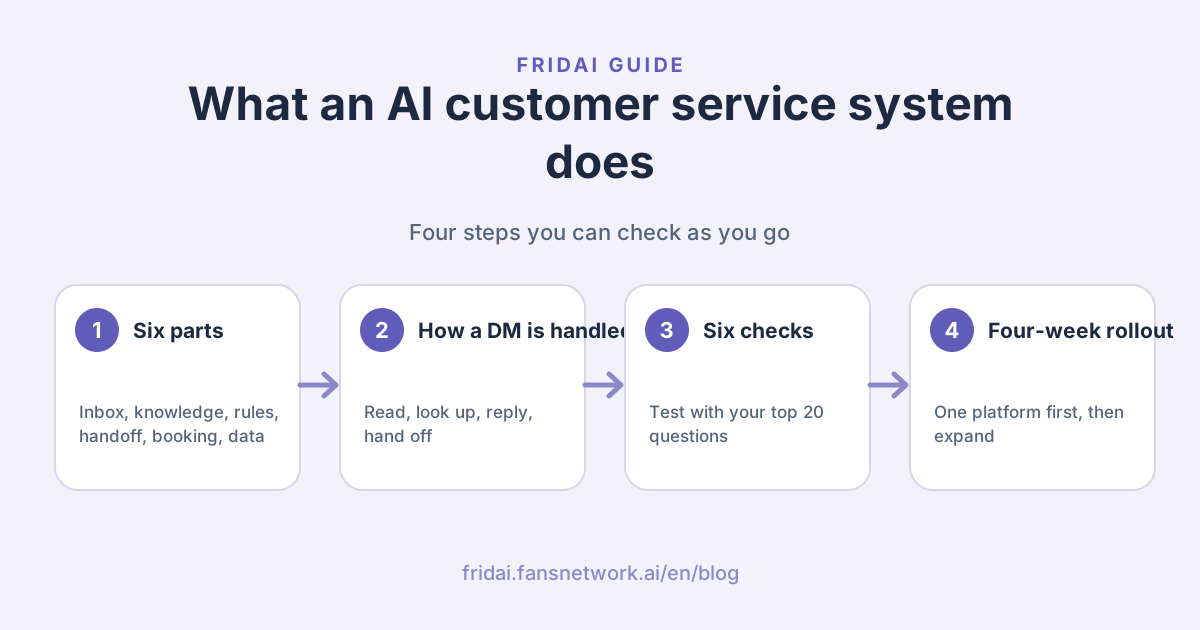
The six parts of an AI customer service system
Whichever vendor you look at, a complete AI customer service system has these six parts. Choosing a system means checking how well it does each one.
| Part | What it does | The question to ask |
|---|---|---|
| 1. Inboxes | Brings in DMs from LINE, Instagram, Facebook, website chat and more | Where do my customers come from, and are all of them covered? |
| 2. Brand knowledge | Products, prices, opening hours, returns | How do I write it, and how long does one change take? |
| 3. Rules and tone | How to address customers, what never to say, which voice to use | Can I describe it in plain words instead of building flows? |
| 4. Human handoff | Complaints, refunds and special requests go to you | How am I notified, and can I hand it back to the AI afterwards? |
| 5. Booking and sales | Booking times, collecting details, recommending products | Can customers book without leaving the chat? |
| 6. Records and data | Conversation history, customer data, reply counts | Can I see what the AI said and what customers asked? |
A quick tip from me: many people only check part 1, the platforms. Parts 2 and 4 decide whether the AI answers well and whether you can step in when something goes wrong~
How it works: one message from inbox to reply
Take a common DM. A customer asks on Instagram: "Any tables Saturday afternoon? Can I bring my dog?"
- Receive: the system gets the DM through the platform's official connection, so you do not need your phone open.
- Read: it sees the customer asked two things, Saturday availability and the pet policy.
- Look up: it finds "pet friendly, leash required" in your brand knowledge and checks open slots in the booking system.
- Reply by your rules: it answers both questions in your tone and asks the customer to pick a time.
- Hand off: if the customer says "I want to book the whole place", that is a case you chose to handle yourself, so the system notifies you to take over.
What the AI says depends on the knowledge and rules you give it. That is why how you write the knowledge matters more to reply quality than which model sits underneath. For how to organise it, see How to write an AI customer service knowledge base.
Which shops need an AI customer service system most?
If two or more of these fit, an AI customer service system will make a clear difference:
- Lots of repeat questions: price, hours, address, shipping and stock, answered several times a day.
- Lots of messages at night and on weekends: customers ask after you close, and by the next morning they have gone elsewhere.
- One person, many platforms: LINE, Instagram and Facebook each in their own window, so messages get missed.
- A booking-based business: beauty, restaurants, classes and clinics spend the most time agreeing on times.
- You want to keep customers: you want everyone who asks to leave their details so you can follow up.
| Business type | Most-asked questions | What the system handles first |
|---|---|---|
| Nail, lash and hair studios | Prices, open slots, removal fees | Quotes and booking times |
| Restaurants and cafés | Reservations, minimum spend, pets, parking | Reservations and house rules |
| Online and boutique shops | Stock, sizes, shipping, delivery | Product questions and shipping info |
| Classes and tutoring | Schedules, fees, trial lessons | Course info and collecting contact details |
| B&Bs and small hotels | Availability, check-in times, transport | Room info and booking guidance |
Six things to check when choosing an AI customer service system
Print this table and tick each line during your trial. It tells you far more than any feature page.
| Check | How to test it | What good looks like |
|---|---|---|
| 1. Covers your platforms | List every place customers come from and confirm each one | LINE, Instagram and Facebook all connect, ideally several platforms on one plan |
| 2. Easy-to-maintain knowledge | Add one common question yourself | Written in plain words, live as soon as you save |
| 3. Sounds like you | Ask the same question three times and compare the tone | Address, voice and wording all match your brand |
| 4. Smooth handoff | Send a complaint on purpose | You are notified right away and the customer knows someone will help |
| 5. Can do sales | Book a time inside the chat | The booking is done without leaving the chat |
| 6. Predictable cost | Price last month's message volume | Clear billing units you can forecast for busy season too |
Use the 20 questions your shop gets asked most as the test, and give every system the same set. To see how the main vendors compare, read The best AI customer service platforms in Taiwan for 2026. To work out the billing models, see AI customer service pricing per conversation, per contact or per reply.
Platform rules to know: the 24-hour window and LINE reply messages
An AI customer service system replies through each platform's official connection, so the platform's rules shape what it can do. These two come up most:
- The Messenger and Instagram standard messaging window: Meta's policy gives businesses a standard messaging window to respond after a customer messages, which for most user actions is 24 hours. Outside the window you need a Meta-approved option, for example the Human Agent tag, which gives a separate 7 days for manual replies. An AI customer service system replies in seconds, so every answer lands inside the window. For details, read The Messenger and Instagram 24-hour rule.
- LINE reply messages: push, multicast, broadcast and narrowcast messages from a LINE Official Account count toward the monthly message quota; reply messages sent in response to a customer do not. When AI customer service answers a customer right away, it uses a reply message.
A quick tip: ask every vendor whether it uses each platform's official connection. Official connections keep your accounts safest~
Rollout: four weeks from one question to fully live
You do not need to switch everything on at once. I suggest four weeks:
- Week 1: build the test set. Pick the 20 most-asked questions from your LINE and Instagram history and write down how you usually answer.
- Week 2: write knowledge and tone. Turn the answers into handover notes for a new teammate, then set the form of address, the voice and the cases that come to you. No code needed; follow Set up AI customer service without code.
- Week 3: trial on one platform. Start with your busiest inbox. Spend 10 minutes a day reading what the AI said and add a line of knowledge whenever it gets something wrong.
- Week 4: expand. Once replies are steady, connect the other platforms and turn on booking so customers can book inside the chat.
To keep your rules tidy as they grow, use the six-part template in How to write AI customer service rules.
Which numbers to watch after launch
Check these four numbers every week and you will know what to tune next:
| Number | What it tells you | What to do |
|---|---|---|
| AI replies | How much work the AI took on | Use it to pick a plan and forecast busy season |
| Conversations handed to a person | What still needs you | Add the most common ones to the knowledge |
| Replies that were wrong or you edited | Gaps in knowledge or rules | Add a line of explanation for each one |
| Bookings or details collected | Whether the AI is bringing in business | Add a clear next step to replies |
A quick tip from me: every reply you edit is the best teaching material. Add a line of knowledge each time and the AI sounds more like you week after week~
Summary: for an AI customer service system, check knowledge and handoff first

A quick note from FRIDAI
We just took an AI customer service system apart, from its parts and how it works to choosing and rolling it out~
- An AI customer service system sits behind your inboxes, understands questions and answers from your knowledge and rules.
- A complete system has six parts: inboxes, knowledge, rules and tone, human handoff, booking and sales, records and data.
- Choose with the six checks, using your shop's 20 most-asked questions as the same test for every system.
- Roll out over four weeks: build the test set, write the knowledge, trial one platform, then expand.
- After launch, watch replies, handoffs, edited replies and bookings every week, and keep adding knowledge.
Send me your 20 most-asked questions and let's write your first knowledge base together ☺️
FAQ
What is an AI customer service system?
An AI customer service system is software that answers customer DMs for a business automatically. It sits behind inboxes like LINE, Instagram and Facebook Messenger, understands the customer's question, answers from the brand knowledge and rules the business wrote, and hands conversations to a person when needed.
How is AI customer service different from a regular chatbot?
Regular chatbots mostly use keywords or buttons to trigger fixed replies, so a different wording misses. An AI customer service system understands the whole sentence, so it can answer from your brand knowledge even when customers phrase things differently or ask several things at once.
Do I need to code to use an AI customer service system?
No. Modern AI customer service systems let you maintain brand knowledge and rules in plain words, like writing handover notes. Connecting platforms usually takes a few authorisation clicks.
Can an AI customer service system get answers wrong, and how do I prevent it?
What the AI says depends on the knowledge and rules you give it. Test with your 20 most-asked questions before launch, send refunds and complaints to a person, and add every wrong or edited reply to the knowledge each week so accuracy keeps improving.
How much does an AI customer service system cost?
It depends on the billing model: per conversation, per contact, per seat plus resolutions, or per AI reply. FRIDAI Chat starts at US$70 a month with 500 AI replies, connects 8 DM platforms on one plan, and yearly billing gives 2 months free.
Does a small shop need an AI customer service system?
Small shops that fit two or more of these get the most out of it: many repeat questions, many messages at night and on weekends, one person running several platforms, or a booking-based business. Start with one platform and your 20 most-asked questions.
How FRIDAI can help
FRIDAI Chat is an AI customer service system built for shops in Taiwan: write your knowledge notebook and rules in plain words, and connect LINE, Facebook Messenger, Instagram, Threads, WhatsApp, Telegram, Discord and website chat, 8 platforms on one plan. Every plan includes the booking and reservation system, human collaboration and human review, and FRIDAI's official LINE notifies you whenever you need to step in. Plans start at US$70 a month with 500 AI replies, and you can try it for 30 days for US$1 (NT$30 through PAYUNi or JKOPAY).
- DM customer service: FRIDAI Chat
- Plans and pricing: FRIDAI pricing
- Hands-on setup: Set up AI customer service without code
- Instagram: FRIDAI Instagram
- Threads: FRIDAI Threads
- Facebook: FRIDAI Facebook
Official sources
- FRIDAI Chat: fridai.fansnetwork.ai/
en/ fridai-chat - FRIDAI plans and pricing: fridai.fansnetwork.ai/
en/ pricing - Meta Messenger Platform policy overview: developers.facebook.com/
docs/ messenger-platform/ policy/ policy-overview - LINE Developers Messaging API pricing: developers.line.biz/
en/ docs/ messaging-api/ pricing/