
Since April 2026, general official accounts no longer show what used to be called the "grey shield". Customers now tell at a glance whether an account is verified by whether it has a badge. Many shops noticed the missing mark at that point and started looking up how verification works. Below we cover the three account types, what changed with the badge, what verification gives you, three things to check before applying, how to prepare documents, the application steps, tracking progress and fast review, and what to watch after approval.
What LINE Official Account verification is: the three account types
LINE sorts official accounts into three types: general, verified and premium (企業
| Account type | Who can have it | How you get it | What customers see |
|---|---|---|---|
| General official account | Individuals or business owners | Apply yourself on the web | No badge |
| Verified official account | Government-approved companies, shops or organizations | Buy a Premium ID, submit documents, pass LINE's review | Verified badge |
| Premium official account | High-quality accounts that operate deeply on LINE | Invited by LINE; verification comes first | Verified badge |
So "verified" means one thing: LINE has looked at your documents and confirmed that a government-approved company, shop or organization is behind the account. Everyday features such as chat, broadcasts and rich menus work the same on general and verified accounts. For monthly fees and message costs, see LINE Official Account pricing.
The 2026 badge update: general accounts no longer show the grey shield
LINE started rolling out a new badge display on April 1, 2026. Three points matter:
| When | What changed | What it means for shops |
|---|---|---|
| March 2026 | The response status of unverified accounts is always shown, with a pinned line in the chat such as "This official account is replying automatically" | Verified accounts can still adjust the display as before |
| April 2026 | General official accounts stop showing the grey shield and show no badge | Daily operation and features are unaffected |
| April 2026 | The verified badge becomes a more recognizable green or blue check mark | Customers spot verified accounts more easily |
A missing shield is a display change across all accounts, and your account is working normally. LINE's advice is practical: if you want customers to clearly see a verified mark, consider applying; if you keep a general account, spell out your payment, pickup and form-filling steps so customers feel safe. If an account is actually suspended you will be notified, and the steps are in what to do when a LINE Official Account is suspended.
What a verified official account gives you
Of the benefits LINE lists, small shops feel the first four most:
| Benefit | What you actually gain |
|---|---|
| Set apart from fake accounts | The badge shows you passed LINE's document review, so customers know which account is really you |
| Searchable | Customers can find you by typing your shop name or a keyword in the official account list and the LINE chat list; the text in your status message is searchable too |
| Free LINE character posters | The web admin can generate posters with your account ID and QR code to print for your shop |
| Add-friend ads and reviewed features | You can run add-friend ads from the admin and use features that need review, such as live streaming |
LINE lists two more: opening your own store page, and applying for LINE SPOT fast-track listing for free.
Being searchable matters most. A customer who has heard your shop name can open LINE, search and add you without hunting for a QR code. The status message can change with each campaign, so put your featured service there to add another way to be found. More ways to gain friends are in how to get more LINE Official Account friends.
Three things to check before applying: eligibility, name, Premium ID
If any of these is off, the application cannot be submitted or gets sent back. Spend ten minutes checking them first.
1. Your industry and service meet the verification standard
LINE's standard weighs three things: the account offers a service to the general public, it complies with the LINE Official Account terms, and the service is already live. The eligible industries are the ones listed on the application form.
One company can apply for several verified accounts under different types and names:
- Company account: the company name as the account name
- Physical or online shop account: the shop name as the account name
- Product brand account: the registered brand name as the account name
For example, a café and an online shop under the same company can each apply. A shop that exists only as a Facebook Page is outside the scope of verification.
2. Name the account by the naming rules
A verified account name must match the company or shop name, the actual store name, the online platform or the brand name. The top principle is no infringement and nothing misleading, so friends recognize you at once.
| Item | Rule |
|---|---|
| Length | Up to 20 characters, no full-width characters |
| Allowed characters | Chinese, English, numbers and some symbols |
| Based on | Company or shop name, brand name, physical store name, online platform name |
| Leave out | Emoji, special symbols and extra punctuation (such as ★ or ®) |
| Do not write | Exaggerated or promotional words ("tastiest", "strongest", "limited-time offer") or the words "official account" |
| Do not do | Use someone else's brand, or suggest you are a government body, financial institution or head office |
Once the name passes review you cannot change it yourself, so fix it before submitting: web admin → Settings → Account settings → Basic settings → Account name, then save. After a change the name is locked for seven days, so leave time for that. Put your services and highlights in the status message, which is searchable as well.
3. Buy a Premium ID first
LINE states it plainly: buying a Premium ID is the first requirement for a verification application, and without one the application cannot be submitted.
| Item | Premium ID rule |
|---|---|
| Format | "@" plus a custom string of half-width letters and numbers and ".", "_", "-", up to 18 characters |
| Uniqueness | An ID in use by another account cannot be chosen; first come, first served |
| Validity | One year. Bought on the web or Android, the purchase month counts as month one; bought on iOS, it starts the following month |
| Cost | LINE describes it as averaging as little as NT$2 a day, with the amount shown on the purchase screen; it is billed and charged separately from your message plan |
| Where to buy | LINE Official Account billing area → Premium ID, on a computer or a phone |
| After buying | It cannot be changed; to change it you cancel and buy again. Your original random ID and add-friend QR code keep working |
A Premium ID is the entry ticket for submitting; the review result still depends on your industry and documents. With an eligible industry and a Premium ID, the verification application itself is free. Use the same string as your Instagram handle and website address so customers remember it everywhere.
How to prepare the supporting documents
LINE looks at three kinds of documents: a description of your service, an establishment document approved by a Taiwan authority, and proof of the applicant's identity.
| Document | What to prepare | Who submits it |
|---|---|---|
| Establishment document | Company or business registration, or an establishment document approved by the competent authority | Every application |
| Applicant identity | Proof of employment, a business card or a staff ID, any one of the three | Every application |
| Shop sign | A sign that shows the shop name | Physical shops |
| Site address | Your website or store URL | Online platforms |
| Trademark document | A trademark document issued by the Taiwan Intellectual Property Office | Applying under a domestic brand name |
| Distributor document | A document proving you are the brand's general agent in Taiwan, or the brand owner's public information | Applying under a foreign brand name |
Some industries add one more certificate from their authority:
| Industry | Extra document |
|---|---|
| Cram schools | Cram school registration certificate |
| Hotels and B&Bs | Hotel registration certificate |
| Medical institutions | Medical institution practice license |
| Pharmacies | Pharmacy license |
| Schools | Government approval of establishment |
| Foundations, civil associations, temples | Their respective registration certificates |
| Artists and models | Agency contract |
| Apps | App download link |
LINE's verification application page has a document checker: choose your industry, physical or online, and whether you are a brand, and it lists what you need to submit. Keep four points in mind:
- The applicant must hold admin permission on the official account.
- Upload the files directly; cloud links are not accepted.
- If another company applies for you, attach LINE's authorization letter for applying on your behalf.
- When the review team asks for more documents in OAV, follow that notice.
Quick tip: the shop name on your sign photo, your registration document and your account name should all match. When the names line up, the reviewer can confirm it is the same shop at a glance.
LINE Official Account verification application: three steps
The application flow runs on a computer; phones are not supported. With documents ready, follow these three steps:
Step 1: Submit the verification application
| Your situation | Where to apply |
|---|---|
| No official account yet | On a computer, use the LINE Biz-Solutions site to create the account and apply for verification in one go |
| Already have a general account | Web admin → Settings → Billing area → "Apply for a verified account", or apply directly in OAV |
If you have not opened an account yet, read LINE Official Account setup and first-week checklist and set up your profile and response mode at the same time.
Step 2: Upload supporting documents in OAV
OAV is the LINE Official Account verification platform (LINE OA Verification). After filling in the application form, upload your documents to OAV. Only then is the application complete and the account enters formal review.
Step 3: Wait for the review result
The result arrives by email and as a LINE verified account review notice. Check the inbox you entered when applying, and look in the spam folder too so nothing is missed.
After submitting: progress, extra documents and fast review
Check progress: in OAV's official account list, click the account's Status button to see the application details and the review team's replies. LINE notes that review time varies with the case.
Who to ask: for verification review questions, use the inquiry form in OAV to reach the LINE Official Account review team. For account operation and login questions, contact the LINE support center or the "LINE 客服
Keep operating during review: LINE explains that verification is a status of the account, and features are unaffected during review. If you cancel the application, the account stays and continues as a general account.
Fast review: shops in retail, beauty and hair, and medical industries can hand their documents to LINE's industry partners, who check them and pass them to the LINE review team. With correct documents, fast review completes in 5 business days. Other industries can apply for fast review through LINE's sales partners.
The waiting period is a good time to tidy the account: the greeting message, rich menu and chat sorting can all be done first. For chat settings, see the LINE Official Account chat guide.
Three things to watch after you are verified
Renaming goes through LINE. After verification you cannot rename the account yourself. For a business-driven change, file the OAV inquiry form with your account ID, the current and desired names, a business registration document or website address or sign photo that shows the change, and the reason. Processing takes about 10 business days. When the tax ID differs, the brand is transferred, or the service becomes a different kind (for example, a buying agent turning into a café), LINE recommends creating a new official account.
Note your Premium ID expiry. A Premium ID is valid for one year, so write the expiry month in your calendar when you buy it.
Be ready for more messages. Once a verified account is searchable, new customers message you directly about prices, opening hours and how to book. Turn your common questions into fixed answers first, so your reply speed keeps up.
A reminder from the editor: do not leave the status message blank. Write this season's featured service there, and you get one more chance to be seen when customers search a keyword.
Summary: key points for LINE Official Account verification

A quick note from FRIDAI
Verification is asking LINE to vouch that "this really is my shop", and it goes smoothly when you prepare in order.
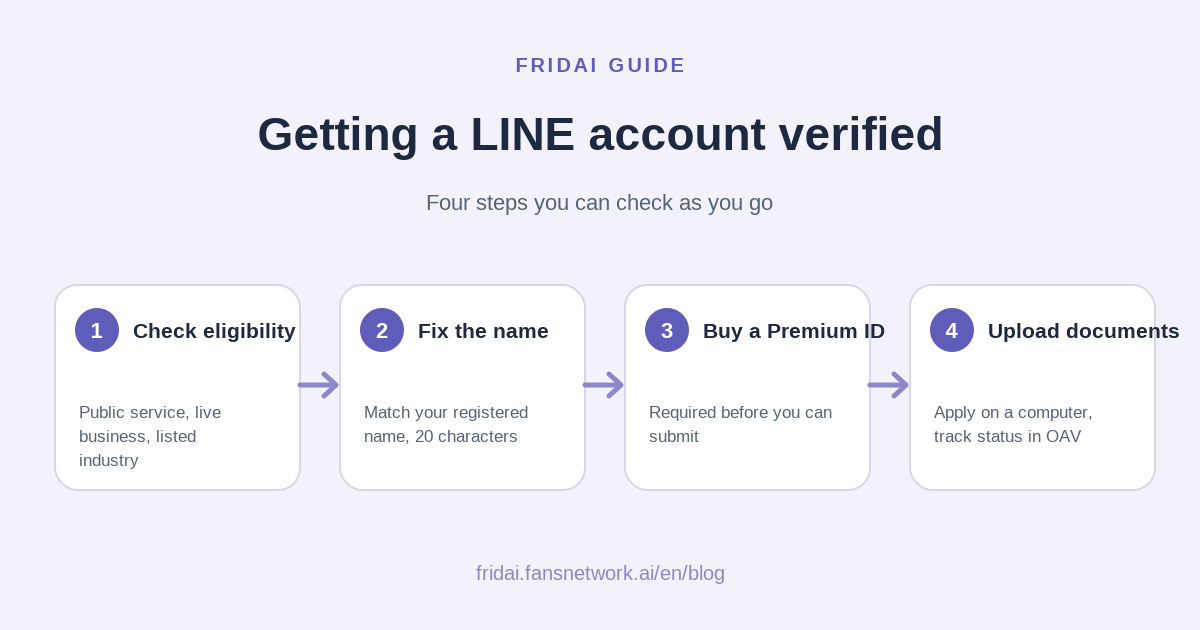
- Check eligibility first: a service for the public, already operating, in an industry on the application form.
- Change the account name to the shop name on your registration and sign, within 20 characters, without symbols or promotional words.
- Buy a Premium ID, then gather the establishment document, applicant identity and a sign or site address.
- Apply on a computer, upload the documents to OAV, then check Status in OAV for progress.
- Retail, beauty and medical shops can use the industry partners' 5-business-day fast review.
When messages pick up after approval, hand me your common questions and I will catch them one by one ☺️
FAQ
Does LINE Official Account verification cost money?
The verification application itself is free. LINE says an eligible industry plus a Premium ID lets you apply for a verified account at no charge. What you pay for is the Premium ID, the first requirement for applying. It is valid for one year and the amount is shown on the purchase screen.
Do I have to buy a Premium ID to apply for verification?
Yes. LINE states that buying a Premium ID is the first requirement, and without one the application cannot be submitted. The order is: confirm the name follows the naming rules, buy a Premium ID, then apply and upload your documents to OAV.
Can an individual apply for a verified LINE Official Account?
Verified accounts are for government-approved companies, shops or organizations, and require a company or business registration or an establishment document approved by the competent authority. Individuals can apply for a general official account, which has the same features and pricing as a verified account.
How long does LINE Official Account verification take?
LINE notes that review time varies with the case. Retail, beauty and hair, and medical businesses that submit through an industry partner can complete fast review in 5 business days when the documents are correct. You can check progress under Status in OAV's official account list.
Can I use my official account while the application is in review?
Yes. LINE explains that verification is a status of the account. Features are unaffected during the application and you can keep using general account services. Cancelling the application does not delete the account.
Can I apply for verification on a phone?
The verification application flow runs on the computer web version. A Premium ID can be bought on a computer or a phone; submit the application form and documents on a computer.
My grey shield disappeared. Is something wrong with my account?
Your account is fine. Since April 1, 2026, general official accounts show no badge, and features such as chat and broadcasts work as usual. To show a verified badge, apply for verification.
Can a verified account change its name?
After verification you cannot change the name yourself. For a business-driven change, file the inquiry form in OAV with the review team; processing takes about 10 business days. When the company tax ID or the service differs, LINE recommends creating a new official account.
How many verified accounts can one company apply for?
A company can apply separately under different types and names, such as a company account, a physical or online shop account and a product brand account. A store and an online shop under the same company can each apply for verification.
How FRIDAI can help
Once your account is verified and customers can find you by search, the next step is making sure every message gets an answer. FRIDAI Chat connects to your LINE Official Account and replies in your voice from the products, prices and service processes in your knowledge base. When a case should go to a person, it notifies you, and the AI steps aside once a person takes over. The same plan also covers DMs on 8 platforms, including Instagram and Facebook Messenger.
- DM customer service: FRIDAI Chat
- LINE overview: The complete LINE Official Account guide
- Plans and pricing: FRIDAI pricing
- Instagram: FRIDAI Instagram
- Threads: FRIDAI Threads
- Facebook: FRIDAI Facebook
Official sources
- LINE Biz-Solutions: verified official account application flow (Traditional Chinese): tw.linebiz.com/
column/ line-lac-id-0418/ - LINE Biz-Solutions: official account badge update (Traditional Chinese): tw.linebiz.com/
column/ 2026-OA-rebranding/ - LINE Biz-Solutions: advantages of a verified official account (Traditional Chinese): tw.linebiz.com/
column/ lac-verified/ - LINE Biz-Solutions: verification fast review (Traditional Chinese): tw.linebiz.com/
service/ account-solutions/ line-official-account/ online-solutions-partner/ - LINE Biz-Solutions: how general, verified and premium accounts differ (Traditional Chinese): tw.linebiz.com/
faq/ oa-basic/ 59/ - LINE Biz-Solutions: general, verified and premium account definitions (Traditional Chinese): tw.linebiz.com/
faq/ oa-operation/ 23/ - LINE Biz-Solutions: is a Premium ID required to apply for verification (Traditional Chinese): tw.linebiz.com/
faq/ oa-operation/ 13/ - LINE Biz-Solutions: naming rules for verified accounts (Traditional Chinese): tw.linebiz.com/
faq/ oa-operation/ named/ - LINE Biz-Solutions: can one company apply for different verified account types (Traditional Chinese): tw.linebiz.com/
faq/ oa-operation/ accounttype/ - LINE Biz-Solutions: how to rename a verified account (Traditional Chinese): tw.linebiz.com/
faq/ oa-operation/ 28/ - LINE Biz-Solutions: using the account while verification is in review (Traditional Chinese): tw.linebiz.com/
faq/ oa-operation/ 15/ - LINE Biz-Solutions: cancelling a verification application (Traditional Chinese): tw.linebiz.com/
faq/ oa-operation/ 14/ - LINE Biz-Solutions: no reply after applying for verification (Traditional Chinese): tw.linebiz.com/
faq/ oa-operation/ 4/ - LINE Biz-Solutions: how to buy a Premium ID (Traditional Chinese): tw.linebiz.com/
faq/ oa-price/ 27/ - LINE Biz-Solutions: Premium ID validity (Traditional Chinese): tw.linebiz.com/
faq/ oa-operation/ 11/ - LINE Biz-Solutions: Premium ID introduction (Traditional Chinese): tw.linebiz.com/
column/ premium-id-exposure-naming/ - FRIDAI Chat: fridai.fansnetwork.ai/
en/ fridai-chat