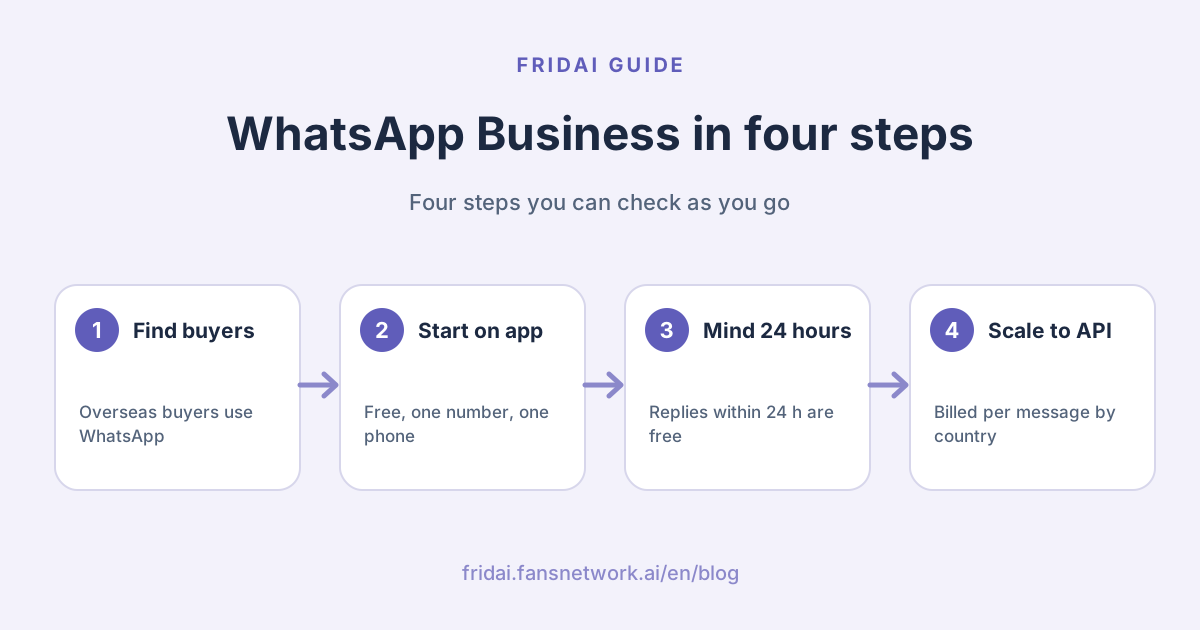
Does a Taiwan shop really need WhatsApp?
Ask one question first: where are your customers?
Customers in Taiwan usually reach shops through a LINE Official Account (the business side of the LINE messaging app) or through Instagram and Facebook DMs. If nearly all your customers are in Taiwan, opening WhatsApp just adds another inbox to watch, and slow replies make you look absent. Running LINE well pays off far more; start with our complete LINE Official Account guide.
The shops that really need WhatsApp usually fall into these groups:
Your customers are overseas
Cross-border e-commerce, export orders, guesthouses and travel agencies hosting foreign visitors, brands selling to overseas Chinese-speaking communities. If they live on WhatsApp, meet them there instead of asking them to install LINE for you.
You deal with overseas distributors or agents
Wholesale, trade-show follow-ups, overseas resellers. Volume is low, but any single message might be a big order.
You run international ads
Meta ads can send people straight into a WhatsApp chat. As you will see below, chats that start this way get special treatment in billing.
What the WhatsApp Business app is
The WhatsApp Help Center describes WhatsApp Business as a free-to-download app for Android and iPhone, built with the small business owner in mind, with tools to automate, sort and quickly respond to messages, and designed to feel just like regular WhatsApp.
The features it lists include:
Business profile
A place for key details such as your address, email and website, visible as soon as a customer taps in.
Lists to organize contacts
Sort contacts and chats so they are easier to find.
Messaging tools for quick replies
WhatsApp's product page adds that you can greet people when they start a conversation, respond even when you are away, and showcase products and services with prices.
Two practical limits to know up front:
First, the Help Center states that WhatsApp Messenger and WhatsApp Business are two different apps. You cannot use the same phone number in both at the same time, though you can move between them.
Second, WhatsApp's official resource page says the WhatsApp Business app provides for one phone number. If you want separate numbers per brand or department, look at the Platform.
What the WhatsApp Business Platform (Cloud API) is
WhatsApp's official resource page positions the Business Platform as the way medium and enterprise businesses interact with customers on WhatsApp at scale, and says smaller businesses may only need the free app. The Platform supports multiple phone numbers and display names, automated message templates and integration with other business systems.
Meta's developer documentation adds rules you will run into:
Templates usually need approval
Template messages generally require approval before you can send them. Templates are also the only type of message you can send to WhatsApp users outside a customer service window.
Get opt-in before sending templates
Meta states you must obtain user opt-in before sending message templates, and the opt-in must make your business name and intent clear.
Businesses can be verified
Business portfolios can be verified, and phone numbers can have display names and earn Official Business Account status.
How to get started
WhatsApp's official Platform page offers two entries: find a partner, or sign up yourself on Meta's developer site. Connecting on your own takes engineering work; without developers, go through a partner or a tool that already integrates WhatsApp.
App vs Platform at a glance
| Item | Business app | Business Platform |
|---|---|---|
| Built for | Small shops, owner replies | Medium and enterprise businesses |
| Cost | Free to download | Billed per message |
| Phone numbers | One number | Multiple numbers |
| Automation | Greetings, away replies | Templates, integrations, automation |
| How to start | Download the app | Partner or build it yourself |
Already on the app: can you move to the API?
Yes, with conditions. Meta's developer documentation explains that through Embedded Signup a business can connect its existing WhatsApp Business app account and number to Cloud API, keep chatting one-to-one in the app afterwards, and have history synced between the two.
The limits are spelled out: the app must be version 2.24.17 or higher; history synced is messages from the 180 days before onboarding; group chats are not synced; broadcast lists are disabled; and some app features are not supported on Cloud API. Ask your tool provider whether it supports this type of onboarding.
How WhatsApp API pricing works
This is the section most worth reading. Meta's developer documentation states that from July 1, 2025, billing moved to a per-message basis, and the old conversation-based pricing is deprecated.
The four message categories
| Category | Official use | Billing point |
|---|---|---|
| Marketing | Offers, product suggestions, cart reminders | Templates charged per message |
| Utility | Order and payment updates triggered by users | Free inside the window |
| Authentication | One-time passwords | Templates charged per message |
| Service | Answering customer questions, by agent or AI | Free inside the window |
The 24-hour customer service window
WhatsApp's official pricing page says that when a user messages a business, a 24-hour customer service window opens, during which the business can reply with service messages at no charge, and the window resets with each user message. The page also notes that service messages can be handled by an agent or a conversational AI bot.
Put simply: the customer asks, you answer within 24 hours, and there is no message fee.
Free entry points: 72 hours with no charges
If a customer messages you from a Click to WhatsApp ad or a Facebook Page call-to-action button, every message you send for the next 72 hours is free, templates included. The developer documentation adds that this applies only to the Android and iOS apps, not desktop or web.
Pricing follows the recipient's country code
This is where Taiwan shops most often get it wrong. Meta states that charges are based on the country calling code of the recipient's WhatsApp number, then on message category. So you may be in Taiwan, but if your customer is in Singapore or the US, their market's rate applies.
The developer documentation places Taiwan (country code 886) in the "Rest of Asia Pacific" regional rate group. Rate cards are offered in several currencies but not New Taiwan dollars, and the official pages we checked give no Taiwan-specific amount, so we do not quote numbers. To budget, choose the market and currency on the official pricing page.
Volume tiers
Utility and authentication messages have volume tiers, so heavier use can unlock lower rates, reset monthly. Utility messages sent inside a customer service window or a free entry point window do not count toward tiers.
Seen "first 1,000 conversations free" in older articles?
That describes the old conversation-based model. Some WhatsApp resource pages still carry the old wording, but Meta's developer pricing documentation states conversation-based pricing is deprecated. Go by the developer pricing page and the current official pricing page.
What changed in 2026
The update log on Meta's developer pricing page shows several rate changes in 2026, including changes for a number of markets in January, April and July, and more billing currencies being added. Whether the regional group that includes Taiwan moved is something to check on the rate card at the time.
The other common question is about AI. In 2026 Meta began charging "AI Providers", meaning providers of AI technologies such as large language models, for non-template messages in certain countries. The same official page states this does not change how Meta charges all other businesses on the WhatsApp Business Platform, and non-template messages in an open customer service window are still free. A shop using AI to answer its own customers can estimate costs with the rules above.
Five steps before you open WhatsApp
1. Decide on the number first
Pick a number used only for customer service. One number cannot run regular WhatsApp and the Business app at the same time, so do not make the owner's personal number the support line; evenings get painful.
2. Complete the business profile
Address, email, website and a note on hours. Overseas customers cannot see your shopfront, so the profile is your shopfront.
3. Prepare an English FAQ
Overseas customers usually ask about shipping cost, payment methods, lead times and returns. Writing these in advance beats translating on the spot.
4. Set greeting and away messages
Time zones are everyday life in overseas support. At least let customers know you saw the message and roughly when you will reply.
5. Talk about the Platform when volume grows
When one person can no longer keep up, or you need shared access, an order-system link or AI replies, then evaluate the Platform and tool providers. Collecting real questions on the app first also makes AI setup faster later.
Ready-to-use reply templates
Regular replies inside the customer service window are free, so a tidy set of saved replies pays off. Here is a Chinese version for Chinese-speaking customers (gloss: "thanks for your message; our support hours in Taiwan time; tell us the product, shipping country and quantity"), followed by an English one:
您好,謝謝您的訊息!我們是〇〇〇(台灣)。
目前台灣時間 HH:MM,客服時間為週一至週五 10:00–18:00(GMT+8)。
請告訴我們:1. 想詢問的商品 2. 寄送國家 3. 需要的數量
我們會在客服時間內盡快回覆您。Hi, thanks for messaging 〇〇〇 from Taiwan!
Our support hours are Mon–Fri 10:00–18:00 Taiwan time (GMT+8).
Please share: 1. the product 2. your shipping country 3. quantity.
We will get back to you as soon as we can.Ask for the shipping country in the very first message; shipping cost and lead time answers depend on it.
FAQ
Does the WhatsApp Business app cost money?
No. The WhatsApp Help Center states that WhatsApp Business is a free-to-download app for Android and iPhone. What costs money is template messages on the Business Platform, billed per message by category and the recipient's country code.
How much does one WhatsApp API message cost in Taiwan?
Meta's official rate cards have no New Taiwan dollar currency and no Taiwan-specific amount; Taiwan numbers sit in the Rest of Asia Pacific regional group. Billing also follows the recipient's country code, so check the rate for your customer's market on the official pricing page.
Do I pay to reply when a customer messages me?
Within the 24-hour customer service window after the customer's last message, regular replies are free, and utility templates in the window are free too. After 24 hours you can only send templates, which are charged by category.
Can one number use WhatsApp and WhatsApp Business at the same time?
No. The WhatsApp Help Center states they are different apps and the same number cannot be used in both at once, though you can move between them. Keep a separate number just for customer service.
I already use the Business app. Can I switch to the API?
Yes, through a tool provider that supports this onboarding, using your existing number, and you can keep chatting one-to-one in the app. The app must be version 2.24.17 or higher, group chats are not synced, and broadcast lists are disabled.
Why do some sites say the first 1,000 conversations a month are free?
That is the old conversation-based model. Meta's developer pricing documentation states billing has been per message since July 1, 2025 and the old model is deprecated. Some older pages have not been updated, so estimate from the current pricing page.
Will using AI to answer WhatsApp add an AI fee?
Meta's 2026 AI Provider charges target companies that provide AI technology, and Meta states they do not change how other businesses are charged; non-template messages in the service window remain free. Confirm the details of your own plan with your tool provider.
How FRIDAI can help
If your overseas customers are on WhatsApp and your Taiwan customers are on LINE and Instagram, the tiring part is switching between apps. FRIDAI Chat supports DM channels including WhatsApp, LINE Official Accounts, Instagram and Messenger, replies from the knowledge and rules you write, detects the customer's language and answers naturally in it, and hands exceptions to a person. Each plan covers one connected platform account; ask the FRIDAI team how WhatsApp is connected before you sign up.
- Product: FRIDAI Chat
- FRIDAI Social: FRIDAI Social
- Many channels, one team: Omnichannel customer service guide
- Blue check: Meta Verified for business guide
- Instagram: FRIDAI on Instagram
- Threads: FRIDAI on Threads
- Facebook: FRIDAI on Facebook
Official sources
- About WhatsApp Business (WhatsApp Help Center): faq.whatsapp.com/
641572844337957/ - WhatsApp Business app product page: whatsappbusiness.com/
products/ business-app/ - WhatsApp Business Platform product page: whatsappbusiness.com/
products/ business-platform/ - The difference between WhatsApp and WhatsApp Business: whatsappbusiness.com/
resources/ resource-library/ whatsapp-vs-whatsapp-business/ - WhatsApp Business Platform pricing: whatsappbusiness.com/
products/ platform-pricing/ - WhatsApp Business Platform pricing (Meta developer docs): developers.facebook.com/
docs/ whatsapp/ pricing - AI Providers pricing (Meta developer docs): developers.facebook.com/
documentation/ business-messaging/ whatsapp/ pricing/ ai-providers - About the WhatsApp Business Platform: developers.facebook.com/
documentation/ business-messaging/ whatsapp/ about-the-platform - Onboard WhatsApp Business app users: developers.facebook.com/
documentation/ business-messaging/ whatsapp/ embedded-signup/ onboarding-business-app-users/ - FRIDAI Chat: fridai.fansnetwork.ai/
fridai-chat