What Meta Verified for business is
Meta's Business Help Center defines it as a paid subscription available on Instagram, Facebook and WhatsApp that provides a verified badge, enhanced customer support, impersonation protection and other tools for businesses. It describes it as a monthly or annual subscription.
Meta's Traditional Chinese business page (the version shown to Taiwan visitors) calls it the "Meta 驗證
Two things people often mix up:
The creator version and the business version are separate
Meta runs separate help centers for creators and for businesses. This article covers the business version only. If you are an influencer or teacher running a personal account, read the creator help center instead; eligibility and benefits differ.
Accounts that already have the old badge do not need to act
The FAQ on Meta's business plan page says accounts that already have a verified badge keep it without doing anything. If they meet the requirements, they can also apply for the subscription.
2026 pricing: what Meta says and what it does not
Meta's business plan page lists four monthly prices in US dollars. Each price is for one Facebook Page, one Instagram account or one WhatsApp phone number.
| Plan | Official monthly price | Billed per |
|---|---|---|
| Standard | US$14.99 | Account or number |
| Plus (升級版) | US$49.99 | Account or number |
| Premium (高級版) | US$149.99 | Account or number |
| Max (頂級版) | US$499.99 | Account or number |
The English help center calls the plans Standard, Plus, Premium and Max, while the Chinese page uses different names. Match them by order.
Taiwan price and availability
None of the official Meta pages we checked lists a Taiwan price or says in a sentence that Taiwan is supported. What Meta does say is that plans, benefits and availability may vary by region, by app and by account, and that to see what is available to you, you should start the subscription process.
So the honest answer is this: open Meta Business Suite, or the Facebook or Instagram app, go to the Meta Verified sign-up entry, and the plans and amounts shown there are your price. If you cannot see the entry at all, your region, account or eligibility may not be in place yet.
Meta decides which plans you can see
Few people expect this. Meta states that it decides which plans to offer based on your business activity on its apps, which may include profile views, post engagement, story views and messaging conversations. In other words, wanting Max does not mean you can buy Max, and a small account may only see some plans.
Discounts and payment
Meta's billing article lists two offers: new subscribers may qualify for a 12-month introductory discount, and there is a bundle discount for verifying two business assets. The Chinese business page adds a 20% discount for subscribing on Facebook and Instagram together. The same article notes that offers may not be available in every region or to every business.
Buying directly from Meta, you can pay with a Visa, Mastercard or American Express credit or debit card. Through the Apple App Store or Google Play, payment methods depend on the store. The subscription renews automatically on the same date each month until you cancel.
What the four plans include
Benefits below follow the plan table in Meta's help center, grouped into the items most owners care about:
| Benefit | Standard | Plus | Premium and Max |
|---|---|---|---|
| Verified badge | Yes | Yes | Yes |
| Impersonation protection | Yes | Yes | Yes, plus employees |
| Support | Chat and email | Prioritized | Adds callback requests |
| Search optimization | Yes | Yes | Yes |
| Links in Reels | None | 2 a month | 4 or 6 a month |
A few details that do not fit the table:
Standard
Verified badge, impersonation protection, chat and email support, search optimization, and an enhanced profile where you can add images to links.
Plus
Everything in Standard plus prioritized support, a featured profile, room to feature 3 associated brands and 3 business addresses, and 2 links in Reels a month.
Premium and Max
Premium adds phone call requests from support agents, custom chat themes, impersonation protection for 2 employees and 4 links in Reels a month. Max extends employee protection to 5 people and links in Reels to 6 a month, and adds agent monitoring of active support cases and personalized content strategy advice.
One rule matters a lot: Meta states that benefits apply only to the Page, Instagram account or WhatsApp number you subscribed, not to other accounts in the same business portfolio. Three brand accounts means three subscriptions.
What it does and does not do
| What you hope for | What Meta says | Our take |
|---|---|---|
| Customers spot the real account | Badge on Page, IG, Threads, WhatsApp | This is the main value |
| Fake accounts get handled | Listed as a core benefit | Matters most if you were copied |
| Someone answers when things break | Chat and email support | Faster than hunting for forms |
| More reach or visibility | Only a "search optimization" label | No reach promise; not an ad |
| Every account in the portfolio benefits | Subscribed account only | Subscribe one by one |
On traffic: Meta's Chinese page shows some user testimonials mentioning higher reach, but those are individual users' comments, not a Meta commitment, and "search optimization" in the benefits table comes with no explanation. Our advice is simple: if your reason for buying the badge is reach, that money is probably easier to measure in your ad budget.
Meta lists where the badge appears: Facebook Pages and Messenger, Instagram and Threads, and the WhatsApp business profile and top of chats. Other benefits are not yet available on Threads or Messenger.
Eligibility and sign-up on Facebook and Instagram
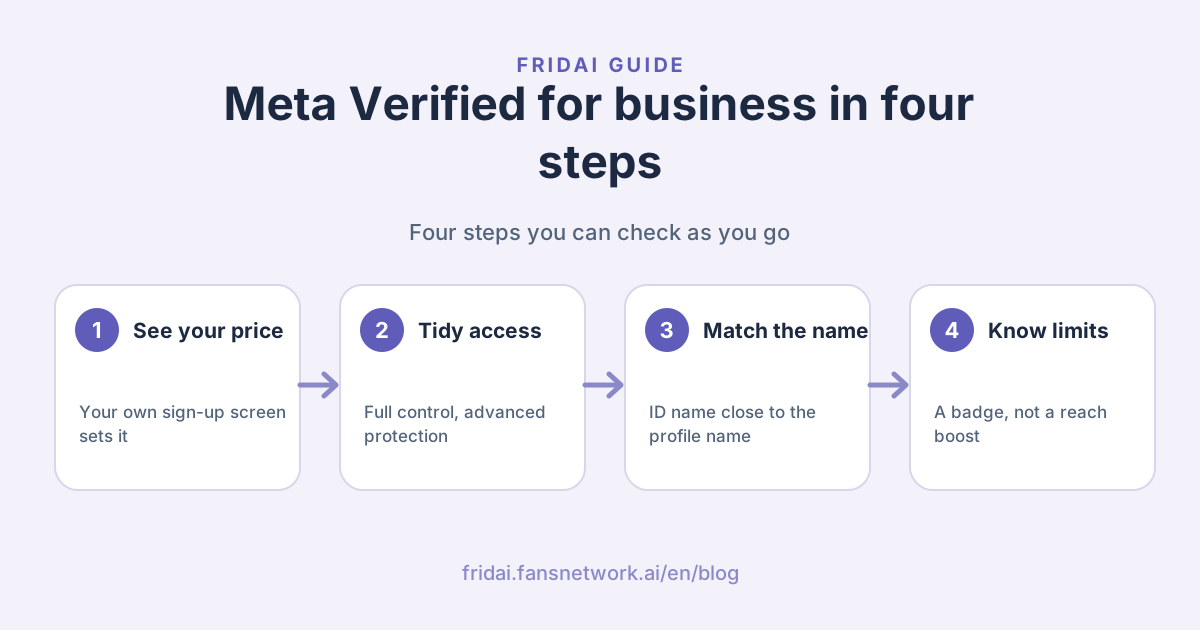
The overall path first. People usually get stuck in the middle two boxes:
Meta's article on why a business cannot sign up lists the Facebook and Instagram requirements. All of them must be met or the sign-up option does not appear.
1. A complete business profile
Every Page or Instagram professional profile connected to the business needs a profile picture, and the business name, category and contact information filled in.
2. Full control of a business portfolio
The person applying must have full control of an existing business portfolio in Meta Business Suite. If not, ask the owner to grant it or create a new portfolio. For what a portfolio is and how to split permissions, see our Meta Business Suite guide.
3. Eligible assets in the portfolio
At least one Page or Instagram professional profile must meet the requirements. Assets that are incomplete, restricted or out of line with content policies may not qualify.
4. Advanced protection for everyone with access
This is where most applications stall. Meta states that if even one person with access has not turned on advanced protection, the sign-up option will not appear, and changes can take up to 24 hours to show. Clear out former staff, old social media managers and agency accounts first.
5. ID and name
You may need to upload a valid, unexpired, government-issued photo ID, and the name on it should be similar to the name of the business asset you are verifying. Meta's example: if the business is "Annie Smith's Flowers", the ID should contain Annie or Smith.
This matters a lot for Taiwanese shops. Meta's profile name rules say a trade name or brand name that differs from the name on your legal ID may be rejected, and names cannot contain symbols, numbers or characters from multiple languages. An owner whose shop is called 小森
Meta's business page says you will get a review status update within 3 business days. Some profile fields are locked during review, and after approval name changes are limited: twice every 14 days on Instagram and once every 60 days on Facebook.
WhatsApp has its own rules
The WhatsApp Help Center lists these requirements: the applicant is at least 18, has a phone number in a country where Meta Verified for businesses is available, the WhatsApp Business account has been on the app for a certain number of days, has recently sent a message, has a profile name and picture, and does not already have an active Meta Verified subscription through Meta Business Suite. Some categories, such as government and political organizations, are not eligible.
Refunds, cancellation and revocation
Before you pay, this table is worth thirty seconds:
| Situation | Result | Refund |
|---|---|---|
| Verification not completed within 3 days | Subscription does not proceed | Yes |
| Meta cannot verify your business | Subscription canceled | Yes |
| You cancel after approval | Benefits until period ends | No, not prorated |
| Payment fails with no backup card | Subscription canceled | Not applicable |
| IG switched to a personal account | Revoked after 7 days or at period end | No |
| Policy violation or move to unsupported region | Benefits lost immediately | No |
Revocation is not the same as canceling. When a subscription is revoked you lose every benefit at once, including any open support cases. Meta recommends adding a backup payment method that is charged if the main one fails. If you bought through the App Store or Google Play, refunds must be requested from that store, and changing plans directly in the store can get the subscription revoked.
Who should buy and who can wait
Brands that get the most out of it:
Brands that get impersonated
A fake account messaging your customers that they won a prize and should pay shipping first only has to happen once. The badge plus impersonation protection is the most direct use of this plan.
Brands that take orders in Instagram or Facebook DMs
Customers hesitate before paying: is this really the official account? The badge removes one step of that doubt. Whether the order actually closes still depends on how fast and how accurately you reply.
Brands that need someone to answer when an account breaks
Meta lists chat and email support, and higher plans add callback requests. For handling a disabled or hacked account, prepare alongside our guide to recovering a disabled or hacked Instagram or Facebook account.
Brands that can wait:
You only want more reach
Meta does not promise reach. Go back to content and ads for that.
Your portfolio permissions are a mess
If an agency holds full control and former staff are still in the portfolio, sort out permissions first, or you will not even see the entry.
Your brand name is far from your ID name
It is not automatically a no, but rejection is more likely. Look at how your account appears on the sign-up screen before deciding.
Pre-application checklist
Copy this to whoever runs your social accounts and tick it off line by line. It stays in Chinese for Taiwanese teams; the gloss is "Meta Verified business pre-application check":
Meta 藍勾勾商家版申請前檢查
1. 誰對商家資產管理組合有完整控制權?名單是否最新?
2. 組合裡每個人都開了進階保護嗎?前員工與代操帳號移除了嗎?
3. 粉專/IG 專業帳號:大頭貼、名稱、類別、聯絡資訊都填了嗎?
4. 申請人證件上的名字,和要驗證的帳號名稱相似嗎?
5. 我們要驗證幾個帳號?每個帳號各一份訂閱,預算算進去了嗎?
6. 付款卡是否有效?有沒有加一張備用卡?
7. 在 App 訂閱畫面看到的方案與金額截圖存檔了嗎?
The last item is not overkill. Meta decides which plans each account sees, so a screenshot makes billing questions and plan changes easier to discuss later.
FAQ
How much does Meta Verified for business cost in Taiwan?
Meta's official page lists four plans at US$14.99, US$49.99, US$149.99 and US$499.99 per account per month, but gives no Taiwan-specific price. The plans and amounts you can actually buy are whatever your app or Meta Business Suite sign-up screen shows.
Is Meta Verified for business available in Taiwan?
None of the official Meta pages we checked says whether Taiwan is supported; they only say plans and availability vary by region, app and account. The quickest check is to go through the sign-up entry with your business account. If you can see it, you can apply.
Will the blue check increase my post reach?
Meta does not promise reach. Its benefits table lists only a "search optimization" label with no performance claim, and the reach comments on its page are user testimonials, not a Meta guarantee. Content and ads remain the main levers for reach.
Why can't I see the sign-up option?
The usual causes are someone in the portfolio without advanced protection, an incomplete business profile, or you lacking full control. Meta says fixes can take up to 24 hours to show; if you see a waitlist instead, your assets are still missing information.
Do my Page and Instagram account need separate subscriptions?
Yes. Meta states that benefits apply only to the subscribed Page, Instagram account or WhatsApp number, not to other accounts in the portfolio. Meta's page mentions a bundle discount for Facebook and Instagram together, though it may not be offered everywhere.
Can I get a refund if I cancel?
Canceling after approval gives no refund and no proration; you keep benefits until the period ends. Refunds apply only if you did not complete verification within 3 days of starting, or if Meta could not verify your business.
Will I be rejected if my brand name differs from my ID?
Possibly. Meta's name rules say trade or brand names that differ from your legal ID may be rejected, and names cannot use symbols, numbers or mixed languages. Comparing names before you apply is easier than fixing them after a rejection.
How FRIDAI can help
A badge makes customers comfortable enough to message you, but whether they buy depends on how quickly and correctly they are answered. FRIDAI Chat connects to your Instagram and Facebook DMs and your LINE Official Account, replies from the knowledge and rules you write, and hands exceptions to a person.
- Product: FRIDAI Chat
- FRIDAI Social: FRIDAI Social
- Sort out permissions: Meta Business Suite guide
- Account safety: Recovering a disabled or hacked Instagram or Facebook account
- Instagram: FRIDAI on Instagram
- Threads: FRIDAI on Threads
- Facebook: FRIDAI on Facebook
Official sources
- Meta Verified for business plans and pricing: www.facebook.com/
business/ tools/ meta-verified-for-business - Meta Verified overview: www.meta.com/
meta-verified/ - What is Meta Verified for businesses: www.facebook.com/
business/ help/ 1980422732333373 - Meta Verified benefits for businesses: www.facebook.com/
business/ help/ 248456111431653 - Why can't I sign up my business for Meta Verified: www.facebook.com/
business/ help/ 626333159331357 - ID requirements for Meta Verified business subscriptions: www.facebook.com/
business/ help/ 3561016884200905 - Profile name eligibility for Meta Verified business subscriptions: www.facebook.com/
business/ help/ 635089366197498 - Billing and payments for Meta Verified business subscriptions: www.facebook.com/
business/ help/ 1723059664805181 - Refunds for Meta Verified business subscriptions: www.facebook.com/
business/ help/ 1051747709359362 - Revoked Meta Verified business subscriptions: www.facebook.com/
business/ help/ 1008321637512283 - Meta Verified for Business eligibility on WhatsApp: faq.whatsapp.com/
7508793019154580