
Your website is where customers study you most carefully: prices, past work, return rules. When a question comes up halfway through, the chat bubble in the corner is the nearest door. Answer well and the customer stays; answer badly and they close the tab and ask someone else. Below we cover what website chat does, the main types of tools, how to judge them, how to prepare your data and how to work out the cost.
What is a website AI chat widget, and how is it different from a plain chat box?
A website AI chat widget sits in the corner of your site. Visitors type a question and an AI answers straight away from the brand information you provide. Anything the AI should not decide on its own goes to a person.
A plain website chat box only collects messages: the visitor writes, and the shop replies when someone sees it. Small brands often have one or two people who are packing orders, teaching or serving customers during the day, so messages wait for hours. In FRIDAI's after-hours DM report, about half of website chat enquiries arrived outside working hours. In other words, if your site chat can only wait for a person, half your visitors start their conversation by waiting.
An AI chat widget fills that gap. Prices, opening hours, how to book, shipping costs: the answers are already in your materials, so the AI can reply on the spot. Haggling, complaints and special requests go to a person.
Why small brands should answer the site, Instagram and LINE together
A small brand's customers rarely take one path. A common route: see a post on Instagram → open your site to check prices → go back to LINE to ask whether Saturday is free. They are asking about the same thing in three places, and the answer should be the same too.
| Situation | A separate tool for each channel | One AI shared across channels |
|---|---|---|
| Price change | Edit the site, Instagram and LINE separately | Edit once, all three update |
| Answers | Set up separately, easy to drift apart | One knowledge base, one answer |
| Human handoff | Watch three dashboards for alerts | Get alerts and take over in one place |
| Results | Three separate reports | One message center for every conversation |
| Monthly fee | Three tools, three fees | One plan sized to total message volume |
Quick tip: pick the question customers ask most, such as "how much is this", and look at what you replied on your site, Instagram and LINE. If the three answers differ, it is time to bring them together~
The four types of website chat tools
There are many website chat tools. Sorted by who answers and which channels they cover, they fall into four types. Work out which type you need first, then compare brands.
| Type | Who answers | Strength | Good for |
|---|---|---|---|
| Live chat widget | People | The warmest conversations when someone is at the desk | Teams with dedicated agents online during business hours |
| Button-flow chatbot | Pre-drawn flows | Fixed Q&A, form collection, guided clicks | Sites with few, very fixed questions |
| Site-only AI chat | AI reading your site content | Content-heavy sites with lots of visitors | Brands whose customers mostly come through the site |
| Cross-channel AI customer service (with site chat) | AI answering every channel from one knowledge base, with a person on call | Site, Instagram, LINE and Facebook on the same rules | Small brands whose customers move between channels |
FRIDAI is the fourth type: website chat is one of the 8 DM platforms in FRIDAI Chat, sharing one plan and one brand knowledge base with LINE Official Account, Instagram, Facebook Messenger, Threads, WhatsApp, Telegram and Discord. To see how far free plans go first, read free AI customer service chatbots compared.
How to judge a website AI chat: six tests
When you trial a tool, do not just type "hello". Test it with your real questions. Each of these six tests comes up every day after launch.
1. Where do the answers come from?
The AI should answer from your own brand information, and you should be able to change it any time. A good tool can scan your website, posts and documents to draft the first knowledge base, then you add what the site leaves out, such as "weekend surcharge NT$200" or "how to reschedule in a typhoon".
2. Can it share with Instagram and LINE?
Check whether the same knowledge and rules can answer your site, Instagram and LINE at once. Sharing means one edit updates everything, and customers get the same answer wherever they ask.
3. What happens when it does not know?
Ask something your materials do not cover and see whether the AI makes things up. The right behaviour is to say it needs to check and notify a person; once the person takes over, the AI steps aside.
4. Can it move the customer to the next step?
Site chat is not there for chatting. It is there to help the customer finish something: book, buy, check an order, add you on LINE. See whether the AI can book a time directly, or connect to your online store to look up products and orders.
5. Can overseas visitors follow it?
Websites often get visitors from abroad. Check whether the widget's buttons and prompts switch to the visitor's language, and whether the AI replies in the customer's language.
6. Can you see which page started the chat?
Knowing which page triggers the most questions tells you which page needs more information. If people ask "is there a student price" on your pricing page every day, put the answer on the page.
| Test | How to test | What a pass looks like |
|---|---|---|
| Answer source | Change one price, then ask again | The new price applies at once |
| Cross-channel | Ask the same question on the site and on LINE | Both answers match |
| Unknown questions | Ask something not in your materials | No guessing; a person is notified |
| Next step | Say "I'd like to book Saturday afternoon" | It checks availability or guides the booking |
| Languages | Ask in English or Japanese | Interface and reply switch to the customer's language |
| Source page | Start chats from different pages | You can see how many chats each page started |
What FRIDAI's website chat can do
FRIDAI's website chat is part of FRIDAI Chat, so one plan covers it together with the other 7 DM platforms. According to the product page, the main points are:
- One brand knowledge base: write products, prices, service steps and brand voice in plain language, or scan posts, comments, DMs, websites, URLs and documents in one click to draft the first knowledge base.
- Interface follows the visitor's language: the widget's buttons and prompts switch to the visitor's language (Chinese, English, Spanish, Japanese), and the AI detects the customer's language and replies naturally, in 100+ languages.
- Chats started on each page: under "Website source pages" in the message center you can see how many chats each page started and open the conversations.
- Human handoff: every plan includes human collaboration and human review. When a person is needed, FRIDAI's official LINE account notifies you, and once you take over the AI steps aside.
- Bookings and reservations: every Chat plan includes the booking and reservation system, so when a customer asks to book in chat, the AI can book them in.
- Products and orders: connect SHOPLINE, CYBERBIZ, WooCommerce, Ruten or Shopify, and when a customer asks "is this in stock?" or "has my order shipped?", the AI looks it up before replying. It only reads data and never changes your store.
Site, Instagram and LINE conversations all land in the same message center, so you can see at a glance who is waiting for a person and who the AI has already answered. Every conversation stays in one list, so the whole team works from the same place.
Launch checklist
How well a website AI chat answers depends mostly on the information you give it. Prepare these five things before launch:
Step 1: List the 10 questions your site gets most
From past Instagram and LINE DMs and emails, pick the 10 most common questions and write down your usual answer to each. These are the questions the AI has to handle on day one.
Step 2: Add what the site leaves out
Sites usually explain what you offer; customers usually ask "what if…". Add surcharges, rescheduling rules, delivery times and return exceptions to the knowledge base.
Step 3: Write down what always needs a person
Haggling, complaints, refunds, custom quotes and health-related questions: write them as rules. When these come up, notify a person; the AI does not decide alone.
Step 4: Decide where each conversation should end
Decide the end point of every conversation first: book directly, buy on the product page, add you on LINE for an offer, or leave contact details for a call back. With a clear end point, the AI knows where to steer.
Step 5: Test with real questions
Take five customer messages with personal details removed, ask them in the site chat widget, then ask the same questions on LINE. Check the two answers match and that the right cases go to a person.
Sample test questions:
1. "How much is this course? Can I pay in instalments?"
2. "Can I book Saturday afternoon?"
3. "Do you ship to Hong Kong?"
4. "My last order hasn't arrived, the order number is…"
5. "Can you give me a better price?"
Editor's tip: write your knowledge base the way you normally talk to customers, not like a manual. The AI replies in your voice, so customers feel like they are talking to you~
For a fuller knowledge base, read how to write an AI customer service knowledge base.
Working out the cost: use your own message volume
Website chat tools are usually priced one of three ways: per seat (how many agents), per conversation or visitor, or per AI reply. The units differ, so always price each option on your own volume.
FRIDAI Chat, according to the official pricing page, is priced on monthly AI replies, with the allowance shared across all 8 DM platforms:
| Plan | Monthly | Yearly | DM replies per month |
|---|---|---|---|
| Plus | US$70 | US$700 (2 months free) | 500 |
| Pro | US$160 | US$1,600 (2 months free) | 2,000 |
| Max | US$300 | US$3,000 (2 months free) | 5,000 |
Paying with PAYUNi or JKOPAY is in New Taiwan dollars at US$1 = NT$33.6, so the US$70 plan is NT$2,350 a month. You can start with a US$1, 30-day trial (NT$30 via PAYUNi or JKOPAY), with no contract.
The volumes in these two examples are hypothetical, to show how to do the maths:
| Hypothetical case | AI replies per month | Plan to look at first |
|---|---|---|
| Site chat plus LINE, about 400 replies a month | 400 | Plus, two channels sharing 500 replies |
| Site, Instagram and LINE, about 1,500 replies a month | 1,500 | Pro, three channels sharing 2,000 replies |
One plan covers your site, Instagram and LINE, so you are not paying three fees for three tools. For the full method, read how AI customer service pricing works.
Summary: make your site chat say the same thing as Instagram and LINE

A quick note from FRIDAI
We just took website AI chat apart from start to finish, and the main points are simple~
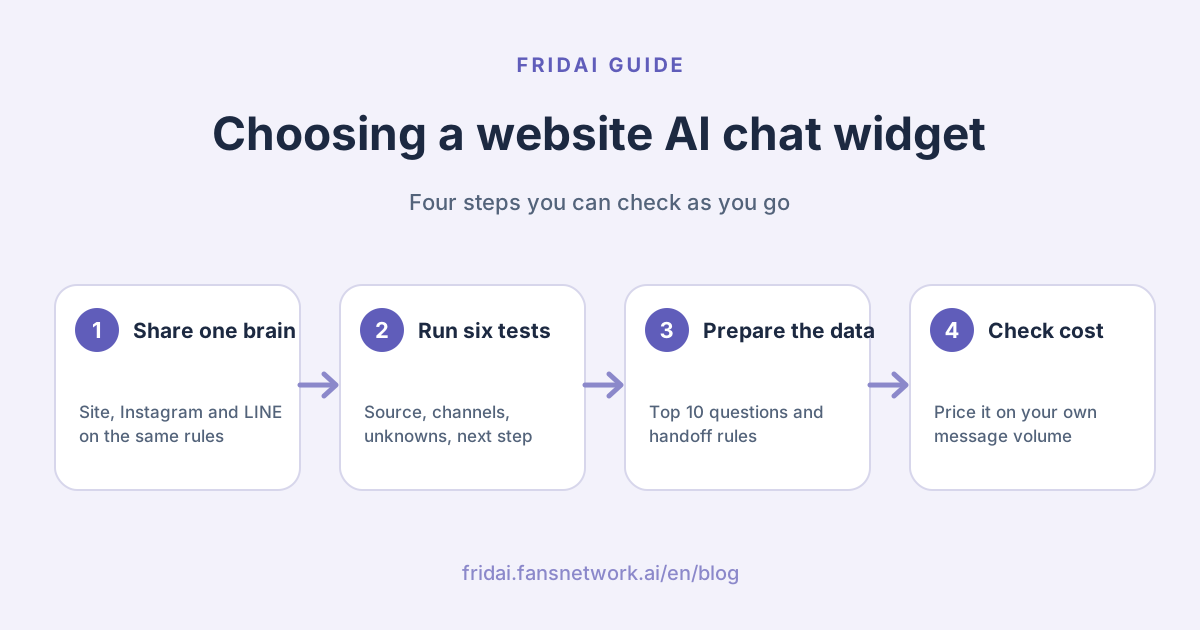
- First check whether it shares one brand knowledge base with Instagram and LINE, so one edit updates all three.
- Run the six tests: answer source, cross-channel, unknown questions, next step, languages, source page.
- Before launch, prepare your top 10 questions, the details your site leaves out, the cases that always need a person, and the end point for each conversation.
- Price it on your own message volume; one plan across several channels is the simplest.
Get those top 10 questions from your site together and send them my way for a test run, and see how I handle them ☺️
FAQ
What is a website AI chat widget?
A website AI chat widget is a chat box on your site where an AI answers visitors' questions from the brand information you provide, and notifies a person for haggling, complaints or special requests.
Does a small brand need website chat?
Yes, if customers check your site for prices, past work or rules before they decide to buy. Site chat lets them get an answer the moment a question comes up, without switching to Instagram or LINE.
Can website chat be answered together with Instagram and LINE?
Yes. One FRIDAI Chat plan covers 8 platforms, LINE Official Account, Instagram, Facebook Messenger, Threads, WhatsApp, Telegram, Discord and website chat, all answered from the same brand knowledge and rules.
Can the AI understand overseas visitors on my site?
FRIDAI's website chat switches its buttons and prompts to the visitor's language (Chinese, English, Spanish, Japanese), and the AI detects the customer's language and replies naturally, in 100+ languages.
How much does a website AI chat cost?
FRIDAI Chat is US$70, US$160 or US$300 a month, with 500, 2,000 or 5,000 DM replies a month shared across 8 platforms; yearly billing gives 2 months free. You can start with a US$1, 30-day trial.
Can I set up website AI chat without coding?
Yes. FRIDAI uses plain language for brand knowledge and rules, and can scan your website, posts and documents in one click to draft the first knowledge base. If you can type, you can set it up and edit it.
What happens when the AI cannot answer?
Every FRIDAI plan includes human collaboration and human review. When a person is needed, FRIDAI's official LINE account notifies you, and once you take over the AI steps aside.
How FRIDAI can help
If your customers move between your site, Instagram and LINE, start FRIDAI Chat with website chat plus the DM channel you use most, run the five test questions above, and switch everything on once both answers match.
- DMs and website chat: FRIDAI Chat
- Plans and pricing: FRIDAI pricing
- Omnichannel planning: omnichannel customer service guide
- Instagram: FRIDAI Instagram
- Threads: FRIDAI Threads
- Facebook: FRIDAI Facebook
Official sources
- FRIDAI Chat: fridai.fansnetwork.ai/
en/ fridai-chat - FRIDAI pricing: fridai.fansnetwork.ai/
en/ pricing