
When a post takes off, comments pour in, and many ask the same few things: how many colors are there, can I buy just one, can I pick up at a convenience store. Review keeps you safe, yet each comment waits for your click and the customer may have scrolled away by then. Full automation brings a different worry: AI jumping into a complaint.
Product question auto-reply solves that. AI handles questions with fixed answers, and you handle the ones that need judgment.
The screenshots show the dashboard in Traditional Chinese. The English dashboard has the same layout, and each step names the setting you need.
What is product question auto-reply?
It is a sub-setting of comment review mode. With review alone, you approve every comment. With both on, product questions are answered automatically and everything else stays in your review queue.
| Mode | Product questions | Complaints | Best for |
|---|---|---|---|
| Review everything | You approve | You approve | New setups |
| Product question auto-reply | AI replies | You approve | Busy brands with strict voice |
| Fully automatic | AI replies | Rules or human alert | Stable, proven rules |
It works on public Facebook and Instagram comments. Direct messages have their own settings and are unaffected by this switch.
Which comments get answered, and which wait for you?
AI first decides whether the comment asks about a product. It then writes a reply and checks it against your notebook. A reply goes out only after both checks pass, and any doubt sends the comment back to your review queue.
| Example comment | Type | Goes to |
|---|---|---|
| How many colors does it come in? | Product question | AI reply |
| Can I pick up at a store? | Buying question | AI reply |
| It arrived broken, I want a refund | Complaint | Your review |
| My order hasn't shipped | Order issue | Your review |
| My skin stings after using this | Body reaction | Your review |
| Amy look at this | Tagging a friend | Your review |
| I want this! | No question asked | Your review |
| A photo asking which model it is | Image comment | Your review |
These also go straight to review: live video comments, comments during your quiet hours and questions your notebook cannot answer. Post keyword replies you have set up keep working by their own rules.
Quick tip: complaints and refunds need a person's judgment. Keeping them for yourself is exactly what makes this setting worth using!
Before you start: put common questions in your notebook
AI only answers what your notebook supports, so a fuller notebook means more comments answered automatically. Spend ten minutes reading recent comments and add the most frequent questions:
- Product details: size, color, ingredients, differences between items
- How to buy: store link, retail locations, whether single items are sold
- Shipping: pickup, delivery, expected time
- Current offers: what's included, gifts, end dates
Write each answer as a complete sentence you could send to a customer, and delete offers when they end so AI never quotes an expired deal.
Step 1: Open Human handoff in Reply settings
Go to the FRIDAI dashboard, select your comment account, open Reply settings and click Human handoff. On a phone, Reply settings is a list, and Human handoff is one of its entries.

Step 2: Turn on comment review mode
Turn on Comment Review Mode (Public Comments). A new row, Auto-reply to product questions, appears below it. If review is already on, go straight to the next step.

Step 3: Turn on product question auto-reply
Turn on Auto-reply to product questions. Changes save automatically. New comments follow the new setting from now on, and comments already in the review queue keep waiting for you.

Quick tip: to pause, just turn this switch off and every comment returns to full review!
Step 4: Test with two comments and check the Comment Center
From another account, leave two test comments on a recent post:
| Test comment | Expected result |
|---|---|
| A product question your notebook answers | AI reply within minutes |
| "It arrived broken, I want a refund" | No reply, moves to review |
Then open the Comment Center in the left menu. AI replies carry an AI label, so you can check their tone and content. If a product question got no reply, confirm the notebook answers it clearly, then try again.

Step 5: Work through the review queue each day
Back in Human handoff, click Open review page under comment review mode, or copy the link for a teammate. The page now holds only comments that need a person. For each one you can:
- Generate: ask AI for a draft to read before sending
- Reply manually: type your own reply
- Skip: remove it from the list when no reply is needed
- Send: post the reply once you are happy with it

The queue is also a great guide for your notebook. When the same product question keeps showing up there, the notebook is missing that answer. Add it, and AI can reply next time.
What to check during the first week
| Check daily | If you see | Do this |
|---|---|---|
| AI replies in Comment Center | Wrong tone or content | Rewrite the notebook entry |
| Product questions in review | The same one repeating | Add the answer to the notebook |
| Monthly balance | Higher use than expected | Confirm your plan covers it |
Automatic replies count toward your monthly quota like any other AI reply. Generating drafts on the review page uses quota too, so generate only for comments you plan to answer.
Spend five minutes a day during the first week. Once things are steady, a weekly look is enough, and your time goes to the customers who need you.
Summary: AI takes the product questions, you keep the judgment calls

A quick note from FRIDAI
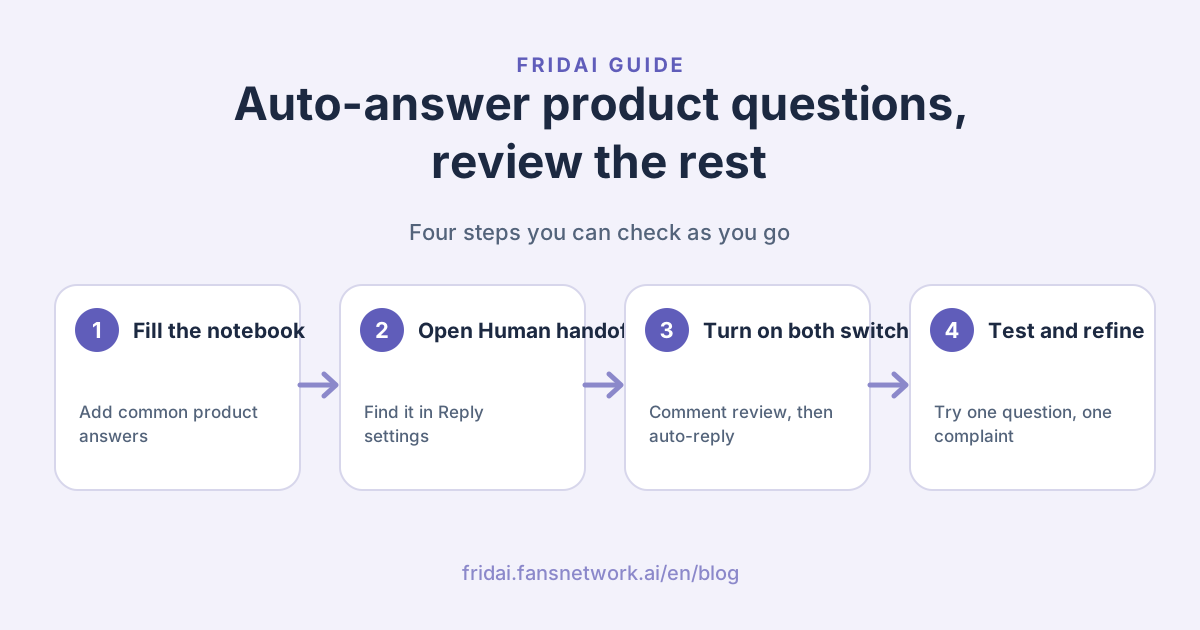
Review can stay on and still feel light. I'll take the questions with fixed answers, and you only look at the comments that need you. Here's the smoothest way to do it:
- Add common product, buying and shipping questions to your notebook
- Open Human handoff in Reply settings and turn on comment review mode
- Turn on product question auto-reply right below it
- Leave one product question and one complaint to confirm where each goes
- Add any product question that keeps repeating in review to the notebook
Pick the question you get asked most, write it into your notebook, then leave a comment and see how I answer ☺️
FAQ
Which settings does product question auto-reply need?
Turn on both comment review mode and product question auto-reply, found under Human handoff in Reply settings. With comment review off, comments follow your regular auto-reply rules.
Will AI reply to complaints automatically?
Complaints, refunds, order issues, sensitive content and comments about physical discomfort stay in the review queue for you. AI does not reply directly to comments it identifies as these types.
Why did a product question get no automatic reply?
The usual reason is that the notebook lacks the answer, or the comment does not make clear which product it means. These comments go to review, where you can reply yourself and add the answer to the notebook.
Does it work on Threads or direct messages?
This setting covers public Facebook and Instagram comments. Direct messages have their own review setting, so you can adjust them separately.
Do automatic replies use my quota?
Yes. Automatic replies count toward your monthly quota like any other AI reply.
Will comments already in the review queue get answered?
Comments already in the queue keep waiting for you. The setting applies to new comments received after you turn it on.
How FRIDAI can help
FRIDAI connects public comments, direct messages and content scheduling in one flow. AI answers common questions from your notebook, hands judgment calls to you, and the questions you review can go back into the notebook so the next reply is better.
- Comment engagement and review: FRIDAI Social
- AI customer service for DMs: FRIDAI Chat
- Social auto-posting: FRIDAI Post
- Instagram: FRIDAI Instagram
- Threads: FRIDAI Threads
- Facebook: FRIDAI Facebook
Official sources
- FRIDAI Social comment engagement: fridai.fansnetwork.ai/
en/ fridai-social - FRIDAI Chat: fridai.fansnetwork.ai/
en/ fridai-chat