
Anyone who does home cleaning, AC cleaning or plumbing and electrical repairs knows the feeling: the phone buzzes while you have gloves on, are up a ladder, or are crouched under a customer's sink. By the time you finish and reply, the customer has already asked someone else. Below we cover the kinds of DMs a home service business gets, how to write quotes, how to take on-site bookings, how to lay out reschedules and reminders, which messages always stay with you, and the eight tests to run before launch.
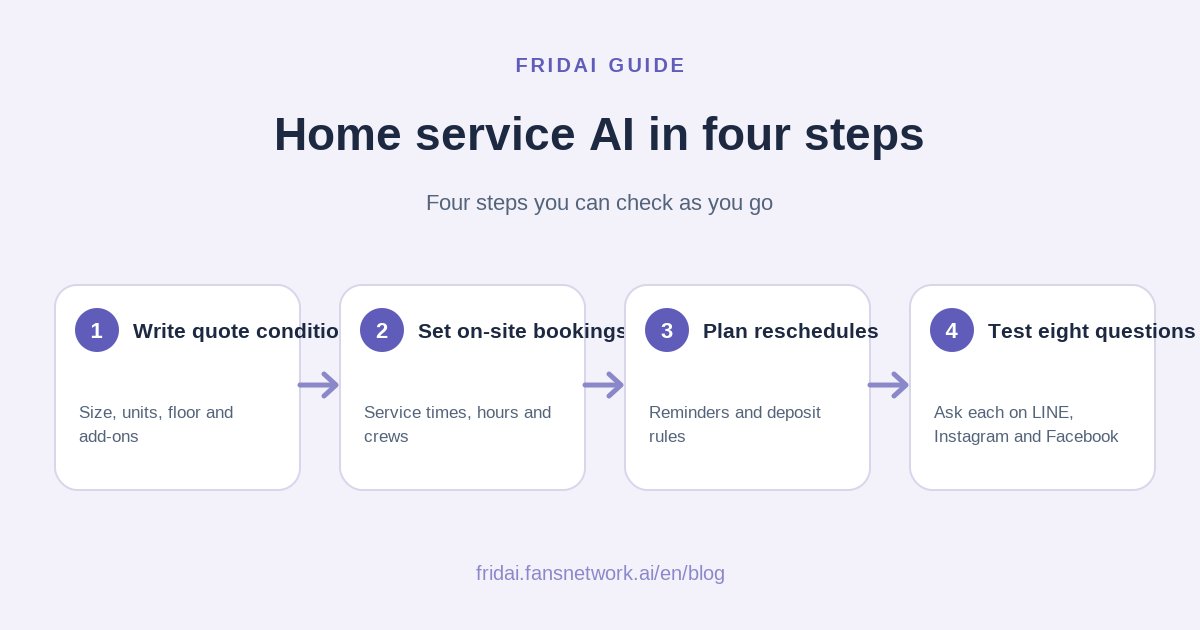
Home service DMs come down to four things
Look back over the last month of DMs and you will see how concentrated the questions are:
| What customers ask | Typical wording (illustrative) | Where the answer lives | Who answers |
|---|---|---|---|
| Quotes | "How much to clean an 80 m² flat?" "What does it cost to clean two split AC units?" | Price list and calculation conditions | AI |
| Service area and time slots | "Do you cover Xindian?" "Can you come this Saturday morning?" | Service area, free slots on your calendar | AI |
| Rescheduling and cancelling | "I have to go out that day, can I move it to next week?" | Reschedule and cancellation rules | AI |
| On-site problems | "My ceiling keeps dripping, what do I do?" "Can this be fixed?" (with a photo) | Needs your judgement | You |
The first three have fixed answers, so once they are written down the AI can follow them. The fourth needs professional judgement: the AI collects the photo and address, then notifies you. That split is the backbone of this guide.
FRIDAI's after-hours DM report found that 62% of DM enquiries arrive outside working hours. People looking for a home service often ask in the evening, when they get home and see the AC dripping or mould in the bathroom. A reply at that moment keeps the job.
Step 1: write your quote conditions so the AI can quote in its first reply
The most common line on a home service price list is "quoted on site". The customer asks "how much", you reply "it depends", and the customer sends three photos and five more sentences. That is a dozen messages. Write down the conditions you normally work out in your head, and the AI asks everything it needs and gives a clear price range in its first reply.
Every amount in this table is illustrative. Replace them with your own prices:
| Service | Written like this, customers ask again | Written like this, the AI answers in one go |
|---|---|---|
| Home cleaning | Quoted by floor area | 2 people for 4 hours 2,800, for homes up to 25 ping (about 80 m²); add 1 hour per extra 10 ping, 700 per hour |
| AC cleaning | From 1,500 per unit | Wall-mounted split unit 1,500; ducted unit from 3,500, send a photo of the model first; 200 off each unit from the second at the same address |
| Washing machine cleaning | Extra | Top-loader 1,800; front-loader 2,800; for machines over 8 years old, send the model number and the technician confirms |
| Plumbing and electrical repairs | Quoted on site | On-site inspection fee 500, deducted if you go ahead; tap replacement labour 800, parts extra |
| Add-on conditions | Extra charges may apply | 4th floor or higher without a lift +300; parking space or parking fee provided by the customer; after 7 pm +500 |
| Payment and invoice | Pay on site | Cash or bank transfer on completion; for a company invoice, give the company name and tax ID when booking |
When you write your quotes, add these four things:
- What the AI asks first: floor area, number of units, model, floor and whether there is a lift. Write "ask these before quoting" and the AI asks them all, then quotes.
- Services that need a photo: write "ask the customer for a photo and the technician will confirm the quote". The AI collects the photo, explains the price range, then notifies you.
- Service area: list the cities and districts you cover, and the travel fee for remote areas.
- Work you do not take: for example high exterior walls, gas pipes or stone polishing. Write it out and the AI explains clearly and suggests the customer find a specialist.
A small tip: look back at your last ten quote conversations and see what you yourself ask the customer in your second message. Those questions are the list the AI should ask before quoting.
Step 2: taking on-site bookings: set service times and crews first
On-site bookings need tighter timing than in-store ones. One crew can only reach so many addresses in a day, and if one job runs long the next customer is squeezed. Whether the AI can take bookings depends on whether it knows your real free slots.
FRIDAI Chat has a built-in booking system. As the official site describes it, when a customer says in a DM that they want to book, the AI checks your business hours and free slots, asks for the date and contact details, and creates the booking. Each service can be set separately as online, in-store or on-site. Have these ready when you set it up:
- Services and durations: home cleaning for 4 hours, AC cleaning per unit, washing machine cleaning, a plumbing or electrical inspection, and how long each takes. Include travel time in the duration so the crew can reach the next address.
- Business hours and days off: you can set several time blocks a day, so split the day in two for a lunch break. On a day you close at short notice, customers cannot book.
- Staff: if you have two or more crews, each person has their own working hours. Staff sign in with their own email to see their bookings and request leave.
- Google Calendar: once connected, bookings appear in Google Calendar automatically, and customers cannot book times that already have an event.
Customers can also book by themselves: put your booking link in your Instagram bio, LINE menu or website, and they open it, pick a date and time, fill in their details and are booked. If they send "
Every new booking, time change or cancellation is sent to your LINE notification group or email with the name, time, service and phone number, and bookings the AI makes in DMs are notified the same way. For the address, floor, parking and model that an on-site visit needs, write a rule asking the AI to collect them in the conversation, and the technician can open the conversation before leaving. For the full setup screens, see how to take bookings on LINE.
Step 3: write the rules for reschedules, reminders and deposits first
Two things hurt an on-site business most: the technician arrives and nobody is home, and a cancellation the night before. Write the rules down, let the system follow them, and you no longer have to chase people yourself.
Rescheduling and cancelling
Decide your rule and write it as one sentence customers understand, for example "to reschedule, tell us by 12 noon the day before the visit". FRIDAI's booking confirmation includes a change link. The customer opens it to change the time or cancel, and you are notified each time. A customer can also just tell the AI in a DM. Bookings that are already paid or about to start cannot be cancelled by the customer and come back to you.
Automatic reminders
Reminders are the most direct way to avoid a wasted trip. In booking settings, turn on "Auto-remind customers" and tick the times you want, up to 6:
| When | Sent by | Content |
|---|---|---|
| Booking confirmed | Email + LINE | Sent as soon as it is booked, with the change link |
| The day before | Email + LINE | "See you tomorrow" |
| 3 hours before | LINE | "See you today" |
| 1 hour before | Email + LINE | "See you in 1 hour" |
| 15 minutes before | LINE | Sent for online bookings only |
| Started | LINE | "We've started" |
LINE reminders need your LINE Official Account connected to FRIDAI, and the customer must have booked with you on LINE or tapped "Get reminders on LINE" after booking. These reminders count towards your LINE Official Account message quota. Email reminders need the customer's email address.
Deposits and nobody home
If large jobs need a deposit, write the amount and the deadline into your rules. As the FRIDAI Chat site describes it, the AI explains the plan in your brand voice and attaches a payment link, so the customer can pay inside the conversation. FRIDAI Chat's daily to-do list also reads the last 7 days of customer conversations, pulls out details not yet sent, deposits not yet paid and questions not yet answered, and sends them to your LINE at the time you set.
If the technician arrives and nobody is home, mark that booking as a no-show. The next day the system asks the customer whether they want another time and attaches the next 3 free slots, and one reply books them in again.
A reminder from us: only write the cancellation rule you will actually enforce. If the rule says one thing and you waive it every time, neither customers nor the AI can tell which one counts.
Step 4: these messages always stay with you
The AI takes the fixed answers. You take anything that needs professional judgement or involves safety. Write "notify a person in these cases" straight into your rules:
| Situation | What the AI does first | What you do |
|---|---|---|
| Customer sends a photo asking "can this be fixed" | Collects the photo, asks for the address and how long it has been happening, explains the inspection fee | Look at the photo, decide the approach and the quote |
| Urgent leak, power trip or blocked toilet | Asks the customer to turn off the main water valve or main switch, notifies you at once | Decide whether you can come the same day and how to handle it |
| Smell of gas or a smoking socket | Asks the customer to leave the area at once and contact the gas company or call 119 (Taiwan's emergency number) | Call back yourself to check |
| Unhappy after the service, or something damaged | Apologises, asks for a photo, says a person will reply | Handle it yourself and decide how to make it right |
| Bargaining, long-term contracts, quotes for companies | Explains the current plans | Decide the quote |
| Outside the service area or work you do not take | Explains clearly from your rules | Decide whether to make an exception |
Every FRIDAI Chat plan includes human collaboration and human review. When a person is needed, FRIDAI's official LINE account notifies you, and once you take over the AI steps aside. Before launch, bind the notification and test it once: check that the notification arrives and that the AI stops after you take over. For the order and wording of complaint replies, see how to handle customer complaints. To write the whole flow in a form your team can follow, fill in the template in how to write a customer service SOP.
Five conditions to check when you evaluate AI customer service for home services
Many tools can answer LINE and Instagram. A home service business can choose by testing these five conditions against its own needs:
| Condition | Why it matters | How to test |
|---|---|---|
| LINE, Instagram and Facebook share one set of data | Change a price once and it applies everywhere | Ask the same question on all three |
| Quote conditions written in plain language | You can edit them yourself, no engineer needed | Change one add-on, then ask again |
| Booking sees real free slots | Two addresses are never put in the same slot | Try to book a slot that is already taken |
| Reschedules and reminders have a flow | The technician does not make a wasted trip | Walk through a reschedule and a nobody-home case |
| Clear human handoff | Urgent cases and complaints come back to you | Send a photo of a leak and see whether you are notified |
FRIDAI Chat's launch conditions are simple: subscribe, connect your LINE Official Account, Instagram and Facebook, write your quote conditions and service rules in natural language (or scan your posts, DMs, website and documents in one click for a first draft), bind human notifications, then open Booking management and set your hours and services. Instagram, Facebook and LINE DMs all run on officially authorised APIs. For renovation and turnkey jobs that need a site measurement before a quote, the flow is in AI customer service for interior design.
Before launch, run these eight tests
Use your own price list and calendar, and ask each one on LINE, Instagram and Facebook. Turn everything on once all eight pass:
1. "How much to clean a 25-ping (about 80 m²) home once?"
2. "I have two split units and one ducted unit. How much to clean them together?"
3. "Do you cover Xindian? It's a 5th-floor flat with no lift."
4. "Can you come this Saturday morning?"
5. (Send a photo) "My tap keeps dripping. Can it be fixed? How much?"
6. "Something came up that day. Can I move to next Wednesday?"
7. "My bathroom ceiling is leaking right now. What do I do?"
8. "Can you give me a discount? I'll book you regularly."| Question | What a pass looks like |
|---|---|
| 1, 2 | Asks for the conditions it needs, then gives the price and add-ons from your price list |
| 3 | Answers from your service area and add-on conditions |
| 4 | Offers only slots that are really free, and asks for address, name and phone |
| 5 | Collects the photo, explains the inspection fee and price range, notifies you |
| 6 | Follows your reschedule rule, and you are notified after the change |
| 7, 8 | Does not decide by itself; gives the safety reminder first and notifies a person |
How pricing works
According to the official pricing page, FRIDAI Chat is priced by AI replies per month. The allowance is shared across 8 DM platforms, including LINE, Instagram and Facebook, and every plan includes the booking system at no extra cost:
| Plan | Monthly | Yearly | DM replies per month |
|---|---|---|---|
| Plus | US$70 | US$700 (2 months free) | 500 |
| Pro | US$160 | US$1,600 (2 months free) | 2,000 |
| Max | US$300 | US$3,000 (2 months free) | 5,000 |
Paying through PAYUNi or JKOPAY is charged in New Taiwan dollars at NT$33.6 per US dollar, so the US$70 plan is NT$2,350 a month. You can try it for 30 days for US$1 (NT$30 through PAYUNi or JKOPAY). Booking management is in the advanced dashboard after you move to a full subscription.
To estimate a plan, add up last month's DMs across LINE, Instagram and Facebook, and include peak seasons such as AC cleaning in summer and year-end deep cleaning. The full method is in how AI customer service pricing works.
Summary: you work at the customer's home, I take the messages

A quick note from FRIDAI
Once home service DMs are sorted into kinds, they are clear. Let's wrap up~
- Write out your quote conditions, and I ask for the floor area, units and floor first, then give a clear price in my first reply.
- Set service durations, business hours and crew schedules, so the slots I find are really free.
- Lay out reschedule rules and automatic reminders first, and your technician does not make a wasted trip.
- Put photo quotes, urgent leaks, complaints and bargaining under "notify a person". Those stay with you.
- Before launch, ask the eight questions on LINE, Instagram and Facebook, and turn everything on once they all pass.
Hand me your price list and these eight questions for a trial run, and you can finish the job in front of you with an easy mind ☺️
Frequently asked questions
Is AI customer service a good fit for home services?
Yes. DMs for home cleaning, AC cleaning and repairs centre on quotes, service area, available slots and rescheduling, and the answers are all in your price list and calendar. Technicians cannot reply while they work, so when the AI takes the messages first, jobs are not missed.
Can the AI give quotes directly?
Yes. Write the calculation conditions such as floor area, number of units, model and floor, plus your add-on rules, and the AI asks first and then quotes. For work that needs a photo or a site visit to judge, the AI explains the inspection fee and price range, then notifies you to confirm.
Can the AI book an on-site visit for a customer?
Yes. FRIDAI Chat has a built-in booking system, and each service can be set as on-site. Once business hours, services and durations are set, a customer says they want to book in a LINE, Instagram or Facebook DM, and the AI checks free slots, asks for contact details, creates the booking and notifies you.
How does the AI handle a reschedule or cancellation?
The booking confirmation includes a change link the customer can open to change the time or cancel, or they can tell the AI in a DM. You are notified every time. Bookings that are already paid or about to start are handled by you.
What does the AI say when a customer messages at midnight about a leak?
Write leaks, power trips and similar cases into your rules as "notify a person". The AI asks the customer to turn off the main water valve or main switch, collects the photo and address, then notifies you at once, and you decide how to arrange it.
Can it work with several crews?
Yes. Each staff member has their own working hours, and staff sign in with their own email to see their bookings and request leave. All bookings sit in one calendar, so nobody keeps separate notes.
How much does AI customer service cost for a home service business?
FRIDAI Chat is US$70, US$160 or US$300 a month for 500, 2,000 or 5,000 DM replies, shared across 8 platforms, and every plan includes the booking system. Yearly billing gives 2 months free, and you can try it for 30 days for US$1.
How FRIDAI can help
If customers ask you every day on LINE, Instagram and Facebook how much it costs, which day you can come and whether they can change the time, use FRIDAI Chat to write your quote conditions and service rules as brand knowledge, open Booking management, then run the eight tests above to confirm bookings go in and the right messages reach you.
- DM AI customer service: FRIDAI Chat
- Booking system: FRIDAI booking system
- Plans and pricing: FRIDAI pricing
- Instagram: FRIDAI Instagram
- Threads: FRIDAI Threads
- Facebook: FRIDAI Facebook
Official sources
- FRIDAI Chat: fridai.fansnetwork.ai/
en/ fridai-chat - FRIDAI booking system: fridai.fansnetwork.ai/
en/ booking-system - FRIDAI pricing: fridai.fansnetwork.ai/
en/ pricing