
This guide starts at the free trial button on the FRIDAI website and ends with FRIDAI replying "✅ 綁定
Why binding LINE comes first after you pay
However good AI support gets, some messages need you: a partnership enquiry, a return, a question your Notebook doesn't cover, or a customer who simply says "I want to talk to a person". I hand those conversations to you, but only if I can reach you.
Many shops connect accounts and write rules first and leave alerts for "later", and customers end up waiting. So right after payment I ask for ten seconds to bind LINE:
- Instant alerts: the handoff lands in your LINE, no need to keep the dashboard open.
- Reply from LINE: what you write in LINE goes back to the platform the customer used.
- Future accounts follow: accounts you connect later with the same email alert the same LINE.
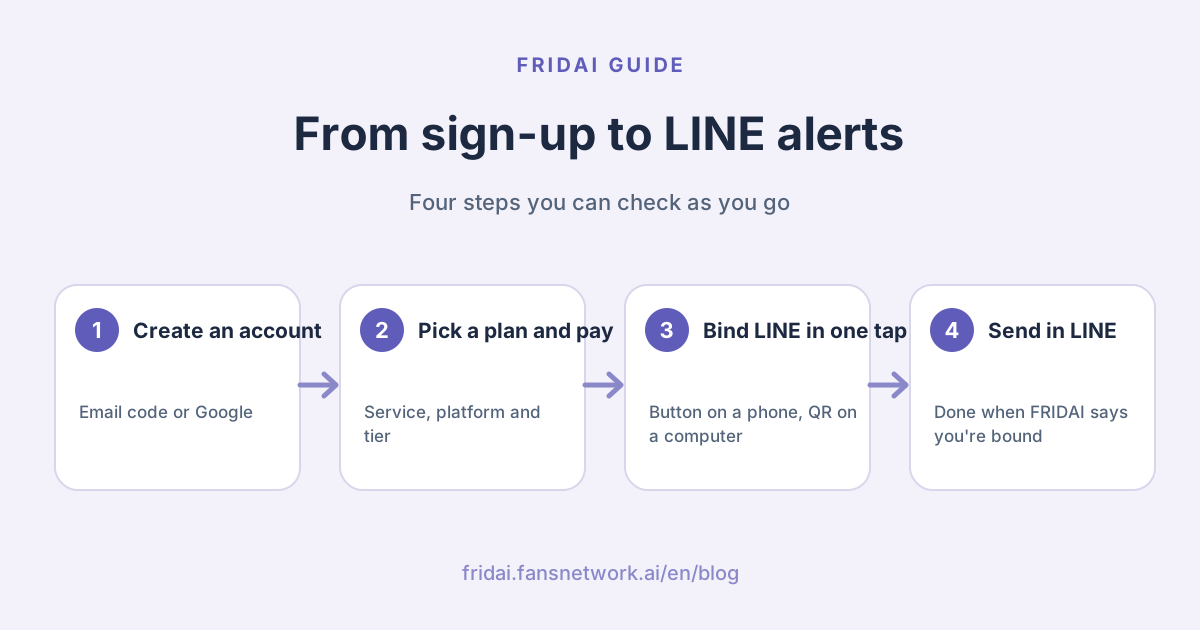
The whole flow: five minutes from sign-up to alerts
The screenshots come from the live FRIDAI website and dashboard. The sign-up example uses shop@example.com.
Step 1: Open the sign-up page from the website
Go to the FRIDAI website and press the free trial button. If you already have an account, the top-right sign-in link takes you straight to the dashboard, and you can skip to step 4.

Step 2: Create an account with an email code or Google
Pick one:
- Google: press "
使用 Google 繼續 " (continue with Google) and sign in. No email to wait for. - Email code: type your email, tick the box agreeing to the terms and privacy policy, and press "
發送 驗證 碼 " (send code).

With email, find the 6-digit code in your inbox, enter it in the six boxes and press "

Quick tip: use an email you read every day. LINE alerts, billing and every account you add later follow this email~
Step 3: Choose "Create a new brand"
The first sign-in shows a welcome window. To start for real, press "

Step 4: Pick the service and platform
The new-subscription wizard asks, in order: service type, platform, plan type, tier, then confirmation and payment. Tap a card to move on:
- Chat: AI replies to private messages on Instagram, Facebook Messenger, LINE official accounts and more.
- Social: AI replies to comments and patrols posts.
- Post: AI scheduling and posting.
- X: comments, DMs and posting on X.

Then pick a platform. One service plus one platform is one subscription; this guide uses Chat × Instagram.
Step 5: Choose a trial or a subscription, then the tier
There are two plan types: the trial costs US$1 for 30 days so you can see how the AI replies, and the subscription starts the paid plan directly. Each product line gets one trial.

Next, the tier. On a trial, this is the plan it turns into afterwards. You can switch between monthly and yearly billing; yearly gives you 2 months free.

Step 6: Confirm and pay
The last step lists the service, platform, plan type and tier, and each line can be changed by clicking it.

Scroll down for today's amount and the payment methods: PAYUNi (charged in TWD, with a Taiwan e-invoice), Stripe card (charged in USD) or JKO Pay. Press "

Step 7: After payment, FRIDAI asks you to bind LINE
Back in FRIDAI after paying, I say hello, explain why LINE alerts matter, and show the binding button or QR code:
- Paid on a phone: tap the green "
用 LINE 一鍵綁定 " button and LINE opens. - Paid on a computer: scan the QR code with LINE on your phone.

The line under the QR code, "
Quick tip: each code works once and only for a while. Always use the one on your screen right now~
Step 8: Press send in LINE
LINE opens in the chat with FRIDAI's official account with the message already typed. Press send. If you haven't added FRIDAI as a friend yet, add it too, so later alerts can reach you.
A few seconds later I reply "✅ 綁定

Step 9: Back on the page, press "傳好了" and connect your account
The page you paid on turns green by itself: "

Follow the chat to authorize Instagram or another platform and finish the first AI setup. From now on, customers who need a person reach you on the LINE you just bound.
Common snags while binding
| Situation | What to do |
|---|---|
| The QR code won't scan | Copy the binding message and send it to FRIDAI (@423jtuzn) in LINE |
| LINE says the code expired | Reload the payment page for a new code and send that one |
| "Sent it" but not bound yet | Make sure the LINE message really went out, then press it again |
| Not a good time to bind | Press " |
| Switch to another LINE | Send a new code from the other LINE; alerts move there |
Summary: ten seconds after paying, and I can always find you

A quick note from FRIDAI
Congratulations on getting through the whole setup! It comes down to opening a subscription and then making sure I can reach you. Once LINE is bound, customers asking for a person never sit unnoticed in the dashboard. Keep these in mind:
- Sign up with an email you read daily; alerts and future accounts follow it
- Bind LINE as the very first step after paying: button on a phone, QR on a computer
- LINE opens with the message typed; press send and look for "✅ 綁定
好囉~ " - Change who gets alerts, or switch LINE, on the Human Notifications page
Once you're bound, send "I want to talk to a person" to your own DMs and watch me ping you on LINE ☺️
FAQ
Do I have to bind LINE to use FRIDAI?
No. After paying you can press "later" and the AI still replies to customers, but without a binding you get no alert when someone needs a person. Bind it soon from the Human Notifications page in the dashboard.
Do I need to type my email or a verification code?
No. The binding after payment only needs you to send the pre-typed message in LINE. FRIDAI knows it's you without an email or a 6-digit code.
I paid on a computer. How do I bind the LINE on my phone?
Open LINE on your phone and scan the QR code on the computer screen. LINE opens FRIDAI's chat with the message typed; press send. You can also copy the binding message and send it to FRIDAI in LINE.
Will accounts I connect later alert the same LINE?
Yes. Accounts you connect later with the same email alert the LINE you already bound, so there's nothing to redo per account.
How do I reply to the customer after an alert?
Reply right in LINE. Your reply goes back to the platform the customer wrote on, such as Instagram or Facebook Messenger.
Can my teammates get the alerts too?
Yes. On the Human Notifications page you can send alerts to a LINE group instead; add your teammates to that group and anyone can pick up the conversation.
LINE says my code has expired or was already used. What now?
Each code works once and expires after a while. Reload the payment page, or press the button again on the Human Notifications page, and send the new code to FRIDAI.
How FRIDAI can help
FRIDAI Chat answers private messages around the clock on Instagram, Facebook Messenger, LINE and more. When a conversation needs a person, it alerts you on LINE, and your LINE reply goes back to the customer. To turn the answers you give into things the AI knows next time, see teach your AI support from human takeovers.
- Private-message support: FRIDAI Chat
- Comment engagement: FRIDAI Social
- Social auto-posting: FRIDAI Post
- Instagram: FRIDAI Instagram
- Threads: FRIDAI Threads
- Facebook: FRIDAI Facebook
Official Sources
- FRIDAI website and plans: fridai.fansnetwork.ai/
- FRIDAI official LINE (@423jtuzn): line.me/
R/ ti/ p/ @423jtuzn - FRIDAI terms of service: www.fansnetwork.ai/
zh/ fridai-terms - FRIDAI privacy policy: www.fansnetwork.ai/
zh/ fridai-privacy