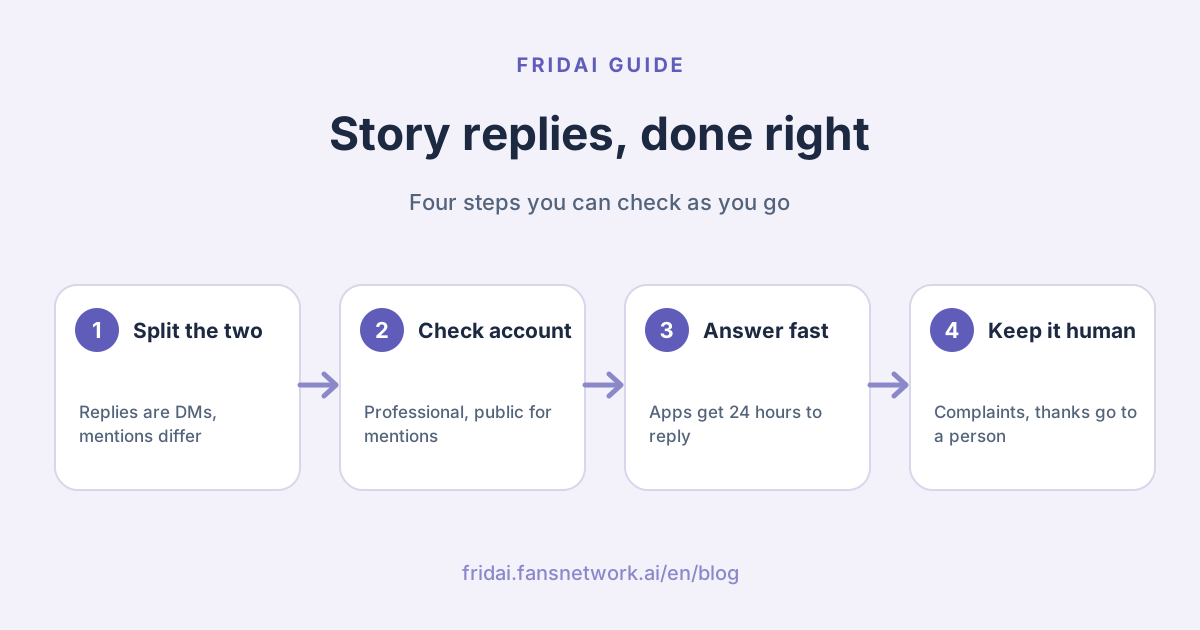
The answer up front: story replies and story mentions are different things
| Event | What the customer did | What you receive | Automate? |
|---|---|---|---|
| Story reply | Sent a message under your story | A DM that references the story | Good for questions |
| Story mention | Tagged you in their own story | A mention message in your inbox | Careful with thanks |
| Emoji-only reply | Replied with just an emoji | A DM with only an emoji | Usually no reply needed |
People mix them up because both land in the DM inbox. They mean very different things. A story reply usually says "I want to ask about this". A story mention usually says "I was there, I bought it, I'm recommending you". The first needs a correct answer; the second needs a human touch.
What can the Instagram app do on its own?
Start with what needs no tool at all. In the official help pages FRIDAI Editorial checked today, neither Instagram nor Meta Business Suite has a dedicated "auto-reply to stories" switch. What you get is control over who can reply, plus the general DM automation tools.
Control who can reply to your story
The Instagram Help Center says that by default, anyone who can see your story can reply to it with a message, and that people you prevent from replying will not see the option inside your story. On iPhone the path is: your profile, the menu at the top right, then under "How others can interact with you" tap "Messages and story replies", tap "Story replies" and choose who can reply. Menu names may differ slightly on other devices.
The same page notes that a story disappears from Feed, your profile and Direct after 24 hours unless you add it to a highlight. After that, the story's photos and videos are no longer visible in conversations, though any text in the message stays. This matters for customer service, as the next section shows.
FAQs in chats: up to four
Business and creator accounts can set frequently asked questions in Instagram chats, shown when someone starts a message to you. The Help Center says you can add up to four, each with an optional automated response. It is not story-specific, but questions that come in from stories are often those same few.
Meta Business Suite inbox automations
The Meta Business Help Center lists inbox automation templates for Messenger, Instagram and WhatsApp: an instant reply for first-time messages, an away message, frequently asked questions, location, contact information, hours, custom keywords, and comment-to-message triggered by hashtags. There is no story-specific template on the list.
Custom keywords come with official limits: they can only be set up on Meta Business Suite desktop for now; each automation takes up to 5 keywords; keywords are case-sensitive and must match exactly; and the keyword reply is sent after 15 minutes unless you respond yourself first. Also, turning on Meta Business Agent pauses existing automations such as away messages and instant replies.
Creator AI auto replies
The Instagram Help Center also has a page on AI auto replies. You need a professional account, a creator AI built in Meta AI Studio, and agreement to the Creator AI terms; the feature is being introduced gradually and can only be set up in the mobile app. You choose whether the AI replies to people you don't follow, followers you don't follow back, or only people you pick. The page talks about messages and message requests and does not specifically mention story replies or story mentions.
| Built-in tool | What it handles | Main limit |
|---|---|---|
| Story reply setting | Who can reply | Controls only, never replies |
| Chat FAQs | Questions shown at chat start | Up to 4 |
| Inbox custom keywords | Messages with keywords | Desktop only, up to 5 |
| Creator AI | Messages from a chosen audience | Gradual rollout, needs an AI |
For a full comparison of native features and third-party tools, see Instagram auto-reply: Meta's free features vs 5 tools. This article sticks to stories.
What can a tool receive through the Instagram API?
Third-party tools handle Instagram stories through Meta's official Instagram messaging API. Here is what Meta for Developers documents today. You do not need to code, but knowing this keeps vendor pitches honest.
Story replies arrive as ordinary DMs
Meta's webhook examples show that when someone replies to your story, the message carries a reply_to object containing that story's URL and ID. So a tool can see which story the customer is responding to and work out which product or campaign they mean.
Story mentions only come from some accounts
Meta's story mention documentation says that when a user mentions your professional account in a story, your inbox gets a message referencing that story, and the webhook carries an attachment of type story_mention with the story's CDN URL. Three conditions apply:
- Only mentions from public accounts come through; a private account's mention arrives only if that account follows you.
- You must not store or cache the story's media on your own server; you may store the URL.
- Once the story is deleted or expires, the URL stops working, and the docs suggest showing a "content no longer available" placeholder.
One common misunderstanding: Instagram's mentions API, which handles @mentions in comments and captions, states plainly that mentions on stories are not supported. Story mentions travel through messaging, not through comments.
The 24-hour window
The Instagram messaging API docs say your app has 24 hours to respond to a message an Instagram user sends to your account, and that the app can only message someone after they have messaged you first. Past 24 hours, the docs say a response can be tagged as coming from a human agent so it can be sent outside the window, which is meant for people, not bots. The details are in the Messenger 24-hour rule.
Other official limits
| Item | Official rule | What it means |
|---|---|---|
| Message requests | New chats from non-followers go to Requests | After 30 days idle, the API can't read them |
| Text length | UTF-8, 1000 bytes or less | Keep Chinese replies short |
| Group messages | Not supported | One-to-one only |
| Account type | Instagram professional account | Personal accounts can't connect |
| Webhooks | App Live plus Business Verification | Check this first if nothing arrives |
Meta's human agent escalation doc also requires an escalation path in automated experiences: in app review you must show that when a conversation escalates, thread control passes to the inbox and an agent can reply from there. In other words, Meta itself expects the bot not to do everything.
Which story messages are worth automating?
| Message type | Automate? | Why |
|---|---|---|
| Price, size, opening hours | Yes | Fixed answers from the knowledge base |
| Asking about a product in the story | Yes | The tool can see which story it was |
| Just a heart or emoji | No need | A forced reply looks robotic |
| Complaint, return, bad review | No | Needs a person to judge and apologise |
| Partnership or press request | No | The owner should decide |
| Many identical mentions | Pause first | Could be a campaign or spam |
Four times you should not automate
1. Emotional messages and complaints
A customer replies to your story with "the one I bought last time broke". That is a complaint, not a question. A canned "thanks for your feedback" from an AI only adds fuel. Route these to a person; at most, the automatic reply should say a colleague will get in touch.
2. Mentions that deserve a personal thank-you
When a regular, a partner or a customer who wrote a thoughtful review tags you, they can tell if you answer with the same template as everyone else. Thank-you templates suit high-volume campaigns such as check-in giveaways. For a genuine share, thirty seconds of your own reply is the best value you will get all day.
3. Do not guess when you cannot see the story
Stories vanish after 24 hours, and their photos and videos disappear from the conversation too. If a tool only knows "the customer replied to an expired story" and not which product it showed, asking "which one did you see?" beats guessing.
4. Volume that can look like spam
During a campaign, a flood of mentions each answered instantly with the same line and a link looks a lot like spam. The official pages FRIDAI Editorial checked do not publish a specific threshold, and we will not guess one. The safe approach is to vary your wording and not put a link in every reply. If your account does get restricted, see Can Instagram auto-reply get you banned?
Steps to set up Instagram story reply automation
1. Check your account first
API-based tools need an Instagram professional account. Story mentions only arrive from public accounts or private accounts that follow you. Tell your team, so nobody thinks messages are going missing.
2. Decide who can reply to your stories
If strangers keep flooding your story replies, narrow the audience in the "Story replies" setting. Keep in mind that people you restrict lose the reply option, which also closes one door for questions.
3. Put story FAQs into your knowledge base
Write down what the story promotes, when the campaign ends and how to buy before you post it. The story disappears; your answers should not.
4. Define when to hand over to a person
Complaints, returns, partnership requests and "I want the owner" always go to a person. Automation needs to be able to stop, not push through.
5. Test with five messages
From another account, reply to your story with a price question, then just a heart, then a product complaint; tag your account in a story; and the next day reply to a story that has expired. See whether the tool tells them apart.
Story reply templates you can copy
These stay in Chinese because they go to Taiwan customers. Each has a one-line English gloss.
A story reply asking about a product (gloss: thanks for noticing this one; price and size are here, ask me anything):
謝謝你注意到這款!它目前售價與尺寸都放在這裡了,
想看實品或有其他問題,直接在這裡問我就好。
A story mention, routine thanks (gloss: we saw your share, thank you for tagging us, tell us how it goes next time):
看到你的分享了,好開心!謝謝你特地標註我們,
下次來也歡迎再跟我們說說使用心得。
A story reply with a complaint (gloss: sorry for the bad experience; a colleague will contact you, and an order number or purchase date will speed things up):
很抱歉讓你有不好的體驗,我請負責的同事直接跟你聯絡,
方便的話先告訴我們訂單或購買日期,會處理得更快。
The story has expired and the question is unclear (gloss: that story has expired; which product or campaign did you see?):
不好意思,那則限時動態已經過期了,
可以告訴我你是看到哪一款或哪個活動嗎?我馬上幫你查。
FAQ
Does Instagram have a built-in story auto-reply?
In the Instagram and Meta help pages FRIDAI Editorial checked today, there is no story-specific auto-reply switch. You can control who replies to your stories and use chat FAQs and inbox automations for DMs in general.
Why didn't my tool receive a story mention someone made?
Meta's docs say only story mentions from public accounts come through; a private account's mention arrives only if it follows you. The tool's app must also be Live and have completed Business Verification before webhooks are sent.
Can I still auto-reply to a story reply after 24 hours?
The Instagram messaging API gives apps 24 hours after the customer's message to respond. After that, only a person can reply using the human agent tag, so automated follow-ups are not appropriate.
Can I still see a story in the chat after it expires?
According to the Instagram Help Center, a story disappears after 24 hours unless you add it to a highlight. After that, its photos and videos are no longer visible in the conversation, but the message text remains.
Will sending the same thank-you to every story mention get me restricted?
Meta does not publish a specific threshold, but lots of identical messages with links can look like spam. Vary your templates, skip the link most of the time, and have a person answer the mentions that matter.
Can Meta Business Suite keyword replies handle story replies?
Story replies arrive as DMs, but Meta's template list has no story-specific option. Custom keywords are desktop-only, take up to 5 keywords, are case-sensitive, and send only if you have not replied within 15 minutes.
How FRIDAI can help
FRIDAI Chat is AI customer service for Instagram DMs. It uses Meta's officially authorised API, answers product and campaign questions from your knowledge base, and can hand complaints or sensitive messages to a person through human takeover and human review. FRIDAI's product pages do not specifically list handling for story replies or story mentions, so if that is your focus, run the five test messages above during the trial or contact us first.
- Product: FRIDAI Chat
- FRIDAI Social: FRIDAI Social
- Tool comparison: Instagram auto-reply: Meta's free features vs 5 tools
- Instagram: FRIDAI on Instagram
- Threads: FRIDAI on Threads
- Facebook: FRIDAI on Facebook
Official sources
- Instagram Help Center, manage who can reply to your story: help.instagram.com/
1133988223332503 - Instagram Help Center, set up FAQs on chats: help.instagram.com/
4153704678000867 - Instagram Help Center, turn on AI auto replies: help.instagram.com/
317190238019695 - Meta Business Help Center, inbox automations: www.facebook.com/
business/ help/ 395965998733706 - Instagram messaging API (Instagram Login): developers.facebook.com/
docs/ instagram-platform/ instagram-api-with-instagram-login/ messaging-api/ - Instagram webhooks: developers.facebook.com/
docs/ instagram-platform/ webhooks - Instagram webhook examples: developers.facebook.com/
docs/ instagram-platform/ webhooks/ examples - Instagram story mentions: developers.facebook.com/
documentation/ business-messaging/ instagram-messaging/ features/ story-mention.md - Instagram mentions API: developers.facebook.com/
docs/ instagram-platform/ instagram-api-with-instagram-login/ mentions/ - Instagram human agent escalation: developers.facebook.com/
documentation/ business-messaging/ instagram-messaging/ features/ human-agent-escalation.md - FRIDAI Chat: fridai.fansnetwork.ai/
fridai-chat