
Your Chinese Instagram is running well and you want an English account too, without rebuilding the voice, rules, images and schedule from scratch. This guide shows how to set it up in one step.
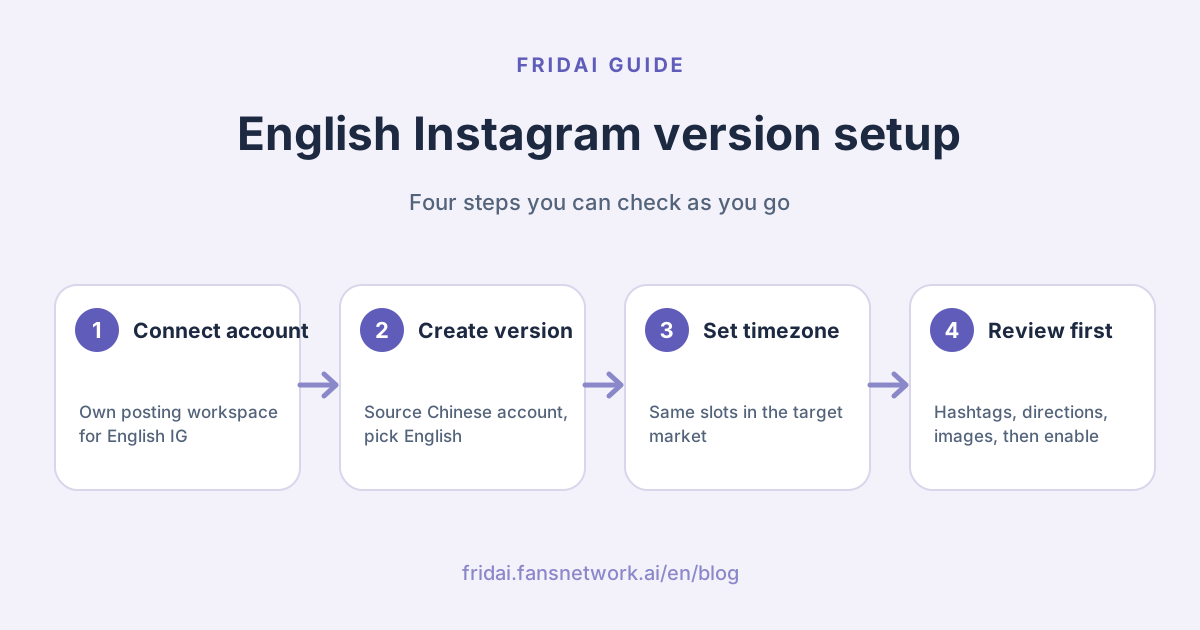
First decide: is the English account a sync or a version?
The first instinct is to add the English Instagram to the Chinese account's workspace so every post goes out to both, translated. That works well for Facebook or Threads, where it is the same brand talking to the same readers. Two Instagram accounts talk to two audiences, and those audiences need more than a translation.
| Approach | Sync from one workspace | Language version (two workspaces) |
|---|---|---|
| Best for | Same brand, same language, several platforms (IG + FB + Threads) | Same brand, two languages and two markets on Instagram |
| Post content | One caption, translated and published together | Every post regenerated for English readers |
| Posting time | Follows the main account's timezone and slots | Switched to the target market timezone, same morning/ |
| Hashtags and first comment | One shared set | Separate sets, editable independently |
| Image library | Shared | Synced from the source, future uploads keep syncing |
| Usage and history | Logged under one account | Logged separately, easier to verify each market |
The one-line test: if the two audiences wake up in different timezones, use a language version.
The architecture: shared brand layer, independent market layer
This layout solves three problems. Voice and rules are maintained once: edit the brand profile on the Chinese account, it is copied when you create the English version, and the English account can still fine-tune afterwards. Images are never uploaded twice: creating the version syncs the whole existing library, and images added to the Chinese account later keep flowing across. Topic research is shared: both workspaces draw on the same brand research, so neither hunts down the same news twice and the same topic does not get told once per account.
Step 1: connect the English Instagram as its own posting account
In Brand Manager click "New Subscription", choose posting (Auto Post) and connect the English Instagram account. Authorize with the Facebook account that owns that Instagram. When it is done, Brand Manager shows a new card labelled "Posting". The only goal of this step is to give the English account its own workspace, so the copied settings have somewhere to live.
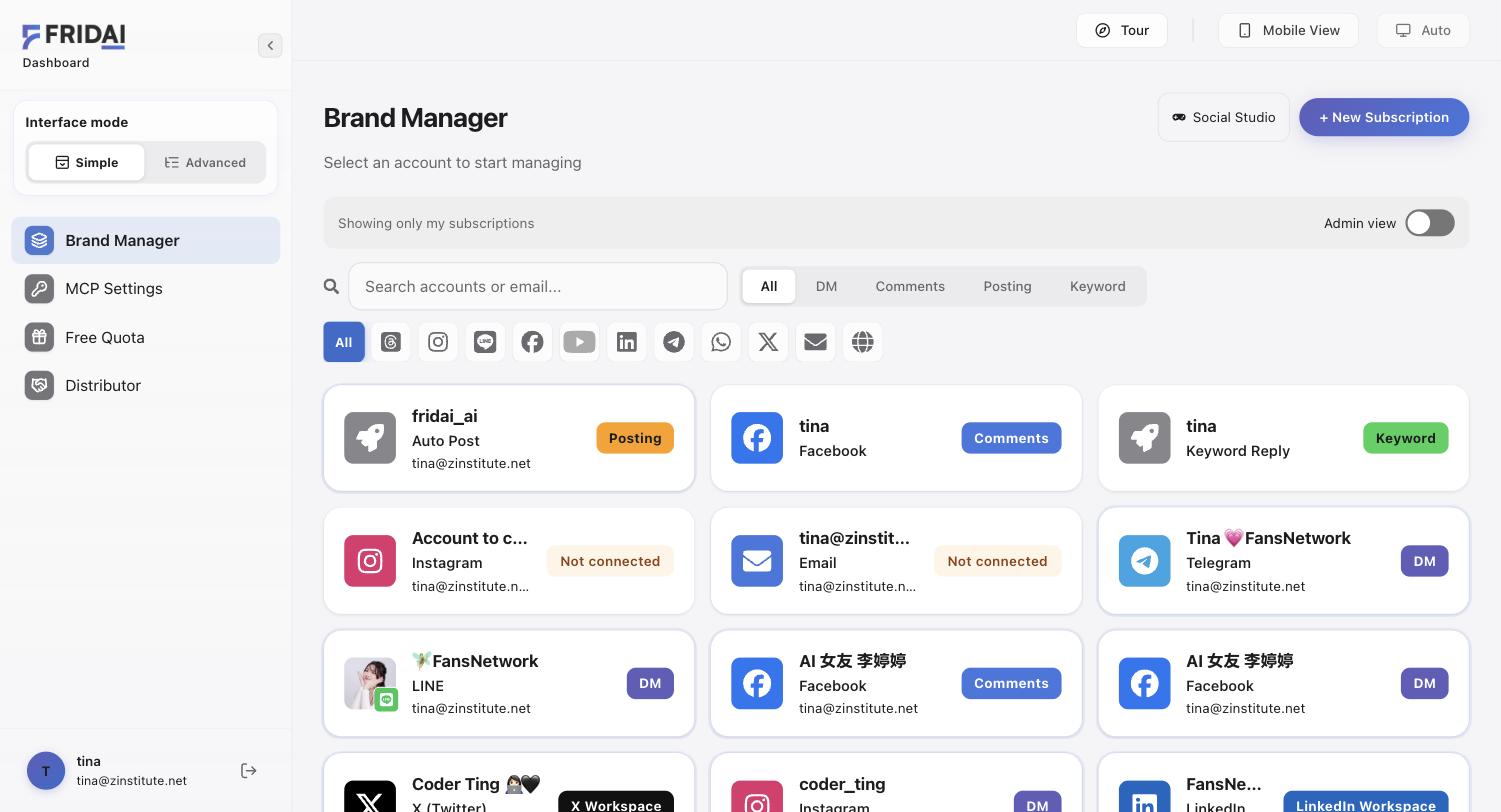
If you already have a card named after the English account that actually opens the Chinese workspace, separate the two ideas: the card name is whatever you typed, but what decides where posts go is the Instagram ticked under "Publish to" inside the workspace.
Step 2: click "Create English version" inside the English workspace
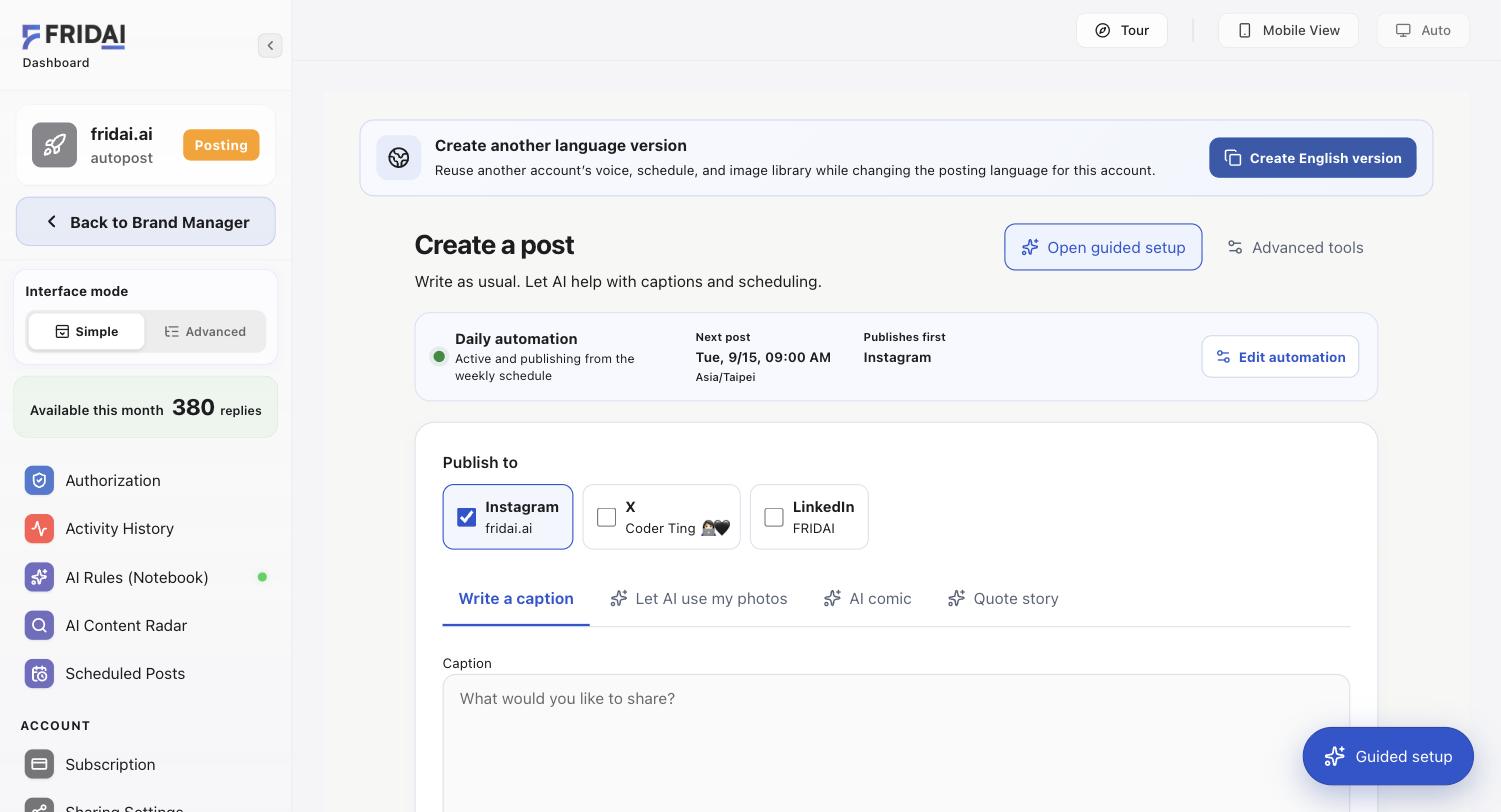
Open the English account's workspace. The top of the posting page shows a "Create another language version" banner with a "Create English version" button. This entry copies settings into the account you are currently in, so check that the account shown top-left is the English one, not the Chinese one.
Step 3: pick the source, language and market timezone, then confirm
The dialog has four fields. "Reuse this account" is the Chinese account (fridai.ai). "Apply to this account" is locked to the current account. "Posting language" is English. "Market timezone" is where your English readers live. Timezone is the field people skip: FRIDAI keeps the same morning, midday and evening slots as the Chinese account but fires them in this timezone, so if the audience is in the US, pick a US timezone instead of leaving Asia/
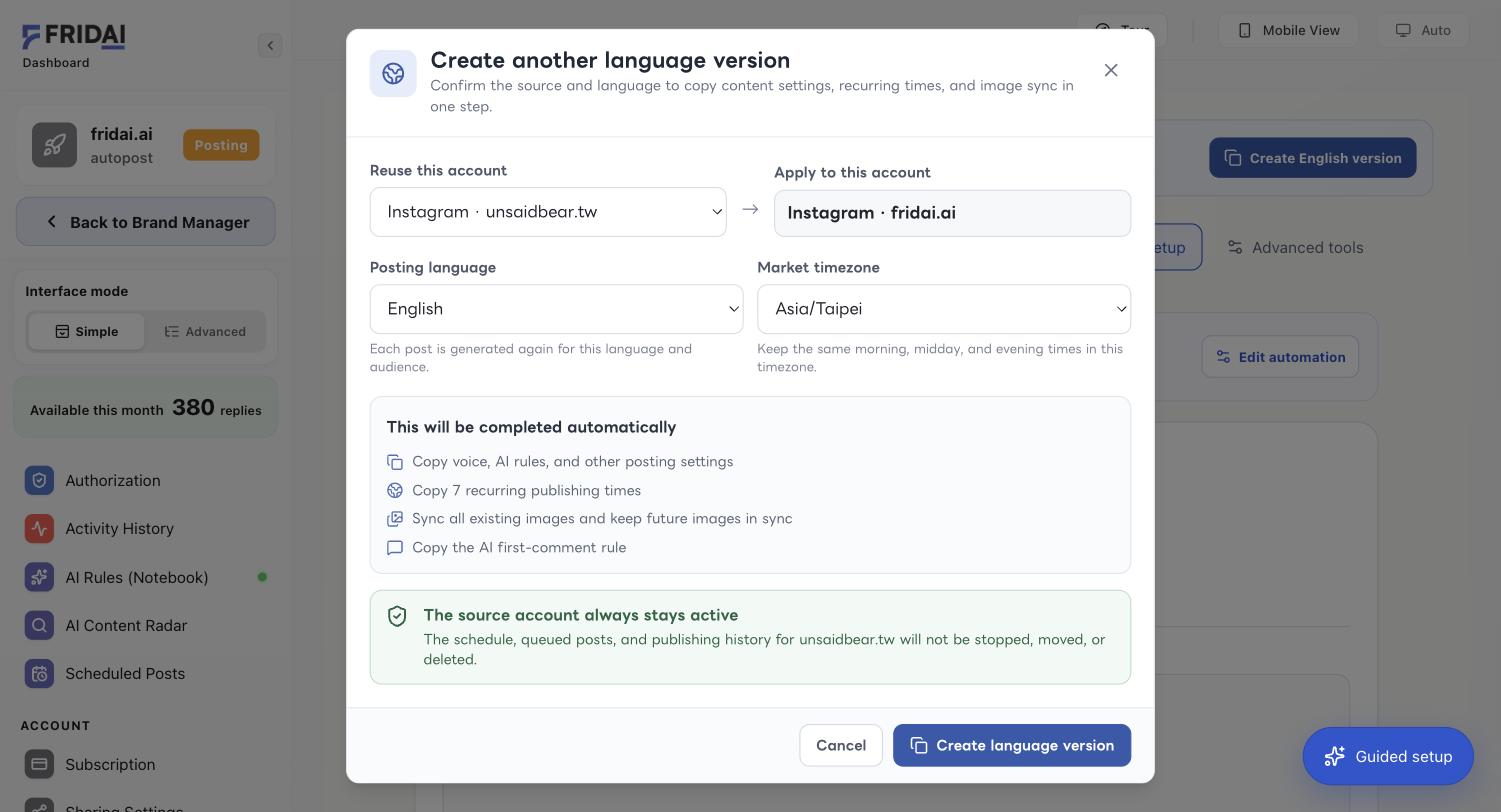
Below the fields the dialog lists what happens automatically: copy voice, AI rules and other posting settings; copy the recurring publishing times; sync all existing images and keep future images in sync; copy the first-comment setting (fixed text is translated into English, an AI rule is copied as is). The green box confirms the source account stays active, so the Chinese schedule and queued posts are not stopped or moved. When everything matches, click "Create language version".
Step 4: treat the new English account as a new account and review it
What gets copied is settings, not judgement. Before enabling automation, walk the English workspace like a fresh account:
| Where to look | Why | What FRIDAI Editorial suggests |
|---|---|---|
| Publish to | Make sure the English Instagram is ticked and the Chinese one is not | Tick only the English IG |
| Platform posting language | It was set to English, but check the generated captions | Preview one post and confirm it is not mixed-language |
| Hashtags | The Chinese account's hashtags are copied verbatim | Swap in tags your English market actually uses |
| Platform directions and topics | Taiwan-specific examples mean nothing to English readers | Rewrite them with target-market examples |
| Image library | Synced, but images with Chinese text do not belong on the English account | Keep images text-free or prepare English variants |
| Recurring slots | Already converted to the market timezone | Nudge them around the audience's commute and lunch times |
Then click “Edit automation”, open setup step 4 “Posting slots & switch on”, and turn daily auto-posting on in “Autopost switch & writing style”.
How FRIDAI Editorial decides the English version is really done
| Level | Evidence you want | Not a completion signal |
|---|---|---|
| Brand Manager | The English account has its own posting card | The English name typed onto the Chinese card |
| Language version | The result screen states how many slots were copied and images synced | The dialog simply closed |
| Posting slots | The next post shows the target market timezone | Timezone still says Asia/ |
| An English post appears on the English account at the expected time while the Chinese account keeps posting | Only the Chinese account has posts |
Summary: one brand, two workspaces

A quick note from FRIDAI
The one thing to take away: an English Instagram speaks to a different audience, so make it a language version instead of syncing from the Chinese workspace. Voice, rules, image library and topic research are shared; account, language, timezone and schedule belong to each market.
Before you start, walk through this list:
- If the two audiences wake up in different timezones, use a language version; use sync posting only for the same readers and the same content.
- Connect the English Instagram as its own posting account first, then click "Create English version" in its workspace.
- Set the market timezone to where English readers live instead of leaving Asia/
Taipei. - Before enabling, walk the English workspace like a new account: Publish to, language, hashtags, topics and images.
Once everything on the list matches, the English account is ready to post daily, with each market running on its own rhythm ☺️
FAQ
Does creating the English version disable or change the Chinese account?
No. The source account always stays active; its schedule, queued posts and publishing history are not moved or deleted. The language version is an independent copy, and edits on either side stay on that side.
Will both accounts publish identical content?
No. A language version is not a translation; every post is generated again for English readers. Both workspaces share topic research, so the same topic is not told once on each account.
Can I skip the second workspace and just tick the English IG in the Chinese workspace?
You can, but that is sync posting: captions, timing and hashtags follow the Chinese account. Only do it when both audiences are in the same timezone and want the same content.
If I upload new images to the Chinese account later, does the English account get them?
Yes. Creating the language version syncs all existing images, and images added to the source account afterwards keep syncing to the English account.
Do I have to translate the fixed first comment myself?
No. Fixed text is translated into English when the version is created and saved on the English account. If you use an AI first-comment rule, the rule is copied and the English account generates its own comments.
How FRIDAI can help
If your brand already runs a healthy Chinese Instagram, the expensive part of an English account is not translation but moving voice, rules, images and schedule all over again. FRIDAI Post's "Create language version" turns that into one dialog. Walk the checklist above before enabling it; a perfect English caption on the wrong account is still the wrong account.
- Product: FRIDAI Post
- Related: Instagram auto-reply tools
- Instagram: FRIDAI on Instagram
- Threads: FRIDAI on Threads
- Facebook: FRIDAI on Facebook
Official sources
- Instagram Platform API content publishing: developers.facebook.com/
docs/ instagram-platform/ content-publishing - FRIDAI Post: FRIDAI Post