
You want a website that looks like you, that customers understand, and that you can change without booking a developer every time. This guide shows what each plan includes, how you edit the site day to day in the dashboard, how the site keeps improving after launch, and finally how to choose.
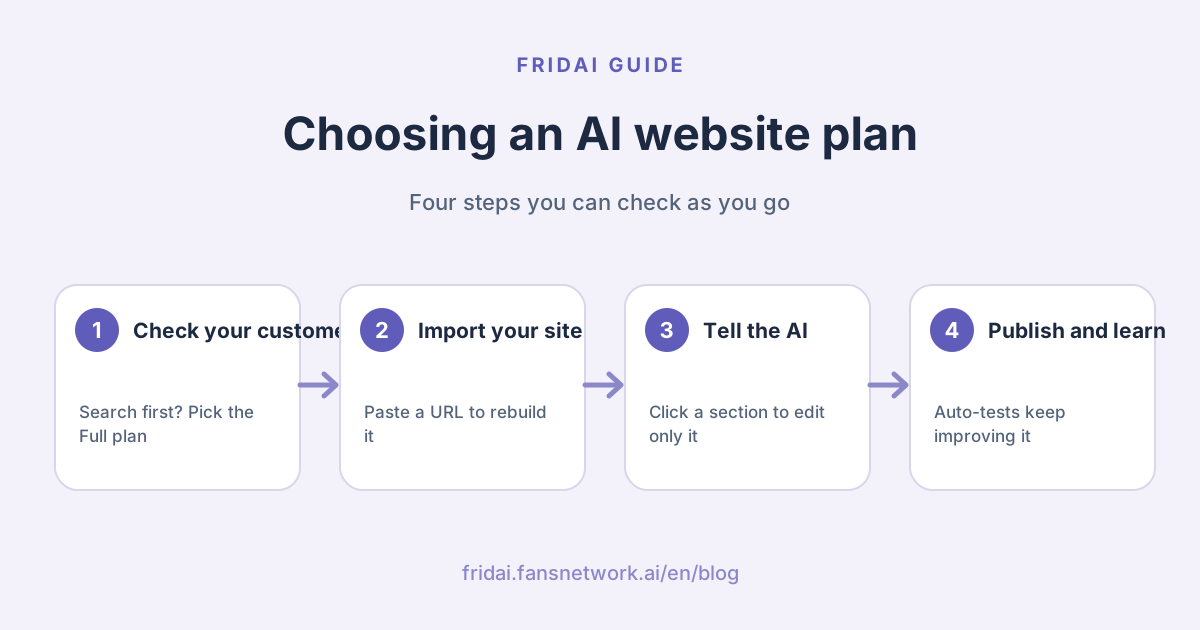
How is an AI-built website different from a traditional one?
A traditional website is usually "build it and hand it over": changing a price or a photo means waiting for a designer or developer. The difference with an AI website comes after launch: you change it by telling the AI, and the site uses real visitors' clicks to test which version works better.
| Aspect | Built once | Built with AI |
|---|---|---|
| Changes | Book someone to edit | Tell the AI in one sentence |
| After launch | Frozen at handover | Automatic A/ |
| Data | Install tools yourself | CTA clicks and traffic sources built in |
| Search traffic | Hire a writer | Optional monthly SEO articles |
FRIDAI's AI website suits shops, clinics, studios and personal brands that want a site that brings in bookings and that they can adjust themselves.
What do the two plans include?
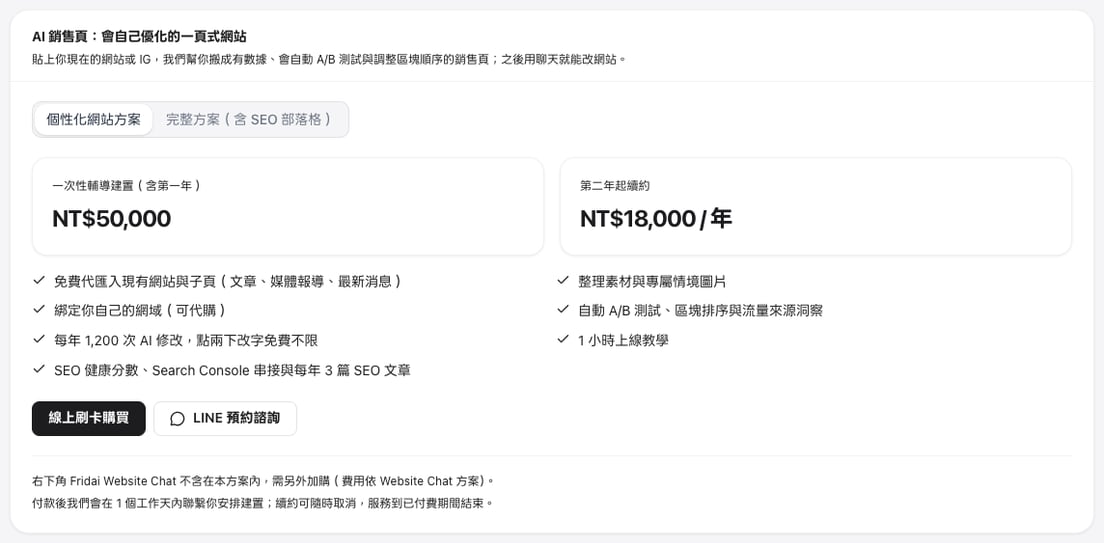
The website features are the same in both plans: importing your existing site, design templates, AI edits, automatic testing and analytics. The only difference is the number of SEO blog articles.
| Item | Personal Website | Full plan |
|---|---|---|
| Setup | NT$50,000 incl. year one | NT$50,000 incl. year one |
| Renewal | NT$18,000 / year | NT$18,000 / year |
| SEO articles | 3 a year | 3 a year + 8 a month |
| Blog fee | Included | US$70 / month |
| AI edits | 1,200 a year | 1,200 a year |

Both plans include:
- Free import of your existing site, with the home page and sub-pages rebuilt and images re-hosted.
- 6 design templates; sections without material are hidden automatically.
- AI-generated scene and service images; portraits always use real photos you provide.
- Your own domain connected, plus a 1-hour onboarding session.
- Tracking of CTA clicks, bookings, traffic sources and section engagement.
- Automatic A/
B tests of headlines, button text and section order. - 1,200 AI edits a year; double-click text edits in the preview are free and unlimited.
- SEO health score, Google Search Console connection and 3 SEO articles a year.
How to choose: Personal Website or the Full plan?
One question decides it: do your customers search and compare online before they contact you?
| Your situation | Suggested plan |
|---|---|
| Customers come from IG, LINE or referrals | Personal Website |
| Customers Google prices, results, reviews | Full plan |
| Site first, decide on the blog later | Personal Website, add the blog any time |
| Competitors write articles to win search | Full plan |
Clinics, beauty, classes, consultants and renovation, where customers research before choosing, usually go straight for the Full plan. You can add the blog from the dashboard at any time after launch, so starting with the Personal Website plan works just as smoothly.
After you buy: from import to launch
There are only a few steps. After that, the daily routine is "tell the AI what to change, take a look, publish". The dashboard is in Traditional Chinese, so the original labels are given in brackets.
The dashboard: your site in the middle, the AI on the right
An account with only a website plan sees just Sales Pages (銷售頁), Subscriptions (訂閱
- Top bar: the site name (click the arrow next to it to switch sites), publish status, a desktop/phone preview switch, Preview link (預覽連結), Publish (發布) and a ⋯ menu.
- Left rail: Edit (編輯), Results (成效), Blog (部落格), Settings (設定), Domain (網域), SOP, LINE and AI chat (AI 客服).
- Centre and right: in Edit, your site fills the centre and the "Edit your site by chat" (用聊天
修改 網站) panel sits on the right, with a few ready-made suggestions you can click.

Tell the AI one sentence and the site is updated
Type into the AI chat on the right, for example "add an FAQ: how long does treatment take?

Click a section and the AI changes only that section
Click any section of the site in the centre, such as the FAQ, and a toolbar floats above it: Edit "FAQ" with AI (用 AI 改

For a single typo, double-click the text on the site and type. That kind of edit is free and unlimited.
Compare Original and Edited before you keep it
After each AI edit, an Original | Edited (原本
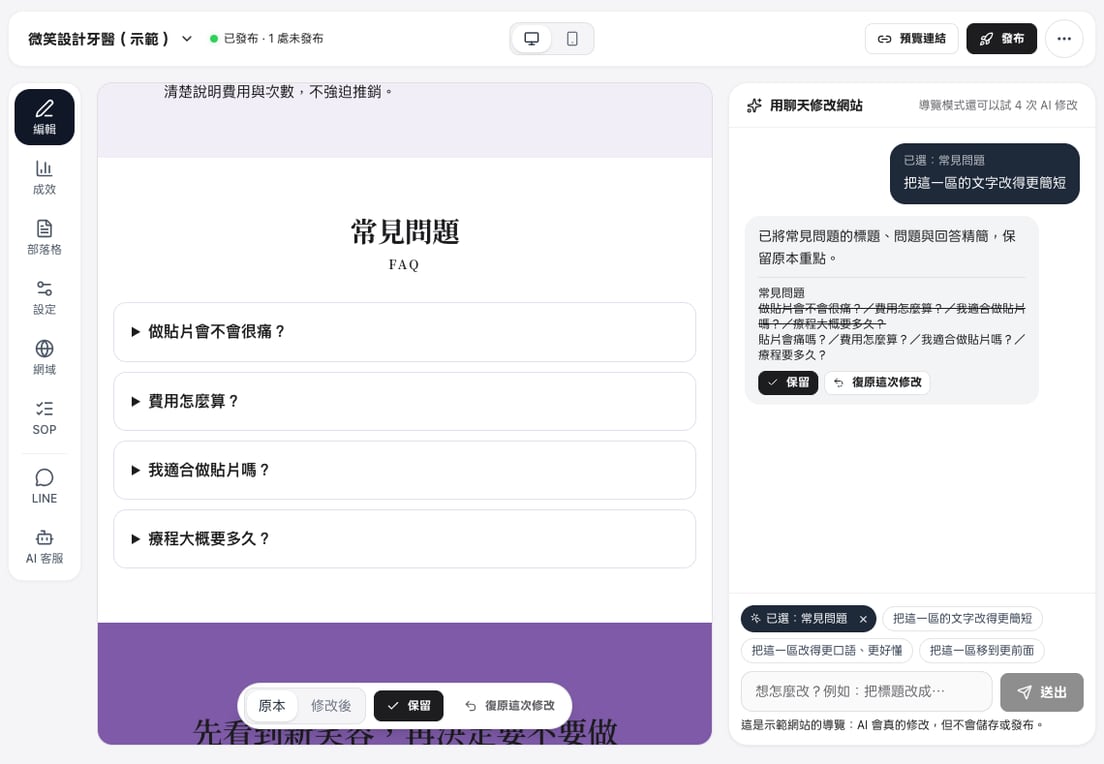
Tip: it's fine if you can't say exactly what you want. For a request like "make it look more professional", the AI first offers a few concrete directions plus "Decide for me" (幫我決定); click one and it goes that way~
Happy with it? Click Publish
When there are changes waiting, the top bar says "1 unpublished" (1 處未發布) and the Publish button at the top right turns black. Click Publish and the site updates immediately. To check on your phone first or share it with a colleague, click Preview link: it copies a private preview that only people with the link can open.
The ⋯ menu at the top right holds a few more everyday actions:
- Open site and Copy link: open or share the live site.
- Back to the last published version: drop this draft and return to what is live, in one click.
- Unpublish: take the site offline for now.

Edit from your phone too
On a phone, the site preview fills the screen and the top bar still shows the site name, status and Publish. There are two ways to edit:
- Tap the floating "What would you like to change?
" (想怎麼改?) box and the AI chat slides up from the bottom; type a sentence or tap a suggestion. - Tap a section of the site first, then the floating Edit with AI button (for example 用 AI 改
「常見 問題」), and the AI changes only that section.
Four tabs sit at the bottom: Edit, Results, Blog and More. More holds site content and images, Domain, the sales SOP check, editing on LINE, URL and publishing, AI chat, Plan and billing, and New sales page.

After launch, the site keeps improving
Launch is not the finish line. Click Results on the left and start with the four numbers at the top: visitors, people who clicked an action, click rate and booking forms. Below, AI auto-optimisation on the left tests new headlines and button text with real visitors' clicks and switches to the winner only when the difference is clear; AI insights on the right turns the numbers into plain advice, such as which channel's visitors are most likely to act. Further down are the daily trend and traffic sources.

To get found by more people on Google, open Blog: the SEO health score, Google search data and the website blog all live there. We explain how the automatic SEO blog picks topics and writes articles in What an automatic SEO blog is.
Try it first: the website tour
Before you decide, you can try a real AI edit in the tour mode. Click "Try the dashboard" on the AI Sales Pages product page, or click Tour (導覽) at the top right of the FRIDAI dashboard and choose the website tour (網站

How to buy
You can pay by card online in Sales Pages in the FRIDAI dashboard, even without any other FRIDAI plan. A switch at the top toggles between the Personal Website plan (個性化
- Personal Website plan: click Pay by card online (線上
刷卡 購買) and pay the setup fee once. - Full plan: click Payment step 1: website plan (付款
第 1 步: 網站 方案), then activate the SEO blog (US$70 a month) on the next screen. The two are charged separately and can be managed separately in Plan and billing (方案 與付款).
Summary: choosing an AI website plan

A quick note from FRIDAI
Choosing comes down to one question: do customers search online before they find you? If yes, take the Full plan; if you want the site sorted first, take the Personal Website plan and add the blog whenever you like~
Keep these in mind:
- The website is identical in both plans; the difference is 8 SEO articles a month.
- Tell the AI on the right about big changes, click a section to change only that part, and double-click small text.
- Compare Original and Edited, then click Publish when you're happy.
- After launch, check Results to see which channel brings bookings, and let the automatic tests fine-tune the site.
- Want to try it first? Open the website tour and make a real AI edit.
Hand me the site you have now and we'll turn it into one that brings you bookings ☺️
FAQ
Is the website different between the Personal Website plan and the Full plan?
The website is exactly the same: import, templates, AI edits, automatic A/
Can I buy the Personal Website plan now and add the blog later?
Yes. The SEO blog is an add-on in the dashboard that you can switch on any time after launch. It is billed monthly in US dollars, and the articles are published under /blog on the same site.
Can my AI website use my own domain?
Yes. Both plans include connecting your own domain. If you don't have one, we can buy it for you at the domain's actual cost plus NT$300 a year.
What happens if I run out of AI edits?
Each plan year includes 1,200 AI edits, and only edits that actually change the page count; double-click text edits in the preview are free and unlimited. If you need more, top up 50 edits for NT$300 in the dashboard.
Can I try it before deciding?
Yes. Open the website tour in tour mode: the sample site lets the AI make 5 real edits so you can see the whole flow of editing, publishing and results.
How FRIDAI can help
If you want a website that looks like you, that you can change yourself and that improves with data after launch, FRIDAI AI Sales Pages start from the site you already have: we handle the import, materials and onboarding, and you just tell the AI what to change. To see it in action, try the website tour; when you're ready, buy it online in the dashboard.
- AI website plans and pricing: FRIDAI AI Sales Pages
- Try the dashboard: Website tour (AI Sales Pages)
- Buy online: Buy in the FRIDAI dashboard
- How the automatic SEO articles work: What an automatic SEO blog is
- Step-by-step from purchase to launch: AI sales page tutorial
- Instagram: FRIDAI on Instagram
- Threads: FRIDAI on Threads
- Facebook: FRIDAI on Facebook
Official sources
- FRIDAI AI Sales Pages product page (both plans, pricing and inclusions): fridai.fansnetwork.ai/
en/ sales-pages - FRIDAI dashboard Sales Pages (buy and manage): www.fansnetwork.ai/
en/ dashboard/ sales-pages - Dashboard screenshots come from the website tour in FRIDAI's tour mode; the sample site and numbers are sample data.