
Before customers contact you, they search: "does it hurt?", "how much is it?", "how long until it heals?". If your site has an article that answers that exact question, customers walk in from Google. This guide explains how the automatic SEO blog picks topics, what the articles look like, how to track results, and then walks you through switching it on.
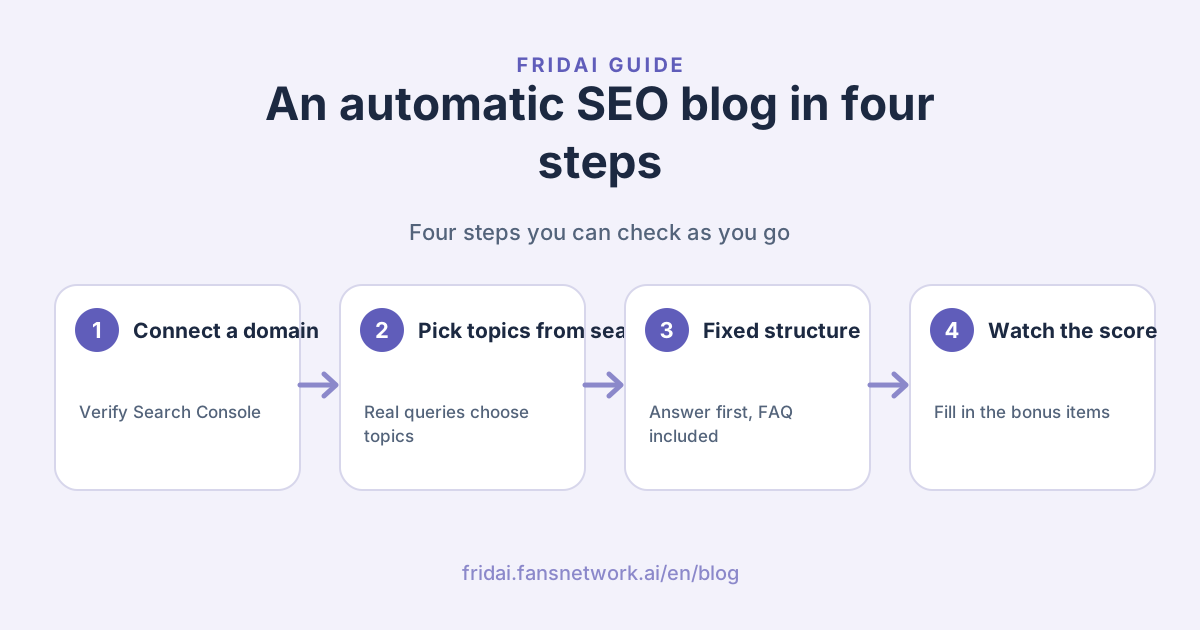
What is an automatic SEO blog?
The automatic SEO blog is the article feature of FRIDAI's AI website: the system regularly writes an article that answers a customer question and publishes it under /blog on your own domain, so people searching those questions find you.
The big difference from writing a blog yourself is that topics are grounded in data: it looks at the searches your site already shows up for on Google, then decides what to write next.
| Aspect | Writing it yourself | Automatic SEO blog |
|---|---|---|
| Topics | Whatever comes to mind | Picked from real search data |
| Frequency | Stops when you're busy | 8 a month, steadily |
| Structure | Different every time | A fixed SEO structure |
| Results | Hard to judge | Tracked by SEO health score |
Here is the path an article takes from topic to booking:
Why does a website need a steady stream of articles?
A one-page site is great at persuading people who are already reading it, but it can only rank for so many searches. Customers often search very specific questions, like "do dental implants hurt?" or "how long do I wear clear aligners?", and each of those deserves its own answer.
Writing steadily brings three benefits:
- Every article is a new way in, answering a question customers really search.
- Each article ends with your booking button, so readers can book straight away.
- Fresh content makes it easier for search engines and AI search such as ChatGPT to cite you.
Where topics come from: your Search Console
Once your own domain is connected, the system verifies Google Search Console for you and submits your sitemap. Topics then draw on two sources first:
- Search Console queries: which searches your site already appears in, how often it is seen and its average position. Queries that people already see but where you don't rank high enough yet are the most worth a dedicated article.
- Google search suggestions: for a new site without Search Console data yet, Google's autocomplete suggestions surface questions related to your services that you haven't covered.
Click Blog (部落格) on the left of the dashboard and scroll down to the Google Search Console section. The four boxes at the top track verifying ownership, creating the property, submitting the sitemap and daily sync; below, "What people search to find you" (客人

Tip: Search Console needs your own domain. If you don't have one yet, ask us to buy one for you in Domain; once it's connected, topics start drawing on your real search data~
What does each article look like?
Every article follows the same structure, the same rules the FRIDAI blog itself uses:
| Part | What it covers |
|---|---|
| Search title | The question plus your brand |
| Opening | Answers the question right away |
| Subheadings | In the order readers need |
| Comparison table | Turns into cards on phones |
| FAQ | With FAQ structured data |
| Ending | Leads to your booking button |
The writing rules forbid inventing results, case studies or customer quotes, and prices and treatments only come from what your site already says.

Track progress with the SEO health score
Open Blog and the top section is SEO growth (SEO 成長): your SEO health score out of 100 with how many points you've gained since you started, the score trend, the Google impressions trend, and five numbers for Google impressions, Google clicks, average position, visitors from search and article views. Further down, Bonus items (加分

The score looks at three things:
- Your site's setup: whether it is live, uses your own domain, has Search Console verified, has search titles and descriptions of a good length, and has complete services and FAQs.
- Your blog: how many articles are published, how many different keywords they cover, and whether there's anything recent.
- Visitors from search: people arriving from Google, Bing, or AI search such as ChatGPT and Perplexity.
The score measures your site setup, content and search visits so it can tell you what to improve next; for Google rankings, look at the average position above it.
Plans and pricing: 3 articles a year or 8 a month?
The automatic SEO blog is part of FRIDAI's AI website. Both plans include a blog; the difference is the number of articles:
| Plan | Articles | Cost |
|---|---|---|
| Personal Website | 3 a year | Included |
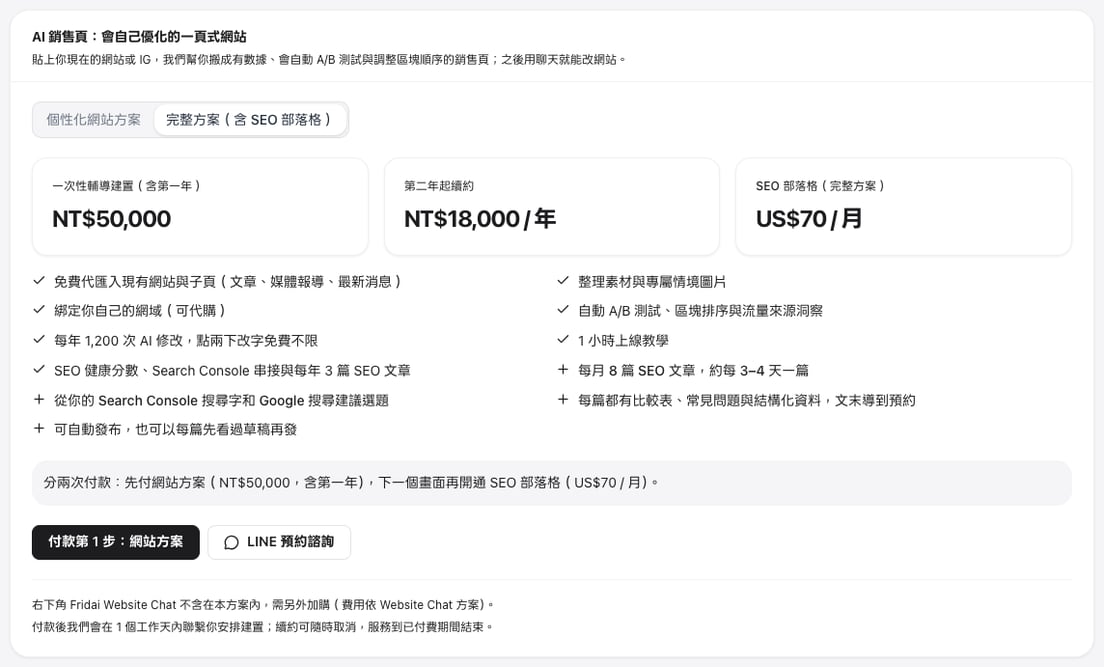
| Full plan | 3 a year + 8 a month | US$70 / month |
The website plan itself is a one-off guided setup of NT$50,000 including the first year, then NT$18,000 a year. The SEO blog is billed monthly in US dollars, and you can manage or cancel it any time in Plan and billing (方案
How to switch on the automatic SEO blog
Three steps get your site growing new articles every month. If you already have the website plan, click Add the blog plan (加購部落
Step 1: Choose the Full plan in Sales Pages
Open Sales Pages (銷售頁) in the FRIDAI dashboard and switch the plan card to the Full plan with SEO blog (完整
Step 2: Connect your own domain in Domain
Click Domain (網域) on the left (on a phone it's under More). Without a domain, choose Buy a domain for me (recommended), search for the one you want, and we handle the purchase, DNS and SSL. If you already have one, choose I already have a domain and follow the setup guide for GoDaddy, Cloudflare or another registrar. Once it's connected, we verify Search Console for you and topics start drawing on your real search data.

Step 3: In Blog, choose automatic publishing or review first
The Website blog (網站
- Auto-schedule articles (自動
排程 : when on, the AI picks topics customers are searching for and spreads the articles evenly over the period.寫文章) - Publish when written (寫好
直接 : off by default, so every article is saved as a draft for you to read and edit before it goes live. That suits industries where price and treatment wording needs care. Turn it on and articles go live as soon as they're written.公開) - Write one now (立即
寫一篇) : enter a topic to write an article right away; leave it blank and the AI picks a question customers are searching for.
Published articles appear in the Latest articles section of your site, on its /blog page and in the sitemap.

Summary: the automatic SEO blog

A quick note from FRIDAI
What the automatic SEO blog does is simple: it sees what customers really search on Google, writes articles that answer those questions every month, and sends readers to your booking button~
Keep these in mind:
- Connect your own domain first, so topics draw on your site's real search data.
- Every article follows a fixed SEO structure and only uses prices and services from your site.
- If your industry needs careful wording, keep Publish when written off and review before publishing.
- Check the SEO health score at the top of Blog regularly, and fill in the bonus items.
- The Full plan adds 8 articles a month for US$70, managed any time in Plan and billing.
Want more people to find you on Google? Give me the questions you get asked most, and I'll write the answers one article at a time ☺️
FAQ
Who writes the articles?
The AI writes them from your site's services, FAQs and search data, following a fixed SEO structure; prices and treatments only come from what your site already says. You can publish articles as soon as they're written or save them as drafts to review first.
How do I know the automatic SEO blog is working?
Look at SEO growth at the top of Blog in the dashboard: the SEO health score and trend, Google impressions and clicks, average position, visitors from search and article views are all there, and the Search Console section lists the queries people use to find you.
Where are the articles published?
Under /blog on your own domain, on the same address as your AI website, and each article ends with your site's booking button.
Can I use it without my own domain?
Articles can still be written; Search Console topics and tracking need your own domain. If you don't have one, ask us to buy it in Domain in the dashboard, at the domain's actual cost plus NT$300 a year.
How are the 8 articles a month published?
The Full plan adds 8 articles a month, roughly one every 3–4 days, spread evenly across the month; you can also use Write one now any time to get an article on a specific topic straight away.
How FRIDAI can help
If your customers research and compare online before choosing, the automatic SEO blog writes articles for your site every month based on the questions they actually search, and sends readers to your booking button. To see the whole flow, try the website tour; when you're ready, choose the Full plan in the dashboard.
- Automatic SEO blog and plans: FRIDAI AI Sales Pages
- Try the dashboard: Website tour (AI Sales Pages)
- Buy online: Choose the Full plan in the FRIDAI dashboard
- Comparing the two plans: Which AI website plan should you choose
- Step-by-step from purchase to launch: AI sales page tutorial
- Instagram: FRIDAI on Instagram
- Threads: FRIDAI on Threads
- Facebook: FRIDAI on Facebook
Official sources
- FRIDAI AI Sales Pages product page (SEO blog, SEO health score and pricing): fridai.fansnetwork.ai/
en/ sales-pages - FRIDAI dashboard Sales Pages (buy and manage): www.fansnetwork.ai/
en/ dashboard/ sales-pages - Google Search Console help: support.google.com/
webmasters/ answer/ 9128668?hl=en - Dashboard screenshots come from the website tour in FRIDAI's tour mode; the sample site and numbers are sample data.