
Almost every vendor now says it has an AI agent, and it is hard for a business to tell how that differs from an AI assistant, AI customer service or a chatbot. This article walks through one appointment-change request to show where the real difference sits, then which jobs really need an agent and the six questions to ask when choosing a product.
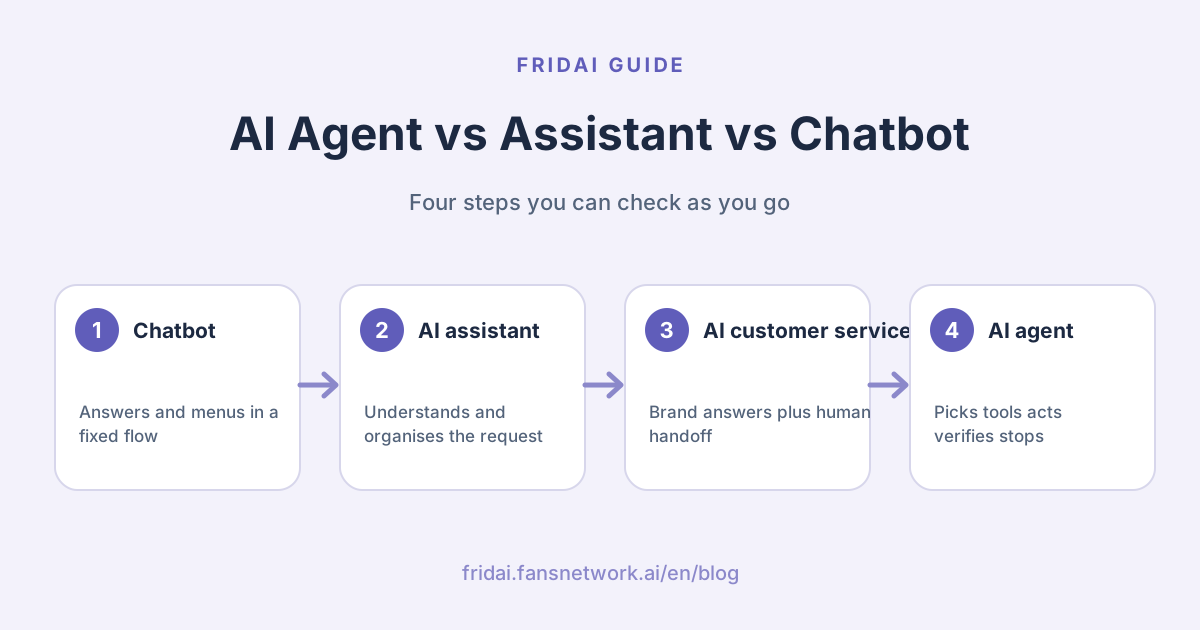
The four terms in one table
| Term | What it mainly describes | What it can usually do | What to confirm before you buy |
|---|---|---|---|
| Chatbot | A conversation interface | Answer questions, show menus, run a fixed flow | Whether it uses external tools and finishes the job |
| AI assistant | A role that helps a person | Organise information, generate content, suggest the next step | Whether it can act on its own and verify the outcome |
| AI customer service | A use case: serving customers | Answer brand questions, collect details, triage and hand off to humans | Whether an agent or a rule-based flow runs behind it |
| AI agent | A way of getting a goal done | Decide, pick tools, act, read results, correct or stop | How permissions, boundaries and human oversight are set |
Look at what it does before you look at the name. "AI customer service" and "AI agent" are not an either/
The real difference: does it only answer, or does it move the job forward?
Let's use a situation any shop can face on any given day. A customer messages: "Can I move my 3 pm appointment tomorrow to the evening?"
Chatbot
It offers a "Change appointment" button or a form link. The flow is stable: the customer picks a slot and re-enters their details, and finds which available times count as "the evening" in the menu themselves.
AI assistant
It understands what the customer means and can tidy it into "Original booking: tomorrow 15:00; request: move to evening", then suggest what the support team should do next. But if it is not connected to the booking system, it can only help organise; it cannot say the change is done.
AI customer service
It answers according to brand rules, reuses details from earlier in the conversation, asks only for what is missing, and hands a full summary to a human when needed. To actually change the booking, it also needs the booking tool, permission to edit, and a way to read the result.
AI agent
It can look up the original booking first, read the evening availability, offer the open slots, submit the change once the customer confirms, and then read what the system returns. Only when it sees a valid success status does it tell the customer "your appointment has been moved". If the slot is full, the details do not match, or it lacks permission, it switches to an alternative flow or hands off to a human.
Replying "done!" within a second is easy. The hard part is whether it actually did it, and whether it knows to stop when something goes wrong.
How does an AI agent work?
Set the long list of technical jargon aside for a moment. In OpenAI's framing, an agent completes tasks on the user's behalf using a model, tools, and clear instructions; Anthropic also draws a sharp line between fixed workflows and agents that decide their own next step. In FRIDAI Editorial's version, it comes down to this loop:
If a vendor says its product is an agent, FRIDAI Editorial checks at least these five things:
- A clear goal: for example, completing the reschedule, not just wrapping up the chat.
- Trusted data: prices, opening hours, policies and customer status all need a source.
- Controlled tools: read-only, able to modify, or able to refund. Those permissions must be kept separate.
- A definition of done: which returned result counts as real success.
- Stop and handoff conditions: conflicting data, high-risk decisions or repeated failures go straight to a human.
Which jobs go to an AI agent, and which to fixed rules
An AI agent can do a lot, and it works best on the right job. The more open-ended the task, the higher the cost, the longer the wait, and the more it needs clear stop conditions. Anthropic's practical advice is blunt: if a simple approach solves it, use the simple approach. Match each job like this:
| Job | Better fit |
|---|---|
| Send a coupon when a comment contains a keyword | Fixed rule |
| Answer opening hours, address and basic FAQs | Chatbot or AI assistant |
| Understand different phrasings and answer from brand knowledge | AI customer service |
| Look up orders, collect missing details, update status and verify the result | An AI agent with clear permissions and boundaries |
| Refunds, medical judgements, major commitments or conflicting data | A human confirms, then it runs |
Fixed jobs belong in fixed flows: usually faster, cheaper, and easier to sign off. Sending the menu when someone types MENU does not need an agent to circle the globe and come back.
When choosing a product, don't just ask "does it have an agent?"
During a demo, do not just listen to feature names. Bring your actual workflow and ask these six questions:
- Which tools can it use? Can it only read data, or can it change it?
- What permission does each action need? Can important operations require human approval?
- How does it know the job is done? Does it read the system's result?
- What happens when a tool fails, the data conflicts, or the customer changes their mind?
- When a human takes over, can they see the conversation history, the details already collected, and why it failed?
- Is there an execution log so the team knows what it did?
If the demo stops at "it sounds just like a human", you are looking at an AI that chats. If it can show lookup, execution, verification, stopping and handoff, you are closer to an agent that can own a piece of work.
Where should a small business start?
FRIDAI Editorial would ask you to pick one flow that is high-frequency, low-risk, and has a visible outcome: checking order status, collecting booking details, or creating a support ticket. Add refunds, price changes and major commitments one at a time, once the first flow runs smoothly and its records check out.
Before going live, test at least five scenarios: complete details, missing details, the customer changing their mind, a tool failure, and a case that must go to a human. Write down the expected result for each one, then check that the AI's reply, the system log and the actual state all agree. A screen that says "processing" is not a finished job, and a customer replying "thanks" does not mean the booking or the transaction went through.
Summary: check whether it can finish the work safely

A quick note from FRIDAI
If you remember one thing, make it this: ignore the label and check whether it can finish the work safely. Chatbots, AI assistants, AI customer service and AI agents overlap anyway; the real difference is whether it only finishes the conversation, or whether it can pick tools, act, read the result, and hand off to a human when it should stop.
Next time you evaluate a tool, bring these with you:
- To tell whether something is an agent, check whether it reads the result the system returns.
- Give fixed jobs to fixed rules, varied questions to AI customer service, and lookups and changes to an agent with clear permissions and boundaries.
- In a demo, bring your own workflow and ask about tools, permissions, the definition of done, failure handling and the execution log.
- Start with one high-frequency, low-risk flow with a visible outcome, and test the five scenarios before going live.
Pick one customer service flow and let the AI get it right, following your rules and leaving a record. If you'd like, I'll set up that first flow with you ☺️
FAQ
Do ChatGPT, Claude or Gemini count as AI agents on their own?
Check whether it uses tools to finish the job. Chatting, organising or generating content only proves it is AI. It gets closer to an AI agent when it can choose tools based on a goal, run multiple steps, read the results, and correct or stop when it hits a boundary.
Is AI customer service always better than a chatbot?
Each has the jobs it does best. Give fixed campaigns, legally required wording, simple lookups and clear menus to a rule-based chatbot; give questions that come in many phrasings and need conversation history and brand knowledge to AI customer service.
Can an AI agent fully replace human customer service?
The best design splits the work. Agents take repetitive, verifiable work; exceptions, emotions, high-risk decisions and important commitments go to a human for approval and handoff.
How FRIDAI can help
If your questions are scattered across LINE, Instagram, Facebook and other social channels, FRIDAI can first organise your brand knowledge, reply rules, follow-up questions for missing details, and comment and DM flows, and spell out which situations go to a human. Whether to move toward an agent from there is not about following the trend; it is about whether that piece of work has tools you can connect, clear permissions, and a result you can verify.
FRIDAI Editorial's advice is to start with one thing: let the AI get one customer service flow right and leave a record, then decide whether to add more actions. Doing many things is cool; knowing which things it must never do is what makes it ready to go live.
- Product: FRIDAI Chat
- Tool overview: Five AI customer service platforms compared
- Start with the difference: AI customer service vs chatbot: what's the difference?
- Write the boundaries: How to write AI customer service rules
- Decide whether it fits: Does a small business need AI customer service?
- Instagram: FRIDAI on Instagram
- Threads: FRIDAI on Threads
- Facebook: FRIDAI on Facebook